

- Posts: 81
- Thank you received: 0
Disable drop down list - Product vote
12 years 6 months ago #148688
by bordia
Disable drop down list - Product vote was created by bordia
-- url of the page with the problem -- :
www.bordia.de
-- HikaShop version -- : 2.3
-- Joomla version -- : 3.2.3
-- PHP version -- : 5.3
Hi,
I have the voting for the products shown enabled for this module named Best Sellers. How and where can I to assess the drop-down list to disable the ratings so that worked only on stars?
In one other module to the drop-down list does not appear if you want to rate a product.
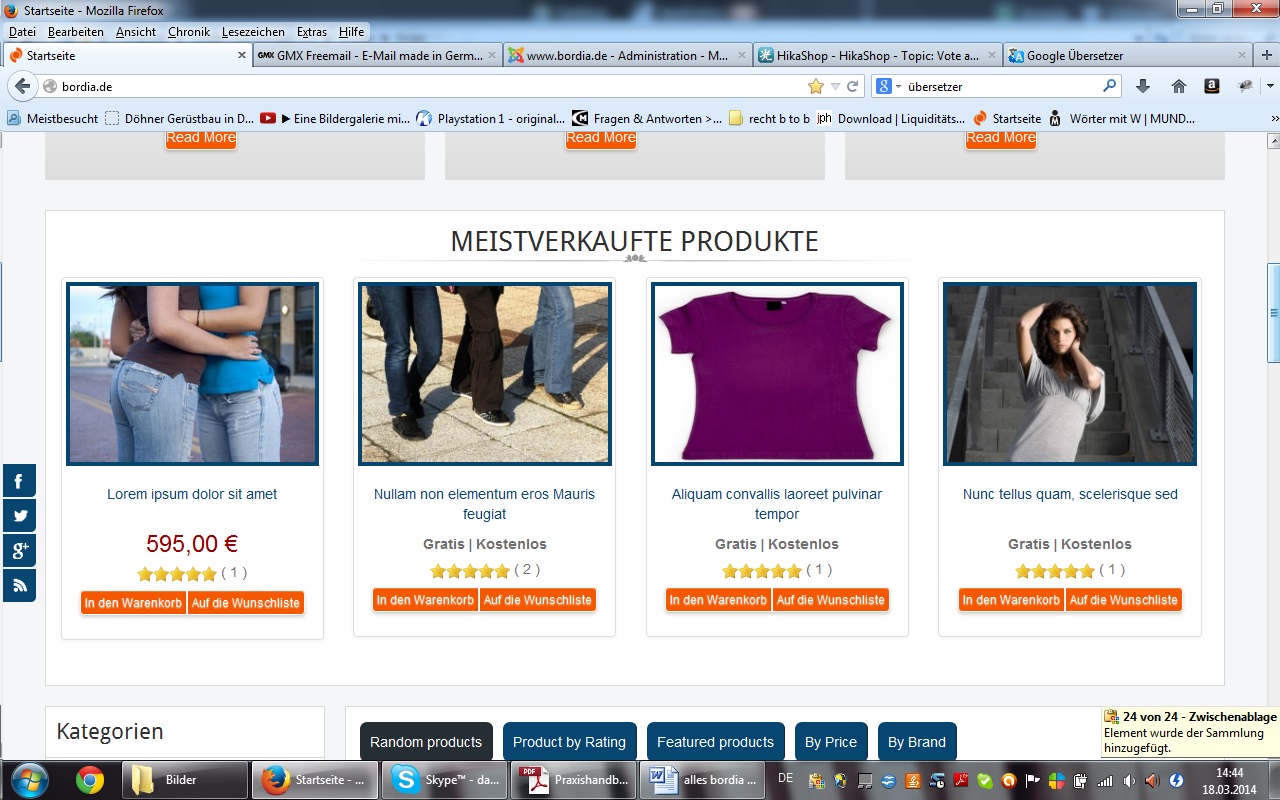
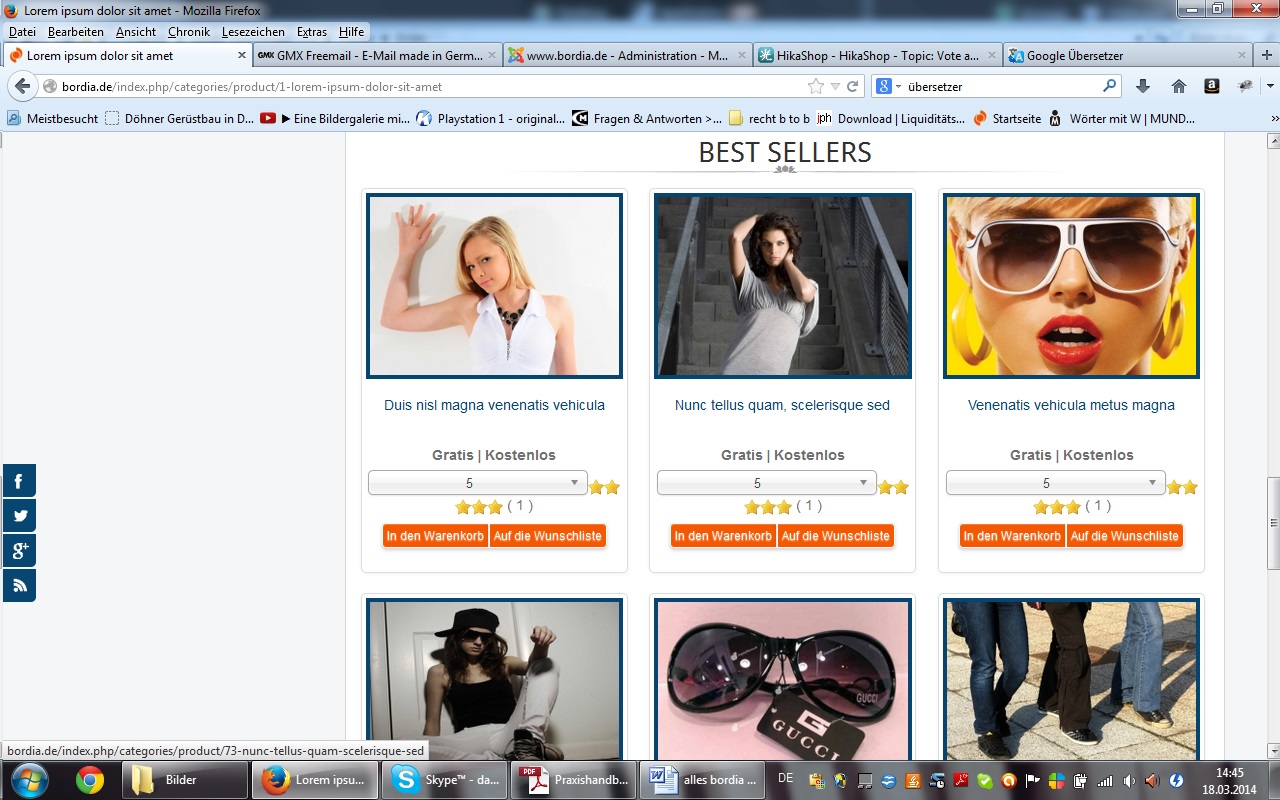
In addition, two images. The first picture shows how it should look, and the second image is the drop-down list will be disabled.
Best Regards
Daniel
-- HikaShop version -- : 2.3
-- Joomla version -- : 3.2.3
-- PHP version -- : 5.3
Hi,
I have the voting for the products shown enabled for this module named Best Sellers. How and where can I to assess the drop-down list to disable the ratings so that worked only on stars?
In one other module to the drop-down list does not appear if you want to rate a product.
In addition, two images. The first picture shows how it should look, and the second image is the drop-down list will be disabled.
Best Regards
Daniel
Please Log in or Create an account to join the conversation.
12 years 6 months ago #148690
by bordia
Replied by bordia on topic Disable drop down list - Product vote
Here are the pictures
Please Log in or Create an account to join the conversation.
12 years 6 months ago - 12 years 6 months ago #148691
by bordia
Replied by bordia on topic Disable drop down list - Product vote
Now here are the pictures.
Could not insert the images to the text.
Could not insert the images to the text.
Last edit: 12 years 6 months ago by bordia.
Please Log in or Create an account to join the conversation.

12 years 6 months ago #148759
by Xavier
Replied by Xavier on topic Disable drop down list - Product vote
Hi,
Thanks to edit the view "vote / mini" in the frontend template and replace:
By:
Thanks to edit the view "vote / mini" in the frontend template and replace:
Code:
<select name="hikashop_vote_rating" class="chzn-done" id="<?php echo $select_id;?>">
Code:
<select name="hikashop_vote_rating" style="display: none;" class="chzn-done" id="<?php echo $select_id;?>">
Please Log in or Create an account to join the conversation.
12 years 6 months ago #148763
by bordia
Replied by bordia on topic Disable drop down list - Product vote
Hi,
thank you for your reply. But nothing changes. Is it possible that at product in the views -> listing vote what to change? As well as in product view this drop down list is there.
Thanks and best regards
thank you for your reply. But nothing changes. Is it possible that at product in the views -> listing vote what to change? As well as in product view this drop down list is there.
Thanks and best regards
Please Log in or Create an account to join the conversation.
12 years 6 months ago - 12 years 6 months ago #148769
by Xavier
Replied by Xavier on topic Disable drop down list - Product vote
Thanks to try the following css property:
Code:
.hikashop_vote_stars .chzn-container{ display: none !important; }
Last edit: 12 years 6 months ago by Xavier.
Please Log in or Create an account to join the conversation.
12 years 6 months ago #148782
by bordia
Replied by bordia on topic Disable drop down list - Product vote
Hi,
but again did not happen. I hope that I have the ".hikashop_vote_stars .chzn-container{ display: none !important; }" is inserted to the right place. This should also be inserted in the vote / mini?
but again did not happen. I hope that I have the ".hikashop_vote_stars .chzn-container{ display: none !important; }" is inserted to the right place. This should also be inserted in the vote / mini?
Please Log in or Create an account to join the conversation.
12 years 6 months ago #148787
by Xavier
Replied by Xavier on topic Disable drop down list - Product vote
You have to put this property in the hikashop frontend css file, if it still doesn't work, thanks to place it in your main template file at the end of the file.
Actually I think that your template is overriding our css properties.
In the view "vote / mini" do you have :
in the select ?
Actually I think that your template is overriding our css properties.
In the view "vote / mini" do you have :
Code:
class="chzn-done"
Please Log in or Create an account to join the conversation.
12 years 6 months ago #148905
by bordia
Replied by bordia on topic Disable drop down list - Product vote
Hi Xavier,
thank you very much for your help. It works just as you described it. Great job! Thank you!
Best regards
Daniel
thank you very much for your help. It works just as you described it. Great job! Thank you!
Best regards
Daniel
Please Log in or Create an account to join the conversation.
Time to create page: 0.282 seconds