

- Posts: 39
- Thank you received: 0
Error in Tax display
14 years 7 months ago - 14 years 7 months ago #42809
by Margot
Error in Tax display was created by Margot
Hi Nicolas,
I noticed today that my products are displaying the before tax price on the product page and in the cart. The cart does not display the tax at all and totals the pretax amounts. I had it set to price with tax. I have tried to reset it in config/display bu it does not change - only when I say display both does it change, and then to the pre tax price 2x.
Have checked the prices in the products and its fine there. Nothing has changed in the tax settings and there is nothing to see there that can effect this.
I upgraded to 2.5.2 this week. Not sure if this is the cause.
I need to publish my first batch of products tomorrow and cannot do so without the taxes as thats a bit illegal here.
Thanks for your help.
I noticed today that my products are displaying the before tax price on the product page and in the cart. The cart does not display the tax at all and totals the pretax amounts. I had it set to price with tax. I have tried to reset it in config/display bu it does not change - only when I say display both does it change, and then to the pre tax price 2x.
Have checked the prices in the products and its fine there. Nothing has changed in the tax settings and there is nothing to see there that can effect this.
I upgraded to 2.5.2 this week. Not sure if this is the cause.
I need to publish my first batch of products tomorrow and cannot do so without the taxes as thats a bit illegal here.
Thanks for your help.
Last edit: 14 years 7 months ago by Margot.
Please Log in or Create an account to join the conversation.

14 years 7 months ago #42829
by nicolas
Replied by nicolas on topic Re: Error in Tax display
If your taxes are properly configured, then it's probably that you changed the main tax zone option of the configuration to a zone which is not taxed.
Please Log in or Create an account to join the conversation.
14 years 7 months ago - 14 years 7 months ago #42852
by Margot
Replied by Margot on topic Re: Error in Tax display
I dont think I have done that.
See attached. When I look in the Denmark zone I see nothing that allows me to set the zone as a non taxed zone. Denmark is definitely a taxed zone.
See my tax rule.
Just want to add that the tax appears nowhere - not on emails, invoices etc..
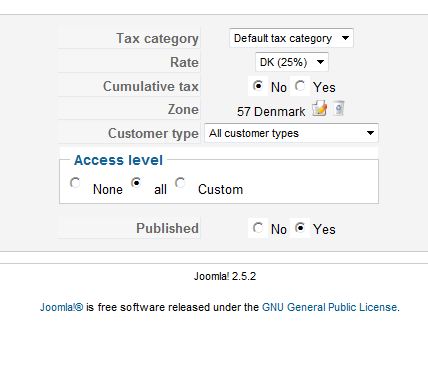
Update: have tried changing the tax zone to Europe in case I broke something, but there is no change. When I createa product the tax is not automatically calcualted like it used to be: If I complete the Price with Tax amount, the Price field autocompletes the same amount, not the pre tax amount.
See attached. When I look in the Denmark zone I see nothing that allows me to set the zone as a non taxed zone. Denmark is definitely a taxed zone.
See my tax rule.
Just want to add that the tax appears nowhere - not on emails, invoices etc..
Update: have tried changing the tax zone to Europe in case I broke something, but there is no change. When I createa product the tax is not automatically calcualted like it used to be: If I complete the Price with Tax amount, the Price field autocompletes the same amount, not the pre tax amount.
Last edit: 14 years 7 months ago by Margot.
Please Log in or Create an account to join the conversation.
14 years 7 months ago #42867
by nicolas
Replied by nicolas on topic Re: Error in Tax display
Then it means that your tax entries are not configured properly. Please post a screenshot of your tax entries (menu System->Taxation).
Also, you should check the different points of that FAQ:
www.hikashop.com/en/support/documentatio...ion-listing.html#faq
Also, you should check the different points of that FAQ:
www.hikashop.com/en/support/documentatio...ion-listing.html#faq
Please Log in or Create an account to join the conversation.
14 years 7 months ago #42872
by Margot
Replied by Margot on topic Re: Error in Tax display
Thanks for your reply.
Here is the screen shot under System > Taxes but it does not reveal much. I have gone through the trouble shooting list you link to and the only thing I can think of is that I lost my country at one point. I posted it as an issue here and you told me to make it again. In going through the list I found that I had Denmark twice, the original Denmark had the Type set at Tax zone instead of country. I must have done that at one point thinking it was how it should be.
I have now removed new Denmark zone and reset the original Denmark zone to the Type country.
Even when logged on I see only one price.
I have tried editting the prices and both fields are set to whatever it is I type in in either field.

Here is the screen shot under System > Taxes but it does not reveal much. I have gone through the trouble shooting list you link to and the only thing I can think of is that I lost my country at one point. I posted it as an issue here and you told me to make it again. In going through the list I found that I had Denmark twice, the original Denmark had the Type set at Tax zone instead of country. I must have done that at one point thinking it was how it should be.
I have now removed new Denmark zone and reset the original Denmark zone to the Type country.
Even when logged on I see only one price.
I have tried editting the prices and both fields are set to whatever it is I type in in either field.
Please Log in or Create an account to join the conversation.
14 years 7 months ago #42874
by nicolas
Replied by nicolas on topic Re: Error in Tax display
Yes the denmark zone should be set to country and you should only have one. Please make sure that it's the one you have in your address (edit your user address and save it). It must indeed come from an inconsistency with the zones.
Please Log in or Create an account to join the conversation.
14 years 7 months ago #42878
by Margot
Replied by Margot on topic Re: Error in Tax display
Yes. I have done that, its ID is the same in the many places it appears 
Please Log in or Create an account to join the conversation.
14 years 7 months ago #42882
by nicolas
Replied by nicolas on topic Re: Error in Tax display
Then it's maybe something else. Did you select the proper tax category in your products ?
Please Log in or Create an account to join the conversation.
14 years 7 months ago #42893
by Margot
Replied by Margot on topic Re: Error in Tax display
Yes, checked that too, but will double check - its the default category.
Please Log in or Create an account to join the conversation.
14 years 7 months ago #42899
by Margot
Replied by Margot on topic Re: Error in Tax display
Double checked and my products are set to the default tax category.
Please Log in or Create an account to join the conversation.
14 years 7 months ago #42974
by nicolas
Replied by nicolas on topic Re: Error in Tax display
It must be one of the points in the FAQ. It you can't find which one, you can send us a back end access via our contact form and we'll look at your configuration.
The following user(s) said Thank You: Margot
Please Log in or Create an account to join the conversation.
14 years 7 months ago #42980
by Margot
Replied by Margot on topic Re: Error in Tax display
I will make you an account. Its probably something stupid but as sometimes happens, I just cant see it.
Please Log in or Create an account to join the conversation.
14 years 7 months ago #43032
by nicolas
Replied by nicolas on topic Re: Error in Tax display
Your tax rule was unpublished. I just published it and it seems to work. By the way, I can see the icon on your back end, so it must be a problem with your browser.
Please Log in or Create an account to join the conversation.
14 years 7 months ago #43034
by Margot
Replied by Margot on topic Re: Error in Tax display
Thank you so much! I can see it works
I checked that though as its part of the list. Problem now is my 250 new products are priced too high because its taken the tax on top of the price
I will make my products again as I want to change them anyway as descussed in the how to topic.
Odd how I cannot see the icons in my browser. Thats quite a new thing. Think I will be changing browsers.
Thanks again for your help.
I checked that though as its part of the list. Problem now is my 250 new products are priced too high because its taken the tax on top of the price
I will make my products again as I want to change them anyway as descussed in the how to topic.
Odd how I cannot see the icons in my browser. Thats quite a new thing. Think I will be changing browsers.
Thanks again for your help.
Please Log in or Create an account to join the conversation.

14 years 3 weeks ago #69972
by protorob
Replied by protorob on topic Re: Error in Tax display
Which browser were you using?
Please Log in or Create an account to join the conversation.
Time to create page: 0.139 seconds