

- Posts: 209
- Thank you received: 18
Price calc with tax
13 years 11 months ago - 13 years 11 months ago #77856
by JIK
Price calc with tax was created by JIK
Hi, have just upgraded a site to v2 and am getting a weird calculation problem when adding new products.
When I add the price with tax and then click into the price box it correctly calculates the pre-tax price. eg: $365.00 price with tax calculates the price before tax as $331.818181818.
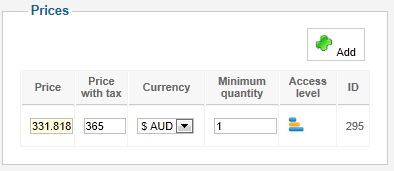
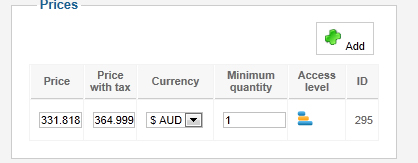
As soon as I hit "Apply" the prices revert to $364.999998 price with tax and $331.818181818 price before tax.
This is my currency setting:
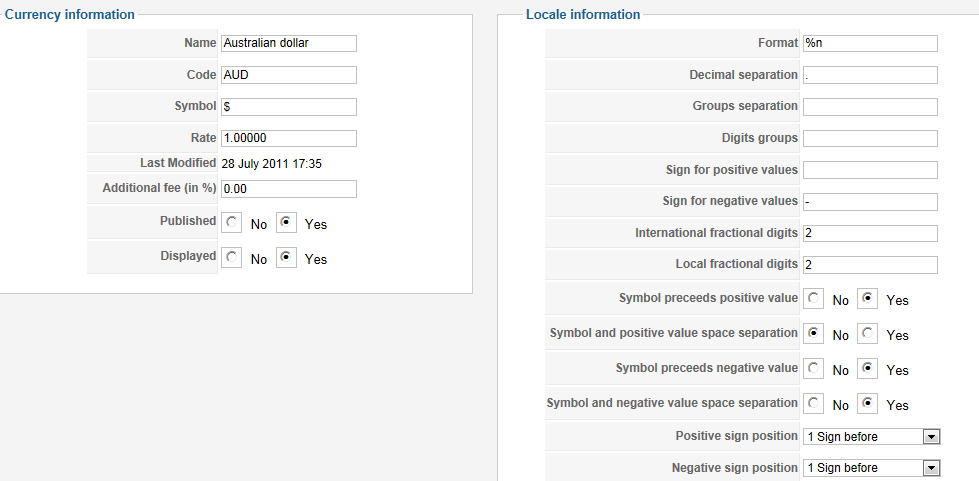
Is there some new setting I need to change somewhere in v2 to keep the price with tax at 2 decimals?
Tkx in advance.
When I add the price with tax and then click into the price box it correctly calculates the pre-tax price. eg: $365.00 price with tax calculates the price before tax as $331.818181818.
As soon as I hit "Apply" the prices revert to $364.999998 price with tax and $331.818181818 price before tax.
This is my currency setting:
Is there some new setting I need to change somewhere in v2 to keep the price with tax at 2 decimals?
Tkx in advance.
Last edit: 13 years 11 months ago by JIK.
Please Log in or Create an account to join the conversation.

13 years 11 months ago #77890
by Xavier
Replied by Xavier on topic Price calc with tax
Hi,
The price with tax is re-calculated on apply based on the price without tax. That's why the price with tax change.
Just change the price without tax value to obtain the price of $365.0.. and all the prices displayed will be well rounded.
The price with tax is re-calculated on apply based on the price without tax. That's why the price with tax change.
Just change the price without tax value to obtain the price of $365.0.. and all the prices displayed will be well rounded.
Please Log in or Create an account to join the conversation.
13 years 11 months ago #78040
by JIK
Replied by JIK on topic Price calc with tax
Hi, thanks for the reply but it does seem that something has changed between v1.5.8 and 2.0 in the way this works. Using your advice, in order to get an exact post tax price of $365.00 I need to enter a pre-tax price calculated to a full 9 decimal places!
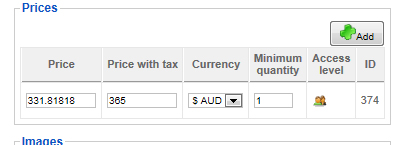
In a store using Hikashop version 1.5.8, all I need to do is enter $365.00 into the post tax price and it calculates the pre tax price without changing the post tax price at all.
This is from a store using 1.5.8:
Okay - but means that now knowing the pre-tax price to it's full decimal value is key to getting the right prices shown. A few Excel worksheets no doubt... But if there is a workaround to what appears to be a rounding problem it would be appreciated.
Thanks.
In a store using Hikashop version 1.5.8, all I need to do is enter $365.00 into the post tax price and it calculates the pre tax price without changing the post tax price at all.
This is from a store using 1.5.8:
Okay - but means that now knowing the pre-tax price to it's full decimal value is key to getting the right prices shown. A few Excel worksheets no doubt... But if there is a workaround to what appears to be a rounding problem it would be appreciated.
Thanks.
Please Log in or Create an account to join the conversation.
13 years 11 months ago #78043
by JIK
Replied by JIK on topic Price calc with tax
Update... just looking at the file administrator/components/com_hikashop/classes/currency.php (which I had problems with a few years ago) there seem to be some code differences, for example:
in v2.0 this line
$price->unit_price->price_value_with_tax=($price->price_value_with_tax);
in v1.5.8 there is this line..
$price->unit_price->price_value_with_tax=round($price->price_value_with_tax,$rounding);
And other lines in v2 that don't appear to explicit the rounding.
So, is there some setting in v2 where you can tell the system to round?
Telling my admins they have to calculate and enter pre-tax prices to 9 decimals is going to be very painful.
in v2.0 this line
$price->unit_price->price_value_with_tax=($price->price_value_with_tax);
in v1.5.8 there is this line..
$price->unit_price->price_value_with_tax=round($price->price_value_with_tax,$rounding);
And other lines in v2 that don't appear to explicit the rounding.
So, is there some setting in v2 where you can tell the system to round?
Telling my admins they have to calculate and enter pre-tax prices to 9 decimals is going to be very painful.
Please Log in or Create an account to join the conversation.

13 years 11 months ago #78065
by Jerome
Jerome - Obsidev.com
HikaMarket & HikaSerial developer / HikaShop core dev team.
Replied by Jerome on topic Price calc with tax
Hi,
We removed the rounding on prices in HikaShop because it was generated a lot of problem for right price processing.
After that, in the front-end, rounded prices are displayed. But, in the database, right (and precise) prices are stored because otherwise it generates price errors.
Regards,
We removed the rounding on prices in HikaShop because it was generated a lot of problem for right price processing.
After that, in the front-end, rounded prices are displayed. But, in the database, right (and precise) prices are stored because otherwise it generates price errors.
Regards,
Jerome - Obsidev.com
HikaMarket & HikaSerial developer / HikaShop core dev team.
Please Log in or Create an account to join the conversation.
13 years 11 months ago #78081
by JIK
Replied by JIK on topic Price calc with tax
Oh. That's a bit of a showstopper for upgrading I think. As I said above "Telling my admins they have to calculate and enter pre-tax prices to 9 decimals is going to be VERY painful." It looks like the problem has been transferred to the user...
Any chance of a better solution in future versions?
Any chance of a better solution in future versions?
Please Log in or Create an account to join the conversation.
13 years 11 months ago #78114
by Xavier
Replied by Xavier on topic Price calc with tax
Hi,
We will see if we change that in the future. Actually I suggest you to enter the price with tax like "365.0000022" for the wanted taxed price "365"
We will see if we change that in the future. Actually I suggest you to enter the price with tax like "365.0000022" for the wanted taxed price "365"
The following user(s) said Thank You: JIK
Please Log in or Create an account to join the conversation.
Less
More
- Posts: 127
- Thank you received: 12
13 years 11 months ago #78136
by tony@10uk.net
Replied by tony@10uk.net on topic Price calc with tax
This is an interesting conversation. I had not realised this change was part of v2 following some heated messages on this forum.
I actually changed how HS dealt with the calc myself to get around the issues on 1.5.7.
So my question, just upgrading to v2 won't change the DB values to be held to more decimal places I assume. The change only takes place on a price edit.
Is that correct?
Tony
I actually changed how HS dealt with the calc myself to get around the issues on 1.5.7.
So my question, just upgrading to v2 won't change the DB values to be held to more decimal places I assume. The change only takes place on a price edit.
Is that correct?
Tony
Please Log in or Create an account to join the conversation.
13 years 11 months ago #78139
by Jerome
Jerome - Obsidev.com
HikaMarket & HikaSerial developer / HikaShop core dev team.
Replied by Jerome on topic Price calc with tax
Hi,
The product database entries are not modified during the HikaShop update.
Your product prices won't be affected.
Regards,
The product database entries are not modified during the HikaShop update.
Your product prices won't be affected.
Regards,
Jerome - Obsidev.com
HikaMarket & HikaSerial developer / HikaShop core dev team.
Please Log in or Create an account to join the conversation.
13 years 11 months ago #78688
by JIK
Replied by JIK on topic Price calc with tax
Actually, Xavier's solution above does not work. I can enter as many decimals as I like into the pre-tax box to have it correctly calculate the with-tax price, but as soon as I hit Apply the pre-tax price is rounded to 5 decimals resulting in a with-tax price shown to 6 decimals. (Weird but true!)
For example, an item selling at $145 (including 10% tax):
Before save:
Enter pre-tax: $131.81818181818 to calculate $145 with-tax (yes! 11 decimals required!!)
After save:
Pre-tax = $131.81818 and with-tax $144.999998
In fact, where Jerone says that the prices are stored precisely in the database, this is not the case as my pre-tax price is only being stored to 5 decimals. In effect - BOTH prices seem to be now incorrect.

I know it seems moot, but I would have thought that a correct price in an online store front and back end would be fundamental.
Can we get back the original rounding fix? Or is there someplace where I can still download v1.59 or v1.6.
For example, an item selling at $145 (including 10% tax):
Before save:
Enter pre-tax: $131.81818181818 to calculate $145 with-tax (yes! 11 decimals required!!)
After save:
Pre-tax = $131.81818 and with-tax $144.999998
In fact, where Jerone says that the prices are stored precisely in the database, this is not the case as my pre-tax price is only being stored to 5 decimals. In effect - BOTH prices seem to be now incorrect.
I know it seems moot, but I would have thought that a correct price in an online store front and back end would be fundamental.
Can we get back the original rounding fix? Or is there someplace where I can still download v1.59 or v1.6.
Please Log in or Create an account to join the conversation.
13 years 11 months ago - 13 years 11 months ago #78747
by Jerome
Jerome - Obsidev.com
HikaMarket & HikaSerial developer / HikaShop core dev team.
Replied by Jerome on topic Price calc with tax
Hi,
This is not a limitation of HikaShop but it is your database.
If you want more precision in HikaShop, you have to modify your table #__hikashop_price and change the type of the column "price_value".
Your actual type should be "decimal(16,5)" and you want "decimal(16,11)" (or "decimal(24,11)" if you want more accuracy for big numbers).
We would not found more precision with HikaShop 1.5.9 or HikaShop 1.6.0
Regards,
This is not a limitation of HikaShop but it is your database.
If you want more precision in HikaShop, you have to modify your table #__hikashop_price and change the type of the column "price_value".
Your actual type should be "decimal(16,5)" and you want "decimal(16,11)" (or "decimal(24,11)" if you want more accuracy for big numbers).
We would not found more precision with HikaShop 1.5.9 or HikaShop 1.6.0
Regards,
Jerome - Obsidev.com
HikaMarket & HikaSerial developer / HikaShop core dev team.
Last edit: 13 years 11 months ago by Jerome.
Please Log in or Create an account to join the conversation.
13 years 11 months ago #78911
by JIK
Replied by JIK on topic Price calc with tax
Hmmm. I did a brand new install of Hikashop 2.0 and that's how it created the tables. So which currency in the world has more than 2 decimal places?
Please Log in or Create an account to join the conversation.
13 years 11 months ago #78996
by Jerome
Jerome - Obsidev.com
HikaMarket & HikaSerial developer / HikaShop core dev team.
Replied by Jerome on topic Price calc with tax
Hi,
I don't understand your question.
HikaShop use decimal(16,5) for his prices and because you need more accurate, you should change it.
Regards,
I don't understand your question.
HikaShop use decimal(16,5) for his prices and because you need more accurate, you should change it.
Regards,
Jerome - Obsidev.com
HikaMarket & HikaSerial developer / HikaShop core dev team.
Please Log in or Create an account to join the conversation.
Time to create page: 0.102 seconds