

- Posts: 37
- Thank you received: 2
My (workaround) for an inventory backorder system
13 years 10 months ago #80961
by karlvann
My (workaround) for an inventory backorder system was created by karlvann
I really needed this function and I have no idea how to code, I found a simple solution that I wanted to share just in case anybody else was in the same situation.
First, I added 1000 to my all of my inventory. this way, if it says 1023, I know I have 23 available.
Second, I found this line, I had no idea what I was doing but it worked, I added "-1000" after product quantity. This way my front end displays the product inventory -1000, which is the real inventory.
class="hikashop_product_stock_count">'.JText::sprintf('X_ITEMS_IN_STOCK',$this->row->product_quantity-1000).'</span><br/>';
In the following link it explains how to add some code to notify the customers if there is less than a certain quantity.
www.hikashop.com/en/forum/search.html?q=...antity&childforums=1
Here is the code after I changed it.
if($this->row->product_quantity<1001)
echo '<span class="hikashop_product_stock_count">'.JText::_('This size/colour is on backorder so it might take around ten days for delivery').'</span><br/>';
I added the <1001 here, and my backorder message. This way as soon as the item reaches 0, it informs the customer of a longer waiting time, this is where my plan takes effect. Customers can order with the knowledge that it will take a bit longer due to the item not being in stock.
The only negative effect I can see here is that my inventory has plus 1000 products, But this doesn't bother me at all.
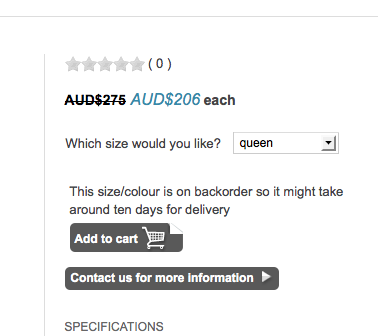
First, I added 1000 to my all of my inventory. this way, if it says 1023, I know I have 23 available.
Second, I found this line, I had no idea what I was doing but it worked, I added "-1000" after product quantity. This way my front end displays the product inventory -1000, which is the real inventory.
class="hikashop_product_stock_count">'.JText::sprintf('X_ITEMS_IN_STOCK',$this->row->product_quantity-1000).'</span><br/>';
In the following link it explains how to add some code to notify the customers if there is less than a certain quantity.
www.hikashop.com/en/forum/search.html?q=...antity&childforums=1
Here is the code after I changed it.
if($this->row->product_quantity<1001)
echo '<span class="hikashop_product_stock_count">'.JText::_('This size/colour is on backorder so it might take around ten days for delivery').'</span><br/>';
I added the <1001 here, and my backorder message. This way as soon as the item reaches 0, it informs the customer of a longer waiting time, this is where my plan takes effect. Customers can order with the knowledge that it will take a bit longer due to the item not being in stock.
The only negative effect I can see here is that my inventory has plus 1000 products, But this doesn't bother me at all.
The following user(s) said Thank You: nicolas
Please Log in or Create an account to join the conversation.
9 years 10 months ago #257619
by montemama
Replied by montemama on topic My (workaround) for an inventory backorder system
Hi, could you, please, advise where to find and change mentioned codes? I cannot find it and the link doesn´t work.
Thank you!
Thank you!
Please Log in or Create an account to join the conversation.

9 years 10 months ago #257620
by nicolas
Replied by nicolas on topic My (workaround) for an inventory backorder system
Hi,
The code evloved a bit since then. It's the file "quantity" of the view "product" that you want to edit via the menu Display>Views.
The cod eto change is now:
The code evloved a bit since then. It's the file "quantity" of the view "product" that you want to edit via the menu Display>Views.
The cod eto change is now:
Code:
if($this->row->product_quantity == 1 && JText::_('X_ITEM_IN_STOCK') != 'X_ITEM_IN_STOCK')
$text = JText::sprintf('X_ITEM_IN_STOCK', $this->row->product_quantity);
else
$text = JText::sprintf('X_ITEMS_IN_STOCK', $this->row->product_quantity);
echo '<span class="hikashop_product_stock_count">'.$text.'<br/></span>';
The following user(s) said Thank You: montemama
Please Log in or Create an account to join the conversation.
9 years 9 months ago #259536
by montemama
Replied by montemama on topic My (workaround) for an inventory backorder system
Hi,
is it possible to use in stock checkbox filter with this "+1000 quantity" hack?
Where and how do I need to customize the code?
Thanks in advance for your help.
is it possible to use in stock checkbox filter with this "+1000 quantity" hack?
Where and how do I need to customize the code?
Thanks in advance for your help.
Please Log in or Create an account to join the conversation.
9 years 9 months ago #259538
by nicolas
Replied by nicolas on topic My (workaround) for an inventory backorder system
No. You'll have to customize the file administrator/components/com_hikashop/classes/filter.php
and change the code:
to:
and change the code:
Code:
if($filter->filter_type=='instockcheckbox' && $infoGet[0]=='in_stock'){
$filters[]=' b.product_quantity!=0 ';
}
Code:
if($filter->filter_type=='instockcheckbox' && $infoGet[0]=='in_stock'){
$filters[]=' (b.product_quantity==-1 OR b.product_quantity<=1000 ) ';
}
Please Log in or Create an account to join the conversation.
9 years 9 months ago #259560
by montemama
Replied by montemama on topic My (workaround) for an inventory backorder system
Hi Nicolas,
thank you for your effort, but when I use it, I get this error in frontend.
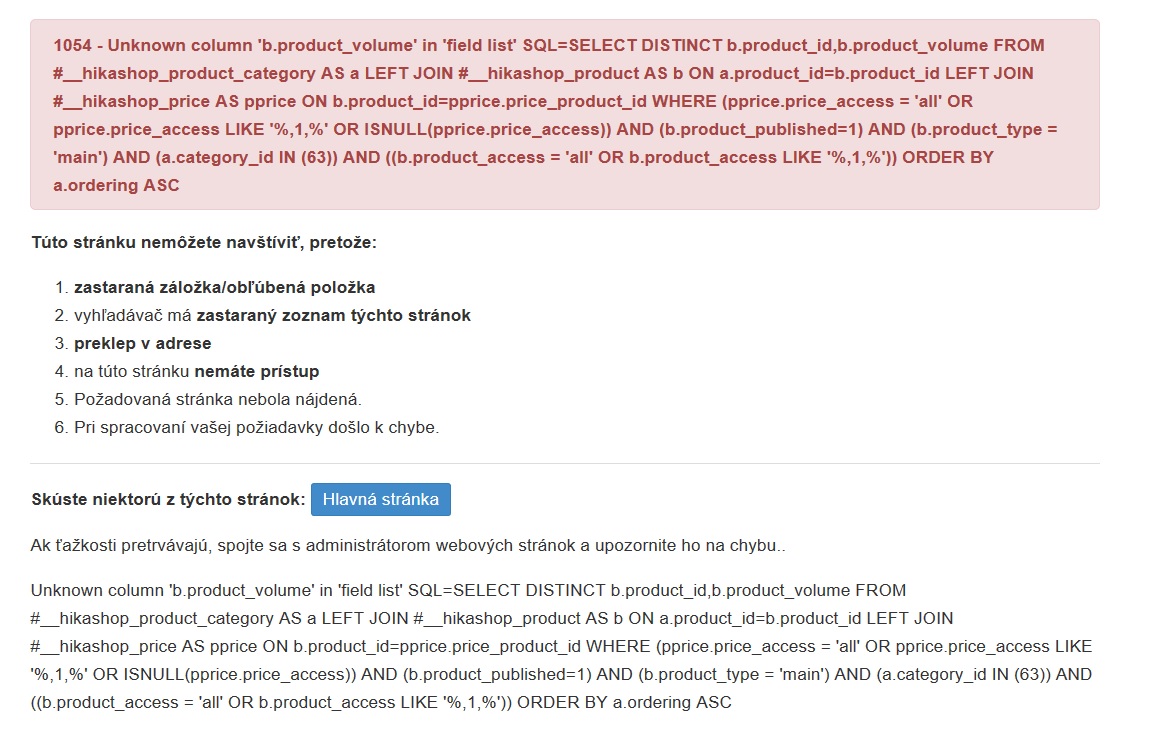
Error is still there also when I use the originial piece of code. I had to unpublish the filter and e-shop works again.
Any ideas why?
thank you for your effort, but when I use it, I get this error in frontend.
Error is still there also when I use the originial piece of code. I had to unpublish the filter and e-shop works again.
Any ideas why?
Please Log in or Create an account to join the conversation.
9 years 9 months ago #259588
by nicolas
Replied by nicolas on topic My (workaround) for an inventory backorder system
Hi,
Try adding the code:
after the line:
in the file administrator/components/com_hikashop/classes/filter.php
That should fix the problem.
Try adding the code:
Code:
function getFieldToLoad($filter, $divName, &$parent){
return '';
}
Code:
class hikashopInStockCheckboxClass extends hikashopFilterTypeClass{
That should fix the problem.
Please Log in or Create an account to join the conversation.
9 years 9 months ago #259628
by montemama
Replied by montemama on topic My (workaround) for an inventory backorder system
Error is gone, but the filter doesn´t work 
Please Log in or Create an account to join the conversation.
9 years 9 months ago #259657
by nicolas
Replied by nicolas on topic My (workaround) for an inventory backorder system
Hi,
Then could you provide a screenshot of the settings of your filter and a link to the page where we can try it ?
Then could you provide a screenshot of the settings of your filter and a link to the page where we can try it ?
Please Log in or Create an account to join the conversation.
9 years 9 months ago - 9 years 9 months ago #259671
by montemama
Replied by montemama on topic My (workaround) for an inventory backorder system
Here is the filter setting.
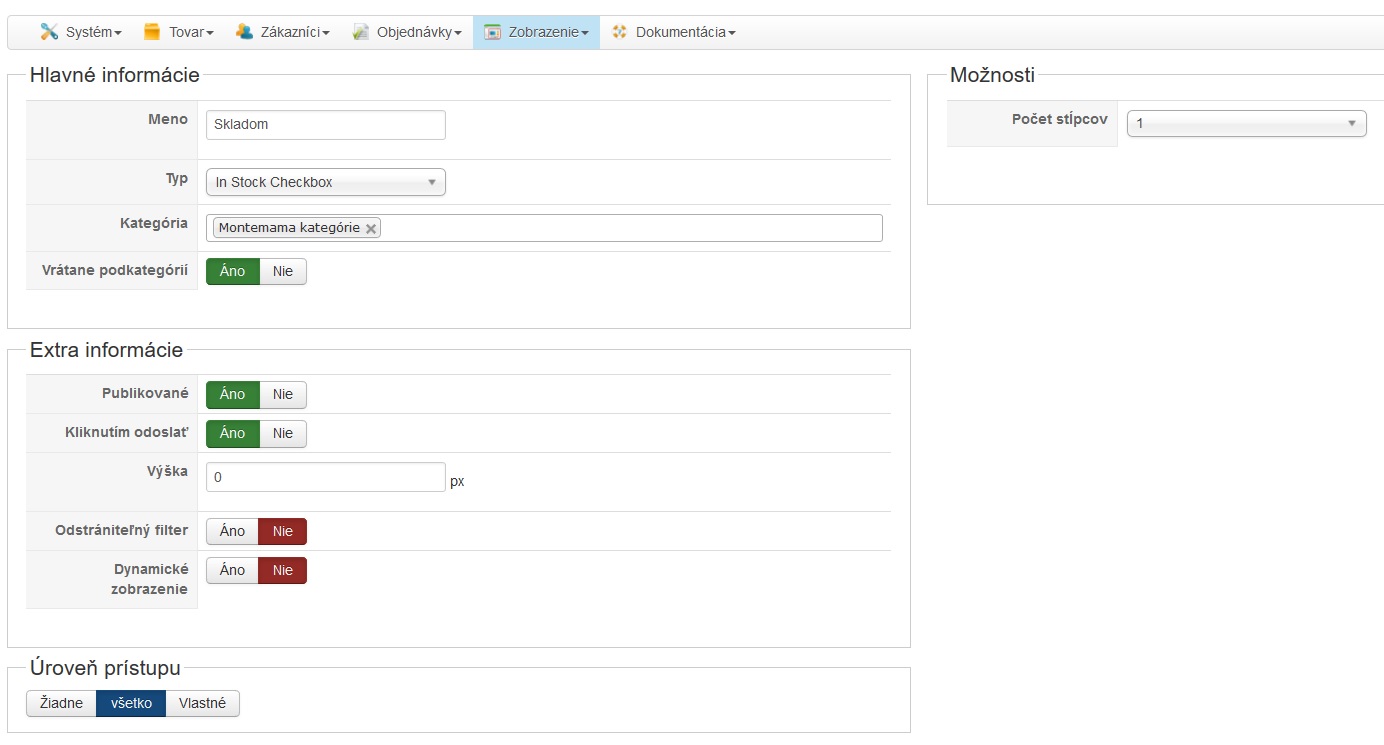
You can try the result here: montemama.eu/index.php/eshop
I tried to select"product category" in fileld Categories.
but, I got this error in frontend when I used the filter
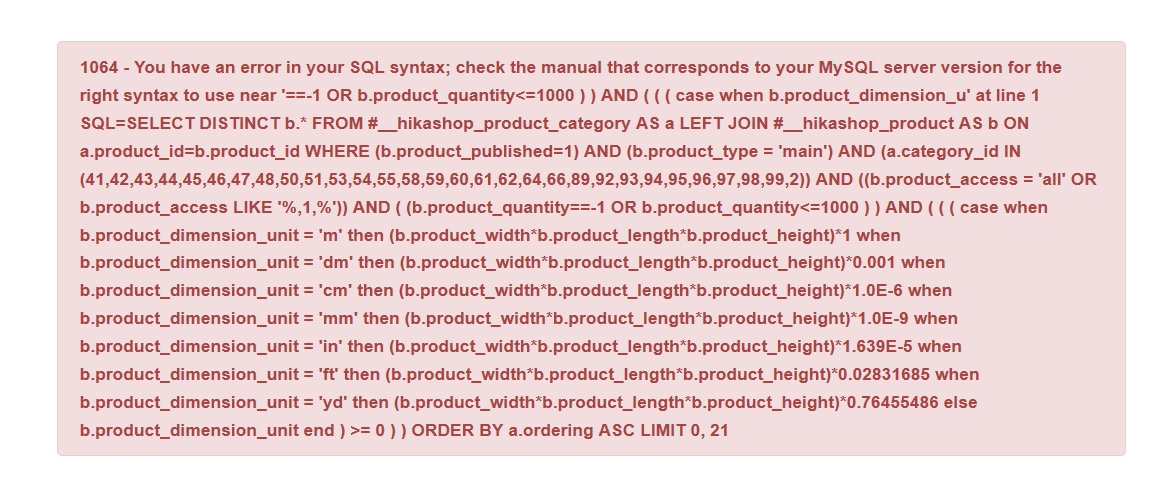 .
.
You can try the result here: montemama.eu/index.php/eshop
I tried to select"product category" in fileld Categories.
but, I got this error in frontend when I used the filter
Last edit: 9 years 9 months ago by montemama.
Please Log in or Create an account to join the conversation.
9 years 9 months ago #259673
by nicolas
Replied by nicolas on topic My (workaround) for an inventory backorder system
Hi,
Change the line:
to:
I made a typo in my previous code.
Change the line:
Code:
$filters[]=' (b.product_quantity==-1 OR b.product_quantity<=1000 ) ';
Code:
$filters[]=' (b.product_quantity=-1 OR b.product_quantity<=1000 ) ';
Please Log in or Create an account to join the conversation.
9 years 9 months ago #259721
by montemama
Replied by montemama on topic My (workaround) for an inventory backorder system
Nicolas, without change. Any other ideas?
Please Log in or Create an account to join the conversation.
9 years 9 months ago #259740
by nicolas
Replied by nicolas on topic My (workaround) for an inventory backorder system
Hi,
It's not possible that you get the exact same error message if you did that change.
Please provide the new error message you have and check that the code has been modified properly.
It's not possible that you get the exact same error message if you did that change.
Please provide the new error message you have and check that the code has been modified properly.
Please Log in or Create an account to join the conversation.
9 years 9 months ago #260361
by montemama
Replied by montemama on topic My (workaround) for an inventory backorder system
Hi Nicolas,
there is no error, but the filter doesn´t work. I get a list of all products, but not only those which are on stock, but completely all.
there is no error, but the filter doesn´t work. I get a list of all products, but not only those which are on stock, but completely all.
Please Log in or Create an account to join the conversation.
9 years 9 months ago #260362
by nicolas
Replied by nicolas on topic My (workaround) for an inventory backorder system
Hi,
Ok. Then try with this line of code instead:
Ok. Then try with this line of code instead:
Code:
$filters[]=' (b.product_quantity=-1 OR b.product_quantity>=1000 ) ';
Please Log in or Create an account to join the conversation.
9 years 9 months ago #260462
by montemama
Replied by montemama on topic My (workaround) for an inventory backorder system
Without change. Filter still doesn´t work. May I send you admin login in private message? Would you try to check it?
Please Log in or Create an account to join the conversation.
9 years 9 months ago #260467
by nicolas
Replied by nicolas on topic My (workaround) for an inventory backorder system
Hi,
Yes and please include a link to this thread in your contact message:
www.hikashop.com/support/contact-us.html
Yes and please include a link to this thread in your contact message:
www.hikashop.com/support/contact-us.html
The following user(s) said Thank You: montemama
Please Log in or Create an account to join the conversation.
9 years 9 months ago #260851
by nicolas
Replied by nicolas on topic My (workaround) for an inventory backorder system
Hi,
We got the access but we're not able to access to your backend. We're getting the error below:
monosnap.com/file/54PetlwJMPpguC6IHlcTyw0pChNB5H
Could you do something about it ?
We got the access but we're not able to access to your backend. We're getting the error below:
monosnap.com/file/54PetlwJMPpguC6IHlcTyw0pChNB5H
Could you do something about it ?
Please Log in or Create an account to join the conversation.
9 years 9 months ago #260995
by montemama
Replied by montemama on topic My (workaround) for an inventory backorder system
Hi Nicolas,
could you, please, try it again? I hope I have fixed the problem with access. Please, let me know if it works now. Thank you!
could you, please, try it again? I hope I have fixed the problem with access. Please, let me know if it works now. Thank you!
Please Log in or Create an account to join the conversation.

9 years 9 months ago #261102
by Jerome
Jerome - Obsidev.com
HikaMarket & HikaSerial developer / HikaShop core dev team.
Replied by Jerome on topic My (workaround) for an inventory backorder system
Jerome - Obsidev.com
HikaMarket & HikaSerial developer / HikaShop core dev team.
Please Log in or Create an account to join the conversation.
Time to create page: 0.158 seconds