

- Posts: 51
- Thank you received: 1
Inline CSS added to head not applying on IE9
13 years 10 months ago #81548
by Dorgo
Inline CSS added to head not applying on IE9 was created by Dorgo
eg,
does not have any effect on IE8 or 9
Code:
#hikashop_category_information_menu_567 div.hikashop_category,#hikashop_category_information_menu_567 div.hikashop_product{
float:left;
width:100%;
}
does not have any effect on IE8 or 9
Please Log in or Create an account to join the conversation.

13 years 10 months ago #81608
by Xavier
Replied by Xavier on topic Inline CSS added to head not applying on IE9
Are you sure that this property have an effect on firefox or chrome ?
If it has no effect, try to set a specific css property in your ie css file.
If it has no effect, try to set a specific css property in your ie css file.
Please Log in or Create an account to join the conversation.
13 years 10 months ago #81744
by Dorgo
Replied by Dorgo on topic Inline CSS added to head not applying on IE9
Yep, absolutely... I've really not seen anything like this before.
If I copy the exact rules into an external stylesheet, they apply on IE. If I leave them in the head, they are ignored. Don't show up in development tools either, so not an inheritance issue.
If I copy the exact rules into an external stylesheet, they apply on IE. If I leave them in the head, they are ignored. Don't show up in development tools either, so not an inheritance issue.
Please Log in or Create an account to join the conversation.
13 years 10 months ago #81824
by Xavier
Replied by Xavier on topic Inline CSS added to head not applying on IE9
I think that's because your template is overriding our css properties.
Please Log in or Create an account to join the conversation.
13 years 10 months ago #81856
by Dorgo
Replied by Dorgo on topic Inline CSS added to head not applying on IE9
It is now, because the ones in the head were not applying.
I have removed the ones in the external files, please look now.
domain.i.sent.you/component/hikashop/cat...ines.html?Itemid=567
in IE and Chrome.
Line:100 of the page has inline CSS. They are applied in chrome but not in IE.
I have removed the ones in the external files, please look now.
domain.i.sent.you/component/hikashop/cat...ines.html?Itemid=567
in IE and Chrome.
Line:100 of the page has inline CSS. They are applied in chrome but not in IE.
Code:
#hikashop_category_information_module_201 div.hikashop_category,#hikashop_category_information_module_201 div.hikashop_product{
float:left;
width:100%;
}
Please Log in or Create an account to join the conversation.
13 years 10 months ago #81950
by Dorgo
Replied by Dorgo on topic Inline CSS added to head not applying on IE9
I had to revert the page this morning but will PM you a copy
Please Log in or Create an account to join the conversation.

13 years 10 months ago #82446
by Jerome
Jerome - Obsidev.com
HikaMarket & HikaSerial developer / HikaShop core dev team.
Replied by Jerome on topic Inline CSS added to head not applying on IE9
Hi,
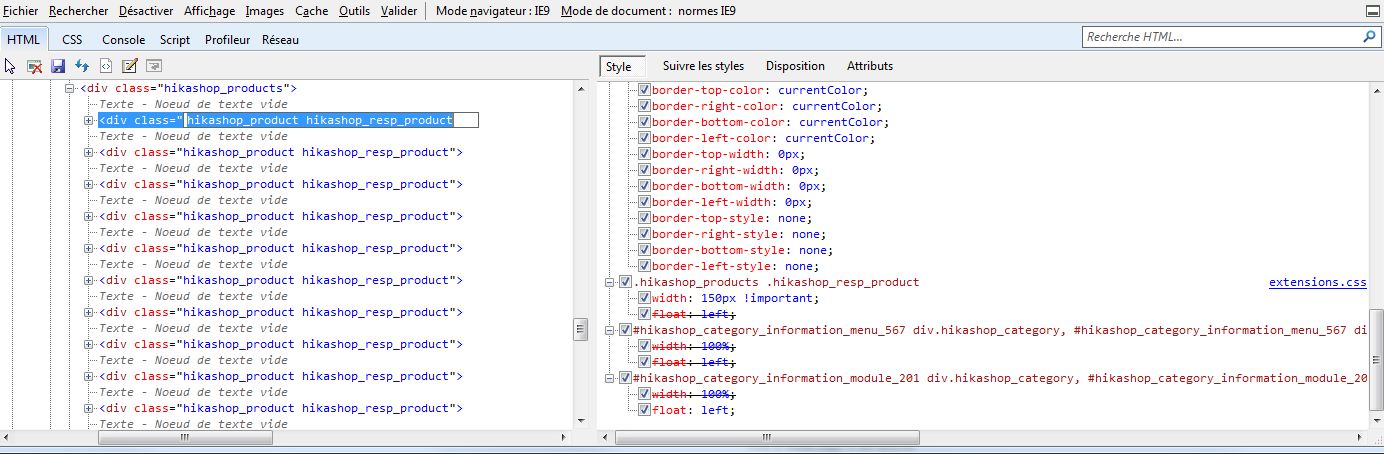
IE9 does not have any problem with inline CSS.
HikaShop rules does not have any problem.
It's working fine on IE9, there are just somes rules which have an higher priority.
Screen of the DOM inspector of IE9:
Regards,
IE9 does not have any problem with inline CSS.
HikaShop rules does not have any problem.
It's working fine on IE9, there are just somes rules which have an higher priority.
Screen of the DOM inspector of IE9:
Regards,
Jerome - Obsidev.com
HikaMarket & HikaSerial developer / HikaShop core dev team.
Please Log in or Create an account to join the conversation.
13 years 10 months ago #82683
by Dorgo
Replied by Dorgo on topic Inline CSS added to head not applying on IE9
Yeah it doesn't make sense to me either.
Please see difference between the two sites I have PM'd to you.
* both display the same in chrome, differently in IE.
* the only difference is one site has the hikashop styles in the head duplicated in an external file
as you can see, IE9 is not seeing the styles in the head (though they are clearly in the source)
Styles only in head:-
image missing https://dl.dropbox.com/u/3209649/hika-ie9-headstylesonly.PNG
Styles in head and extensions.css
image missing https://dl.dropbox.com/u/3209649/hika-ie9-duplicatestyles.PNG
Style clearly in head of page
image missing https://dl.dropbox.com/u/3209649/hikashop_style-in-head-of-page.PNG
Please see difference between the two sites I have PM'd to you.
* both display the same in chrome, differently in IE.
* the only difference is one site has the hikashop styles in the head duplicated in an external file
as you can see, IE9 is not seeing the styles in the head (though they are clearly in the source)
Styles only in head:-
image missing https://dl.dropbox.com/u/3209649/hika-ie9-headstylesonly.PNG
Styles in head and extensions.css
image missing https://dl.dropbox.com/u/3209649/hika-ie9-duplicatestyles.PNG
Style clearly in head of page
image missing https://dl.dropbox.com/u/3209649/hikashop_style-in-head-of-page.PNG
Please Log in or Create an account to join the conversation.
13 years 10 months ago #82960
by Jerome
Jerome - Obsidev.com
HikaMarket & HikaSerial developer / HikaShop core dev team.
Replied by Jerome on topic Inline CSS added to head not applying on IE9
Hi,
I am really sorry but I can't reproduce your problem in my local website using Internet Explorer.
Inlince CSS is read correctly by IE9 and I don't know what you're website contain which generate such problem.
Regards,
I am really sorry but I can't reproduce your problem in my local website using Internet Explorer.
Inlince CSS is read correctly by IE9 and I don't know what you're website contain which generate such problem.
Regards,
Jerome - Obsidev.com
HikaMarket & HikaSerial developer / HikaShop core dev team.
Please Log in or Create an account to join the conversation.
13 years 10 months ago #83051
by Dorgo
Replied by Dorgo on topic Inline CSS added to head not applying on IE9
Were you able to see the same behaviour I am reporting on my site using Internet Explorer?
I PMd you two comparison URLs. The only thing changed is the duplication of the inline rules in an external file.
I am stumped myself. Any ideas?
I PMd you two comparison URLs. The only thing changed is the duplication of the inline rules in an external file.
I am stumped myself. Any ideas?
Please Log in or Create an account to join the conversation.

13 years 10 months ago #83235
by nicolas
Replied by nicolas on topic Inline CSS added to head not applying on IE9
Well, we saw your URLs but could find much clue leading to a solution except keeping the CSS in an external CSS file 
Please Log in or Create an account to join the conversation.
Time to create page: 0.707 seconds