
- Posts: 12
- Thank you received: 0
Error when running report in v2.0
- fandomfest
-
 Topic Author
- Offline
Less
More
13 years 9 months ago - 13 years 9 months ago #84466
by fandomfest
Error when running report in v2.0 was created by fandomfest
I tried to run a report to see all the customers that purchased a certain product and got this error. Now it is displaying everywhere.
How can I fix this?
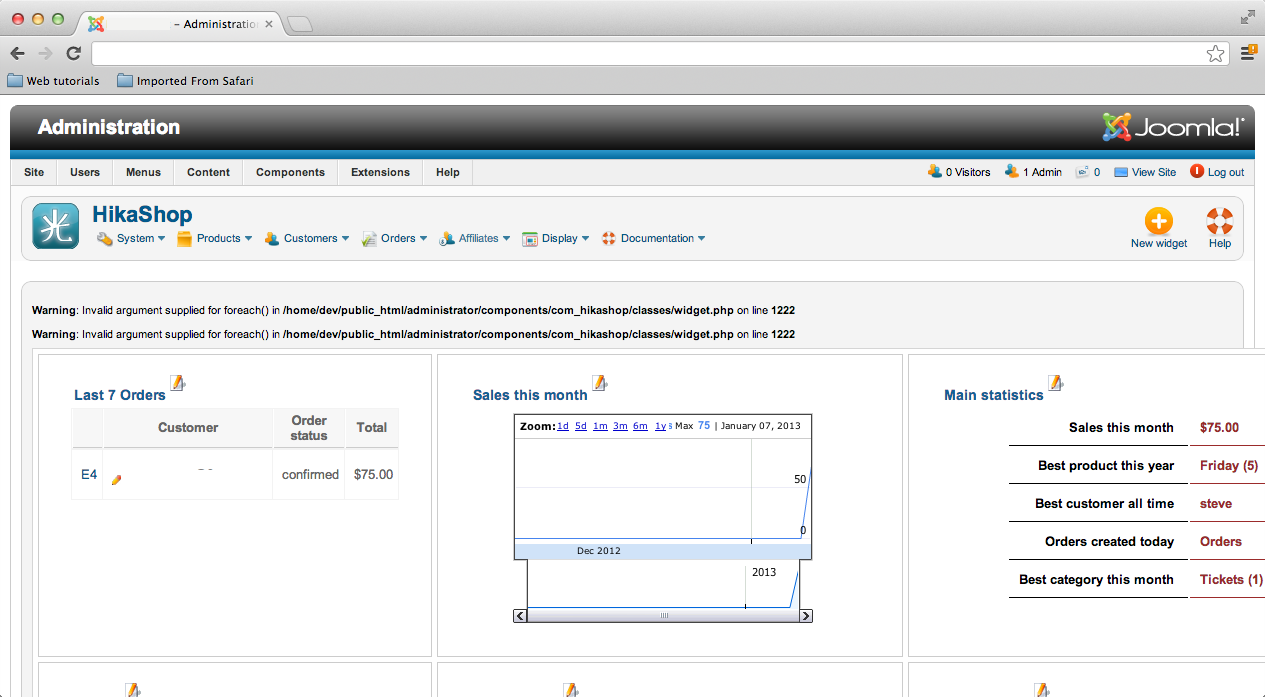
Warning: Invalid argument supplied for foreach() in /home/dev/public_html/administrator/components/com_hikashop/classes/widget.php on line 1222
How can I fix this?
Last edit: 13 years 9 months ago by fandomfest.
Please Log in or Create an account to join the conversation.

13 years 9 months ago #84530
by Eliot
Replied by Eliot on topic Error when running report in v2.0
Hi there,
I think it's a bug we just fixed.
Try to replace the widget.php file by the attached one.
I think it's a bug we just fixed.
Try to replace the widget.php file by the attached one.
Please Log in or Create an account to join the conversation.
- fandomfest
-
Topic Author
- Offline
Less
More
- Posts: 12
- Thank you received: 0
13 years 9 months ago #85897
by fandomfest
Replied by fandomfest on topic Error when running report in v2.0
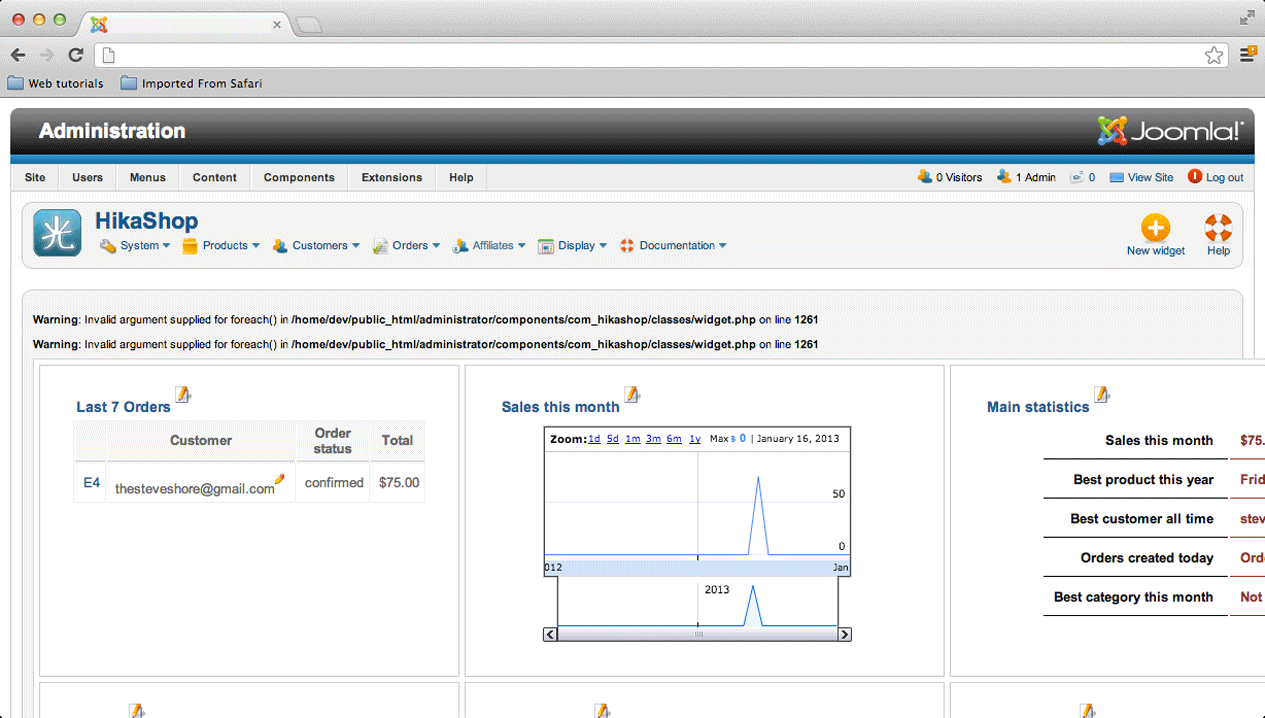
Sorry for the late reply. I just uploaded the revised widget.php and now I'm getting an error on a different line.
Please Log in or Create an account to join the conversation.
13 years 9 months ago #85954
by Eliot
Replied by Eliot on topic Error when running report in v2.0
Hi there,
Could you please look at every widget separately to find from which widget it comes from.
You can also try to re-save the configuration of this widget.
If it doesn't work, I'll need an access to your backend as well as an FTP access to find the source of the issue .
.
Could you please look at every widget separately to find from which widget it comes from.
You can also try to re-save the configuration of this widget.
If it doesn't work, I'll need an access to your backend as well as an FTP access to find the source of the issue
. Please Log in or Create an account to join the conversation.
- fandomfest
-
Topic Author
- Offline
Less
More
- Posts: 12
- Thank you received: 0
13 years 9 months ago #86293
by fandomfest
Replied by fandomfest on topic Error when running report in v2.0
Are plugins the same as widgets?
Please Log in or Create an account to join the conversation.
13 years 9 months ago #86335
by Eliot
Replied by Eliot on topic Error when running report in v2.0
Which plugins are you talking about?
What I need you to do is just click on the edit button next to the widget titles and see if the error is in still in the edition page.
So I'll know which widget cause the error.
What I need you to do is just click on the edit button next to the widget titles and see if the error is in still in the edition page.
So I'll know which widget cause the error.
Please Log in or Create an account to join the conversation.
- fandomfest
-
Topic Author
- Offline
Less
More
- Posts: 12
- Thank you received: 0
13 years 9 months ago - 13 years 9 months ago #86456
by fandomfest
Replied by fandomfest on topic Error when running report in v2.0
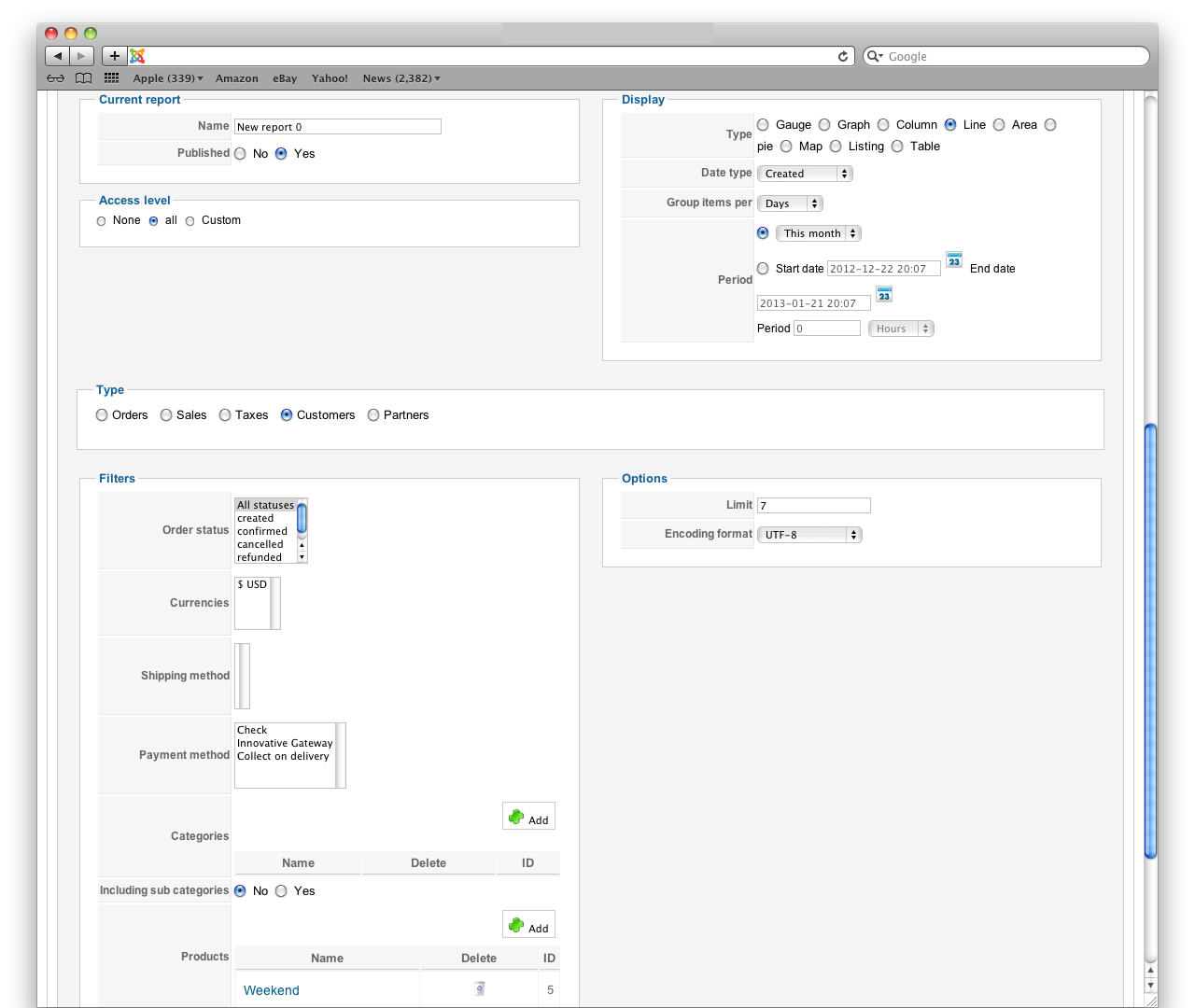
Okay I understand now. I was a little confused about what a widget was. The errors are both coming from custom reports I created. Here are the settings:
Last edit: 13 years 9 months ago by fandomfest.
Please Log in or Create an account to join the conversation.
13 years 9 months ago #86510
by Eliot
Replied by Eliot on topic Error when running report in v2.0
Indeed it's a small bug. You have to edit the file widget.php in administrator/components/com_hikashop/classes and replace these lines:
by these:
By the way, filtering by product on that kind of report is useless since the line of customers just show the number of new customers. Those who just registered.
So filter by product is meaningless.
Code:
foreach($elements as $element){
if(!isset($typeTable[$element->type])){
$typeTable[$element->type]=$element->type;
}
}
by these:
Code:
if(!empty($elements)){
foreach($elements as $element){
if(!isset($typeTable[$element->type])){
$typeTable[$element->type]=$element->type;
}
}
}
By the way, filtering by product on that kind of report is useless since the line of customers just show the number of new customers. Those who just registered.
So filter by product is meaningless.
Please Log in or Create an account to join the conversation.
- fandomfest
-
Topic Author
- Offline
Less
More
- Posts: 12
- Thank you received: 0
13 years 9 months ago - 13 years 9 months ago #86560
by fandomfest
Replied by fandomfest on topic Error when running report in v2.0
Last edit: 13 years 9 months ago by fandomfest.
Please Log in or Create an account to join the conversation.
13 years 9 months ago - 13 years 9 months ago #86562
by Eliot
Replied by Eliot on topic Error when running report in v2.0
I guess the best fix to do is to replace this:
by this:
in the same file.
Code:
if(!empty($elements)){
if(isset($widget->widget_params->compares)){
foreach($elements as $element){
if(empty($element->type)){
$element->type=JText::_('NOT_SPECIFIED');
}
}
}
}
Code:
if(!empty($elements)){
if(isset($widget->widget_params->compares)){
foreach($elements as $element){
if(empty($element->type)){
$element->type=JText::_('NOT_SPECIFIED');
}
}
}
}else{
return true;
}
in the same file.
Last edit: 13 years 9 months ago by Eliot.
Please Log in or Create an account to join the conversation.
- fandomfest
-
Topic Author
- Offline
Less
More
- Posts: 12
- Thank you received: 0
13 years 9 months ago #86581
by fandomfest
Replied by fandomfest on topic Error when running report in v2.0
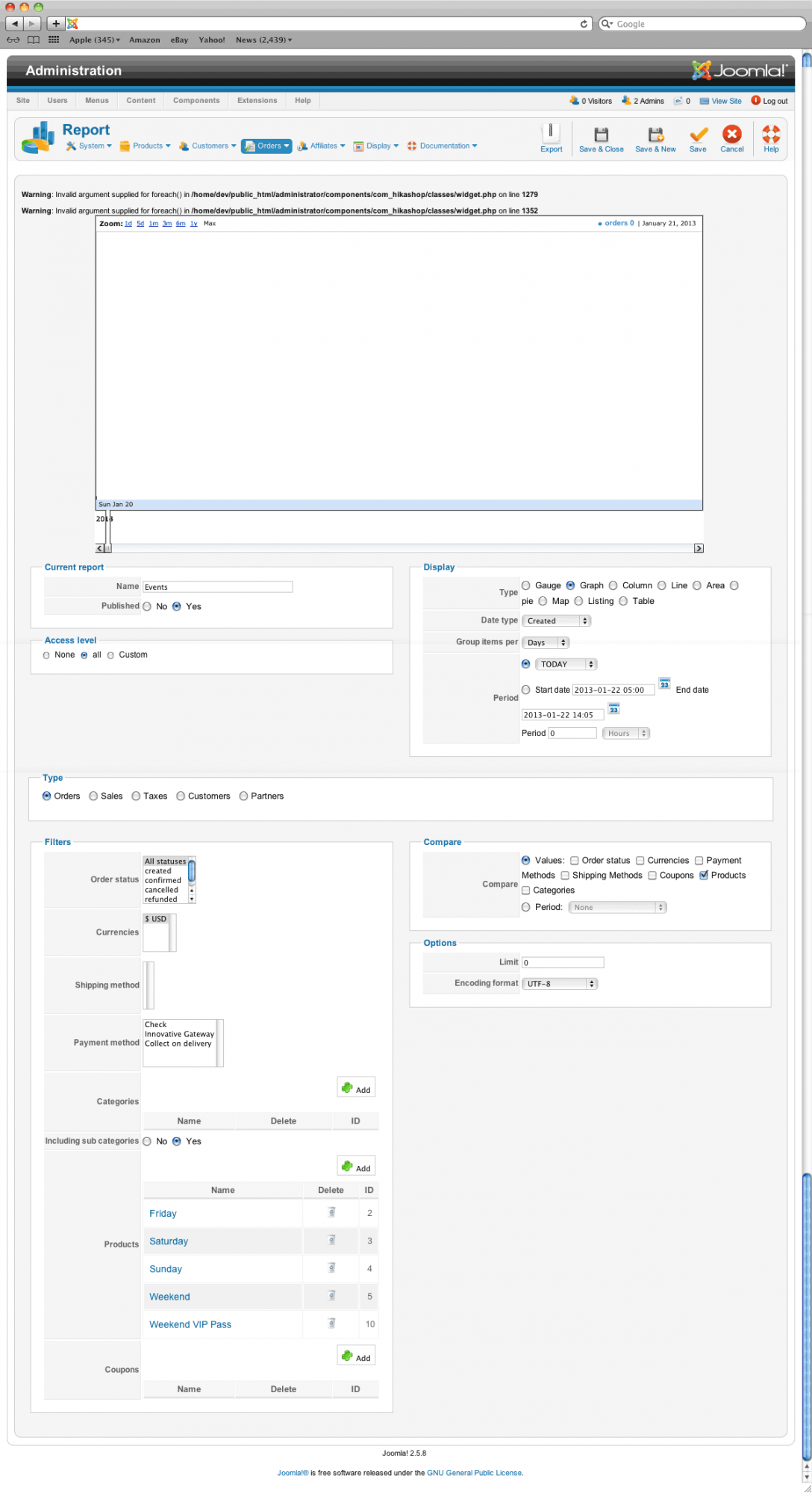
Now getting this error on the same report as before:
Warning: Invalid argument supplied for foreach() in /home/dev/public_html/administrator/components/com_hikashop/views/dashboard/tmpl/graph.php on line 14
Warning: Invalid argument supplied for foreach() in /home/dev/public_html/administrator/components/com_hikashop/views/dashboard/tmpl/graph.php on line 23
Warning: Invalid argument supplied for foreach() in /home/dev/public_html/administrator/components/com_hikashop/views/dashboard/tmpl/graph.php on line 14
Warning: Invalid argument supplied for foreach() in /home/dev/public_html/administrator/components/com_hikashop/views/dashboard/tmpl/graph.php on line 23
Please Log in or Create an account to join the conversation.
13 years 9 months ago #86900
by Eliot
Replied by Eliot on topic Error when running report in v2.0
Ok you better send me a PM with an FTP and a backend access so I can take a look directly.
These are not big issues, you just get this message because the datas you required are empty and so the graph has nothing to display and generate an error.
I will just fix the code to avoid the error.
These are not big issues, you just get this message because the datas you required are empty and so the graph has nothing to display and generate an error.
I will just fix the code to avoid the error.
The following user(s) said Thank You: fandomfest
Please Log in or Create an account to join the conversation.
- fandomfest
-
Topic Author
- Offline
Less
More
- Posts: 12
- Thank you received: 0
13 years 9 months ago #87060
by fandomfest
Replied by fandomfest on topic Error when running report in v2.0
Just sent it. Thanks for looking into it!
Please Log in or Create an account to join the conversation.
13 years 9 months ago #87414
by Eliot
Replied by Eliot on topic Error when running report in v2.0
Thanks for the infos but I also need a backend access to your site to see the effect of my modifications
Please Log in or Create an account to join the conversation.
Time to create page: 0.118 seconds