

- Posts: 35
- Thank you received: 0
500 error on password mismatch
13 years 9 months ago #86853
by jackbat
500 error on password mismatch was created by jackbat
Hello,
We are doing some testing on the flow of checkout and stumbled upon a 500 error when the passwords do not match. When you hit the back button, and fill it out right, it still doesn't take it, but on the third time it will. I saw in the forum that this was a known bug that was fixed some months back but it is happening to me. Based on that post I went in and checked to see if I had somehow modified the view (user - registration) and it is the default value.
I am running the latest version of Hikashop version 2.0.0
Also I checked the same thing on Joomla registration and it seems to work fine.
Any Ideas? See attached error....
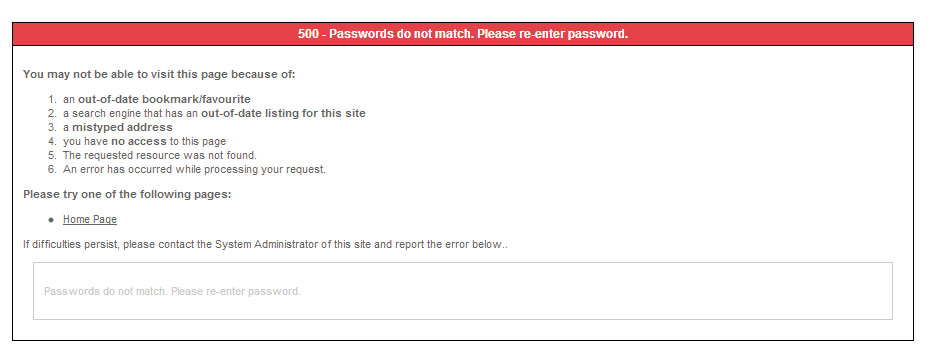
We are doing some testing on the flow of checkout and stumbled upon a 500 error when the passwords do not match. When you hit the back button, and fill it out right, it still doesn't take it, but on the third time it will. I saw in the forum that this was a known bug that was fixed some months back but it is happening to me. Based on that post I went in and checked to see if I had somehow modified the view (user - registration) and it is the default value.
I am running the latest version of Hikashop version 2.0.0
Also I checked the same thing on Joomla registration and it seems to work fine.
Any Ideas? See attached error....
Please Log in or Create an account to join the conversation.

13 years 9 months ago #86978
by Eliot
Replied by Eliot on topic 500 error on password mismatch
Hi there,
It sounds strange indeed. However I can't reproduce the problem on my end so could you please give us link to try?
Alos, are you sure you looked at the right? You know each template has it own view so maybe you made some customization on specific view.
It sounds strange indeed. However I can't reproduce the problem on my end so could you please give us link to try?
Alos, are you sure you looked at the right? You know each template has it own view so maybe you made some customization on specific view.
Please Log in or Create an account to join the conversation.
13 years 9 months ago #86991
by jackbat
Replied by jackbat on topic 500 error on password mismatch
Hello Eliot,
The first thing I checked when I saw the issue was to make sure that joomla core was working correctly and it is. I assume you are making the same call from Hikashop but don't' know for sure that is the case.
As I said below, the only thing I found in the forum about this was a change to the user-registration view could cause an issue. I checked and that is the default view, so I don't know what else to check. The only views I have been changing is the product views.
You can see the problem at www.intheboatshed.com/sandypointboatworks
When you put the wrong passwords in and get the 500 page, hit the back button and try to correct it and you will see some very strange behavior.
Thanks for your help. Let me know if there is anything else I can do.
Jack
The first thing I checked when I saw the issue was to make sure that joomla core was working correctly and it is. I assume you are making the same call from Hikashop but don't' know for sure that is the case.
As I said below, the only thing I found in the forum about this was a change to the user-registration view could cause an issue. I checked and that is the default view, so I don't know what else to check. The only views I have been changing is the product views.
You can see the problem at www.intheboatshed.com/sandypointboatworks
When you put the wrong passwords in and get the 500 page, hit the back button and try to correct it and you will see some very strange behavior.
Thanks for your help. Let me know if there is anything else I can do.
Jack
Please Log in or Create an account to join the conversation.
13 years 9 months ago #86993
by jackbat
Replied by jackbat on topic 500 error on password mismatch
I just verified and checked all hikashop views and there are no customizations other than the product views. I don't think that could effect anything but you can see the product mods at any of the boat kits or boat plans.
Please Log in or Create an account to join the conversation.
13 years 9 months ago #87152
by jackbat
Replied by jackbat on topic 500 error on password mismatch
Hello Eliot,
Have you had a chance to try this just to verify the problem? I have been trying to think of a workaround for the problem but haven't come up with anything.
Regards,
Jack
Have you had a chance to try this just to verify the problem? I have been trying to think of a workaround for the problem but haven't come up with anything.
Regards,
Jack
Please Log in or Create an account to join the conversation.

13 years 9 months ago #87325
by nicolas
Replied by nicolas on topic 500 error on password mismatch
Hi,
I tried to reproduce the problem on your website and I was not able to. I tried to login with the wrong password and didn't get the 500 error. The back button didn't do anything either.
Could you give more information on how to reproduce the problem ?
I tried to reproduce the problem on your website and I was not able to. I tried to login with the wrong password and didn't get the 500 error. The back button didn't do anything either.
Could you give more information on how to reproduce the problem ?
Please Log in or Create an account to join the conversation.
13 years 9 months ago #87338
by jackbat
Replied by jackbat on topic 500 error on password mismatch
That isn't what I said the problem was. If you try to register with Hikashop and you don't type the same password twice, it will go to a 500 error.
I have done it a dozen times and it always gives the same error.
Simply type hello for a password and Hello1 for the "retype" password and you will see the problem.
I have done it a dozen times and it always gives the same error.
Simply type hello for a password and Hello1 for the "retype" password and you will see the problem.
Please Log in or Create an account to join the conversation.
13 years 9 months ago #87423
by Eliot
Replied by Eliot on topic 500 error on password mismatch
Same as Nicolas, I just tried and I just have an error message either for registration or login.
Could you give more information about your browser?
Maybe a video if it doesn't take you too much time... because we definitely can't reach this 500 error.
The passwords you entered do not match. Please enter your desired password in the password field and confirm your entry by entering it in the confirm password field.
Could you give more information about your browser?
Maybe a video if it doesn't take you too much time... because we definitely can't reach this 500 error.
Please Log in or Create an account to join the conversation.
13 years 9 months ago #87494
by jackbat
Replied by jackbat on topic 500 error on password mismatch
Interesting!
I usually use Chrome, however when I got your message I tried it in IE (both latest available softwares) and I got the same error. I have to figure out how to capture my screen. I have the Adobe Creative suite but it doesn't appear to be able to do screen capture. at least I can't find how.
I will get back to you with screen recording as soon as I figure out what to use. Any suggestions would be appreciated.
Jack
I usually use Chrome, however when I got your message I tried it in IE (both latest available softwares) and I got the same error. I have to figure out how to capture my screen. I have the Adobe Creative suite but it doesn't appear to be able to do screen capture. at least I can't find how.
I will get back to you with screen recording as soon as I figure out what to use. Any suggestions would be appreciated.
Jack
Please Log in or Create an account to join the conversation.

13 years 9 months ago #87549
by Xavier
Replied by Xavier on topic 500 error on password mismatch
You can maybe use
camstudio
Please Log in or Create an account to join the conversation.
Time to create page: 0.099 seconds