

- Posts: 423
- Thank you received: 36
how to set show point price
9 years 3 months ago #271556
by lhumdin
how to set show point price was created by lhumdin
i want to set price point in product for use buy point
i am use hikashoppoint
thank you
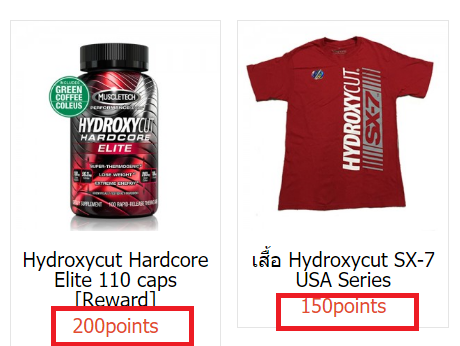
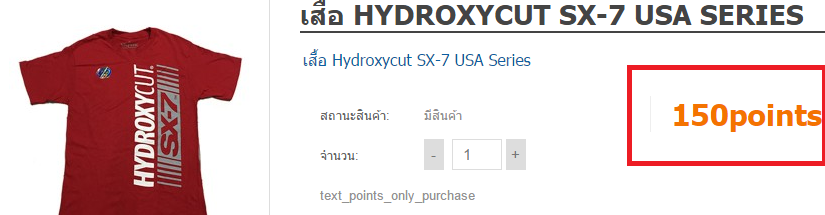
i am use hikashoppoint
thank you
Please Log in or Create an account to join the conversation.

9 years 3 months ago #271557
by Jerome
Jerome - Obsidev.com
HikaMarket & HikaSerial developer / HikaShop core dev team.
Replied by Jerome on topic how to set show point price
Hello,
HikaShop points are not a currency ; it is a value stored in the user profile and the payment plugin can convert these points into a discount based on the current currency.
Regards,
HikaShop points are not a currency ; it is a value stored in the user profile and the payment plugin can convert these points into a discount based on the current currency.
Regards,
Jerome - Obsidev.com
HikaMarket & HikaSerial developer / HikaShop core dev team.
Please Log in or Create an account to join the conversation.
9 years 3 months ago - 9 years 3 months ago #271588
by lhumdin
Replied by lhumdin on topic how to set show point price
and how to set it
i am question for point.
i am use hikashop point
Plugin: userpoints - i set point 10 usd = 1 point
1. if i buy product name ABC price = 100 usd. i will = 10 point and seller confirm this order but point no auto add to buyer
i will get auto point for buyer ?
because i don't have AUTO point in user profile.
2. how to show status total is free if use point ?.
3. How to set Pay with Points only Categories Required
please Step guide for me. thank you sir
i am question for point.
i am use hikashop point
Plugin: userpoints - i set point 10 usd = 1 point
1. if i buy product name ABC price = 100 usd. i will = 10 point and seller confirm this order but point no auto add to buyer
i will get auto point for buyer ?
because i don't have AUTO point in user profile.
2. how to show status total is free if use point ?.
3. How to set Pay with Points only Categories Required
please Step guide for me. thank you sir
Last edit: 9 years 3 months ago by lhumdin.
Please Log in or Create an account to join the conversation.

9 years 3 months ago #271629
by nicolas
Replied by nicolas on topic how to set show point price
Hi,
1. As Jerome said, you can't display the amount of points required to purchase a product.
What you could do is create a new "points" currency and use that currency in your product prices and as default currency of HikaShop so that the prices would actually be amounts of points.
In that case, that's possible, but that also means that you can't have other payment methods like PayPal on your website as they won't understand the number of points currency.
If you want both normal prices and number of points, you would have to have some customization in the view files to display the points or have some kind of custom product field where you would enter the number of points on top of having a price for the products.
2. If you activate the virtual coupon setting of your user points plugin, the points will be added to the cart between the sub total and the total.
3. There is no setting to restrict the points to only some categories.
1. As Jerome said, you can't display the amount of points required to purchase a product.
What you could do is create a new "points" currency and use that currency in your product prices and as default currency of HikaShop so that the prices would actually be amounts of points.
In that case, that's possible, but that also means that you can't have other payment methods like PayPal on your website as they won't understand the number of points currency.
If you want both normal prices and number of points, you would have to have some customization in the view files to display the points or have some kind of custom product field where you would enter the number of points on top of having a price for the products.
2. If you activate the virtual coupon setting of your user points plugin, the points will be added to the cart between the sub total and the total.
3. There is no setting to restrict the points to only some categories.
Please Log in or Create an account to join the conversation.
9 years 3 months ago #271677
by lhumdin
Replied by lhumdin on topic how to set show point price
if i use AlphaUserPoints
this is auto points for buy item ?
if it auto point for buy
tel me please for step by step for rules
thank you
this is auto points for buy item ?
if it auto point for buy
tel me please for step by step for rules
thank you
Please Log in or Create an account to join the conversation.
9 years 3 months ago #271683
by Jerome
Jerome - Obsidev.com
HikaMarket & HikaSerial developer / HikaShop core dev team.
Replied by Jerome on topic how to set show point price
Hello,
Using AlphaUserPoints or AltaUserPoints won't change a thing. What Nicolas told you (and what I told you previously) will still be.
Afterwards I'm sorry but it's not possible to understand the rest of your message.
Regards,
Using AlphaUserPoints or AltaUserPoints won't change a thing. What Nicolas told you (and what I told you previously) will still be.
Afterwards I'm sorry but it's not possible to understand the rest of your message.
Regards,
Jerome - Obsidev.com
HikaMarket & HikaSerial developer / HikaShop core dev team.
Please Log in or Create an account to join the conversation.
9 years 3 months ago - 9 years 3 months ago #271714
by lhumdin
Replied by lhumdin on topic how to set show point price
thank you
are you tell me for Group points: Warning level
in Pay with Points (HikaShop User Points payment plugin)
Group points: Warning level: This option is used when the "Group points by" option is set. It allows you to display a message to the user when he doesn't have enough points to use his points because it didn't reach the minimum required points based on that "Group points by" option.
i am use alphauserpoint and i set Group points: Warning level = 100 points
why user under 100 points use function pays with points ?
i don't know for Group points: Warning level.
ex.
user < = 99 points no use pay with points
user > = 100 points use pay with points
tell me please
are you tell me for Group points: Warning level
in Pay with Points (HikaShop User Points payment plugin)
Group points: Warning level: This option is used when the "Group points by" option is set. It allows you to display a message to the user when he doesn't have enough points to use his points because it didn't reach the minimum required points based on that "Group points by" option.
i am use alphauserpoint and i set Group points: Warning level = 100 points
why user under 100 points use function pays with points ?
i don't know for Group points: Warning level.
ex.
user < = 99 points no use pay with points
user > = 100 points use pay with points
tell me please
Last edit: 9 years 3 months ago by lhumdin.
Please Log in or Create an account to join the conversation.
9 years 3 months ago #271728
by nicolas
Replied by nicolas on topic how to set show point price
Hi,
If you set the "Group points by" setting to 100, then the customer won't be able to use the points below that amount.
The setting "Group points: Warning level" can be set to a lower amount (for example 80) in order to display a message to the customer between 80 and 100 points so that he knows that with a bit more points, he could use them.
If you set the "Group points by" setting to 100, then the customer won't be able to use the points below that amount.
The setting "Group points: Warning level" can be set to a lower amount (for example 80) in order to display a message to the customer between 80 and 100 points so that he knows that with a bit more points, he could use them.
Please Log in or Create an account to join the conversation.
9 years 3 months ago #271883
by lhumdin
Replied by lhumdin on topic how to set show point price
hi i am show subtotal point in checkout
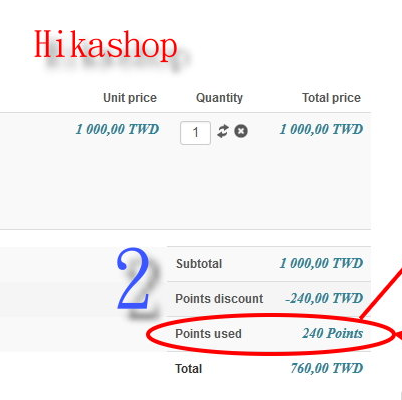
i am open in plugin Give virtual points = yes
and in payment close Use virtual coupons = no
but it no show, help me please thank you
i am open in plugin Give virtual points = yes
and in payment close Use virtual coupons = no
but it no show, help me please thank you
Please Log in or Create an account to join the conversation.
9 years 3 months ago #271899
by Jerome
Jerome - Obsidev.com
HikaMarket & HikaSerial developer / HikaShop core dev team.
Replied by Jerome on topic how to set show point price
Hello,
Why are you using virtual points ?
www.hikashop.com/forum/discount-coupon/8...erpoints.html#271878
As written in the configuration ; that setting should be turn off in must cases.
And I think that you also set the "virtual coupon" otherwise you would not have the additional lines in the cart footer.
Regards,
Why are you using virtual points ?
www.hikashop.com/forum/discount-coupon/8...erpoints.html#271878
As written in the configuration ; that setting should be turn off in must cases.
And I think that you also set the "virtual coupon" otherwise you would not have the additional lines in the cart footer.
Regards,
Jerome - Obsidev.com
HikaMarket & HikaSerial developer / HikaShop core dev team.
Please Log in or Create an account to join the conversation.
9 years 3 months ago - 9 years 3 months ago #271939
by lhumdin
Replied by lhumdin on topic how to set show point price
now i am close but no show
Last edit: 9 years 3 months ago by lhumdin.
Please Log in or Create an account to join the conversation.
9 years 3 months ago #271967
by Jerome
Jerome - Obsidev.com
HikaMarket & HikaSerial developer / HikaShop core dev team.
Replied by Jerome on topic how to set show point price
Hello,
I'm sorry but I don't understand your message.
Can you please provide more details about your current configuration ?
Regards,
I'm sorry but I don't understand your message.
Can you please provide more details about your current configuration ?
Regards,
Jerome - Obsidev.com
HikaMarket & HikaSerial developer / HikaShop core dev team.
Please Log in or Create an account to join the conversation.
9 years 3 months ago #272030
by lhumdin
Replied by lhumdin on topic how to set show point price
plugin userpoint
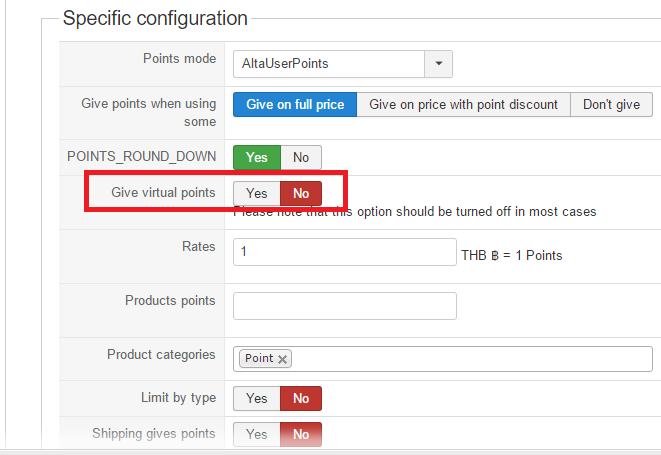
payment pay with point
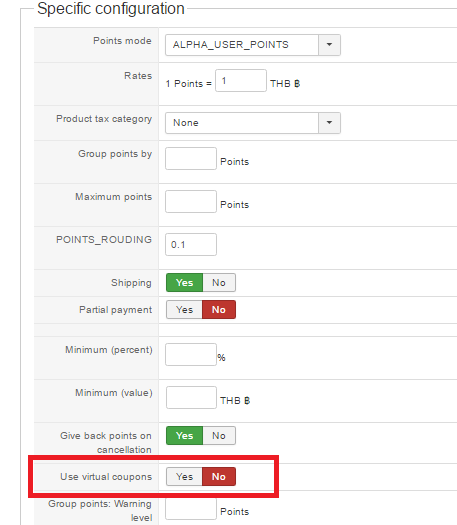
payment pay with point
Please Log in or Create an account to join the conversation.
9 years 3 months ago #272055
by nicolas
Replied by nicolas on topic how to set show point price
Hi,
You need to activate the "partial payment" setting.
Otherwise, the points system will only show the points discount when it can cover the full amount of the order.
You need to activate the "partial payment" setting.
Otherwise, the points system will only show the points discount when it can cover the full amount of the order.
Please Log in or Create an account to join the conversation.
9 years 3 months ago #272115
by lhumdin
Replied by lhumdin on topic how to set show point price
i am active partial payment
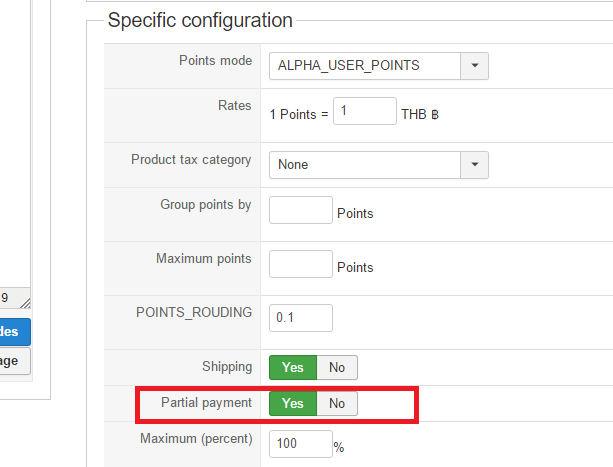
but no show subtotal points
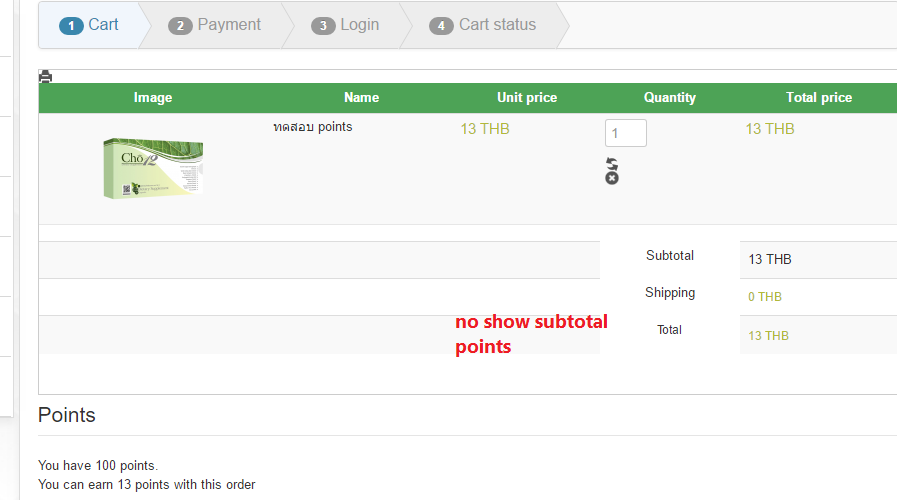
i don't know , and can you see back-end from me ?
but no show subtotal points
i don't know , and can you see back-end from me ?
Please Log in or Create an account to join the conversation.
9 years 3 months ago #272117
by Jerome
Jerome - Obsidev.com
HikaMarket & HikaSerial developer / HikaShop core dev team.
Replied by Jerome on topic how to set show point price
Hello,
When you're using the "user points payment" plugin without the "virtual coupon" mode ; the method is displayed as a classical payment method and not as a discount in the cart additional (footer).
CF my previous message #271899
Regards,
When you're using the "user points payment" plugin without the "virtual coupon" mode ; the method is displayed as a classical payment method and not as a discount in the cart additional (footer).
CF my previous message #271899
But if you don't want to follow my advice ; that's up to you.And I think that you also set the "virtual coupon" otherwise you would not have the additional lines in the cart footer.
Regards,
Jerome - Obsidev.com
HikaMarket & HikaSerial developer / HikaShop core dev team.
Please Log in or Create an account to join the conversation.
9 years 3 months ago #272152
by lhumdin
Replied by lhumdin on topic how to set show point price
yes i can do it, thank you
Please Log in or Create an account to join the conversation.
Time to create page: 0.243 seconds