

- Posts: 206
- Thank you received: 7
[j4] l'insertin de produit via le plugin fait planté mon site
5 years 1 month ago #336100
by c-line
-- HikaShop version -- : 4.4.3
-- Joomla version -- : 4.0.3
hello je viens de faire un test
1 j'ajoute un produit via l'appel produit
2 je lance ma page
le template en template creator plante
avec cassiopeda j'ai cette erreur
des idées ?
-- Joomla version -- : 4.0.3
hello je viens de faire un test
1 j'ajoute un produit via l'appel produit
Code:
Free
WorldPay Global Gateway
Introduction
Use WorldPay Global Gateway payment solution for your HikaShop
Installation- Easy and quick !
- 1) Download the plugin on our website
2) Install it on your Joomla website (extension manager)
3) Configure it - See details, here on the documentation
Use
- This plugin is compatible with all the editions of HikaShop
- PHP 5.3.3 and later
- HikaShop 2.6.3 and later
- No limit of time
- No limit of use
Changelog
Version 3.0.6 on October 21st 2026
- A payment notification from Worldpay is now refused when its admin code, merchant code or MAC is wrong, and when the MAC secret, the admin code or the merchant code is not filled in the payment method. Before, such a notification was logged but still processed.
- A notification for an order paid with another payment method is now ignored, and a refusal, pending or cancel message received after the payment no longer moves a paid order back.
Version 3.0.5 on the 23rd of September 2026
- When Worldpay answers the payment request with an error, the customer now sees the error message. Before, the checkout stopped with a PHP error.
Version 3.0.4 on the 19th of September 2026
- The plugin now checks the certificate of Worldpay before sending it the order and trusting its answer, using the certificates your Joomla or WordPress installation keeps up to date. Before, it skipped that check.
- The payment button of a new payment method no longer loads its background from an old RBS WorldPay address that no longer serves it.
- The plugin no longer prints a deprecation notice on PHP 8.5 when it sends the addresses to Worldpay.
Version 3.0.3 on the 6th of August 2026
- Removed deprecated Joomla and PHP calls (jimport, curl_close) and replaced the Joomla classes and APIs removed or deprecated up to Joomla 7, so the plugin keeps working on recent versions.
- Fixed the update system so the plugin now correctly detects and offers its own new versions.
Version 3.0.2 on the 20th of December 2023
- We fixed an error with the WorldPay Global Gateway plugin on Joomla 4.
- Compatibility updates for PHP 8.2.
Version 3.0.1 on the 30th of December 2022
- Updated the plugin to follow the Joomla and JED standards.
Version 3.0.0 on the 20th of September 2021
- We fixed some fatal errors on Joomla 4.
Version 2.2.0 on the 8th of May 2019
- Migrated from isAdmin() to isClient() for the support of Joomla 4.
Version 2.1.0 on the 25th of July 2018
- New backend interface for Joomla 4 and fixed the input display.
Version 2.0.0 on the 31st of July 2017
- Migrated from JRequest to JInput to prepare for Joomla 4 and improve compatibility with recent versions of PHP 7.
Version 1.2.0 on the 3rd of September 2015
- The payment plugins no longer use Mootools.
Version 1.1.0 on the 26th of May 2014
- We fixed some strict standard messages in the Business Gateway and Global Gateway payment plugins.
Version 1.0.0 on the 3rd of March 2014
- Initial release of the plugin.
le template en template creator plante
avec cassiopeda j'ai cette erreur
Code:
WebAssetManager is locked, you came late
Please Log in or Create an account to join the conversation.

5 years 1 month ago #336108
by nicolas
Replied by nicolas on topic [j4] l'insertin de produit via le plugin fait planté mon site
Bonjour,
Je n'ai pas le souci de mon coté.
L'erreur indique qu'il y a quelque chose qui essai de rajouter un fichier JS ou CSS ou directement du CSS ou du JS dans le head de la page alors que la page a déjà été générée.
Cependant, de notre coté, nous rajoutons directement le CSS/JS au head sans passer par Joomla, donc cela évite ce problème.
Du coup, je ne sais pas pourquoi vous avez cette erreur.
Pourriez-vous activer l'error reporting et le debug system dans la configuration Joomla et refaire l'expérience ? Cela devrait fournir plus d'information sur le soucis et nous permettre de comprendre d'où vient le problème.
Je n'ai pas le souci de mon coté.
L'erreur indique qu'il y a quelque chose qui essai de rajouter un fichier JS ou CSS ou directement du CSS ou du JS dans le head de la page alors que la page a déjà été générée.
Cependant, de notre coté, nous rajoutons directement le CSS/JS au head sans passer par Joomla, donc cela évite ce problème.
Du coup, je ne sais pas pourquoi vous avez cette erreur.
Pourriez-vous activer l'error reporting et le debug system dans la configuration Joomla et refaire l'expérience ? Cela devrait fournir plus d'information sur le soucis et nous permettre de comprendre d'où vient le problème.
Please Log in or Create an account to join the conversation.
5 years 1 month ago #336110
by c-line
Replied by c-line on topic [j4] l'insertin de produit via le plugin fait planté mon site
hello c'est visible ici
revue.com3elles.com/index.php/produit-donation
revue.com3elles.com/index.php/produit-donation
Please Log in or Create an account to join the conversation.
5 years 1 month ago #336112
by nicolas
Replied by nicolas on topic [j4] l'insertin de produit via le plugin fait planté mon site
Bonjour,
L'erreur est différente sur cette page. C'est d'ailleurs une erreur que nous avons corrigé de notre coté début juillet.
Téléchargez à nouveau le paquet d'installation de la 4.4.3 sur notre site et installez-le sur le votre et vous aurez le patch pour ce souci.
L'erreur est différente sur cette page. C'est d'ailleurs une erreur que nous avons corrigé de notre coté début juillet.
Téléchargez à nouveau le paquet d'installation de la 4.4.3 sur notre site et installez-le sur le votre et vous aurez le patch pour ce souci.
Please Log in or Create an account to join the conversation.
5 years 1 month ago - 5 years 1 month ago #336114
by c-line
Replied by c-line on topic [j4] l'insertin de produit via le plugin fait planté mon site
et bien c'est ca ! j'ai du avoir un version pas complete !
juste une autre question
c'est un produit de donation
si je charge que mon produit j'ai bien le champs pour ajouter la valeur voulue
mais si j'utilise l'appel plugin le champs ne s'affiche pas j'ai que le bouton ajouter au panier !
comment faire ?
juste une autre question
c'est un produit de donation
si je charge que mon produit j'ai bien le champs pour ajouter la valeur voulue
mais si j'utilise l'appel plugin le champs ne s'affiche pas j'ai que le bouton ajouter au panier !
comment faire ?
Last edit: 5 years 1 month ago by c-line.
Please Log in or Create an account to join the conversation.
5 years 1 month ago #336117
by nicolas
Replied by nicolas on topic [j4] l'insertin de produit via le plugin fait planté mon site
Bonjour,
Il n'y a pas de paramètre dans les tags de contenu qui permette de gérer cela.
Le système se base sur l'option "Display custom item fields" de l'onglet "Display" de la configuration HikaShop pour afficher ou non les champs personnalisés item (article) pour les tags de contenu.
Donc j'imagine que vous devez avoir cette option désactivée.
Il n'y a pas de paramètre dans les tags de contenu qui permette de gérer cela.
Le système se base sur l'option "Display custom item fields" de l'onglet "Display" de la configuration HikaShop pour afficher ou non les champs personnalisés item (article) pour les tags de contenu.
Donc j'imagine que vous devez avoir cette option désactivée.
Please Log in or Create an account to join the conversation.
5 years 1 month ago #336129
by c-line
Replied by c-line on topic [j4] l'insertin de produit via le plugin fait planté mon site
alors l'option est bien activé je voit bien le champs quand je suis dans le produit mais pas quand je charge le produit dans un article
Please Log in or Create an account to join the conversation.
5 years 1 month ago #336132
by nicolas
Replied by nicolas on topic [j4] l'insertin de produit via le plugin fait planté mon site
Désolé, j'ai vérifié le code mais il n'y a pas de support des champs personnalisés de la table item pour les tags de contenu.
Nous allons voir pour rajouter cela pour la prochaine version d'HikaShop.
Nous allons voir pour rajouter cela pour la prochaine version d'HikaShop.
Please Log in or Create an account to join the conversation.
5 years 1 month ago #336147
by c-line
Replied by c-line on topic [j4] l'insertin de produit via le plugin fait planté mon site
ok cool ! des idée du timing pour la prochaine version ?
Please Log in or Create an account to join the conversation.
5 years 4 weeks ago #336148
by nicolas
Replied by nicolas on topic [j4] l'insertin de produit via le plugin fait planté mon site
Courant Octobre
Please Log in or Create an account to join the conversation.
5 years 4 weeks ago #336166
by c-line
Replied by c-line on topic [j4] l'insertin de produit via le plugin fait planté mon site
Super
Please Log in or Create an account to join the conversation.
5 years 3 weeks ago #336272
by c-line
Replied by c-line on topic [j4] l'insertin de produit via le plugin fait planté mon site
j'ai mis a jour en 4.4.4
et j'ai la page qui plante
des idées ?
et j'ai la page qui plante
Code:
0 Too few arguments to function hikashopProductClass::loadCustomItemFieldsForProductsListing(), 1 passed in /home/com3web5/revue.com3elles.com/plugins/system/hikashopproductinsert/hikashopproductinsert.php on line 389 and exactly 2 expected
Call stack
# Function Location
1 () JROOT/administrator/components/com_hikashop/classes/product.php:2510
2 hikashopProductClass->loadCustomItemFieldsForProductsListing() JROOT/plugins/system/hikashopproductinsert/hikashopproductinsert.php:389
3 plgSystemHikashopproductInsert->_processProduct() JROOT/plugins/system/hikashopproductinsert/hikashopproductinsert.php:123
4 plgSystemHikashopproductInsert->onAfterRender() JROOT/libraries/src/Plugin/CMSPlugin.php:285
5 Joomla\CMS\Plugin\CMSPlugin->Joomla\CMS\Plugin\{closure}() JROOT/libraries/vendor/joomla/event/src/Dispatcher.php:486
6 Joomla\Event\Dispatcher->dispatch() JROOT/libraries/src/Application/EventAware.php:111
7 Joomla\CMS\Application\WebApplication->triggerEvent() JROOT/libraries/src/Application/CMSApplication.php:1042
8 Joomla\CMS\Application\CMSApplication->render() JROOT/libraries/src/Application/SiteApplication.php:804
9 Joomla\CMS\Application\SiteApplication->render() JROOT/libraries/src/Application/CMSApplication.php:284
10 Joomla\CMS\Application\CMSApplication->execute() JROOT/includes/app.php:63
11 require_once() JROOT/index.php:32
Please Log in or Create an account to join the conversation.
5 years 3 weeks ago - 5 years 3 weeks ago #336274
by nicolas
Replied by nicolas on topic [j4] l'insertin de produit via le plugin fait planté mon site
Merci du retour.
C'est un oubli.
Changez la ligne:
function loadCustomItemFieldsForProductsListing(&$rows, $options) {
en:
function loadCustomItemFieldsForProductsListing(&$rows, $options = array()) {
dans /administrator/components/com_hikashop/classes/product.php et cela corrigera le souci.
Nous allons rajouter la modification de notre coté aussi.
C'est un oubli.
Changez la ligne:
function loadCustomItemFieldsForProductsListing(&$rows, $options) {
en:
function loadCustomItemFieldsForProductsListing(&$rows, $options = array()) {
dans /administrator/components/com_hikashop/classes/product.php et cela corrigera le souci.
Nous allons rajouter la modification de notre coté aussi.
Last edit: 5 years 3 weeks ago by nicolas.
Please Log in or Create an account to join the conversation.
5 years 3 weeks ago #336277
by c-line
Replied by c-line on topic [j4] l'insertin de produit via le plugin fait planté mon site
C'est top c'est réglé
par contre je ne voit pas dans le change log l'ajout des champs custom comme évoquer dans ce post
par contre je ne voit pas dans le change log l'ajout des champs custom comme évoquer dans ce post
Please Log in or Create an account to join the conversation.
5 years 3 weeks ago #336279
by nicolas
Replied by nicolas on topic [j4] l'insertin de produit via le plugin fait planté mon site
Pourtant c'est bien mentionné dans le changelog:
We've made some modifications to support custom item fields for content tags.
Please Log in or Create an account to join the conversation.
5 years 3 weeks ago #336287
by c-line
Replied by c-line on topic [j4] l'insertin de produit via le plugin fait planté mon site
a bizarre de mon coté le champs ne s'affiche pas ...
il faut mettre a jour l'appel du plugin ?.
il faut mettre a jour l'appel du plugin ?.
Please Log in or Create an account to join the conversation.
5 years 3 weeks ago #336289
by nicolas
Replied by nicolas on topic [j4] l'insertin de produit via le plugin fait planté mon site
Avez-vous bien activé l'option "Display custom item fields" de l'onglet "Display" de la configuration HikaShop ?
Aussi, il se pourrait que le souci soit particulier à un certain cas de figure. Pourriez-vous fournir une capture d'écran des paramètres de votre champ personnalisé ? Quel tag utilisez-vous exactement ? Et pourriez vous aussi fournir une capture d'écran des options du produit pour lequel vous ajoutez ce tag ?
Cela nous permettra d'avoir un cas concret et précis pour reproduire le problème.
Aussi, il se pourrait que le souci soit particulier à un certain cas de figure. Pourriez-vous fournir une capture d'écran des paramètres de votre champ personnalisé ? Quel tag utilisez-vous exactement ? Et pourriez vous aussi fournir une capture d'écran des options du produit pour lequel vous ajoutez ce tag ?
Cela nous permettra d'avoir un cas concret et précis pour reproduire le problème.
Please Log in or Create an account to join the conversation.
5 years 3 weeks ago #336296
by c-line
Replied by c-line on topic [j4] l'insertin de produit via le plugin fait planté mon site
pour l'affichage du champ
oui

pour le produit
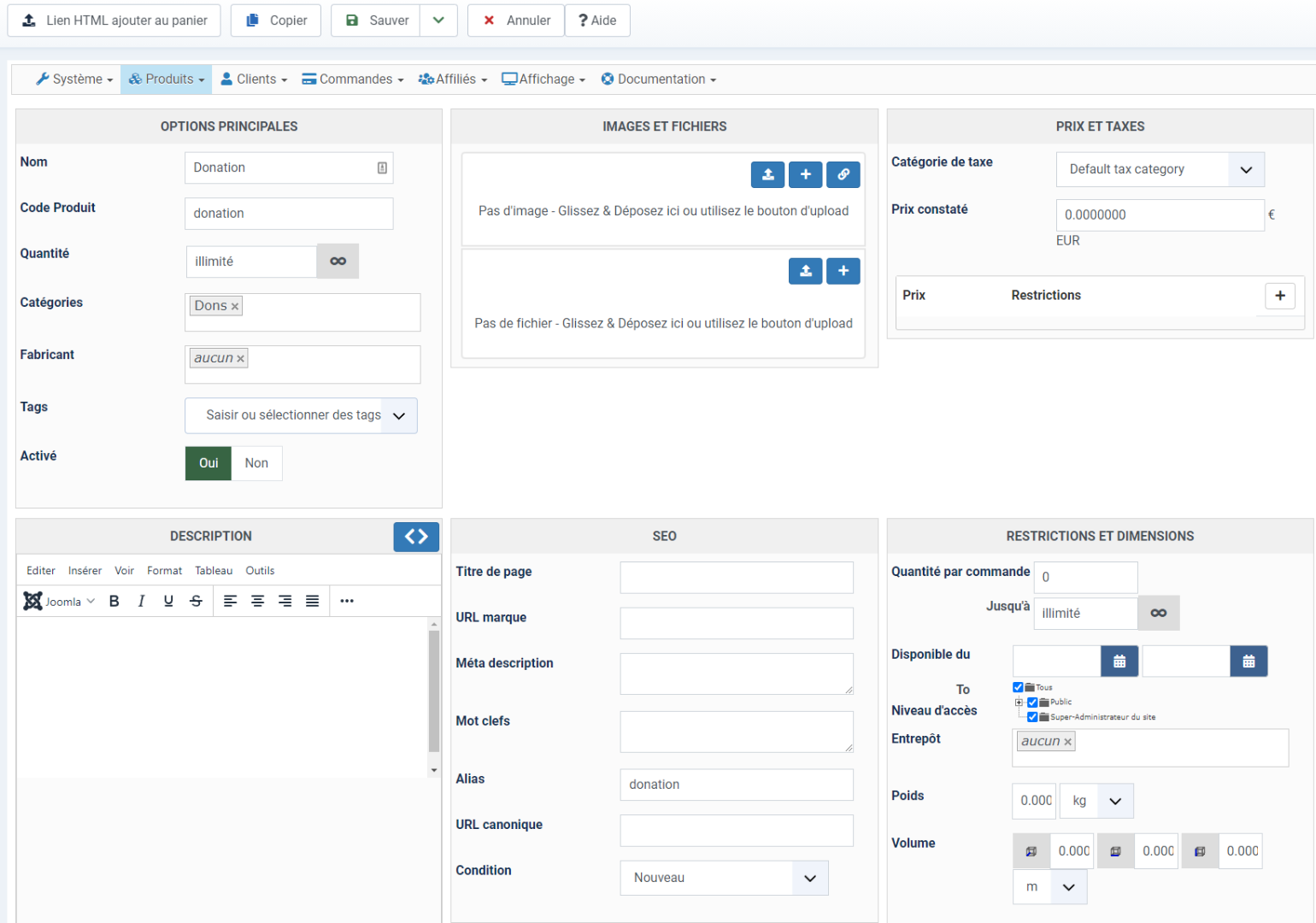
pour le champ
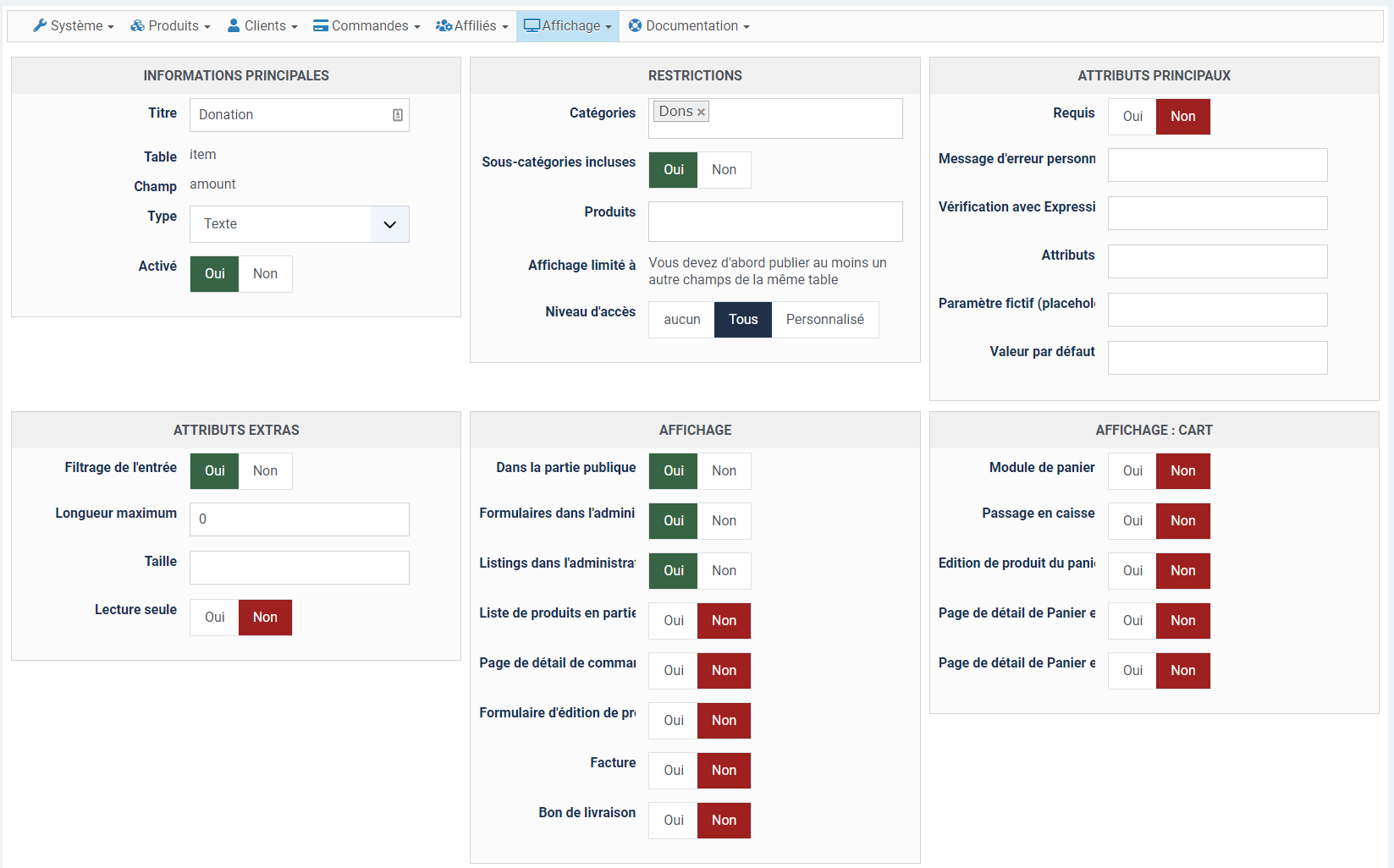
le tag
la page
Dans la vrai page produit aucun soucis
oui
pour le produit
pour le champ
le tag
la page
This message contains confidential information
Dans la vrai page produit aucun soucis
Please Log in or Create an account to join the conversation.
5 years 3 weeks ago #336299
by nicolas
Replied by nicolas on topic [j4] l'insertin de produit via le plugin fait planté mon site
Bonjour,
Comme un tag peut afficher plusieurs produits à la fois, c'est considéré comme un listing de produit. Donc si vous voulez que le champs s'affiche avec le tag, il faut que l'option "liste de produits en partie publique" soit activée dans le champ personnalisé.
Aussi, vous voudrez surement que le champs soit requis. Si vous auriez fait cela, le bouton d'ajout au panier se serait transformé en bouton "choisir les options" si l'option d'affichage sur les listings n'était pas activée.
Comme un tag peut afficher plusieurs produits à la fois, c'est considéré comme un listing de produit. Donc si vous voulez que le champs s'affiche avec le tag, il faut que l'option "liste de produits en partie publique" soit activée dans le champ personnalisé.
Aussi, vous voudrez surement que le champs soit requis. Si vous auriez fait cela, le bouton d'ajout au panier se serait transformé en bouton "choisir les options" si l'option d'affichage sur les listings n'était pas activée.
Please Log in or Create an account to join the conversation.
5 years 3 weeks ago #336301
by c-line
Replied by c-line on topic [j4] l'insertin de produit via le plugin fait planté mon site
parfait !!!
Merci
Merci
Please Log in or Create an account to join the conversation.
Time to create page: 0.210 seconds