

- Posts: 637
- Thank you received: 26
CSS for buttons
9 years 1 week ago - 8 years 11 months ago #278728
by Lumiga
Kind regards,
Lumiga
CSS for buttons was created by Lumiga
-- HikaShop version -- : 3.2.0
-- Joomla version -- : 3.7.5
-- PHP version -- : 7
Hi Hikashop.
I have a request for the CSS Buttons options in the configuration.
As you know you can add an extra CSS class for cart and wishlist. That's very nice.
But this option is not workable anymore for Yootheme PRO and for example JSN, and maybe other templatebuilder.
For example if somebody want to use a secondary button for the shop you have to add these classes:
"uk-button uk-button-secondary" for Yootheme PRO.
And if you want an other class for the add to cart buttons you have to add this class.
Like this situation:
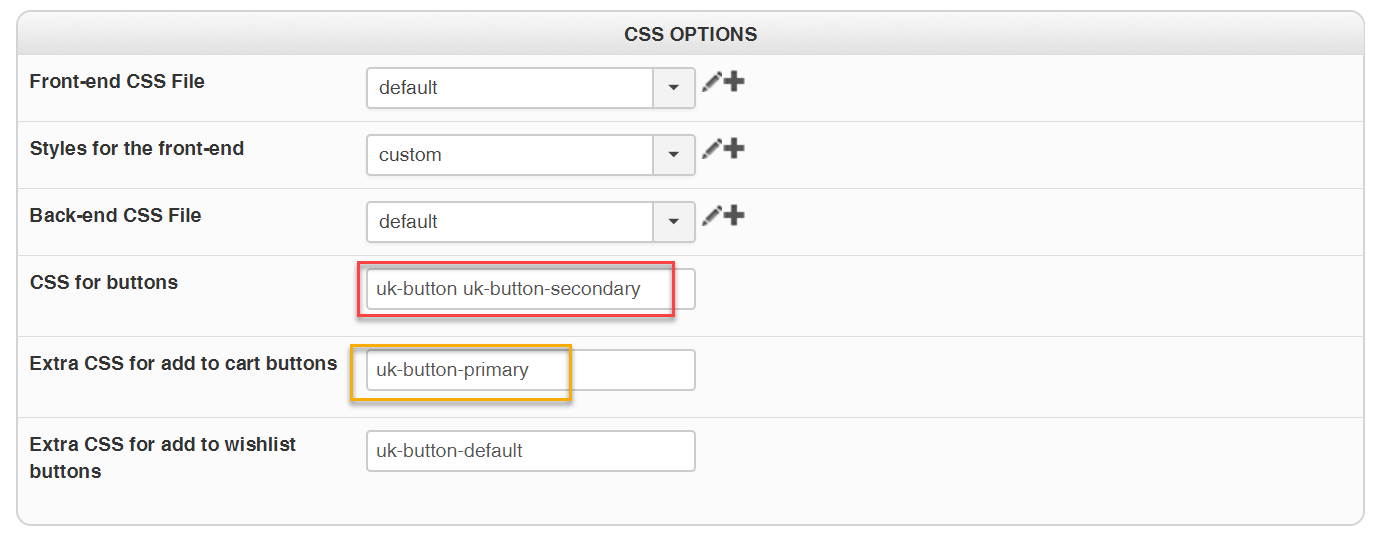
But this situation give a problem as you see. Because when you use the extra CSS class, the extra CSS will be placed behind the CSS for normal shop buttons like this:
"uk-button uk-button-secondary uk-button-primary"
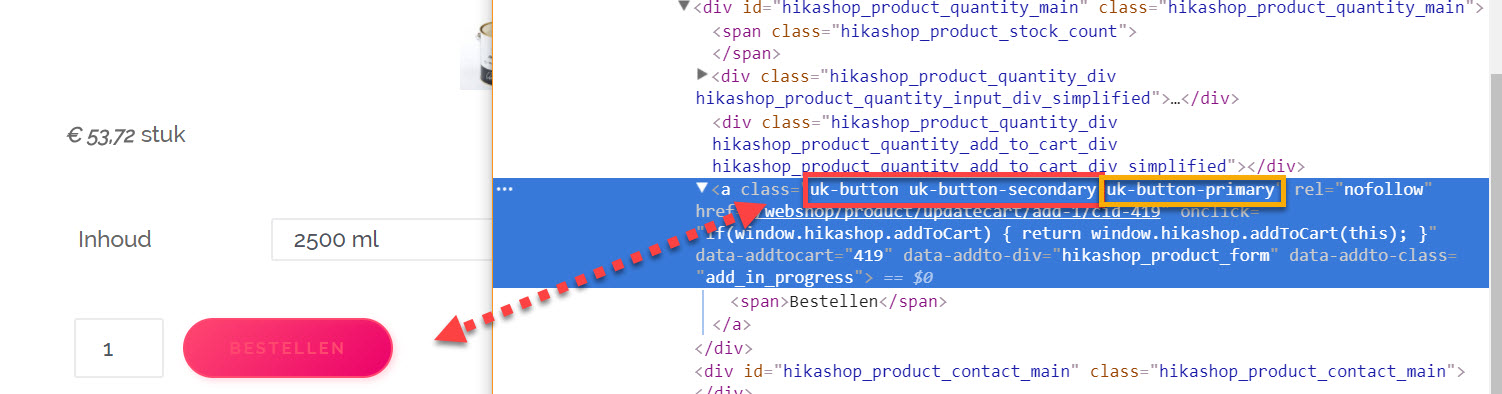
but it must be look like this:
"uk-button uk-button-primary"
So the extra class must be replace the other class.
This this is my thought about it, and would be useful for everybody also with the old templates.
Create a extra field with a replaceable CSS button class. So this class would be replaced by the extra classes for cart and wishlist.
Like this example:
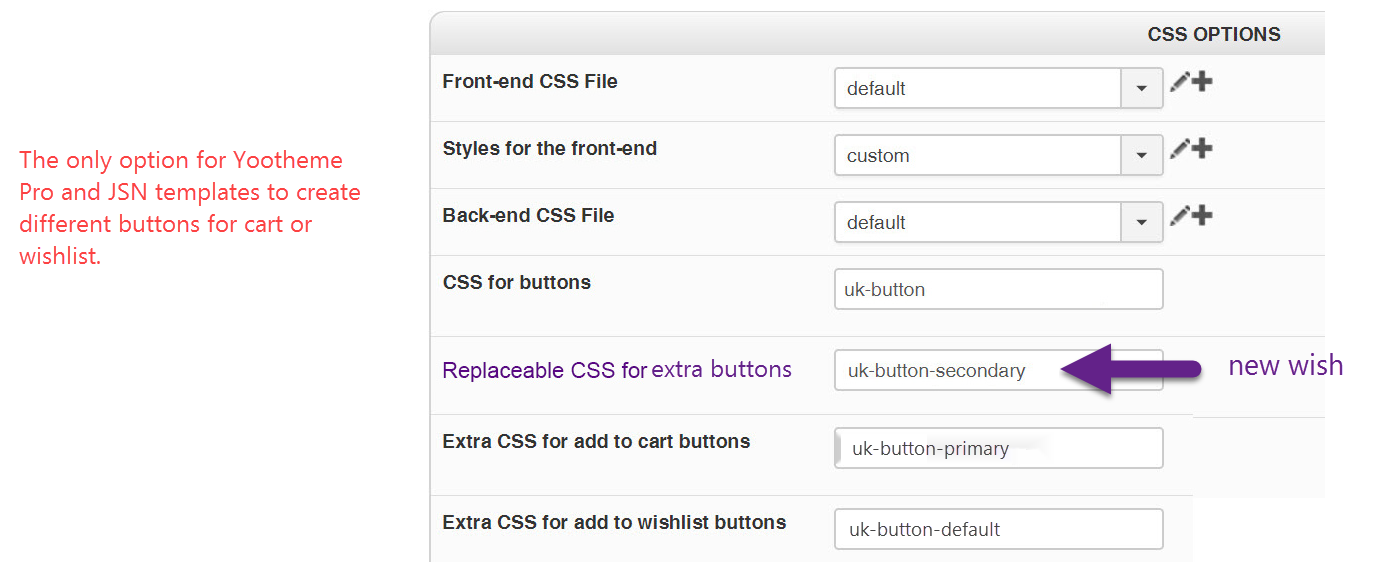
I hope you understand the problem and correct me if I'm wrong.
Kind regards,
Lumiga
See:https://getuikit.com/v2/docs/button.html for the old templates
and: getuikit.com/docs/button for the new one with Yootheme PRO
-- Joomla version -- : 3.7.5
-- PHP version -- : 7
Hi Hikashop.
I have a request for the CSS Buttons options in the configuration.
As you know you can add an extra CSS class for cart and wishlist. That's very nice.
But this option is not workable anymore for Yootheme PRO and for example JSN, and maybe other templatebuilder.
For example if somebody want to use a secondary button for the shop you have to add these classes:
"uk-button uk-button-secondary" for Yootheme PRO.
And if you want an other class for the add to cart buttons you have to add this class.
Like this situation:
But this situation give a problem as you see. Because when you use the extra CSS class, the extra CSS will be placed behind the CSS for normal shop buttons like this:
"uk-button uk-button-secondary uk-button-primary"
but it must be look like this:
"uk-button uk-button-primary"
So the extra class must be replace the other class.
This this is my thought about it, and would be useful for everybody also with the old templates.
Create a extra field with a replaceable CSS button class. So this class would be replaced by the extra classes for cart and wishlist.
Like this example:
I hope you understand the problem and correct me if I'm wrong.
Kind regards,
Lumiga
See:https://getuikit.com/v2/docs/button.html for the old templates
and: getuikit.com/docs/button for the new one with Yootheme PRO
Kind regards,
Lumiga
Last edit: 8 years 11 months ago by Lumiga.
Please Log in or Create an account to join the conversation.

9 years 1 week ago - 9 years 1 week ago #278776
by Philip
Replied by Philip on topic CSS for buttons
Hello,
There is something I don't understand in your first screenshot, from where come from your "Replaceable Css for buttons" ?
I don't have this input...
Anyway, here my configuration that leads to, I think the results you want to have :
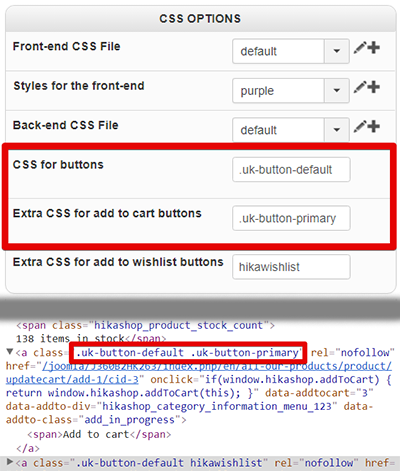
Awaiting news from you.
Regards
There is something I don't understand in your first screenshot, from where come from your "Replaceable Css for buttons" ?
I don't have this input...
Anyway, here my configuration that leads to, I think the results you want to have :
Awaiting news from you.
Regards
Last edit: 9 years 1 week ago by Philip.
Please Log in or Create an account to join the conversation.
8 years 11 months ago #279882
by Lumiga
Kind regards,
Lumiga
Replied by Lumiga on topic CSS for buttons
Hi Philip, I made an update from my post. So hopefully you understand it now better.
Please also see the new structure from Yootheme Pro for the buttons on:
getuikit.com/docs/button
Thanks for your time.
Kind regards,
Lumiga
Please also see the new structure from Yootheme Pro for the buttons on:
getuikit.com/docs/button
Thanks for your time.
Kind regards,
Lumiga
Kind regards,
Lumiga
Please Log in or Create an account to join the conversation.
8 years 11 months ago #279890
by Philip
Replied by Philip on topic CSS for buttons
Hello,
Ok, I get it but I think the way I configure must fit your needs... Did it ?
In your first post, you have talking about a specific case, normally my answer (at least if I make no mistake...) must answer to this concrete case.
Regards
Ok, I get it but I think the way I configure must fit your needs... Did it ?
In your first post, you have talking about a specific case, normally my answer (at least if I make no mistake...) must answer to this concrete case.
Regards
Please Log in or Create an account to join the conversation.
Time to create page: 0.231 seconds