
Continue Shopping Button in Top
- condorazul
-
 Topic Author
- Offline
Less
More
12 years 8 months ago - 12 years 8 months ago #143721
by condorazul
Continue Shopping Button in Top was created by condorazul
I would like to display the continue shopping buttom in top of the cart in the checkout instead of below it how can i do it?
Last edit: 12 years 8 months ago by condorazul.
Please Log in or Create an account to join the conversation.

Less
More
- Posts: 12953
- Thank you received: 1778
12 years 8 months ago #143803
by Mohamed Thelji
Replied by Mohamed Thelji on topic Continue Shopping Button in Top
Hi,
To do that you'll have to directly edit the code of the "Cart" file of the "Checkout" view of yoru front-end template through the page "Hikashop->Display->Views".
Also, showing me some screenshots of where you want your button to be displayed will probably help me to understand your issue.
To do that you'll have to directly edit the code of the "Cart" file of the "Checkout" view of yoru front-end template through the page "Hikashop->Display->Views".
Also, showing me some screenshots of where you want your button to be displayed will probably help me to understand your issue.
Please Log in or Create an account to join the conversation.
- condorazul
-
Topic Author
- Offline
12 years 8 months ago #143811
by condorazul
Replied by condorazul on topic Continue Shopping Button in Top
ok here is the current
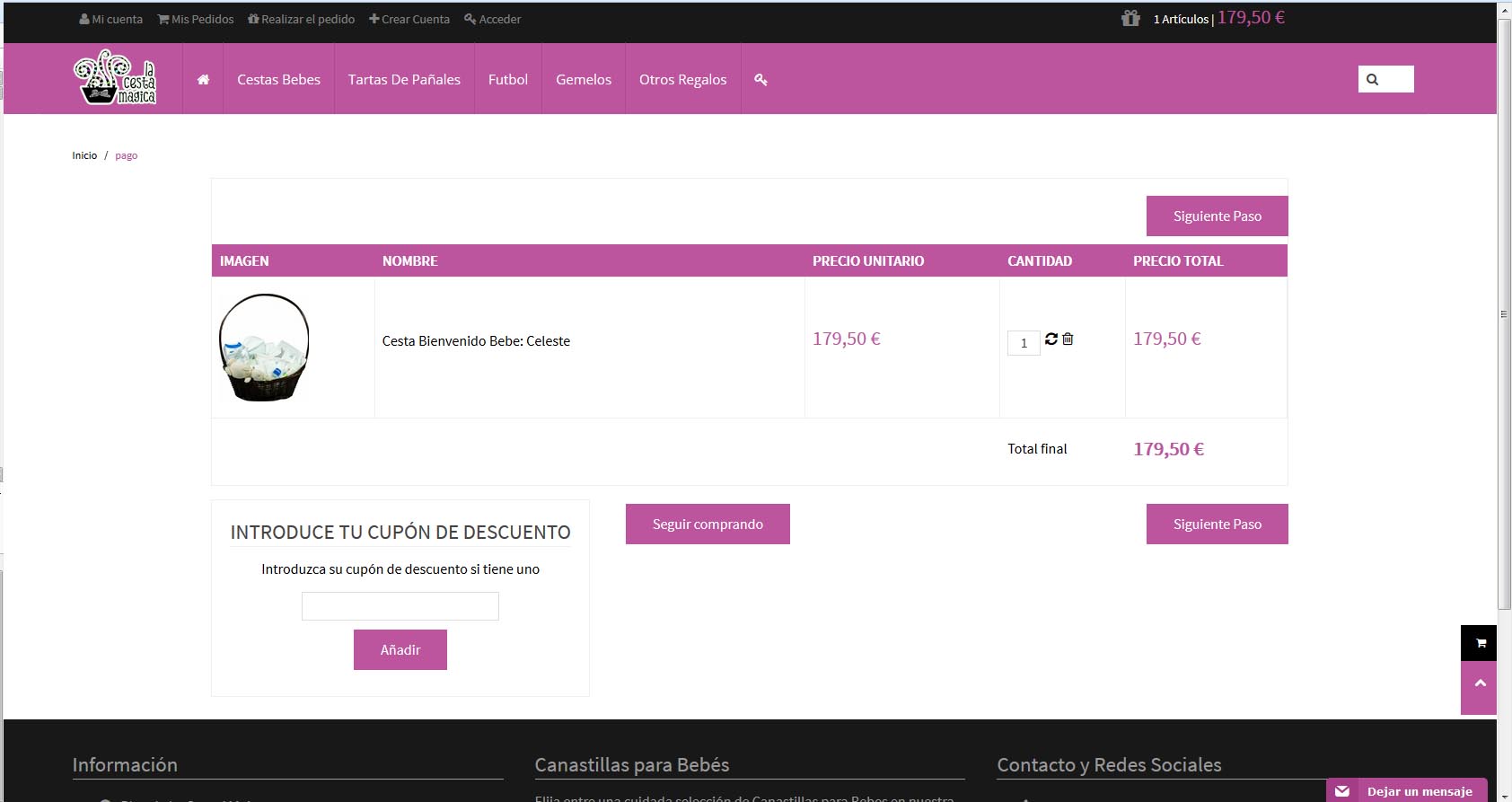
and here is the desired
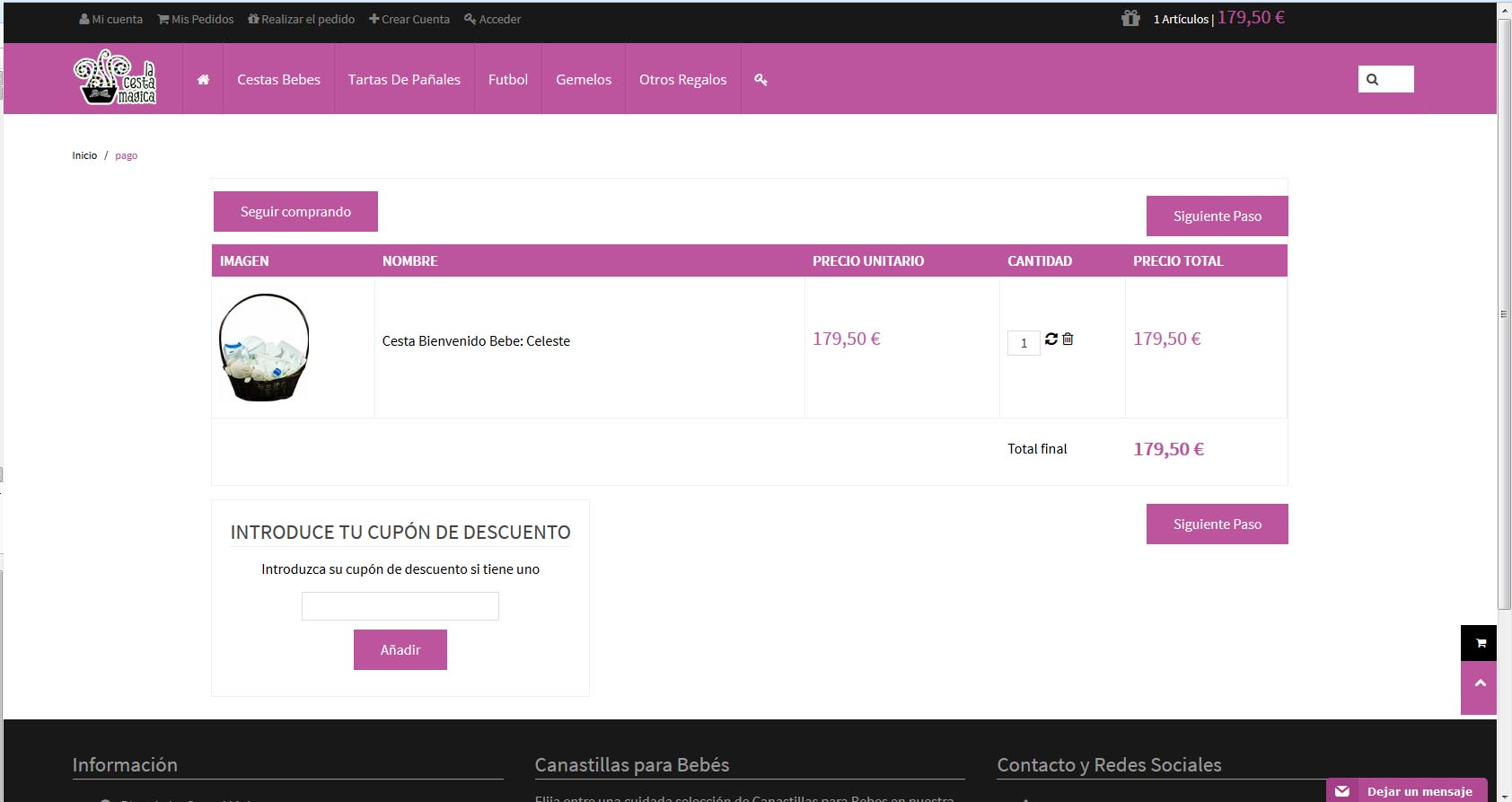
and here is the desired
Please Log in or Create an account to join the conversation.
Less
More
- Posts: 12953
- Thank you received: 1778
12 years 8 months ago #143871
by Mohamed Thelji
Replied by Mohamed Thelji on topic Continue Shopping Button in Top
Then the solution will be to move this code from the "step" file of the "checkout" view of your front-end template through "Hikashop->Display->Views" :
and add it at the beginning of the "cart" file of the "checkout" view of your front-end template.
Code:
if($this->continueShopping){
if(strpos($this->continueShopping,'Itemid')===false){
if(strpos($this->continueShopping,'index.php?')!==false){
$this->continueShopping.=$url_itemid;
}
}
if(!preg_match('#^https?://#',$this->continueShopping)) $this->continueShopping = JURI::base().ltrim($this->continueShopping,'/');
echo $this->cart->displayButton(JText::_('CONTINUE_SHOPPING'),'continue_shopping',$this->params,JRoute::_($this->continueShopping),'window.location=\''.JRoute::_($this->continueShopping).'\';return false;','id="hikashop_checkout_shopping_button"');
}
Please Log in or Create an account to join the conversation.
- condorazul
-
Topic Author
- Offline
12 years 8 months ago #143877
by condorazul
Replied by condorazul on topic Continue Shopping Button in Top
I tried moving it but nothing is displayed in the cart if i do it just a blank page
Please Log in or Create an account to join the conversation.
Less
More
- Posts: 12953
- Thank you received: 1778
12 years 8 months ago #143921
by Mohamed Thelji
Replied by Mohamed Thelji on topic Continue Shopping Button in Top
What do you exactly mean by "just a blank page" ? Did you edit the files of the good front-end template (the one that you are currently using) ?
Please Log in or Create an account to join the conversation.
- condorazul
-
Topic Author
- Offline
12 years 8 months ago - 12 years 8 months ago #143929
by condorazul
Replied by condorazul on topic Continue Shopping Button in Top
WOk Solved More or Less i copied that code
<?php
if($this->continueShopping){
if(strpos($this->continueShopping,'Itemid')===false){
if(strpos($this->continueShopping,'index.php?')!==false){
$this->continueShopping.=$url_itemid;
}
}
if(!preg_match('#^https? /#',$this->continueShopping)) $this->continueShopping = JURI::base().ltrim($this->continueShopping,'/');
echo $this->cart->displayButton(JText::_('CONTINUE_SHOPPING'),'continue_shopping',$this->params,JRoute::_($this->continueShopping),'window.location=\''.JRoute::_($this->continueShopping).'\';return false;','id="hikashop_checkout_shopping_button"');
}
}
?>
But there is one } that i should delete for it to work, if i delete this sentence, then checkout is not workin also, so i hide in css the other button, thanks.
<?php
if($this->continueShopping){
if(strpos($this->continueShopping,'Itemid')===false){
if(strpos($this->continueShopping,'index.php?')!==false){
$this->continueShopping.=$url_itemid;
}
}
if(!preg_match('#^https?
/#',$this->continueShopping)) $this->continueShopping = JURI::base().ltrim($this->continueShopping,'/');echo $this->cart->displayButton(JText::_('CONTINUE_SHOPPING'),'continue_shopping',$this->params,JRoute::_($this->continueShopping),'window.location=\''.JRoute::_($this->continueShopping).'\';return false;','id="hikashop_checkout_shopping_button"');
}
}
?>
But there is one } that i should delete for it to work, if i delete this sentence, then checkout is not workin also, so i hide in css the other button, thanks.
Last edit: 12 years 8 months ago by condorazul.
Please Log in or Create an account to join the conversation.
Time to create page: 0.316 seconds