

- Posts: 139
- Thank you received: 1
Improving checkout flow
12 years 5 months ago #160022
by abasel
Improving checkout flow was created by abasel
-- HikaShop Business: 2.3.0
-- Joomla version -- Joomla! 3.3.1
My Workflow is as follows
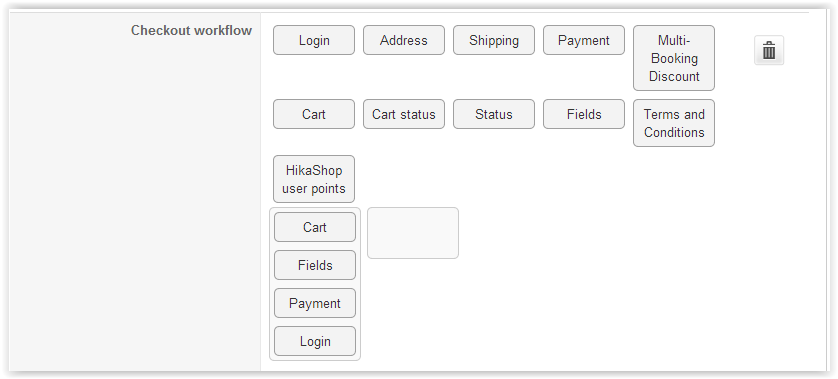
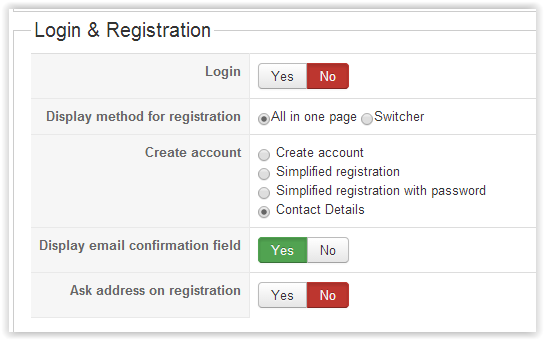
Login Requirements
Current checkout
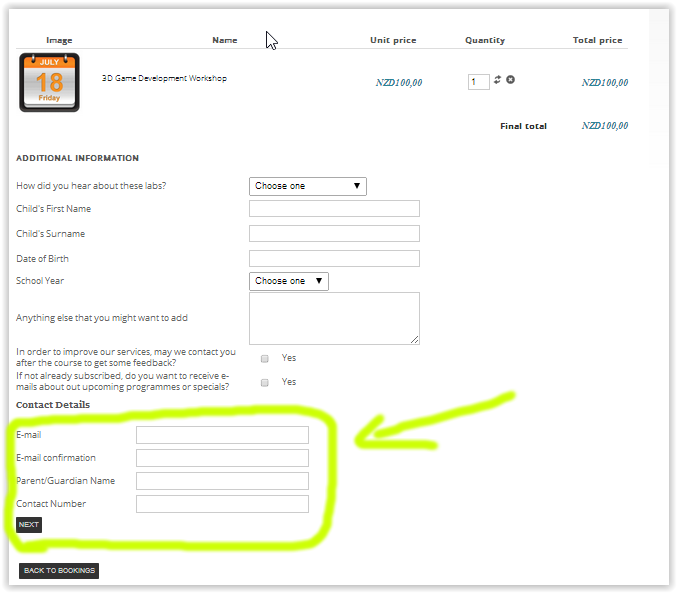
The issue I have is that when the user clicks on next it takes them back to the checkout page (with the user details removed) which can seem a little confusing.
Am I able to achieve one of the following:
1) On clicking next the user is taken directly to the next step in the process
or
2) The login page is on it own page so that the user gets the sense of moving sequentially through the checkout.
Not sure if I am making sense
-- Joomla version -- Joomla! 3.3.1
My Workflow is as follows
Login Requirements
Current checkout
The issue I have is that when the user clicks on next it takes them back to the checkout page (with the user details removed) which can seem a little confusing.
Am I able to achieve one of the following:
1) On clicking next the user is taken directly to the next step in the process
or
2) The login page is on it own page so that the user gets the sense of moving sequentially through the checkout.
Not sure if I am making sense
Please Log in or Create an account to join the conversation.

12 years 5 months ago #160029
by Xavier
Replied by Xavier on topic Improving checkout flow
Hi,
Does your template display the Joomla system messages ?
When pressing next, I think that a message should be displayed, potentially a message related in the payment method.
On the given screenshot I see that there is no payment method displayed, that's maybe because you don't have a valid method for the cart. So thanks to check for the system messages, and check the payment method settings.
If there is no payment method, so the checkout cannot finish.
Please Log in or Create an account to join the conversation.
12 years 5 months ago - 12 years 5 months ago #160144
by abasel
Replied by abasel on topic Improving checkout flow
Hi Xavier
The whole process is working fine but some clients are finding the process confusing... the easiest way to explain is via this youtube video youtu.be/0p_RpEGRFQ8 .. sorry the sound is a little loud
The whole process is working fine but some clients are finding the process confusing... the easiest way to explain is via this youtube video youtu.be/0p_RpEGRFQ8 .. sorry the sound is a little loud
Last edit: 12 years 5 months ago by abasel.
Please Log in or Create an account to join the conversation.
12 years 5 months ago - 12 years 5 months ago #160169
by abasel
Replied by abasel on topic Improving checkout flow
Ok, I think I have worked out how to explain what I am trying to achieve.
I have changed my workflow as follows
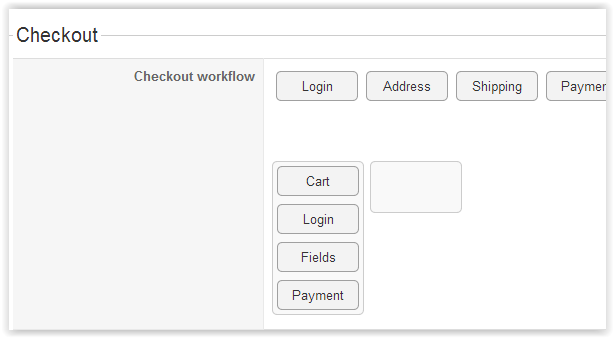
Checkout View
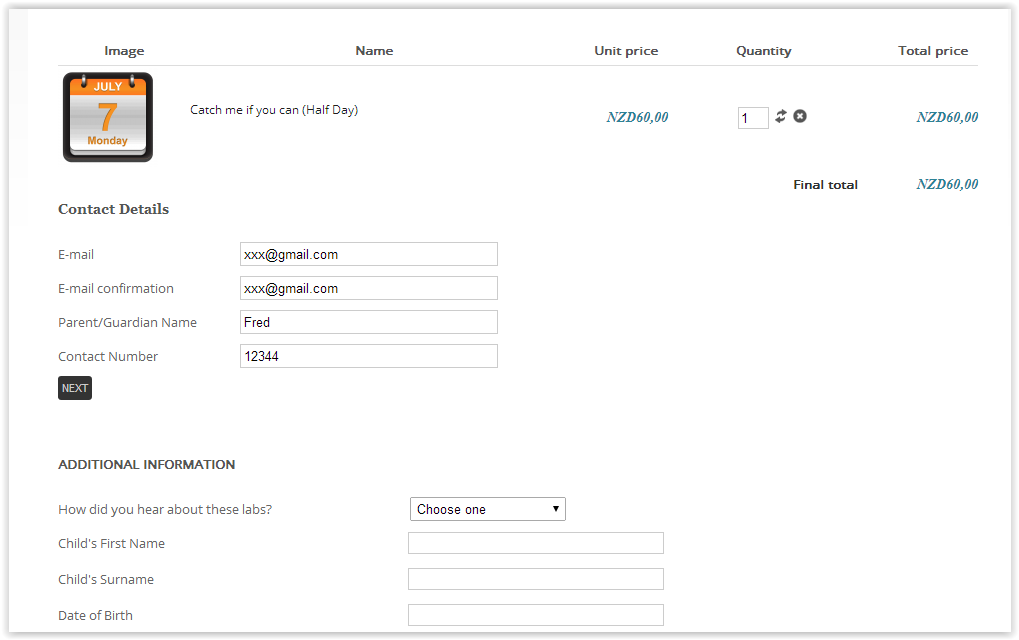
What I would like to happen if for the Additional information to appear only once the contact details have been entered. This would achieve the desired result as described in the video.
Could I maybe add the following code to this page,
If so, where would I do this?
I have changed my workflow as follows
Checkout View
What I would like to happen if for the Additional information to appear only once the contact details have been entered. This would achieve the desired result as described in the video.
Could I maybe add the following code to this page,
Code:
if ($('#hikashop_checkout_login').length <= 0) {
// it exists
Put the code for the Additional information
}
If so, where would I do this?
Last edit: 12 years 5 months ago by abasel. Reason: have an idea
Please Log in or Create an account to join the conversation.

12 years 5 months ago #160180
by Jerome
Jerome - Obsidev.com
HikaMarket & HikaSerial developer / HikaShop core dev team.
Replied by Jerome on topic Improving checkout flow
Hi,
You can override one of the checkout step view.
"checkout | step" is the main page which will display the different steps like : "checkout | login", "checkout | cart", "checkout | fields", "checkout | payment" etc.
www.hikashop.com/support/support/documen...ize-the-display.html
Regards,
You can override one of the checkout step view.
"checkout | step" is the main page which will display the different steps like : "checkout | login", "checkout | cart", "checkout | fields", "checkout | payment" etc.
www.hikashop.com/support/support/documen...ize-the-display.html
Regards,
Jerome - Obsidev.com
HikaMarket & HikaSerial developer / HikaShop core dev team.
The following user(s) said Thank You: abasel
Please Log in or Create an account to join the conversation.
12 years 5 months ago - 12 years 5 months ago #160239
by abasel
Replied by abasel on topic Improving checkout flow
Thanks this is exactly what I was looking for, with respect to "checkout | fields",
I added
And it worked just perfectly.
I added
Code:
if($this->identified) {}
And it worked just perfectly.
Code:
<?php
/**
* @package HikaShop for Joomla!
* @version 2.3.0
* @author hikashop.com
* @copyright (C) 2010-2014 HIKARI SOFTWARE. All rights reserved.
* @license GNU/GPLv3 http://www.gnu.org/licenses/gpl-3.0.html
*/
defined('_JEXEC') or die('Restricted access');
if($this->identified) {
?><?php if(hikashop_level(2) && !empty($this->extraFields['order'])){ ?>
<div id="hikashop_checkout_additional_info" class="hikashop_checkout_additional_info"><p>
</p>
<fieldset class="input">
<legend><?php echo JText::_('ADDITIONAL_INFORMATION');?></legend>
<table cellpadding="0" cellspacing="0" border="0" class="hikashop_contentpane">
<?php
if(!empty($this->extraFields['order'])){
JRequest::setVar('hikashop_check_order',1);
$this->setLayout('custom_fields');
$this->type = 'order';
echo $this->loadTemplate();
}
?>
</table>
</fieldset>
</div>
<div style="clear:both"></div>
<?php } }?>
Last edit: 12 years 5 months ago by abasel.
Please Log in or Create an account to join the conversation.
Time to create page: 0.060 seconds