
- Posts: 43
- Thank you received: 0
Language override for "Total with VAX"---solved
- conlippert
-
 Topic Author
- Offline
Less
More
12 years 3 months ago - 12 years 3 months ago #162510
by conlippert
Language override for "Total with VAX"---solved was created by conlippert
-- url of the page with the problem -- :
69.195.124.215/~mictmorg/index.php?optio...t=listing&Itemid=240
-- HikaShop version -- : 2.3.1
-- Joomla version -- : 3.3
-- PHP version -- :5.5
-- Browser(s) name and version -- : firefox
-- Error-message(debug-mod must be tuned on) -- : None
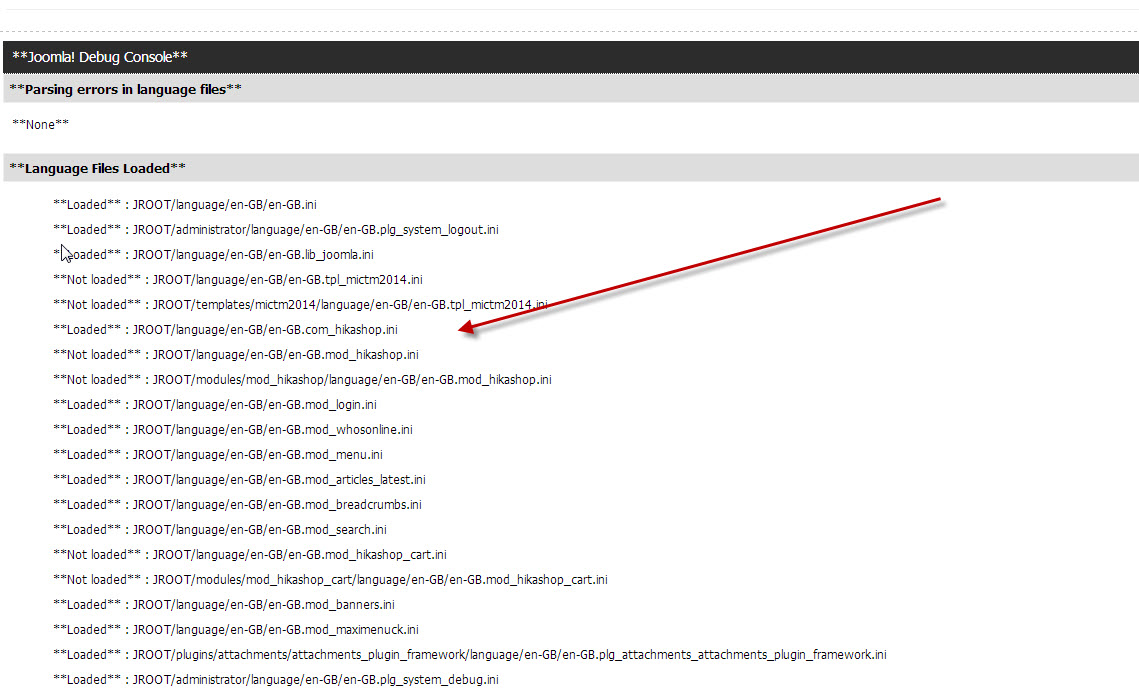
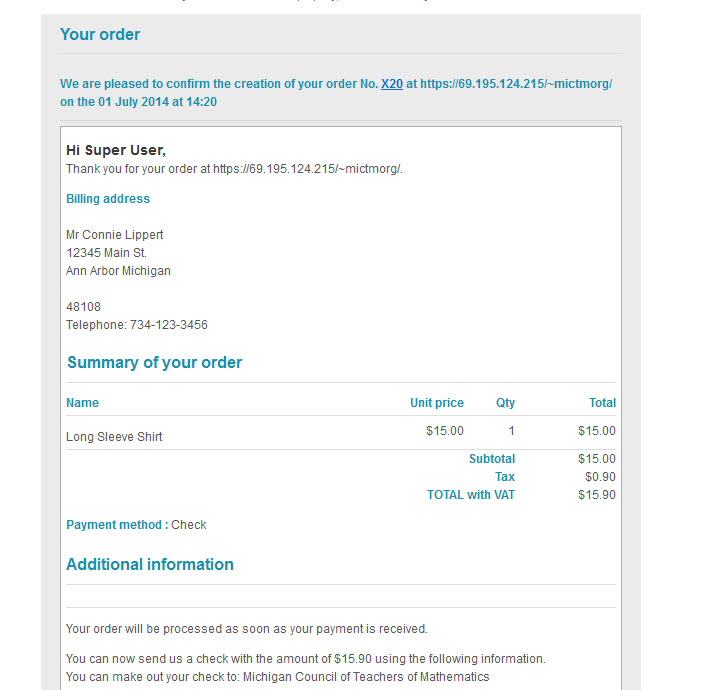
I need the email order confirmation to be changed to "Total with TAX". I have created a language override but it's not being loaded. ( see attached DEBUG language files ).
Any suggestions? See attached screen shot.
And here is my code in the override:
-- HikaShop version -- : 2.3.1
-- Joomla version -- : 3.3
-- PHP version -- :5.5
-- Browser(s) name and version -- : firefox
-- Error-message(debug-mod must be tuned on) -- : None
I need the email order confirmation to be changed to "Total with TAX". I have created a language override but it's not being loaded. ( see attached DEBUG language files ).
Any suggestions? See attached screen shot.
And here is my code in the override:
Code:
TOTAL_WITH_VAT="TOTAL with TAX : %s"
ORDER_TOTAL_WITH_VAT="TOTAL with TAX"
Last edit: 12 years 3 months ago by conlippert.
Please Log in or Create an account to join the conversation.
- conlippert
-
Topic Author
- Offline
Less
More
- Posts: 43
- Thank you received: 0
12 years 3 months ago #162516
by conlippert
Replied by conlippert on topic Language override for "Total with VAX"---solved
Created the overide with the System->Configuration->Language Files...duh!
Please Log in or Create an account to join the conversation.
12 years 3 months ago #163581
by bludove30
Replied by bludove30 on topic Language override for "Total with VAX"---solved
How did you solve it? I am using the System > Configuration > Override but it is not changing for me.
Please Log in or Create an account to join the conversation.

12 years 3 months ago #163584
by Jerome
Jerome - Obsidev.com
HikaMarket & HikaSerial developer / HikaShop core dev team.
Replied by Jerome on topic Language override for "Total with VAX"---solved
Hi,
He created the override for the second translation key, in the language he use.
www.hikashop.com/download/languages.html#modify
If you can precise more about your problem, maybe we will be able to understand it and help you.
Regards,
He created the override for the second translation key, in the language he use.
www.hikashop.com/download/languages.html#modify
If you can precise more about your problem, maybe we will be able to understand it and help you.
Regards,
Jerome - Obsidev.com
HikaMarket & HikaSerial developer / HikaShop core dev team.
Please Log in or Create an account to join the conversation.
12 years 3 months ago #163689
by bludove30
Replied by bludove30 on topic Language override for "Total with VAX"---solved
My problem is that I have tried using the language override for the change and it doesn't change the order notification emails. It works for everything else. I finally changed it in the language file itself and it worked however in know its better to use the overrides.
Furthermore it shows a button to update to the latest language file from your server. I push the button and get a message saying it put it in some text file. I hit save and the button to update reappears.
Furthermore it shows a button to update to the latest language file from your server. I push the button and get a message saying it put it in some text file. I hit save and the button to update reappears.
Please Log in or Create an account to join the conversation.
- conlippert
-
Topic Author
- Offline
Less
More
- Posts: 43
- Thank you received: 0
12 years 3 months ago #163691
by conlippert
Replied by conlippert on topic Language override for "Total with VAX"---solved
Hello,
I used the Configuration->Language edit overide to fix this. Be sure to scroll down in the language edit popup. I am mentioning this only because it took me a few times looking at this to see the Overide screen and because I missed this, my regular language overide wouldn't work as you are describing. Maybe you've already done this, but just in case it helps I attached pictures here.
CL
I used the Configuration->Language edit overide to fix this. Be sure to scroll down in the language edit popup. I am mentioning this only because it took me a few times looking at this to see the Overide screen and because I missed this, my regular language overide wouldn't work as you are describing. Maybe you've already done this, but just in case it helps I attached pictures here.
CL
Please Log in or Create an account to join the conversation.
12 years 3 months ago #163724
by bludove30
Replied by bludove30 on topic Language override for "Total with VAX"---solved
Obviously no one here is understanding my problem. I AM using the override functionality. IT IS NOT WORKING!!!
Please Log in or Create an account to join the conversation.
12 years 3 months ago #163725
by Jerome
Hi,
Saying that it is not working won't help us to understand and help you.
Please provide us some information like your HikaShop version number, the number of language you are using, how you send the order notification email (manually, validation in the front-end, validation thought the payment gateway).
I guess you understand that the override should work and works for most of users. So you should have something different, otherwise, it will work.
Regards,
Jerome - Obsidev.com
HikaMarket & HikaSerial developer / HikaShop core dev team.
Replied by Jerome on topic Language override for "Total with VAX"---solved
bludove30 wrote: Obviously no one here is understanding my problem. I AM using the override functionality. IT IS NOT WORKING!!!
Hi,
Saying that it is not working won't help us to understand and help you.
Please provide us some information like your HikaShop version number, the number of language you are using, how you send the order notification email (manually, validation in the front-end, validation thought the payment gateway).
I guess you understand that the override should work and works for most of users. So you should have something different, otherwise, it will work.
Regards,
Jerome - Obsidev.com
HikaMarket & HikaSerial developer / HikaShop core dev team.
Please Log in or Create an account to join the conversation.
12 years 3 months ago #163769
by bludove30
Replied by bludove30 on topic Language override for "Total with VAX"---solved
Let me go through this again....
-- url of the page with the problem -- : 209.67.23.168/~kbkakes/index.php/shop/
-- HikaShop version -- : 2.3.1
-- Joomla version -- : 3.3.1
-- PHP version -- : 5.3.18
-- Browser(s) name and version -- : Firefox 30.0
-- Error-message(debug-mod must be tuned on) -- : I turned debug off b/c we were ready to make it live despite the small inconsistencies.
I wanted to change the TOTAL with VAT line that appears in the order notification email (see attached email) for both the customer AND the administrator (see attached screenshots)
I went to Configuration > Language and clicked on the little edit icon to edit the language file.
Then I found the text I wanted to change, copied it and then scrolled all the way down to the bottom where the override window is and pasted it there. After I had pasted it there, I changed the text. Basically I followed all of your documentation for how to change the language file info and it worked for all other changes I had but NOT for the order notification emails.
As a last ditch effort, I finally opted to change it in the language file itself instead of the override section. I know this is not best practice but I didn't know what else to do because every response on the forum was sending me to the how to edit the language file instructions which I kept saying I understood but in my case was not working.
I am hoping this response makes things a bit more clear and helps you help me figure this out. I really don't know how else to explain my problem.
-- url of the page with the problem -- : 209.67.23.168/~kbkakes/index.php/shop/
-- HikaShop version -- : 2.3.1
-- Joomla version -- : 3.3.1
-- PHP version -- : 5.3.18
-- Browser(s) name and version -- : Firefox 30.0
-- Error-message(debug-mod must be tuned on) -- : I turned debug off b/c we were ready to make it live despite the small inconsistencies.
I wanted to change the TOTAL with VAT line that appears in the order notification email (see attached email) for both the customer AND the administrator (see attached screenshots)
I went to Configuration > Language and clicked on the little edit icon to edit the language file.
Then I found the text I wanted to change, copied it and then scrolled all the way down to the bottom where the override window is and pasted it there. After I had pasted it there, I changed the text. Basically I followed all of your documentation for how to change the language file info and it worked for all other changes I had but NOT for the order notification emails.
As a last ditch effort, I finally opted to change it in the language file itself instead of the override section. I know this is not best practice but I didn't know what else to do because every response on the forum was sending me to the how to edit the language file instructions which I kept saying I understood but in my case was not working.
I am hoping this response makes things a bit more clear and helps you help me figure this out. I really don't know how else to explain my problem.
Please Log in or Create an account to join the conversation.

12 years 3 months ago #163787
by nicolas
Replied by nicolas on topic Language override for "Total with VAX"---solved
I recall some issues previously with Joomla not loading the translation override when changing the current language for the sending of the email notifications.
You probably have that issue.
One easy solution is indeed to directly do the modification in the translation file. Just make sure that you do a backup of the changes and reapply them after the updates in order not to loose them.
Another solution is to edit your emails via the menu System>Emails and change the line:
'NAME' => JText::_('ORDER_TOTAL_WITH_VAT'),
to:
'NAME' => 'The text I want instead',
That way, you'll get the text changed as an email override and you won't loose the change when updating.
You probably have that issue.
One easy solution is indeed to directly do the modification in the translation file. Just make sure that you do a backup of the changes and reapply them after the updates in order not to loose them.
Another solution is to edit your emails via the menu System>Emails and change the line:
'NAME' => JText::_('ORDER_TOTAL_WITH_VAT'),
to:
'NAME' => 'The text I want instead',
That way, you'll get the text changed as an email override and you won't loose the change when updating.
Please Log in or Create an account to join the conversation.
Time to create page: 0.130 seconds