

- Posts: 53
- Thank you received: 2
Page gets submitted if user selects to use points
11 years 9 months ago #185923
by otx
Page gets submitted if user selects to use points was created by otx
-- url of the page with the problem -- :
www.vitaking.ro
-- HikaShop version -- : 2.3.5
-- Joomla version -- : 3.3.6
-- PHP version -- : 5.4.35
-- Browser(s) name and version -- : Firefox 33
Hello,
Our checkout page gets submitted instantly if the user selects to use points as payment. If prior selects some shipping methods or payments methods, then acts normally, but if the first click goes on the points then the page gets submitted immediately. Please help, we allready upgraded our site and we have missed this bug on our test site.
Regards,
Dezso
-- HikaShop version -- : 2.3.5
-- Joomla version -- : 3.3.6
-- PHP version -- : 5.4.35
-- Browser(s) name and version -- : Firefox 33
Hello,
Our checkout page gets submitted instantly if the user selects to use points as payment. If prior selects some shipping methods or payments methods, then acts normally, but if the first click goes on the points then the page gets submitted immediately. Please help, we allready upgraded our site and we have missed this bug on our test site.
Regards,
Dezso
Please Log in or Create an account to join the conversation.

11 years 9 months ago #185926
by Jerome
Jerome - Obsidev.com
HikaMarket & HikaSerial developer / HikaShop core dev team.
Replied by Jerome on topic Page gets submitted if user selects to use points
Hi,
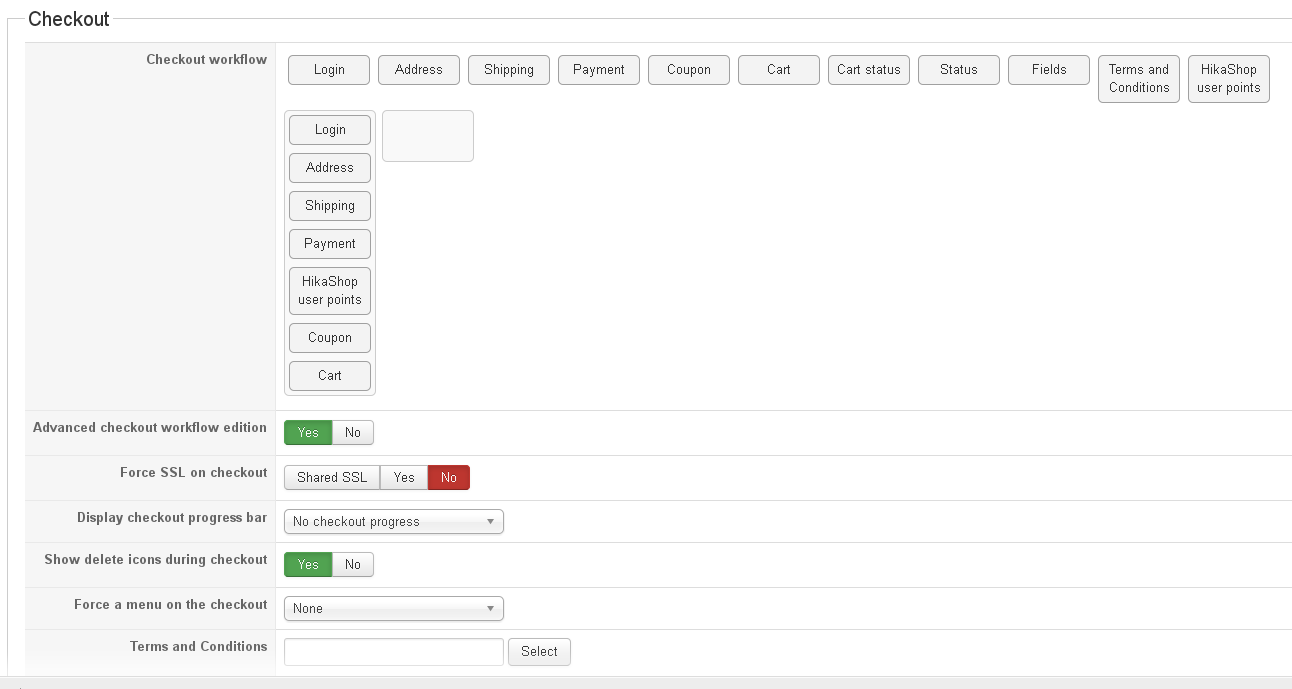
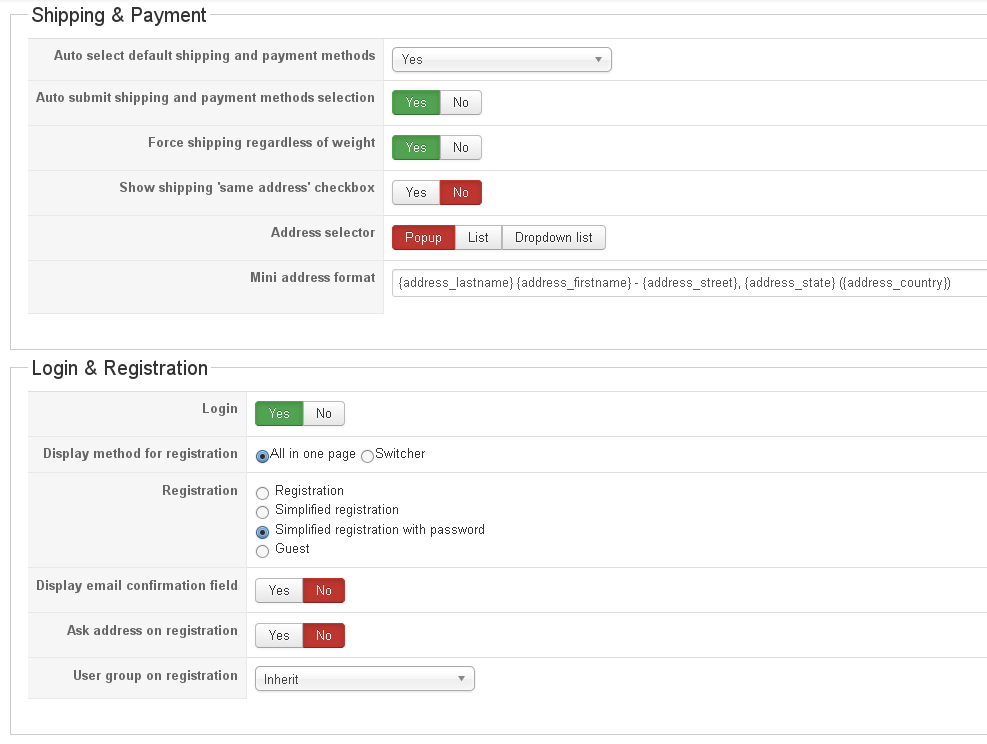
Can you please provide a screenshot of your checkout workflow configuration ?
Regards,
Can you please provide a screenshot of your checkout workflow configuration ?
Regards,
Jerome - Obsidev.com
HikaMarket & HikaSerial developer / HikaShop core dev team.
Please Log in or Create an account to join the conversation.
11 years 9 months ago #186004
by otx
Replied by otx on topic Page gets submitted if user selects to use points
Hi,
Here they are, thanks for your help.
Regards,
Dezso
Here they are, thanks for your help.
Regards,
Dezso
Please Log in or Create an account to join the conversation.

11 years 9 months ago #186052
by nicolas
Replied by nicolas on topic Page gets submitted if user selects to use points
Hi,
We're not able to reproduce the problem on our end.
Could you provide a backend access so that we could check the rest of your settings and a user account with points so that we could do some tests on your checkout ?
If so, you can provide that via our contact form with a link to this thread.
www.hikashop.com/support/contact-us.html
We're not able to reproduce the problem on our end.
Could you provide a backend access so that we could check the rest of your settings and a user account with points so that we could do some tests on your checkout ?
If so, you can provide that via our contact form with a link to this thread.
www.hikashop.com/support/contact-us.html
Please Log in or Create an account to join the conversation.
11 years 9 months ago #186101
by otx
Replied by otx on topic Page gets submitted if user selects to use points
Hi,
I have sent the access details on the provided link.
Regards,
Dezso
I have sent the access details on the provided link.
Regards,
Dezso
Please Log in or Create an account to join the conversation.
11 years 9 months ago #186343
by otx
Replied by otx on topic Page gets submitted if user selects to use points
Dear Nicolas,
Did you received the message with the access details?
Regards,
Dezso
Did you received the message with the access details?
Regards,
Dezso
Please Log in or Create an account to join the conversation.
11 years 9 months ago #186394
by otx
Replied by otx on topic Page gets submitted if user selects to use points
Dear Nicolas,
Due to user complaints we had to swich off the reward points system on our site. We had several reports that as soon as they clicked to use points as payment, the page gets submitted without using the points.
Currently we have a development site, so if you are still interested in helping us, please ask for access details.
Regards,
Dezso Markon
vitaking.ro
Due to user complaints we had to swich off the reward points system on our site. We had several reports that as soon as they clicked to use points as payment, the page gets submitted without using the points.
Currently we have a development site, so if you are still interested in helping us, please ask for access details.
Regards,
Dezso Markon
vitaking.ro
Please Log in or Create an account to join the conversation.
11 years 9 months ago - 11 years 9 months ago #186404
by otx
Replied by otx on topic Page gets submitted if user selects to use points
Dear Nicolas,
Regarding the reproduction of this bug, I think you have in your plugin configuration the option Do not use point by default on No. In this case works as expected. Switch to Yes and give it a try. Of course, you need the Auto select default shipping and payment methods on yes. In this case, on the checkout page if your first click goes on the Yes option to use your existing points, the page gets submitted.
Regards,
Dezso
Regarding the reproduction of this bug, I think you have in your plugin configuration the option Do not use point by default on No. In this case works as expected. Switch to Yes and give it a try. Of course, you need the Auto select default shipping and payment methods on yes. In this case, on the checkout page if your first click goes on the Yes option to use your existing points, the page gets submitted.
Regards,
Dezso
Last edit: 11 years 9 months ago by otx.
Please Log in or Create an account to join the conversation.
11 years 9 months ago #186428
by Jerome
Jerome - Obsidev.com
HikaMarket & HikaSerial developer / HikaShop core dev team.
Replied by Jerome on topic Page gets submitted if user selects to use points
Hi,
Yes we received your credentials (but each time you reply to your thread is lost his place in our ticket system).
Thanks for the tip about the "do not use points by default - yes" ; I'll perform some tests with that and when I'll be able to reproduce your issue, I could provide a patch.
I saw that you made some replies that's why I prefer to notify you now ; but I will work on the patch later (it is in my queue).
Regards,
Yes we received your credentials (but each time you reply to your thread is lost his place in our ticket system).
Thanks for the tip about the "do not use points by default - yes" ; I'll perform some tests with that and when I'll be able to reproduce your issue, I could provide a patch.
I saw that you made some replies that's why I prefer to notify you now ; but I will work on the patch later (it is in my queue).
Regards,
Jerome - Obsidev.com
HikaMarket & HikaSerial developer / HikaShop core dev team.
Please Log in or Create an account to join the conversation.
11 years 9 months ago #186776
by Jerome
Jerome - Obsidev.com
HikaMarket & HikaSerial developer / HikaShop core dev team.
Replied by Jerome on topic Page gets submitted if user selects to use points
Hi,
Sorry for the late answer.
In the file "plugins/hikashop/userpoints/userpoints.php" you will find the function "onAfterCheckoutStep".
Please replace in that function
By
Then replace 2 times (just below)
By
And also
By
So the plugin will have the correct information of the default state for the checkout selection.
Then when you will change the state of the radio, it won't submit the checkout but it will stay on the same step.
Regards,
Sorry for the late answer.
In the file "plugins/hikashop/userpoints/userpoints.php" you will find the function "onAfterCheckoutStep".
Please replace in that function
Code:
if($controllerName != 'plg.shop.userpoints')
return;
$app = JFactory::getApplication();
Code:
if($controllerName != 'plg.shop.userpoints')
return;
$default_no_virtual = (int)(@$this->plugin_options['checkout_step'] && @$this->plugin_options['default_no_use']);
$app = JFactory::getApplication();
Then replace 2 times (just below)
Code:
$app->setUserState(HIKASHOP_COMPONENT.'.userpoints_no_virtual_coupon', 0);
Code:
$app->setUserState(HIKASHOP_COMPONENT.'.userpoints_no_virtual_coupon', $default_no_virtual);
Code:
$no_virtual_coupon = (int)$app->getUserState(HIKASHOP_COMPONENT.'.userpoints_no_virtual_coupon', 0);
Code:
$no_virtual_coupon = (int)$app->getUserState(HIKASHOP_COMPONENT.'.userpoints_no_virtual_coupon', $default_no_virtual);
So the plugin will have the correct information of the default state for the checkout selection.
Then when you will change the state of the radio, it won't submit the checkout but it will stay on the same step.
Regards,
Jerome - Obsidev.com
HikaMarket & HikaSerial developer / HikaShop core dev team.
Please Log in or Create an account to join the conversation.
11 years 9 months ago - 11 years 9 months ago #187416
by otx
Replied by otx on topic Page gets submitted if user selects to use points
Dear Jerome,
In the mentioned file I don't have the
line. Also I don't have $default_no_virtual variable in the file. You are looking at the right version of this file?
This is how it looks the onAfterCheckoutStep function in 2.3.5 :
So what I have to change in this?
Regards,
Dezso
In the mentioned file I don't have the
Code:
if($controllerName != 'plg.shop.userpoints')
line. Also I don't have $default_no_virtual variable in the file. You are looking at the right version of this file?
This is how it looks the onAfterCheckoutStep function in 2.3.5 :
Code:
function onAfterCheckoutStep($controllerName, &$go_back, $original_go_back, &$controller) {
if($controllerName == 'plg.shop.userpoints') {
$app = JFactory::getApplication();
$this->_readOptions();
if(empty($this->plugin_options['checkout_step'])) {
$app->setUserState(HIKASHOP_COMPONENT.'.userpoints_no_virtual_coupon', 0);
return;
}
if(!empty($this->plugin_options['ask_no_coupon'])) {
$no_virtual_coupon = (int)$app->getUserState(HIKASHOP_COMPONENT.'.userpoints_no_virtual_coupon', 0);
$use_coupon_opt = JRequest::getString('userpoints_use_coupon', '');
if($use_coupon_opt !== '') {
$no_coupon = 1 - (int)$use_coupon_opt;
if($no_coupon != $no_virtual_coupon) {
$go_back = true;
$app->setUserState(HIKASHOP_COMPONENT.'.userpoints_no_virtual_coupon', $no_coupon);
}
}
} else {
$app->setUserState(HIKASHOP_COMPONENT.'.userpoints_no_virtual_coupon', 0);
}
}
}
So what I have to change in this?
Regards,
Dezso
Last edit: 11 years 9 months ago by otx.
Please Log in or Create an account to join the conversation.
11 years 9 months ago #187457
by Jerome
Jerome - Obsidev.com
HikaMarket & HikaSerial developer / HikaShop core dev team.
Replied by Jerome on topic Page gets submitted if user selects to use points
Hi,
Oh yes, I've clean a little bit the code after the release...
So for the first replacement block ; the idea stays the same (add a new line)
But the easier will be to use the full new function:
Regards,
Oh yes, I've clean a little bit the code after the release...
So for the first replacement block ; the idea stays the same (add a new line)
But the easier will be to use the full new function:
Code:
function onAfterCheckoutStep($controllerName, &$go_back, $original_go_back, &$controller) {
if($controllerName != 'plg.shop.userpoints')
return;
$app = JFactory::getApplication();
$this->_readOptions();
if(empty($this->plugin_options['checkout_step'])) {
$app->setUserState(HIKASHOP_COMPONENT.'.userpoints_no_virtual_coupon', 0);
return;
}
$default_no_virtual = (int)(@$this->plugin_options['checkout_step'] && @$this->plugin_options['default_no_use']);
if(!empty($this->plugin_options['ask_no_coupon'])) {
$no_virtual_coupon = (int)$app->getUserState(HIKASHOP_COMPONENT.'.userpoints_no_virtual_coupon', $default_no_virtual);
$use_coupon_opt = JRequest::getString('userpoints_use_coupon', '');
if($use_coupon_opt !== '') {
$no_coupon = 1 - (int)$use_coupon_opt;
if($no_coupon != $no_virtual_coupon) {
$go_back = true;
$app->setUserState(HIKASHOP_COMPONENT.'.userpoints_no_virtual_coupon', $no_coupon);
}
}
} else {
$app->setUserState(HIKASHOP_COMPONENT.'.userpoints_no_virtual_coupon', $default_no_virtual);
}
}
Regards,
Jerome - Obsidev.com
HikaMarket & HikaSerial developer / HikaShop core dev team.
The following user(s) said Thank You: otx
Please Log in or Create an account to join the conversation.
11 years 9 months ago #187622
by otx
Replied by otx on topic Page gets submitted if user selects to use points
Hi,
Thank you for your help, works!
One more think, in order to get this payment method work perfectly. You have a bug in the mail notification preload files, around line 255, the line
should be
in order to have the points in the notification mails displayed.
Thanks again, regards,
Dezso
Thank you for your help, works!
One more think, in order to get this payment method work perfectly. You have a bug in the mail notification preload files, around line 255, the line
Code:
if(!empty($additional->order_product_price) || empty($additionaltionnal->order_product_options)) {
should be
Code:
if(!empty($additional->order_product_price) and empty($additionaltionnal->order_product_options)) {
in order to have the points in the notification mails displayed.
Thanks again, regards,
Dezso
Please Log in or Create an account to join the conversation.
11 years 9 months ago #187667
by Jerome
Jerome - Obsidev.com
HikaMarket & HikaSerial developer / HikaShop core dev team.
Replied by Jerome on topic Page gets submitted if user selects to use points
Hi,
No, the "if" check is good, but the value in the variable "order_product_price" should be converted.
You have to add this code just before the "if"
Regards,
No, the "if" check is good, but the value in the variable "order_product_price" should be converted.
You have to add this code just before the "if"
Code:
if(!empty($additional->order_product_price))
$additional->order_product_price = (float)hikashop_toFloat($additional->order_product_price);
Regards,
Jerome - Obsidev.com
HikaMarket & HikaSerial developer / HikaShop core dev team.
Please Log in or Create an account to join the conversation.
Time to create page: 0.357 seconds