
- Posts: 32
- Thank you received: 0
Text transform for address input at checkout
- fernando.alh
-
 Topic Author
- Offline
Less
More
11 years 3 days ago #217314
by fernando.alh
Text transform for address input at checkout was created by fernando.alh
-- HikaShop version -- : 2.5.0
-- Joomla version -- : 3.3.6
-- PHP version -- : 5.3.29
-- Browser(s) name and version -- : Google Chrome 45.0.2454.101 m
Hi there! I'm getting crazy having three days trying to figure the following:
In the checkout process, adding a new billing address, in the fields, I need to force some fields to lowercase, uppercase and capitalize.
just I need to add
to each field.
for example:
What exact line should I edit in the display editor or php file to do that?
-- Joomla version -- : 3.3.6
-- PHP version -- : 5.3.29
-- Browser(s) name and version -- : Google Chrome 45.0.2454.101 m
Hi there! I'm getting crazy having three days trying to figure the following:
In the checkout process, adding a new billing address, in the fields, I need to force some fields to lowercase, uppercase and capitalize.
just I need to add
Code:
style="text-transform:capitalize|lowercase|uppercase;"
for example:
Code:
<tr class="hikashop_billing_address_address_lastname" id="hikashop_billing_address_address_lastname" style"text-transform:capitalize;">
What exact line should I edit in the display editor or php file to do that?
Please Log in or Create an account to join the conversation.

11 years 2 days ago #217316
by nicolas
Replied by nicolas on topic Text transform for address input at checkout
Hi,
You should add such CSS:
#hikashop_billing_address_address_lastname{
text-transform:capitalize !important;
}
to the CSS file of your template, or to the frontend CSS of HikaShop:
www.hikashop.com/support/support/documen...ize-the-display.html
You should add such CSS:
#hikashop_billing_address_address_lastname{
text-transform:capitalize !important;
}
to the CSS file of your template, or to the frontend CSS of HikaShop:
www.hikashop.com/support/support/documen...ize-the-display.html
The following user(s) said Thank You: fernando.alh
Please Log in or Create an account to join the conversation.
- fernando.alh
-
Topic Author
- Offline
Less
More
- Posts: 32
- Thank you received: 0
11 years 2 days ago #217442
by fernando.alh
Replied by fernando.alh on topic Text transform for address input at checkout
Hi there! So simple solution! One more time: THANK YOU! 
Please Log in or Create an account to join the conversation.

10 years 9 months ago - 10 years 9 months ago #225307
by awaddon
Replied by awaddon on topic Text transform for address input at checkout
Hi
I am trying to do the same for the postcode field.
I have some shipping methods setup with prefixes such as "SO" (uppercase) but if the customer types "So" or "so" they do not work.
The method mentioned above with CSS does not save the data as uppercase it only displays on the page as uppercase the data saved to the address remains in lowercase, is there a way to force uppercase and save to the address in uppercase?
can I add a javascript validation to the form?, or php strtoupper to convert to uppdercase on save? if so where would I do it?
I don't want to create several versions of each shipping method just to cover the variations of what the customer might type.
Thanks
Andy
I am trying to do the same for the postcode field.
I have some shipping methods setup with prefixes such as "SO" (uppercase) but if the customer types "So" or "so" they do not work.
The method mentioned above with CSS does not save the data as uppercase it only displays on the page as uppercase the data saved to the address remains in lowercase, is there a way to force uppercase and save to the address in uppercase?
can I add a javascript validation to the form?, or php strtoupper to convert to uppdercase on save? if so where would I do it?
I don't want to create several versions of each shipping method just to cover the variations of what the customer might type.
Thanks
Andy
Last edit: 10 years 9 months ago by awaddon.
Please Log in or Create an account to join the conversation.
10 years 9 months ago #225309
by nicolas
Replied by nicolas on topic Text transform for address input at checkout
Hi,
You can use the "regex check" setting of your custom post code field. You can find it when you edit your field via the menu Display>Custom fields.
There, you can enter for example:
and that will only allow numbers and uppercase letters.
You can use the "regex check" setting of your custom post code field. You can find it when you edit your field via the menu Display>Custom fields.
There, you can enter for example:
Code:
^[0-9A-Z]+$
Please Log in or Create an account to join the conversation.
10 years 9 months ago #225464
by awaddon
Replied by awaddon on topic Text transform for address input at checkout
Thanks Nicolas
But I don't see that setting anywhere on the page (screenshot)
Where do I need to enter it?
Thanks
Andy
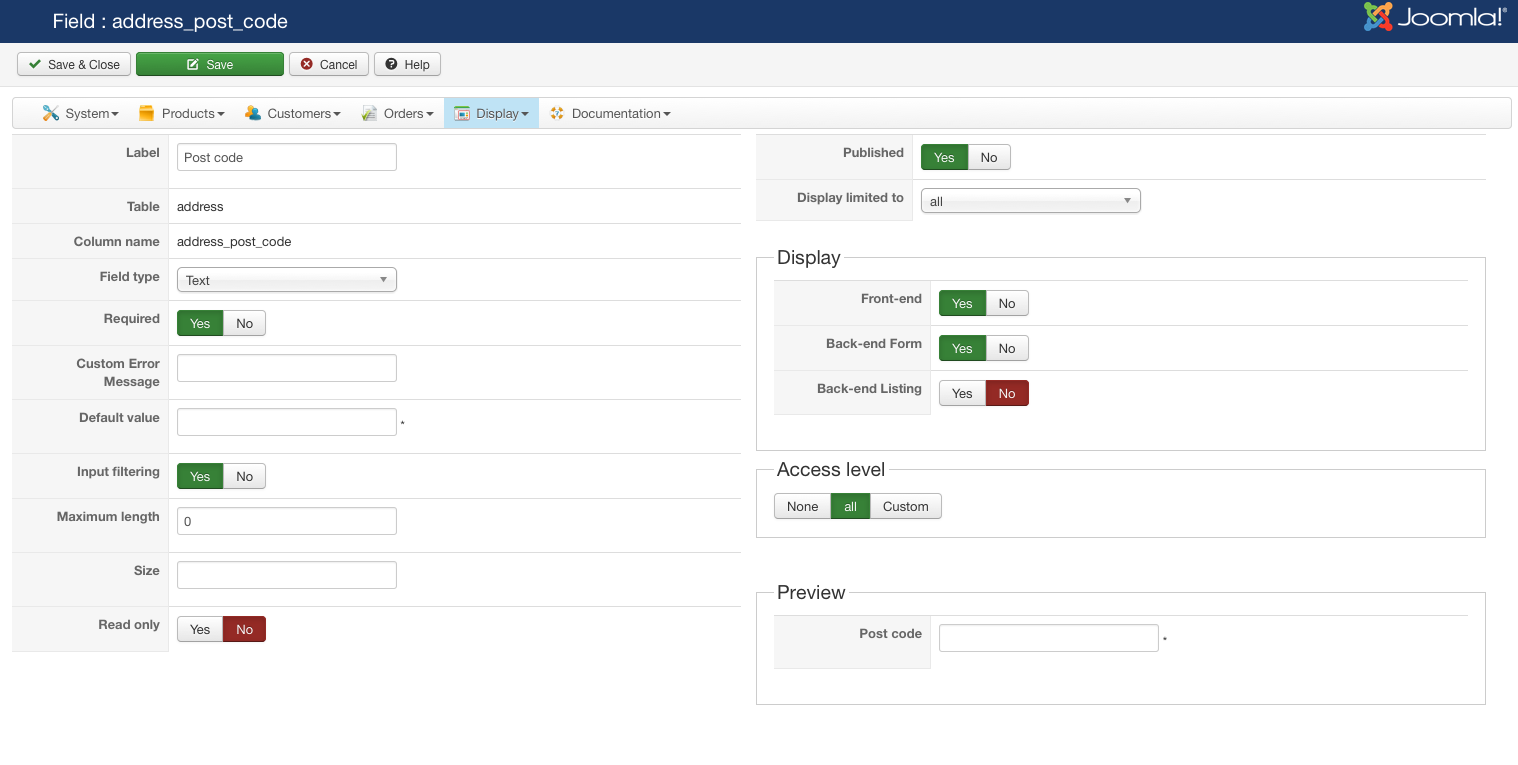
But I don't see that setting anywhere on the page (screenshot)
Where do I need to enter it?
Thanks
Andy
Please Log in or Create an account to join the conversation.
10 years 9 months ago #225513
by nicolas
Replied by nicolas on topic Text transform for address input at checkout
Hi,
Then it means that you have an old version of HikaShop.
Update and you should see that field.
Then it means that you have an old version of HikaShop.
Update and you should see that field.
Please Log in or Create an account to join the conversation.
Time to create page: 0.167 seconds