
Modify checkout page

10 years 11 months ago #217361
by m.fontana
Modify checkout page was created by m.fontana
-- url of the page with the problem -- :
www.hydradetergenti.com/new
-- HikaShop version -- : 2.6.0
-- Joomla version -- : 3.4.4
Hi,
I won't to modify the layout of checkout page, expecially the payment and shipping section: how can I do for put the shipping and payment blocks into same line? like address block
Thanks
Matteo
-- HikaShop version -- : 2.6.0
-- Joomla version -- : 3.4.4
Hi,
I won't to modify the layout of checkout page, expecially the payment and shipping section: how can I do for put the shipping and payment blocks into same line? like address block
Thanks
Matteo
Please Log in or Create an account to join the conversation.

Less
More
- Posts: 12953
- Thank you received: 1778
10 years 11 months ago #217388
by Mohamed Thelji
Replied by Mohamed Thelji on topic Modify checkout page
Hello Matteo,
The solution will probably be to directly :
- Edit the "Shipping" and "Payment" file of the "Checkout" view of your front-end template via "Hikashop->Display->Views"
- Use some CSS code
www.hikashop.com/support/documentation/1...the-display.html#css
The solution will probably be to directly :
- Edit the "Shipping" and "Payment" file of the "Checkout" view of your front-end template via "Hikashop->Display->Views"
- Use some CSS code
www.hikashop.com/support/documentation/1...the-display.html#css
Please Log in or Create an account to join the conversation.

9 years 4 months ago #269850
by dvddvd
Replied by dvddvd on topic Modify checkout page - Hide percentage
Hi,
I'm trying to hide the percentage applied to the checkout payment method, but I can not do it.
How can I hide the highlighted red circle in the next image?
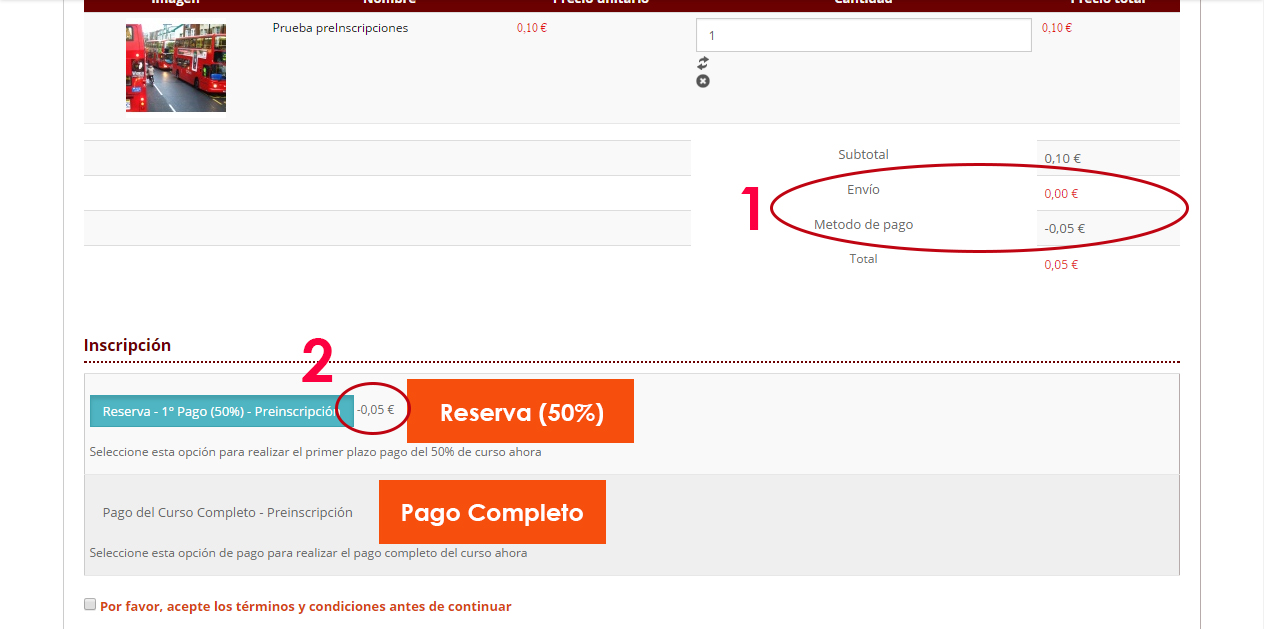
Thank you very much
I'm trying to hide the percentage applied to the checkout payment method, but I can not do it.
How can I hide the highlighted red circle in the next image?
Thank you very much
Please Log in or Create an account to join the conversation.

9 years 4 months ago - 9 years 4 months ago #269861
by Philip
Replied by Philip on topic Modify checkout page - Hide percentage
Hello,
You have 2 solutions :
1°) If you want ALWAYS hide this specific elements, custom Css can be a good & quick solution.
=> See this tutorial
And add some Css code like this :
2°) If you don't have to hide in each case but only when shipping cost is 0 Euros, an override view (or view customization) will be required
=> See this tutorial
Here some html & php knowledge will be required in order to modify show_block_cart (new cart system) or cart (legacy cart).
This kind of code can fit your needs :
Hope this will help you.
Regards
You have 2 solutions :
1°) If you want ALWAYS hide this specific elements, custom Css can be a good & quick solution.
=> See this tutorial
And add some Css code like this :
Code:
.elements_class1,
.elements_class2 {
display: none;
}
=> See this tutorial
Here some html & php knowledge will be required in order to modify show_block_cart (new cart system) or cart (legacy cart).
This kind of code can fit your needs :
Code:
if (Cart_shipping_cost != 0) {
echo "<tr>
<td>
ELEMENTS YOU WANT HIDE
</td>
</tr>"
}
Hope this will help you.
Regards
Last edit: 9 years 4 months ago by Philip.
The following user(s) said Thank You: dvddvd
Please Log in or Create an account to join the conversation.
9 years 4 months ago #270190
by dvddvd
Replied by dvddvd on topic Modify checkout page - Hide percentage
thank you very much,
It was just what i needed
It was just what i needed
Please Log in or Create an account to join the conversation.
Time to create page: 0.218 seconds