

- Posts: 14
- Thank you received: 0
Shipping address box size issue
10 years 11 months ago #222583
by waeshop
Shipping address box size issue was created by waeshop
-- HikaShop version -- : 2.6.0
I'm not sure if this is the right section. When a user who hasn't put in their shipping address goes to the cart, it pops up a box asking for their shipping address.
This is good.
But..
there is a sizing issue.
On mine it looks like this: i.imgur.com/EMTA92R.png
and there is no scroll bar to scroll it.
and there is no way to scroll it (sometimes if you click in the box and highlight text you can make it scroll) it simply won't move.
how can I add a scroll bar or make this pop up full size?
I'm not sure if this is the right section. When a user who hasn't put in their shipping address goes to the cart, it pops up a box asking for their shipping address.
This is good.
But..
there is a sizing issue.
On mine it looks like this: i.imgur.com/EMTA92R.png
and there is no scroll bar to scroll it.
and there is no way to scroll it (sometimes if you click in the box and highlight text you can make it scroll) it simply won't move.
how can I add a scroll bar or make this pop up full size?
Please Log in or Create an account to join the conversation.

10 years 11 months ago - 10 years 11 months ago #222614
by Philip
Replied by Philip on topic Shipping address box size issue
Hello,
Several things can create this kind of trouble, try this different solution:
1°) Go to :
- Components -> HikaShop -> Configuration
- Click on Display tab
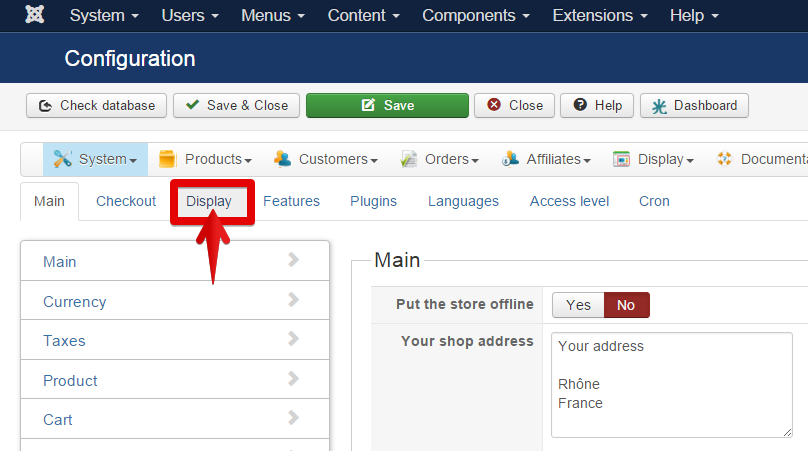
- In General display options, find popup mode and select mootools
2°) Check if the trouble is from your template, go to :
- Extensions -> Templates
- Define Protostar (for Site) as default template
- Test your address popup
If the trouble disappear, it means that it's link to your template, and so contact person which create it.
3°) Nothing works? Give me administrator access and the front end page with the issue.
Pass all these references via contact form AND with in this email the subject URL, here :
www.hikashop.com/forum/checkout/880816-s...-box-size-issue.html
Regards,
Several things can create this kind of trouble, try this different solution:
1°) Go to :
- Components -> HikaShop -> Configuration
- Click on Display tab
- In General display options, find popup mode and select mootools
2°) Check if the trouble is from your template, go to :
- Extensions -> Templates
- Define Protostar (for Site) as default template
- Test your address popup
If the trouble disappear, it means that it's link to your template, and so contact person which create it.
3°) Nothing works? Give me administrator access and the front end page with the issue.
Pass all these references via contact form AND with in this email the subject URL, here :
www.hikashop.com/forum/checkout/880816-s...-box-size-issue.html
Regards,
Last edit: 10 years 11 months ago by Philip.
Please Log in or Create an account to join the conversation.
10 years 11 months ago #222660
by waeshop
Replied by waeshop on topic Shipping address box size issue
1. mootools already chosen so not that (I found that in another thread and tried it but it was already set)
2. same problem with protostar, I'll send you the info
2. same problem with protostar, I'll send you the info
Please Log in or Create an account to join the conversation.

10 years 11 months ago #222672
by Xavier
Replied by Xavier on topic Shipping address box size issue
Hi,
Please note that if the popup setting was already "Mootools" you can try another popup system.
Please note that if the popup setting was already "Mootools" you can try another popup system.
Please Log in or Create an account to join the conversation.
10 years 11 months ago #222740
by waeshop
Replied by waeshop on topic Shipping address box size issue
I did and it did not help. Should have mentioned that sorryXavier wrote: Hi,
Please note that if the popup setting was already "Mootools" you can try another popup system.
Please Log in or Create an account to join the conversation.
10 years 11 months ago #222777
by waeshop
Replied by waeshop on topic Shipping address box size issue
also tested this in firefox and chrome, same behaviour in both so not a browser issue.
Please Log in or Create an account to join the conversation.

10 years 11 months ago #222743
by Jerome
Jerome - Obsidev.com
HikaMarket & HikaSerial developer / HikaShop core dev team.
Replied by Jerome on topic Shipping address box size issue
Hi,
The issue is coming from your template and this "component" view.
It add some special CSS class to the "body" node and it generate conflicts with the "bootstrap.min.css" file.
That is why you have these borders and is also changing the "overflow" setting of the body.
Using your browser you can perform a right click in the center of the popup and you should have something like (it depends your browser) :
And you could see the content of the popup in a regular tab of your browser and perform some test by resizing the window.
Otherwise you can use the browser inspector to see the applied CSS.
But to resume : your issue is not related to HikaShop but to your template.
Regards,
The issue is coming from your template and this "component" view.
It add some special CSS class to the "body" node and it generate conflicts with the "bootstrap.min.css" file.
That is why you have these borders and is also changing the "overflow" setting of the body.
Using your browser you can perform a right click in the center of the popup and you should have something like (it depends your browser) :
Code:
This frame => Open this frame in a new tab
Otherwise you can use the browser inspector to see the applied CSS.
But to resume : your issue is not related to HikaShop but to your template.
Regards,
Jerome - Obsidev.com
HikaMarket & HikaSerial developer / HikaShop core dev team.
The following user(s) said Thank You: waeshop
Please Log in or Create an account to join the conversation.
10 years 11 months ago #222893
by waeshop
Replied by waeshop on topic Shipping address box size issue
Thank you, I'll check with them. This is supposed to be a template built for hikashop.
Please Log in or Create an account to join the conversation.
Time to create page: 0.060 seconds