

- Posts: 136
- Thank you received: 7
Show weight and price per unit in checkout cart
9 years 2 months ago - 9 years 2 months ago #277023
by flexsus
.ninja { color: black; visibility: hidden; }
In case of fire:
1. git commit
2. git push
3. exit building
Show weight and price per unit in checkout cart was created by flexsus
-- HikaShop version -- : 3.1.1
-- Joomla version -- : 3.7.5
-- PHP version -- : 7.0.10
-- Browser(s) name and version -- : all
-- Error-message(debug-mod must be tuned on) -- : none
Hi Hikashop
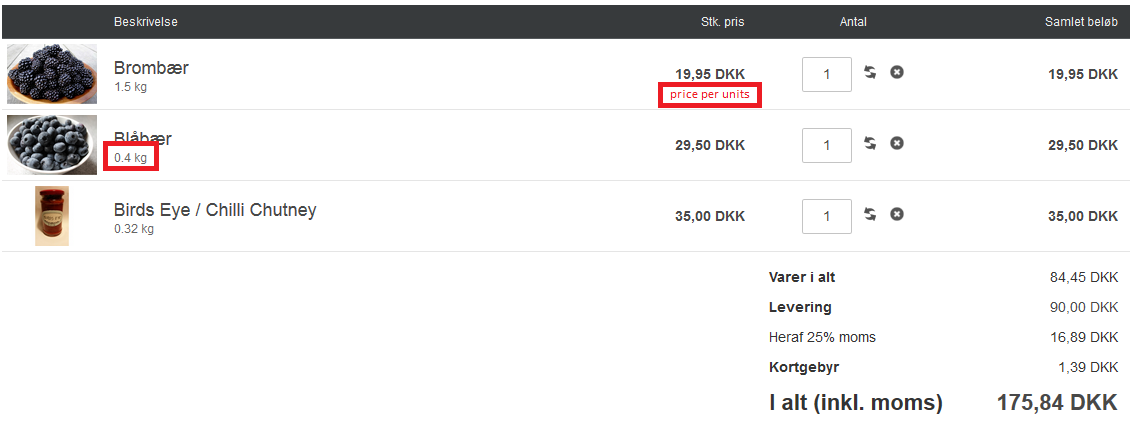
I'm trying to add a little more information to the customers experience when viewing the checkout cart. I have done some override to show_block_cart.php.
Under product name I would suggest and like that the product_weight is shown. I have added the code below, but I have two problems:
1) the $this->options[show_product_weight] is not in the array and this is why I have comment it out for now.
2) the $product->product_weight_unit is all in 'kilo' even though the product has 'gram' as unit.
Under price I would suggest and like that the price_per_unit is shown.
Both information's can be found on the product detail page, from where I have looked for code inspiration.
Thanks in advanced.
Best regards,
Henrik
-- Joomla version -- : 3.7.5
-- PHP version -- : 7.0.10
-- Browser(s) name and version -- : all
-- Error-message(debug-mod must be tuned on) -- : none
Hi Hikashop
I'm trying to add a little more information to the customers experience when viewing the checkout cart. I have done some override to show_block_cart.php.
Under product name I would suggest and like that the product_weight is shown. I have added the code below, but I have two problems:
Code:
//if(!empty($this->options['show_product_weight'])) {
?><span id="hikashop_cart_product_weight" class="hikashop_cart_product_weight">
<?php echo rtrim(rtrim($product->product_weight,'0'),',.').' '.JText::_($product->product_weight_unit);
?></span><?php
//}
1) the $this->options[show_product_weight] is not in the array and this is why I have comment it out for now.
2) the $product->product_weight_unit is all in 'kilo' even though the product has 'gram' as unit.
Under price I would suggest and like that the price_per_unit is shown.
Both information's can be found on the product detail page, from where I have looked for code inspiration.
Thanks in advanced.
Best regards,
Henrik
.ninja { color: black; visibility: hidden; }
In case of fire:
1. git commit
2. git push
3. exit building
Last edit: 9 years 2 months ago by flexsus.
Please Log in or Create an account to join the conversation.

Less
More
- Posts: 12953
- Thank you received: 1778
9 years 2 months ago #277029
by Mohamed Thelji
Replied by Mohamed Thelji on topic Show weight and price per unit in checkout cart
Hello Henrik,
The best solution will probably be to directly check what you have on your PHP variables like "$product" in your case, using functions like var_dump and then you'll fully see which information you have and what you can display.
The best solution will probably be to directly check what you have on your PHP variables like "$product" in your case, using functions like var_dump and then you'll fully see which information you have and what you can display.
Please Log in or Create an account to join the conversation.
9 years 2 months ago #277111
by flexsus
.ninja { color: black; visibility: hidden; }
In case of fire:
1. git commit
2. git push
3. exit building
Replied by flexsus on topic Show weight and price per unit in checkout cart
Hi Mohamed
Yes, in $product there is a lot of strings I can show.
But I was looking for the details of the product found in the product-details page, e.g. if unit is 450 gram. In the cart, this will be two strings product_weight: 0.450 and product_weight_unit: kg
So right now, the cart can not show the details I'm looking for. I will have to do some more customization.
Regards,
Henrik
Yes, in $product there is a lot of strings I can show.
But I was looking for the details of the product found in the product-details page, e.g. if unit is 450 gram. In the cart, this will be two strings product_weight: 0.450 and product_weight_unit: kg
So right now, the cart can not show the details I'm looking for. I will have to do some more customization.
Regards,
Henrik
.ninja { color: black; visibility: hidden; }
In case of fire:
1. git commit
2. git push
3. exit building
Please Log in or Create an account to join the conversation.

9 years 2 months ago - 9 years 2 months ago #277116
by Philip
Replied by Philip on topic Show weight and price per unit in checkout cart
Hello,
What is show in your show_cart is a weight and unit that have already set in order be a useful data for some shipping method that use
these data to process price.
And so you have to use the function "hikashop_get()" function in order to have no processed data, and so have data has you entered it in your product configuration page.
Something must able you to get what you need :
Hope this will help you.
Regards.
What is show in your show_cart is a weight and unit that have already set in order be a useful data for some shipping method that use
these data to process price.
And so you have to use the function "hikashop_get()" function in order to have no processed data, and so have data has you entered it in your product configuration page.
Something must able you to get what you need :
Code:
$productClass = hikashop_get('class.product');
$product = $productClass->get($product_id);
echo $product->product_weight . ' ' . $product->product_weight_unit;
Hope this will help you.
Regards.
Last edit: 9 years 2 months ago by Philip.
Please Log in or Create an account to join the conversation.
Time to create page: 0.089 seconds