

- Posts: 22
- Thank you received: 2
New subtotal after coupon used
7 years 10 months ago #302659
by geenidee3
New subtotal after coupon used was created by geenidee3
-- url of the page with the problem -- :
scopeslipstop.com/nl/winkel
-- HikaShop version -- : 4.0.1
-- Joomla version -- : 3.9.2
-- PHP version -- : 7.2
-- Browser(s) name and version -- : Chrome
Hiiii Hikashop,
I have a question...
Would it be possible to add a new subtotal after a coupon code is used? Now the situation is like:
Subtotal
Coupon
Shipment
tax
Total
But I would like to have it like:
Subtotal
Coupon
(new subtotal where the coupon is taken off)
Shipment
tax
total
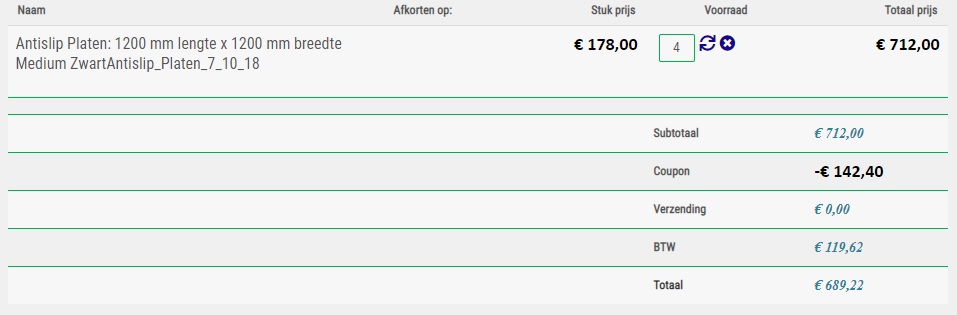
Would that be possible?
Thanks!
Martijn
-- HikaShop version -- : 4.0.1
-- Joomla version -- : 3.9.2
-- PHP version -- : 7.2
-- Browser(s) name and version -- : Chrome
Hiiii Hikashop,
I have a question...
Would it be possible to add a new subtotal after a coupon code is used? Now the situation is like:
Subtotal
Coupon
Shipment
tax
Total
But I would like to have it like:
Subtotal
Coupon
(new subtotal where the coupon is taken off)
Shipment
tax
total
Would that be possible?
Thanks!
Martijn
Please Log in or Create an account to join the conversation.

7 years 10 months ago #302662
by nicolas
Replied by nicolas on topic New subtotal after coupon used
Hi,
It's possible yes. You can edit the file "show_block_cart" via the menu Display>Views and add the corresponding code to the view file to add that line.
It's possible yes. You can edit the file "show_block_cart" via the menu Display>Views and add the corresponding code to the view file to add that line.
Please Log in or Create an account to join the conversation.
7 years 10 months ago - 7 years 10 months ago #302751
by geenidee3
Replied by geenidee3 on topic New subtotal after coupon used
Thank you soooo much  .
Would it be possible (I think because you guys eat code for breakfast) to point me with code I should put where?
Code:
Thanks !
.Would it be possible (I think because you guys eat code for breakfast) to point me with code I should put where?
Code:
Code:
remove full code of the view ; please understand that we also have it
Thanks !
Last edit: 7 years 10 months ago by Jerome.
Please Log in or Create an account to join the conversation.
7 years 10 months ago - 7 years 10 months ago #302755
by nicolas
Replied by nicolas on topic New subtotal after coupon used
Hi,
You would need to add:
after the code:
Please understand that our support is for questions regarding the use of Hikashop or bug reports. For custom development needs like that, you can contact our partners ( www.hikashop.com/home/our-partners.html ) or us ( www.hikashop.com/support/contact-us.html ).
I did it this time as it was just a smal thing but beware that it's an exception to the rule.
You would need to add:
Code:
<tr class="margin"><td colspan="<?php echo $row_count; ?>" class="hikashop_cart_empty_footer"></td></tr>
<tr>
<td colspan="<?php echo $row_count - 2; ?>" class="hikashop_cart_empty_footer"></td>
<td id="hikashop_checkout_cart_total2_title" class="hikashop_cart_subtotal_title hikashop_cart_title"><?php
echo 'Subtotal after coupon';
?></td>
<td class="hikashop_cart_subtotal_value" data-title="<?php echo JText::_('SUBTOTAL'); ?>">
<span class="hikashop_checkout_cart_subtotal"><?php
if(!empty($this->options['price_with_tax']))
echo $this->currencyClass->format(@$cart->total->prices[0]->price_value_with_tax+ (@$cart->coupon->discount_value_without_tax * -1),@$cart->total->prices[0]->price_currency_id);
else
echo $this->currencyClass->format(@$cart->total->prices[0]->price_value+(@$cart->coupon->discount_value * -1),@$cart->total->prices[0]->price_currency_id);
?></span>
</td>
</tr>
Code:
<tr>
<td colspan="<?php echo $row_count - 2; ?>" class="hikashop_cart_empty_footer"></td>
<td id="hikashop_checkout_cart_coupon_title" class="hikashop_cart_coupon_title hikashop_cart_title"><?php
echo JText::_('HIKASHOP_COUPON');
?></td>
<td class="hikashop_cart_coupon_value" data-title="<?php echo JText::_('HIKASHOP_COUPON'); ?>">
<span class="hikashop_checkout_cart_coupon"><?php
if(empty($this->options['price_with_tax']))
echo $this->currencyClass->format(@$cart->coupon->discount_value_without_tax * -1, @$cart->coupon->discount_currency_id);
else
echo $this->currencyClass->format(@$cart->coupon->discount_value * -1, @$cart->coupon->discount_currency_id);
?></span>
</td>
</tr>
Please understand that our support is for questions regarding the use of Hikashop or bug reports. For custom development needs like that, you can contact our partners ( www.hikashop.com/home/our-partners.html ) or us ( www.hikashop.com/support/contact-us.html ).
I did it this time as it was just a smal thing but beware that it's an exception to the rule.
Last edit: 7 years 10 months ago by nicolas.
Please Log in or Create an account to join the conversation.
7 years 10 months ago #302824
by geenidee3
Replied by geenidee3 on topic New subtotal after coupon used
Thanks !
Ok I understand, and therefore I'm even more thankfull !
You guys are the best...
Martijn
Ok I understand, and therefore I'm even more thankfull !
You guys are the best...
Martijn
Please Log in or Create an account to join the conversation.
7 years 10 months ago #302827
by nicolas
Replied by nicolas on topic New subtotal after coupon used
Thanks !
If you want to help us, you can post a comment on the JED and spread the love :
extensions.joomla.org/extensions/extensi...pping-cart/hikashop/
If you want to help us, you can post a comment on the JED and spread the love
:extensions.joomla.org/extensions/extensi...pping-cart/hikashop/
Please Log in or Create an account to join the conversation.
7 years 10 months ago #302881
by geenidee3
Replied by geenidee3 on topic New subtotal after coupon used
I will write a great review for you guys !
One question...
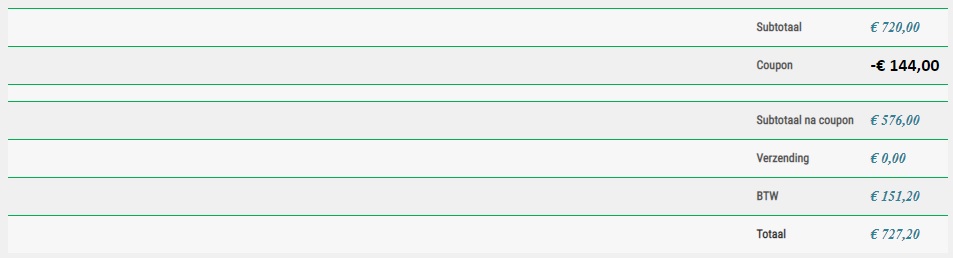
The tax calculation isnt going well. It should calculate the tax (btw) from the price after the coupon, but it takes the tax from the original subtotal.
I cannot find the solution in your forum.
Do you have a suggestion for me?
Thanks, Martijn
One question...
The tax calculation isnt going well. It should calculate the tax (btw) from the price after the coupon, but it takes the tax from the original subtotal.
I cannot find the solution in your forum.
Do you have a suggestion for me?
Thanks, Martijn
Please Log in or Create an account to join the conversation.
7 years 10 months ago #302887
by nicolas
Replied by nicolas on topic New subtotal after coupon used
Hi,
This depends on how you configured the "apply coupon" setting of the HikaShop configuration and how you setup the tax settings in your coupon. So you'll want to switch these and see how it goes.
This depends on how you configured the "apply coupon" setting of the HikaShop configuration and how you setup the tax settings in your coupon. So you'll want to switch these and see how it goes.
Please Log in or Create an account to join the conversation.
7 years 10 months ago #302981
by geenidee3
Replied by geenidee3 on topic New subtotal after coupon used
Not so good yet .
I spend a lot of time in testing all the settings.
The weird thing is that everything is correct now, but in the end at "total" it suddenly does a double tax on the coupon.
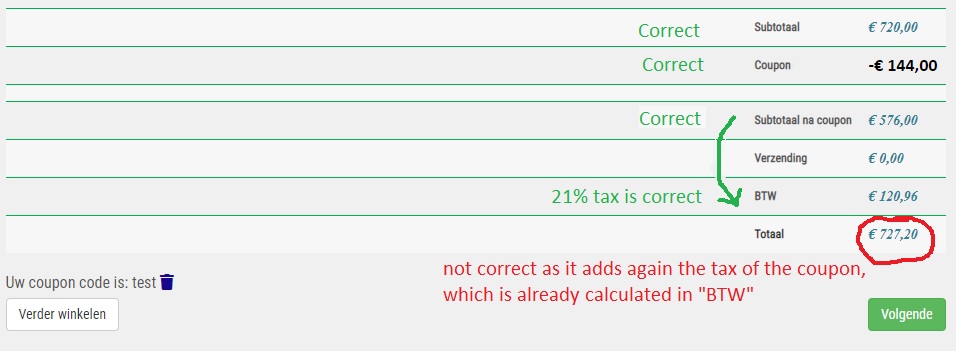
How can I change that? Then I'm finished.
Thanks... Martijn
.I spend a lot of time in testing all the settings.
The weird thing is that everything is correct now, but in the end at "total" it suddenly does a double tax on the coupon.
How can I change that? Then I'm finished
.Thanks... Martijn
Please Log in or Create an account to join the conversation.
7 years 10 months ago #303008
by nicolas
Replied by nicolas on topic New subtotal after coupon used
Hi,
Hard to say without knowing exactly how everything in play there is configured.
Please provide:
- a screenshot of the settings of each of the products in that cart
- a screenshot of the settings of the coupon
- a screenshot of the settings of the taxes area of your HikaShop configuration
- a screenshot of the settings of your tax rule
Please Log in or Create an account to join the conversation.
7 years 10 months ago #303052
by geenidee3
Replied by geenidee3 on topic New subtotal after coupon used
Hi Nicolas,
Hereby the settings:
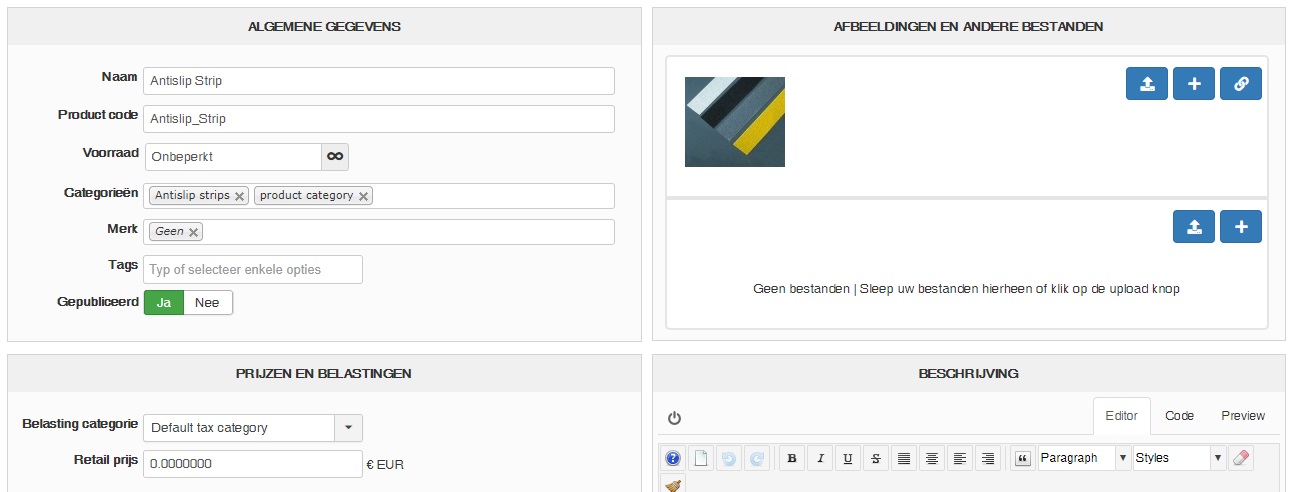
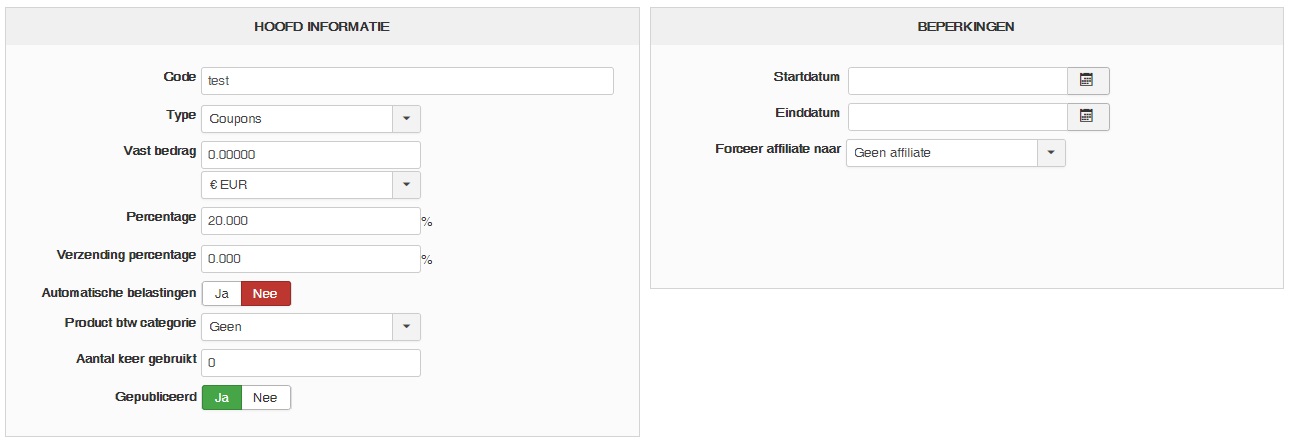
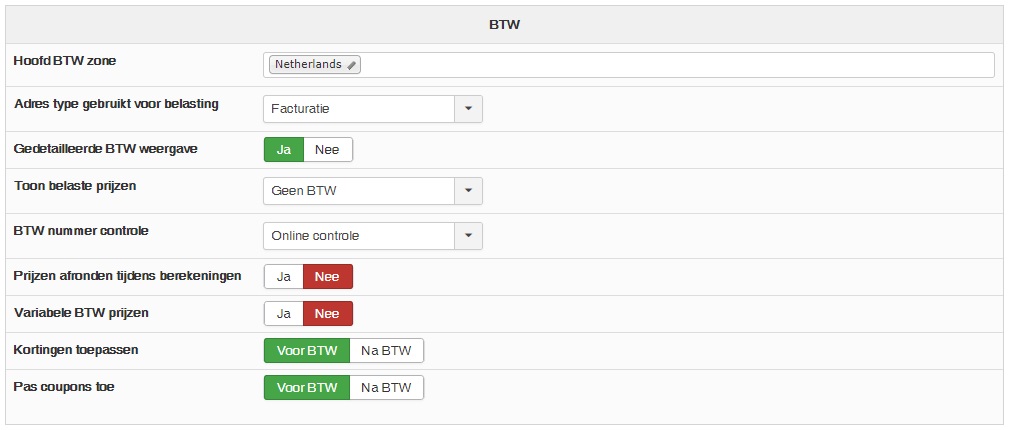
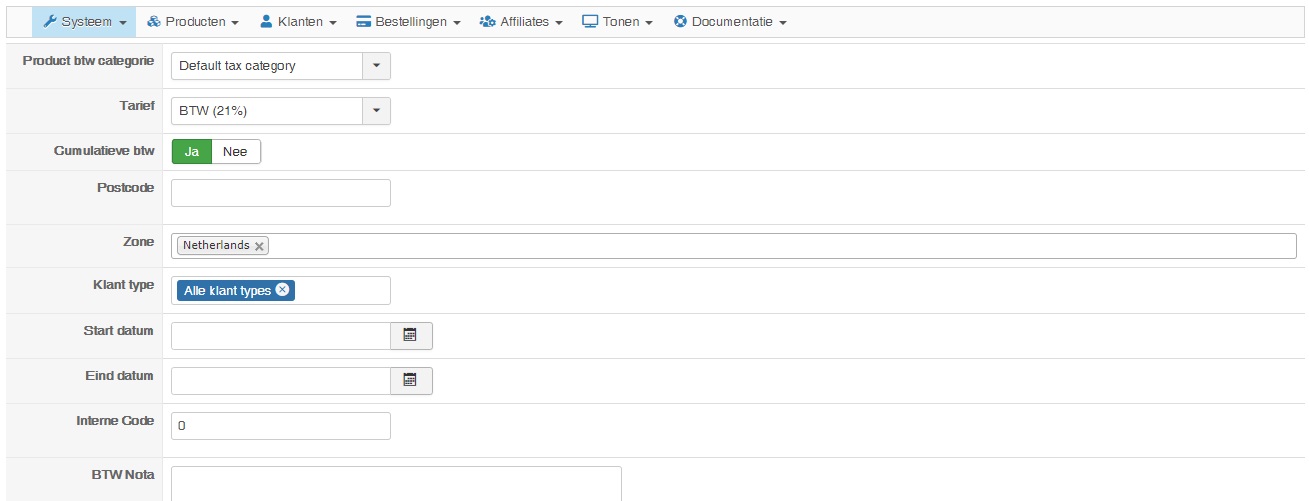
Hope you see the solution...
Martijn
Hereby the settings:
Hope you see the solution...
Martijn
Please Log in or Create an account to join the conversation.
7 years 9 months ago #303097
by nicolas
Replied by nicolas on topic New subtotal after coupon used
Hi,
I'm trying to reproduce the issue on your website but I see that you have several variants for the products and none of them have a price of 720€.
So either you have several times the product in the cart, or I'm missing some information.
Also, could you tell me which variant you used for your test here www.hikashop.com/forum/checkout/896684-n...pon-used.html#302981 and what quantity you used ?
Could you also provide screenshots of all the options of the product and of the variant ?
Please Log in or Create an account to join the conversation.
7 years 9 months ago #303107
by geenidee3
Replied by geenidee3 on topic New subtotal after coupon used
Hi Nicolas,
The problem occurs with every item you would like to buy. As soon as you use a coupon (in this case you can try the "test" coupon, you will see that in the end the calculation isn't going as how it should. (does again tax on the coupon, while the tax already has been calculated).
For the example I used: www.scopeslipstop.com/nl/winkel-2/product/antislip-strip and then the 2400mm x 50mm version, fijn, black and 20 pieces.
Now I'm asking ... I also have always that when I add 20 items in the item box and add it to the shopping cart, it only adds 1 item instead of 20. Do you have any idea why is that?
If you want I can also give you the login of the page if that would be easier?
Martijn
p.s. thanks
The problem occurs with every item you would like to buy. As soon as you use a coupon (in this case you can try the "test" coupon, you will see that in the end the calculation isn't going as how it should. (does again tax on the coupon, while the tax already has been calculated).
For the example I used: www.scopeslipstop.com/nl/winkel-2/product/antislip-strip and then the 2400mm x 50mm version, fijn, black and 20 pieces.
Now I'm asking
... I also have always that when I add 20 items in the item box and add it to the shopping cart, it only adds 1 item instead of 20. Do you have any idea why is that?If you want I can also give you the login of the page if that would be easier?
Martijn
p.s. thanks
Please Log in or Create an account to join the conversation.
7 years 9 months ago #303127
by nicolas
Replied by nicolas on topic New subtotal after coupon used
Hi,
I would think that you want to activate the "automatic tax" setting of the coupon.
Now I'm not sure why you would get the tax correct but the total incorrect.
Could you provide a backend accesss and a FTP access along with a link to this thread so that we could check on the issue ?
www.hikashop.com/support/contact-us.html
Regarding the add to cart quantity issue, that's because of the customization of the layout of the product page. The elements of the product page are no longer inside the main form of the product page:
monosnap.com/file/vz5WCzjJVIJPyxBts8WKuQW9xrKmDX
Because of that, the system doesn't find the quantity input and submits the add to cart without it. So it will require fixing the layout customization for it to work properly.
Please Log in or Create an account to join the conversation.
7 years 9 months ago #303550
by geenidee3
Replied by geenidee3 on topic New subtotal after coupon used
Hi all,
Like a week a go I provided you with all the info, but I believe nothing happened yet. Will you still take a look? (kind reminder).
Thank you
Martijn
Like a week a go I provided you with all the info, but I believe nothing happened yet
. Will you still take a look? (kind reminder).Thank you
Martijn
Please Log in or Create an account to join the conversation.
7 years 9 months ago #303706
by geenidee3
Replied by geenidee3 on topic New subtotal after coupon used
Hi Nicolas,
I'm a bit worried as it looks like you guys are ignoring me.
Can you please come back to this topic?
Thanks Martijn
I'm a bit worried as it looks like you guys are ignoring me
.Can you please come back to this topic?
Thanks Martijn
Please Log in or Create an account to join the conversation.
7 years 9 months ago #303749
by nicolas
Replied by nicolas on topic New subtotal after coupon used
Hi,
Sorry, we didn't had to time to look into it. Looking into taxes issues takes a while as we need to do all the calculations by hand to check each line to try to understand what is wrong so I had to get myself a few hours open to be able to investigate.
And actually, all the calculations done are correct as far as I could see. So no problem with the calculations. The only issue is with the "Subtotaal na coupon", but that's added with custom code I gave you rapidely previously:
www.hikashop.com/forum/checkout/896684-n...pon-used.html#302755
I had actually made a typo there and reverted the without_tax for the coupon value.
So the code should actually be:
Please note that such customization is outside the user support we're supposed to provide with HikaShop commercial editions. I gave it this time, but that's something you're supposed to hire a developer for.
Sorry, we didn't had to time to look into it. Looking into taxes issues takes a while as we need to do all the calculations by hand to check each line to try to understand what is wrong so I had to get myself a few hours open to be able to investigate.
And actually, all the calculations done are correct as far as I could see. So no problem with the calculations. The only issue is with the "Subtotaal na coupon", but that's added with custom code I gave you rapidely previously:
www.hikashop.com/forum/checkout/896684-n...pon-used.html#302755
I had actually made a typo there and reverted the without_tax for the coupon value.
So the code should actually be:
Code:
<tr class="margin"><td colspan="<?php echo $row_count; ?>" class="hikashop_cart_empty_footer"></td></tr>
<tr>
<td colspan="<?php echo $row_count - 2; ?>" class="hikashop_cart_empty_footer"></td>
<td id="hikashop_checkout_cart_total2_title" class="hikashop_cart_subtotal_title hikashop_cart_title"><?php
echo 'Subtotal after coupon';
?></td>
<td class="hikashop_cart_subtotal_value" data-title="<?php echo JText::_('SUBTOTAL'); ?>">
<span class="hikashop_checkout_cart_subtotal"><?php
if(!empty($this->options['price_with_tax']))
echo $this->currencyClass->format(@$cart->total->prices[0]->price_value_with_tax+ (@$cart->coupon->discount_value * -1),@$cart->total->prices[0]->price_currency_id);
else
echo $this->currencyClass->format(@$cart->total->prices[0]->price_value+(@$cart->coupon->discount_value_without_tax * -1),@$cart->total->prices[0]->price_currency_id);
?></span>
</td>
</tr>
Please Log in or Create an account to join the conversation.
7 years 9 months ago - 7 years 9 months ago #303863
by geenidee3
Replied by geenidee3 on topic New subtotal after coupon used
It helped a lot...! Thank you for the help !
I know you don't give code support, but to be honest I believe that there should be a difference in between how thinks look and how things work. But that's only a suggestion. I'm thankful that you guys always helped me so far and I will write a great review for you guys.
Martijn
I know you don't give code support, but to be honest I believe that there should be a difference in between how thinks look and how things work. But that's only a suggestion
. I'm thankful that you guys always helped me so far and I will write a great review for you guys.Martijn
Last edit: 7 years 9 months ago by geenidee3.
The following user(s) said Thank You: nicolas
Please Log in or Create an account to join the conversation.
Time to create page: 0.108 seconds