

- Posts: 30
- Thank you received: 2
Checkout not progressing on FB Social Media Login
7 years 7 months ago #304767
by jtquinto
Checkout not progressing on FB Social Media Login was created by jtquinto
-- HikaShop version -- : 4.0.2
-- Joomla version -- : 3.9.3
Help please.
Logging in using FB (JFBConnect plugin) prevents the Checkout process from progressing.
Logging in normally or thru Google (JFBConnect plugin, too) would continue, though.
-- Joomla version -- : 3.9.3
Help please.
Logging in using FB (JFBConnect plugin) prevents the Checkout process from progressing.
Logging in normally or thru Google (JFBConnect plugin, too) would continue, though.
Please Log in or Create an account to join the conversation.

7 years 7 months ago #304775
by nicolas
Replied by nicolas on topic Checkout not progressing on FB Social Media Login
Hi,
Well, HikaShop doesn't do anything when it's the JFBConnect plugin which handles the login.
All HikaShop does is that when the standard Joomla trigger after login is triggered, it will move the cart from the session id to the user id, and load the user id in session to consider the user logged in.
So if the cusomter is redirected somewhere else, it's something in JFBConnect or something else on the website which does that.
Now, regarding the checkout not progressing, I did some tests on your website and I had the same issue with a normal HikaShop guest checkout. So it doesn't seem that the problem is linked to JFBConnect. First, please provide a screenshot of the settings under the "checkout" tab of the Hikashop configuration so that we know how you configured your checkout.
Well, HikaShop doesn't do anything when it's the JFBConnect plugin which handles the login.
All HikaShop does is that when the standard Joomla trigger after login is triggered, it will move the cart from the session id to the user id, and load the user id in session to consider the user logged in.
So if the cusomter is redirected somewhere else, it's something in JFBConnect or something else on the website which does that.
Now, regarding the checkout not progressing, I did some tests on your website and I had the same issue with a normal HikaShop guest checkout. So it doesn't seem that the problem is linked to JFBConnect. First, please provide a screenshot of the settings under the "checkout" tab of the Hikashop configuration so that we know how you configured your checkout.
Please Log in or Create an account to join the conversation.
7 years 7 months ago #304841
by jtquinto
Replied by jtquinto on topic Checkout not progressing on FB Social Media Login
Here's the screenshot of the Configuration > Checkout section
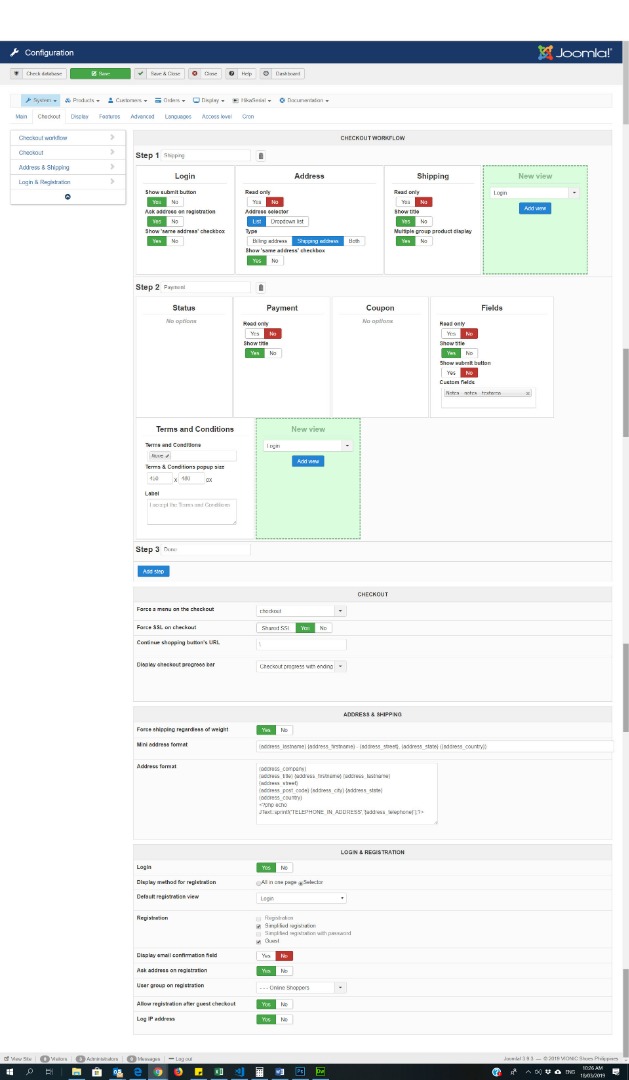
Please Log in or Create an account to join the conversation.
7 years 7 months ago #304843
by nicolas
Replied by nicolas on topic Checkout not progressing on FB Social Media Login
Hi,
The issue is with the "address" view.
You've configured it for only the shipping address.
And in the "login" view, you've configured to display the "same address" checkbox for the shipping address but that checkbox is not there. Thus, it only creates a billing address.
I suppose that you must have some view overrides of show_block_login, show_block_address, sub_block_login_form or sub_block_login_registration via the menu Display>Views. You can check for them in the folder templates/YOUR_TEMPLATE/html/com_hikashop/checkout/ if you find some of them, try temporarily renaming them and it should work better. In that case, I would recommend to redo your modifications to the new versions of these view files via the menu Display>Views.
The issue is with the "address" view.
You've configured it for only the shipping address.
And in the "login" view, you've configured to display the "same address" checkbox for the shipping address but that checkbox is not there. Thus, it only creates a billing address.
I suppose that you must have some view overrides of show_block_login, show_block_address, sub_block_login_form or sub_block_login_registration via the menu Display>Views. You can check for them in the folder templates/YOUR_TEMPLATE/html/com_hikashop/checkout/ if you find some of them, try temporarily renaming them and it should work better. In that case, I would recommend to redo your modifications to the new versions of these view files via the menu Display>Views.
Please Log in or Create an account to join the conversation.
7 years 7 months ago #304884
by jtquinto
Replied by jtquinto on topic Checkout not progressing on FB Social Media Login
Thanks, Nicolas! ... Changing the Address setting did fix the issue.
The following user(s) said Thank You: Philip
Please Log in or Create an account to join the conversation.
Time to create page: 0.056 seconds