

- Posts: 103
- Thank you received: 12
Abschlussseite der Bestellung
3 years 11 months ago #345957
by chli
Abschlussseite der Bestellung was created by chli
Hallo,
wo kann man einen Link für den Abschluss der Bestellung hinterlegen?
Also: Kaufen-Button wurde gedrückt, Verkauf ist abgeschlossen und dann auf Seite .... (Auf der sich dann selbst erstelltes befindet).
Aktuell wird bei mir checkout/after_end.php aufgerufen, was sich aber ziemlich unschön an das linke obere Eck quetscht.
Für Rückmeldungen bedanke ich mich im Voraus.
Grüße vom Christian
wo kann man einen Link für den Abschluss der Bestellung hinterlegen?
Also: Kaufen-Button wurde gedrückt, Verkauf ist abgeschlossen und dann auf Seite .... (Auf der sich dann selbst erstelltes befindet).
Aktuell wird bei mir checkout/after_end.php aufgerufen, was sich aber ziemlich unschön an das linke obere Eck quetscht.
Für Rückmeldungen bedanke ich mich im Voraus.
Grüße vom Christian
Please Log in or Create an account to join the conversation.

3 years 11 months ago #345964
by nicolas
Replied by nicolas on topic Abschlussseite der Bestellung
Hi,
I'm sorry but I'm not sure I understand the issue.
Could you provide a screenshot of your thank you page so that we can better see what's going on ?
I'm sorry but I'm not sure I understand the issue.
Could you provide a screenshot of your thank you page so that we can better see what's going on ?
Please Log in or Create an account to join the conversation.

3 years 11 months ago - 3 years 11 months ago #345974
by lousyfool
Need help with customisations of layouts, style or other site development? PM me!
(Don't forget to turn on "E-mail notification of new messages" )
Replied by lousyfool on topic Abschlussseite der Bestellung
@chli:
Hi,
du kannst eine URL in den Zahlungsmethoden hinterlegen. Also: Zahlungsmethode(n) editieren und im Feld "Rückkehr URL" einen Link eintragen. Das kann natürlich eine relative URL sein (z.B. zu einem Joomla-Artikel mit alias "/dankeschoen"), und so kannst du auch für jede Zahlungsmethode zu einer jeweils speziellen Seite leiten.
P.S.: Deutschsprachige Posts am besten ins deutsche Forum stellen... andernfalls englisch posten, wie du an Nicolas Antwort siehst.
Hi,
du kannst eine URL in den Zahlungsmethoden hinterlegen. Also: Zahlungsmethode(n) editieren und im Feld "Rückkehr URL" einen Link eintragen. Das kann natürlich eine relative URL sein (z.B. zu einem Joomla-Artikel mit alias "/dankeschoen"), und so kannst du auch für jede Zahlungsmethode zu einer jeweils speziellen Seite leiten.
P.S.: Deutschsprachige Posts am besten ins deutsche Forum stellen... andernfalls englisch posten, wie du an Nicolas Antwort siehst.
Need help with customisations of layouts, style or other site development? PM me!
(Don't forget to turn on "E-mail notification of new messages" )
Last edit: 3 years 11 months ago by lousyfool.
The following user(s) said Thank You: nicolas
Please Log in or Create an account to join the conversation.
3 years 11 months ago #346082
by chli
Replied by chli on topic Abschlussseite der Bestellung
Hallo lousyfool,
vielen Dank für die Hilfe.
Und: Ich bin davon ausgegangen, dass ich diesen Post auf der deutschen Seite angelegt habe. Zumindest habe ich diesen Bereich ausgewählt, was aufgrund der deutschen Sprache für mich auch als richtig erschien.
Grüße vom Christian
vielen Dank für die Hilfe.
Und: Ich bin davon ausgegangen, dass ich diesen Post auf der deutschen Seite angelegt habe. Zumindest habe ich diesen Bereich ausgewählt, was aufgrund der deutschen Sprache für mich auch als richtig erschien.
Grüße vom Christian
Please Log in or Create an account to join the conversation.
3 years 11 months ago #346087
by lousyfool
Need help with customisations of layouts, style or other site development? PM me!
(Don't forget to turn on "E-mail notification of new messages" )
Replied by lousyfool on topic Abschlussseite der Bestellung
Hi nochmal!
Nö, wie du hier oben auf der Seite siehst, hast du unter "Checkout" im englischen Bereich gepostet. Aber ist jetzt ja auch egal... alles gut!
chli wrote: Ich bin davon ausgegangen, dass ich diesen Post auf der deutschen Seite angelegt habe. Zumindest habe ich diesen Bereich ausgewählt, was aufgrund der deutschen Sprache für mich auch als richtig erschien.
Nö, wie du hier oben auf der Seite siehst, hast du unter "Checkout" im englischen Bereich gepostet. Aber ist jetzt ja auch egal... alles gut!
Need help with customisations of layouts, style or other site development? PM me!
(Don't forget to turn on "E-mail notification of new messages" )
Please Log in or Create an account to join the conversation.
3 years 10 months ago #346914
by chli
Replied by chli on topic Abschlussseite der Bestellung
Hello, unfortunately it still doesn't work.
The entry in the payment information was made, but this has no effect.
There is still only the text information instead of the forwarding.
The entry in the payment information was made, but this has no effect.
There is still only the text information instead of the forwarding.
This attachment is hidden for guests.
Please log in or register to see it.
Please log in or register to see it.
Please Log in or Create an account to join the conversation.
3 years 10 months ago #346916
by nicolas
Replied by nicolas on topic Abschlussseite der Bestellung
Hi,
The text I see on your screenshot is the default thank you page of HikaShop. However, the bank transfer payment plugin has its own HTML, which adds for example the bank transfer information you've entered in the settings of the payment method.
This HTML also contains the redirection to the return URL you can specify in the parameters of the payment method.
The only reason I can see it wouldn't use that HTML and instead use the default thank you page is if the file plugins/hikashoppayment/banktransfer/banktransfer_end.php would have been deleted. So please check that this file is still there via FTP.
Note that the "bank transfer" payment method is quite similar to the "collect on delivery". So you could try setup instead a payment method with the "collect on delivery" payment plugin. You'll just need to add 1 or 2 translation overrides to adapt the text displayed.
The text I see on your screenshot is the default thank you page of HikaShop. However, the bank transfer payment plugin has its own HTML, which adds for example the bank transfer information you've entered in the settings of the payment method.
This HTML also contains the redirection to the return URL you can specify in the parameters of the payment method.
The only reason I can see it wouldn't use that HTML and instead use the default thank you page is if the file plugins/hikashoppayment/banktransfer/banktransfer_end.php would have been deleted. So please check that this file is still there via FTP.
Note that the "bank transfer" payment method is quite similar to the "collect on delivery". So you could try setup instead a payment method with the "collect on delivery" payment plugin. You'll just need to add 1 or 2 translation overrides to adapt the text displayed.
Please Log in or Create an account to join the conversation.
3 years 10 months ago #347556
by chli
Replied by chli on topic Abschlussseite der Bestellung
Hello,
Thank you for the feedback.
The banktransfer_end.php file is present.
In my shop I created an extra payment method and deactivated all others. Since we operate a B2B shop, the various payment methods are stored in our main system, so the customer only receives information that the order will be carried out in accordance with the agreement made so far.
The return URL is stored in the only payment method I have created, which unfortunately is not used after pressing the purchase button.
Greetings from Christian
Thank you for the feedback.
The banktransfer_end.php file is present.
In my shop I created an extra payment method and deactivated all others. Since we operate a B2B shop, the various payment methods are stored in our main system, so the customer only receives information that the order will be carried out in accordance with the agreement made so far.
The return URL is stored in the only payment method I have created, which unfortunately is not used after pressing the purchase button.
Greetings from Christian
Please Log in or Create an account to join the conversation.
3 years 10 months ago #347559
by nicolas
Replied by nicolas on topic Abschlussseite der Bestellung
Hi,
I don't see how that's possible, unless you removed the "payment" view from your "checkout workflow", or if the total amount of the cart is 0. In these cases, it's possible there is actually no payment method selected at all and thus it displays the default thank you page of HikaShop.
Could you check that it's not the case ?
I don't see how that's possible, unless you removed the "payment" view from your "checkout workflow", or if the total amount of the cart is 0. In these cases, it's possible there is actually no payment method selected at all and thus it displays the default thank you page of HikaShop.
Could you check that it's not the case ?
Please Log in or Create an account to join the conversation.
3 years 10 months ago #347586
by chli
Replied by chli on topic Abschlussseite der Bestellung
Hello,
Sorry I described that wrong.
I selected the payment method "HikaShop bank transfer payment plugin" and indicated there that it will be used from 0.1 kg. All other payment methods have been disabled.
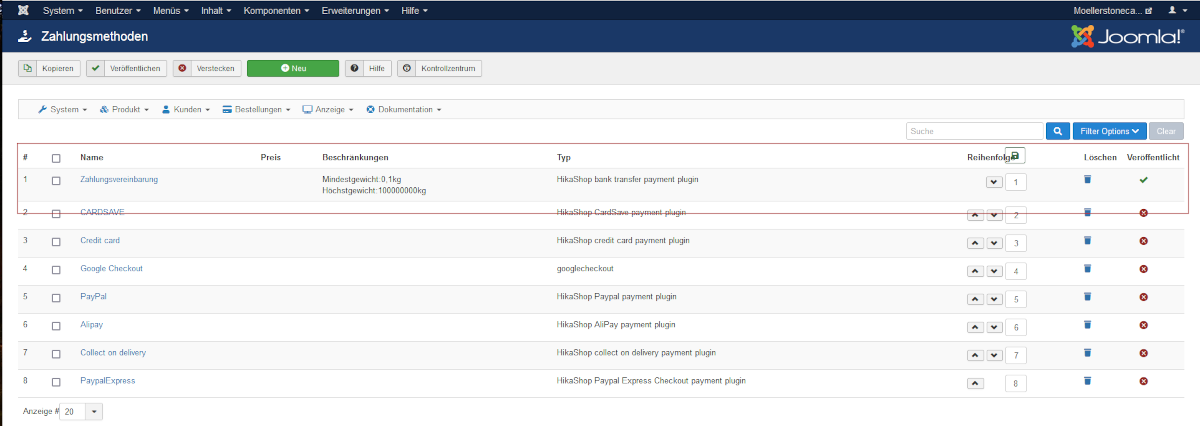
The forwarding is specified in this payment method.
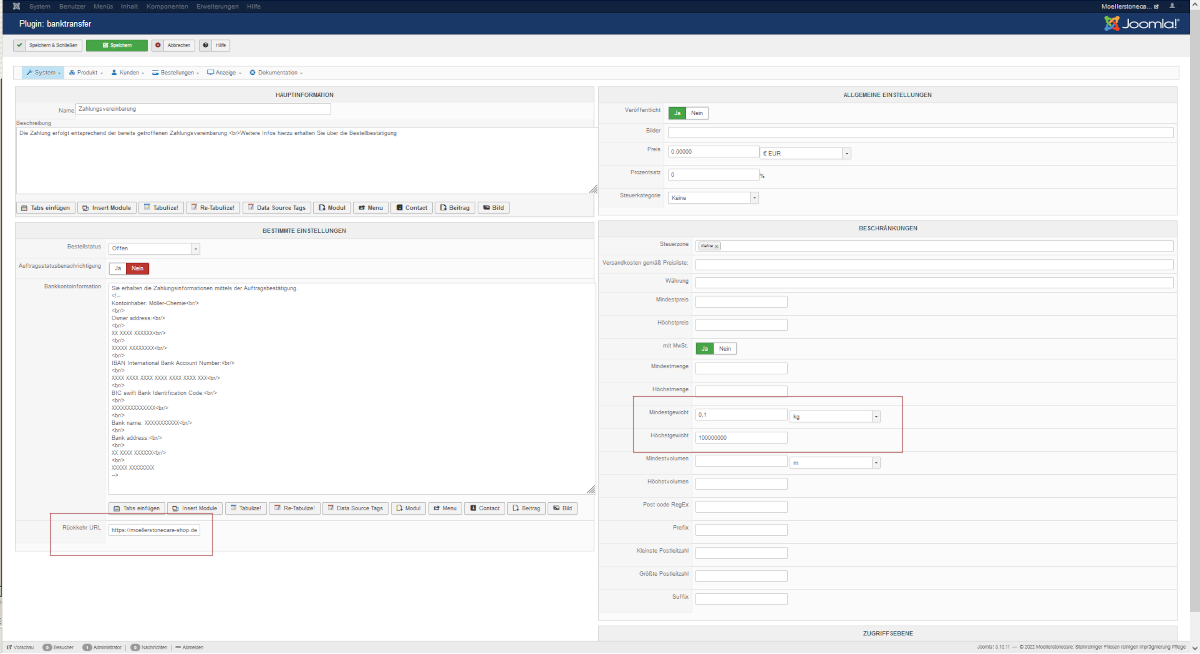
Sorry I described that wrong.
I selected the payment method "HikaShop bank transfer payment plugin" and indicated there that it will be used from 0.1 kg. All other payment methods have been disabled.
The forwarding is specified in this payment method.
Please Log in or Create an account to join the conversation.
3 years 10 months ago #347589
by nicolas
Replied by nicolas on topic Abschlussseite der Bestellung
Hi,
Please make sure you have the "payment" view in the "Checkout workflow" of the HikaShop configuration. And you can remove the restrictions on the weight in the payment method, they won't help, just create potential problems (for example if you forget to set a weight in a product, since it would mean no one would be able to purchase the product as the total weight of the cart would be 0 and thus the payment method wouldn't be available).
Please make sure you have the "payment" view in the "Checkout workflow" of the HikaShop configuration. And you can remove the restrictions on the weight in the payment method, they won't help, just create potential problems (for example if you forget to set a weight in a product, since it would mean no one would be able to purchase the product as the total weight of the cart would be 0 and thus the payment method wouldn't be available).
Please Log in or Create an account to join the conversation.
3 years 10 months ago #347593
by chli
Replied by chli on topic Abschlussseite der Bestellung
Hello,
the payment field was not previously in the checkout, but has now been included. I also deleted the weight range, unfortunately still without a positive result.
the payment field was not previously in the checkout, but has now been included. I also deleted the weight range, unfortunately still without a positive result.
Please Log in or Create an account to join the conversation.
3 years 10 months ago #347595
by nicolas
Replied by nicolas on topic Abschlussseite der Bestellung
Hi,
Can you provide a screenshot of your checkout workflow and provide the URL of the shop (and specific instructions if needed to reproduce the problem) ?
Can you provide a screenshot of your checkout workflow and provide the URL of the shop (and specific instructions if needed to reproduce the problem) ?
Please Log in or Create an account to join the conversation.
3 years 9 months ago #347667
by chli
Replied by chli on topic Abschlussseite der Bestellung
Hello,
I need contact data please, then I would provide a sample customer with login.
I need contact data please, then I would provide a sample customer with login.
Please Log in or Create an account to join the conversation.
3 years 9 months ago #347670
by nicolas
Replied by nicolas on topic Abschlussseite der Bestellung
Please Log in or Create an account to join the conversation.
3 years 9 months ago #347692
by nicolas
Replied by nicolas on topic Abschlussseite der Bestellung
Hi,
There are no prices and thus no payment required on your shop.
So it's normal the payment method is not taken into account since a payment method is only when the total amount is greater than 0.
Change the shipping to be 0.01 instead of 0 and you'll see the payment method on your checkout and then the return URL of the payment method will be taken into account.
Now, if you want a specific return URL while having no prices, and thus no payment method, in your shop, then you should edit the checkout/end view file to add the redirect yourself with a bit of code like this:
where you replace RETURNURL by the actual URL
There are no prices and thus no payment required on your shop.
So it's normal the payment method is not taken into account since a payment method is only when the total amount is greater than 0.
Change the shipping to be 0.01 instead of 0 and you'll see the payment method on your checkout and then the return URL of the payment method will be taken into account.
Now, if you want a specific return URL while having no prices, and thus no payment method, in your shop, then you should edit the checkout/end view file to add the redirect yourself with a bit of code like this:
Code:
<?php JFactory::getApplication()->redirect('RETURNURL'); ?>
Please Log in or Create an account to join the conversation.
Time to create page: 0.187 seconds