

- Posts: 43
- Thank you received: 3
Bad Quality of product pictures
2 years 9 months ago #358302
by Anjasshop
Bad Quality of product pictures was created by Anjasshop
-- HikaShop version -- : 5.0.2
-- Joomla version -- : 4.2
-- PHP version -- : 8.1
-- Browser(s) name and version -- : all
-- Error-message(debug-mod must be tuned on) -- : Quality of product pictures
Dear team, I have been trying for some time to display images in sharp focus both in the category view and on the product page. Although the quality/resolution of the original images is very good, I only get a reduced quality display.
My setting for product images is e.g. 350 x 350px, the sharp original image also has this size, but no longer when it is displayed as a product image.
Is there a setting that allows me to show the images accordingly without losing any quality?
Thanks in advance
Anja
-- Joomla version -- : 4.2
-- PHP version -- : 8.1
-- Browser(s) name and version -- : all
-- Error-message(debug-mod must be tuned on) -- : Quality of product pictures
Dear team, I have been trying for some time to display images in sharp focus both in the category view and on the product page. Although the quality/resolution of the original images is very good, I only get a reduced quality display.
My setting for product images is e.g. 350 x 350px, the sharp original image also has this size, but no longer when it is displayed as a product image.
Is there a setting that allows me to show the images accordingly without losing any quality?
Thanks in advance
Anja
Please Log in or Create an account to join the conversation.
2 years 9 months ago #358303
by oxido
Replied by oxido on topic Bad Quality of product pictures
Hi,
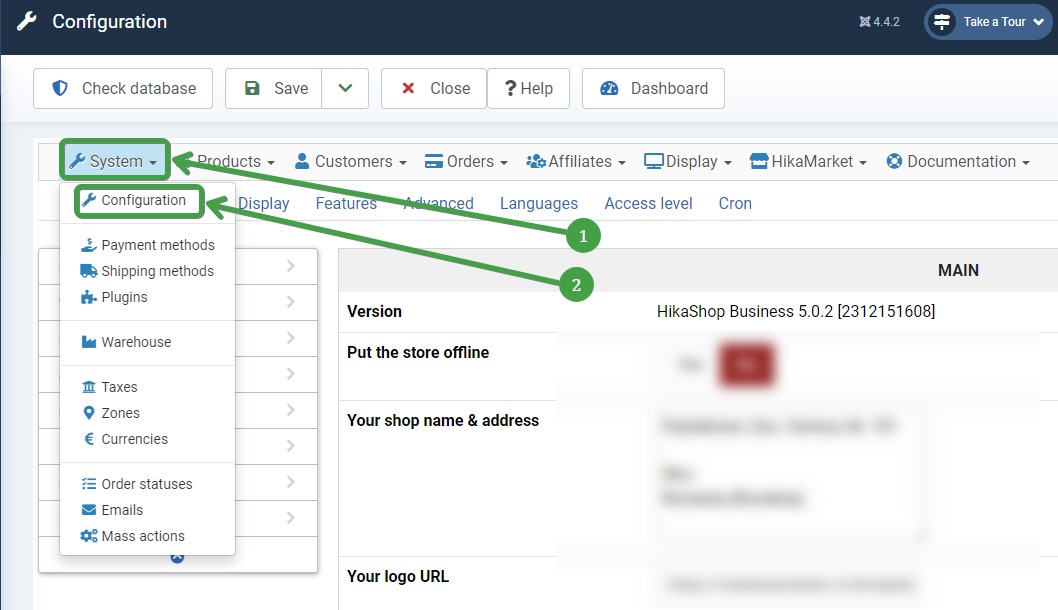
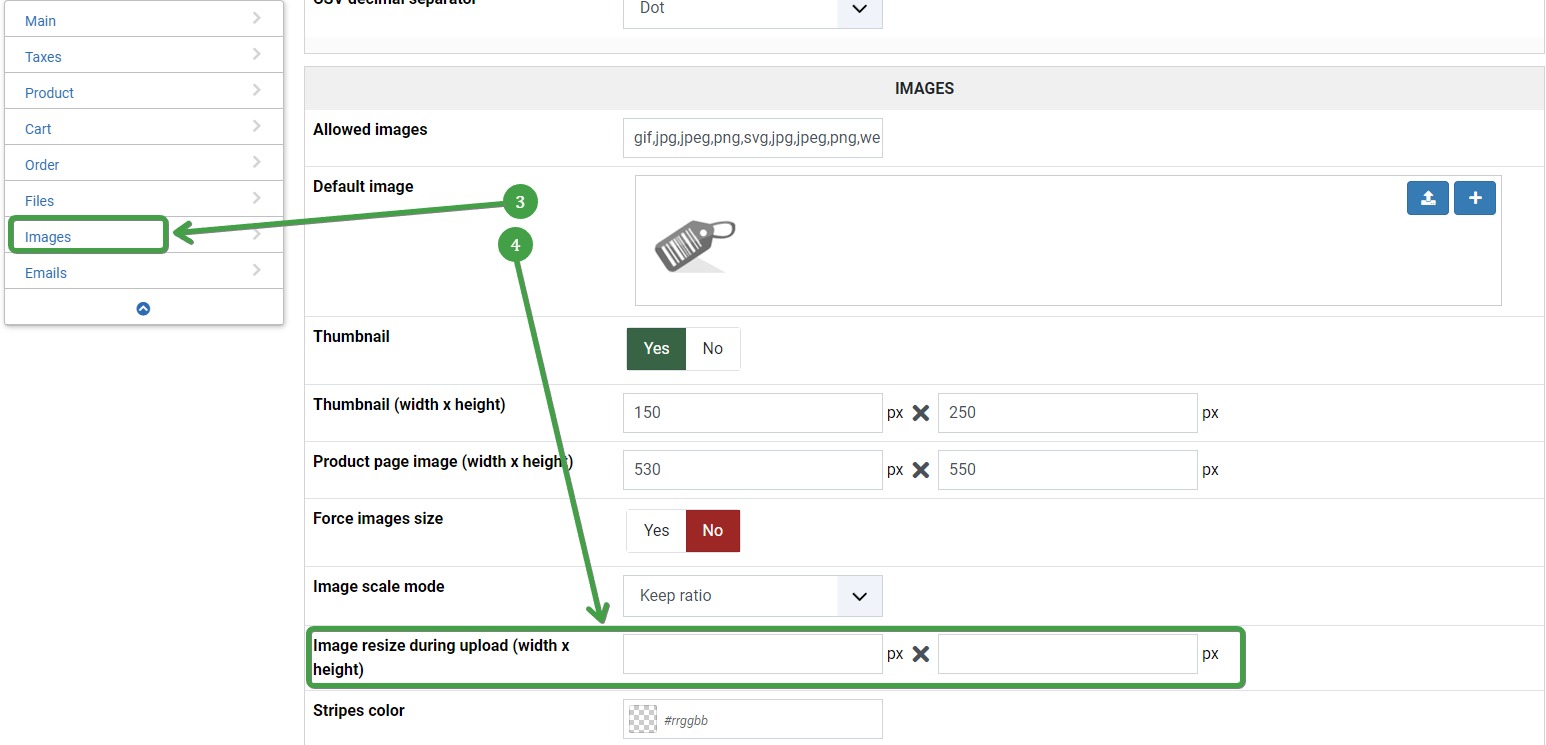
Did you set something in: Hikashop > Systems> Configuration > Images: Image resize during upload (width x height) ?
If you did, delete what you have there and just use a program like FastStone Resizer to resize bulk images and keep them HQ with small size for files.
Did you set something in: Hikashop > Systems> Configuration > Images: Image resize during upload (width x height) ?
If you did, delete what you have there and just use a program like FastStone Resizer to resize bulk images and keep them HQ with small size for files.
Please Log in or Create an account to join the conversation.
2 years 9 months ago #358304
by Anjasshop
Replied by Anjasshop on topic Bad Quality of product pictures
Hi, thank you for your answer,
but I do not find any button in the configuration, that would allow an image resize?
And I dont want to resize the pictures, they are already optimized for that purpose..
but I do not find any button in the configuration, that would allow an image resize?
And I dont want to resize the pictures, they are already optimized for that purpose..
Please Log in or Create an account to join the conversation.
2 years 9 months ago - 2 years 9 months ago #358306
by oxido
Replied by oxido on topic Bad Quality of product pictures
Hikashop > Systems> Configuration > Images: Image resize during upload (width x height) ?
Last edit: 2 years 9 months ago by oxido.
Please Log in or Create an account to join the conversation.
2 years 9 months ago #358308
by Anjasshop
Replied by Anjasshop on topic Bad Quality of product pictures
Okay, thank you, but this button is missing in my backend?
Please Log in or Create an account to join the conversation.

2 years 9 months ago #358310
by nicolas
Replied by nicolas on topic Bad Quality of product pictures
Hi,
As @oxido said, you want to check the "Image resize during upload" setting of the HikaShop configuration page.
If that setting is not empty, HikaShop will resize your images when you add them to your products and categories and this can incur a loss of sharpness.
So make sure that this setting is empty. Now, this will only solve the problem for new images you'll add to your products / categories.
For images already added to your shop, you would need to reupload them via FTP in the folder images/com_hikashop/upload/
As @oxido said, you want to check the "Image resize during upload" setting of the HikaShop configuration page.
If that setting is not empty, HikaShop will resize your images when you add them to your products and categories and this can incur a loss of sharpness.
So make sure that this setting is empty. Now, this will only solve the problem for new images you'll add to your products / categories.
For images already added to your shop, you would need to reupload them via FTP in the folder images/com_hikashop/upload/
Please Log in or Create an account to join the conversation.
Time to create page: 0.125 seconds