

- Posts: 22
- Thank you received: 0
Edit Profile Issues with Custom Fields
11 years 2 months ago - 11 years 2 months ago #211409
by sapura
Edit Profile Issues with Custom Fields was created by sapura
-- HikaShop version -- : 2.5.0
-- Joomla version -- : 3.4.2
-- PHP version -- : 5.6.3
-- Browser(s) name and version -- : Chrome 44.0.2403.155
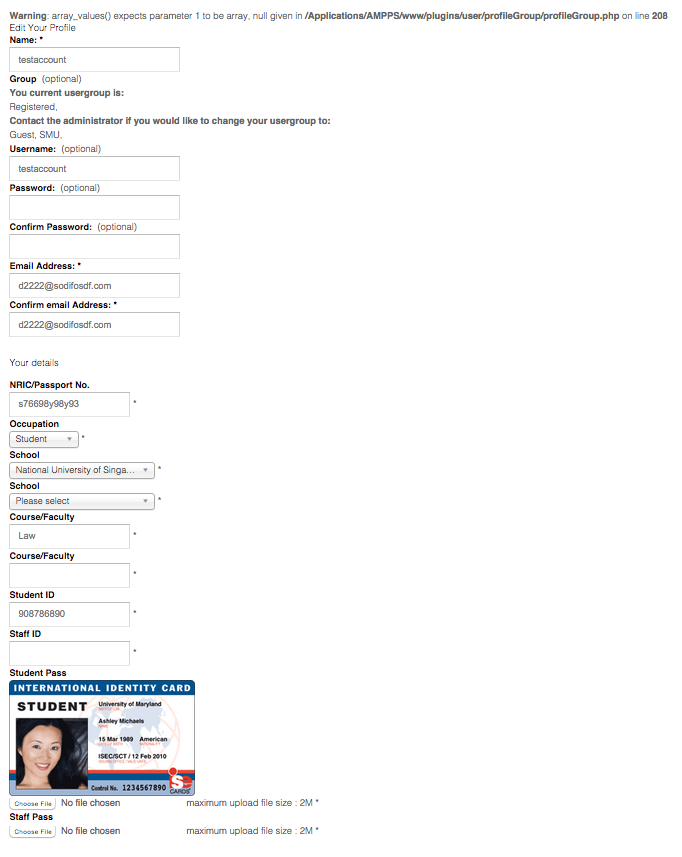
-- Error-message(debug-mod must be tuned on) -- : Warning: array_values() expects parameter 1 to be array, null given in /Applications/AMPPS/www/plugins/user/profileGroup/profileGroup.php on line 208
Hi, please help on these issues regarding the custom fields for users.
On registration, it works perfectly fine. But not in the Edit Profile.
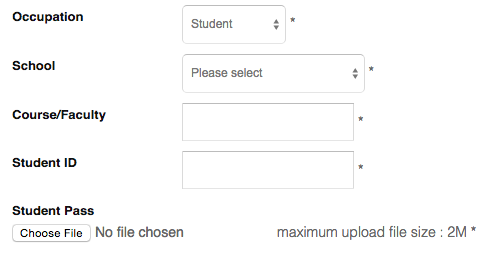
I have set conditional custom fields as follows:
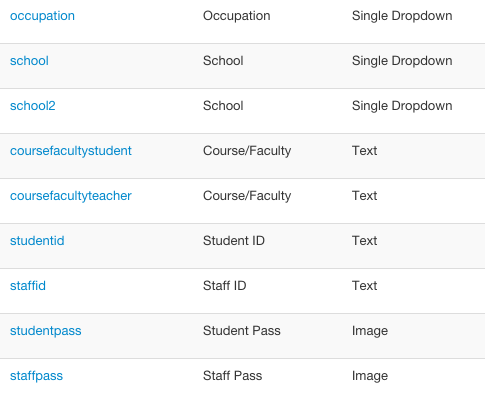
if Occupation = others
- [none]
if Occupation = student
- school
- coursefacultystudent
- studentid
- studentpass
if Occupation = teacher
- school2
- coursefacultyteacher
- staffid
- staffpass
In the Edit Profile, the conditional are not in place and all fields are shown at the same time.
When I try to fill out only 1 set of fields, and submit, I get the error message shown.
Appreciate your help. Thanks!
-- Joomla version -- : 3.4.2
-- PHP version -- : 5.6.3
-- Browser(s) name and version -- : Chrome 44.0.2403.155
-- Error-message(debug-mod must be tuned on) -- : Warning: array_values() expects parameter 1 to be array, null given in /Applications/AMPPS/www/plugins/user/profileGroup/profileGroup.php on line 208
Hi, please help on these issues regarding the custom fields for users.
On registration, it works perfectly fine. But not in the Edit Profile.
I have set conditional custom fields as follows:
if Occupation = others
- [none]
if Occupation = student
- school
- coursefacultystudent
- studentid
- studentpass
if Occupation = teacher
- school2
- coursefacultyteacher
- staffid
- staffpass
In the Edit Profile, the conditional are not in place and all fields are shown at the same time.
When I try to fill out only 1 set of fields, and submit, I get the error message shown.
Appreciate your help. Thanks!
Last edit: 11 years 2 months ago by sapura.
Please Log in or Create an account to join the conversation.

11 years 2 months ago #211433
by nicolas
Replied by nicolas on topic Edit Profile Issues with Custom Fields
Hi,
The warning comes from the "profileGroup" user plugin you're using. That's not a HikaShop plugin.
Regarding the fact that you see fields regardless of their "display limited to" setting, add the code:
after the code:
in the file plugins/system/hikashopuser/hikashopuser.php and that should fix that behavior.
The warning comes from the "profileGroup" user plugin you're using. That's not a HikaShop plugin.
Regarding the fact that you see fields regardless of their "display limited to" setting, add the code:
Code:
$requiredFields = array();
$validMessages = array();
$values = array('user' => $user);
$this->fieldsClass->checkFieldsForJS($extraFields, $requiredFields, $validMessages, $values);
$this->fieldsClass->addJS($requiredFields, $validMessages, array('user'));
Code:
$fieldsClass->addJS($null,$null,$null);
$fieldsClass->jsToggle($extraFields['user'],$user,0);
Please Log in or Create an account to join the conversation.
11 years 2 months ago #211488
by sapura
Replied by sapura on topic Edit Profile Issues with Custom Fields
Hi, Thanks for the reply.
There are however 2 locations of the code in hikashopuser.php
I have tried adding to both locations and I get this error when I tried to Edit the Profile Page
Line 341 after adding the code is referring to
Once I removed the code from the 2nd place, the Edit Profile page is ok, but the fields are again not adhering to the 'display limited to' setting.
Appreciate your help.
Thanks!
There are however 2 locations of the code in hikashopuser.php
Code:
$fieldsClass->addJS($null,$null,$null);
$fieldsClass->jsToggle($extraFields['user'],$user,0);
I have tried adding to both locations and I get this error when I tried to Edit the Profile Page
Fatal error: Call to a member function checkFieldsForJS() on null in /Applications/AMPPS/www/plugins/system/hikashopuser/hikashopuser.php on line 341
Line 341 after adding the code is referring to
Code:
$this->fieldsClass->checkFieldsForJS($extraFields, $requiredFields, $validMessages, $values);
Once I removed the code from the 2nd place, the Edit Profile page is ok, but the fields are again not adhering to the 'display limited to' setting.
Appreciate your help.
Thanks!
Please Log in or Create an account to join the conversation.
11 years 2 months ago #211502
by nicolas
Replied by nicolas on topic Edit Profile Issues with Custom Fields
Hi,
Ah yes, use that code instead:
You can add it to both locations.
Ah yes, use that code instead:
Code:
$requiredFields = array();
$validMessages = array();
$values = array('user' => $user);
$fieldsClass->checkFieldsForJS($extraFields, $requiredFields, $validMessages, $values);
$fieldsClass->addJS($requiredFields, $validMessages, array('user'));
You can add it to both locations.
Please Log in or Create an account to join the conversation.
11 years 2 months ago #211668
by sapura
Replied by sapura on topic Edit Profile Issues with Custom Fields
Hi, I've added to both locations this new code and it is still not working.
/index.php/your-profile/profile?layout=edit
Am I the only one who encounter this issue?
/index.php/your-profile/profile?layout=edit
Am I the only one who encounter this issue?
Please Log in or Create an account to join the conversation.
11 years 2 months ago #211706
by nicolas
Replied by nicolas on topic Edit Profile Issues with Custom Fields
Hi,
Ok, also change the line:
to:
and that should work. It now does on my end with these modifications.
Everyone has the issue but you're the first one noticing it as most people don't need fields limited by other fields for the user profile.
Ok, also change the line:
Code:
$data .= '<div class="control-group"><div class="control-label"><label>'.$fieldsClass->getFieldName($oneExtraField).'</label></div><div class="controls">';
Code:
$data .= '<div class="control-group hikashop_registration_' . $fieldName. '_line" id="hikashop_user_' . $fieldName. '"><div class="control-label"><label>'.$fieldsClass->getFieldName($oneExtraField).'</label></div><div class="controls">';
Everyone has the issue but you're the first one noticing it as most people don't need fields limited by other fields for the user profile.
Please Log in or Create an account to join the conversation.
11 years 2 months ago #211763
by sapura
Replied by sapura on topic Edit Profile Issues with Custom Fields
Hi thanks but it is still showing all fields with the new code.
Please Log in or Create an account to join the conversation.
11 years 1 month ago #211788
by nicolas
Replied by nicolas on topic Edit Profile Issues with Custom Fields
Hi,
We don't have the problem anymore on our end.
Please provide a link to the page, a test account and a FTP access so that we can analyze the issue on your website.
www.hikashop.com/support/contact-us.html
We don't have the problem anymore on our end.
Please provide a link to the page, a test account and a FTP access so that we can analyze the issue on your website.
www.hikashop.com/support/contact-us.html
Please Log in or Create an account to join the conversation.
11 years 1 month ago #211957
by nicolas
Replied by nicolas on topic Edit Profile Issues with Custom Fields
Hi,
I was able to log on your website, but I couldn't access the Display>Custom fields area on your backend and you didn't provide a FTP access so I'm not able to debug the issue.
Could you also provide that please ?
I was able to log on your website, but I couldn't access the Display>Custom fields area on your backend and you didn't provide a FTP access so I'm not able to debug the issue.
Could you also provide that please ?
Please Log in or Create an account to join the conversation.
11 years 1 month ago #212001
by sapura
Replied by sapura on topic Edit Profile Issues with Custom Fields
Hi, sorry about that. I have enabled access for the Custom Fields.
Also, you can use Components > extplorer to access the files.
Thanks!
Also, you can use Components > extplorer to access the files.
Thanks!
Please Log in or Create an account to join the conversation.
11 years 1 month ago #212226
by nicolas
Replied by nicolas on topic Edit Profile Issues with Custom Fields
Hi,
Sorry for the delay.
I'm now able to access the custom fields, but I'm not able to access extplorer.
When I click on the link in the components menu, I'm getting redirected back to the dashboard of the backend.
Sorry for the delay.
I'm now able to access the custom fields, but I'm not able to access extplorer.
When I click on the link in the components menu, I'm getting redirected back to the dashboard of the backend.
Please Log in or Create an account to join the conversation.
11 years 1 month ago #212297
by sapura
Replied by sapura on topic Edit Profile Issues with Custom Fields
Hi, I've enabled access for extplorer. Please check again. Thanks!
Please Log in or Create an account to join the conversation.
11 years 1 month ago #212347
by nicolas
Replied by nicolas on topic Edit Profile Issues with Custom Fields
Hi,
I've checked and I could see that you were missing some other patch we had before. I've added them all for you and it's now working.
I've checked and I could see that you were missing some other patch we had before. I've added them all for you and it's now working.
Please Log in or Create an account to join the conversation.
11 years 1 month ago - 11 years 1 month ago #212372
by sapura
Replied by sapura on topic Edit Profile Issues with Custom Fields
Hi, thanks.
Yes I see the fields are now conditional.
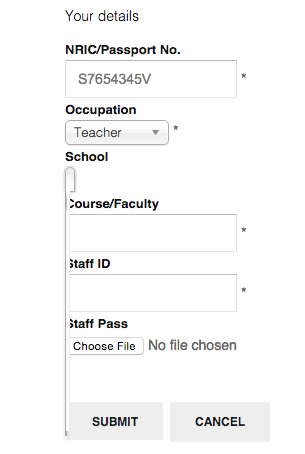
However, if I select "Teacher", the dropdown for school has no options in it.
Also, Can you advise what are the patches you applied? I will need to apply this to the production server.
Thank you so much.
Yes I see the fields are now conditional.
However, if I select "Teacher", the dropdown for school has no options in it.
Also, Can you advise what are the patches you applied? I will need to apply this to the production server.
Thank you so much.
Last edit: 11 years 1 month ago by sapura.
Please Log in or Create an account to join the conversation.
11 years 1 month ago - 11 years 1 month ago #212443
by nicolas
Replied by nicolas on topic Edit Profile Issues with Custom Fields
Hi,
That's an issue with the chozen library. I don't know why it does that.
Try to add that CSS on your website:
#hikashop_user_school .chzn-container-single-nosearch{ width: auto !important; }
If that doesn't help, you can also turn off the "use chozen library" setting of the HikaShop configuration and that should circumvent the problem.
Regarding the patch, you can simply copy the file plugins/system/hikashopuser/hikashopuser.php to your other website in order to fix the issue.
That's an issue with the chozen library. I don't know why it does that.
Try to add that CSS on your website:
#hikashop_user_school .chzn-container-single-nosearch{ width: auto !important; }
If that doesn't help, you can also turn off the "use chozen library" setting of the HikaShop configuration and that should circumvent the problem.
Regarding the patch, you can simply copy the file plugins/system/hikashopuser/hikashopuser.php to your other website in order to fix the issue.
Last edit: 11 years 1 month ago by nicolas.
Please Log in or Create an account to join the conversation.
11 years 1 month ago #212461
by sapura
Replied by sapura on topic Edit Profile Issues with Custom Fields
The chosen library was already turned off. And the CSS didn't work.
But I managed to get it working with
#school2_chzn { width:219px !important;}
Apparently something forces a width:0 on this div.
Thanks for your help in this. Really appreciated.
Cheers!
But I managed to get it working with
#school2_chzn { width:219px !important;}
Apparently something forces a width:0 on this div.
Thanks for your help in this. Really appreciated.
Cheers!
Please Log in or Create an account to join the conversation.
Time to create page: 0.241 seconds