

- Posts: 20
- Thank you received: 0
Iframing specific dashboard components
8 years 3 months ago #293965
by derek_cts
Iframing specific dashboard components was created by derek_cts
-- HikaShop version -- : 3.4.0 Business
-- Joomla version -- : 3.8.8
-- PHP version -- : 7.x
-- Browser(s) name and version -- : chrome / firefox
-- Error-message(debug-mod must be tuned on) -- : n/a
Is there any feasible way to iframe (or otherwise display) the #hikashop_dashboard_stat_last_orders div?
I need this specific information to show up on another related dashboard site I'm building for the client (who is using hikashop business).
They want an 'all-in-1' page, so they don't have to go to the joomla backend of the site.
any suggestions are welcome.
thanks.
-- Joomla version -- : 3.8.8
-- PHP version -- : 7.x
-- Browser(s) name and version -- : chrome / firefox
-- Error-message(debug-mod must be tuned on) -- : n/a
Is there any feasible way to iframe (or otherwise display) the #hikashop_dashboard_stat_last_orders div?
I need this specific information to show up on another related dashboard site I'm building for the client (who is using hikashop business).
They want an 'all-in-1' page, so they don't have to go to the joomla backend of the site.
any suggestions are welcome.
thanks.
Please Log in or Create an account to join the conversation.

8 years 3 months ago #293966
by nicolas
Replied by nicolas on topic Iframing specific dashboard components
Hi,
You can do it like that:
That should work anywhere (in any PHP file) on a Joomla website with HikaShop if Joomla is already loaded.
You can do it like that:
Code:
if(!defined('DS'))
define('DS', DIRECTORY_SEPARATOR);
if(!include_once(rtrim(JPATH_ADMINISTRATOR,DS).DS.'components'.DS.'com_hikashop'.DS.'helpers'.DS.'helper.php')) return true;
$statisticsClass = hikashop_get('class.statistics');
$statisticsClass->display(array('last_orders' => array(
'slot' => 2,
'order' => 2,
'published' => 1,
'container' => 1,
'class' => 'hkc-lg-8 hkc-sm-12',
'type' => 'dynamic',
'label' => JText::_('HIKA_STATS_LAST_ORDERS'),
'vars' => array(
'COUNTER' => 6
),
'prefix' => '<table style="width:100%" class="table table-striped table-hover table-bordered"><thead><tr><th>'.JText::_('ORDER_NUMBER').'</th><th>'.JText::_('ORDER_STATUS').'</th><th>'.JText::_('CUSTOMER').'</th><th>'.JText::_('DATE').'</th><th>'.JText::_('PRICE').'</th></thead><tbody>',
'dynamic' => '<tr><td>{order_number:order_link}</td><td>{order_status:order_status}</td><td>{user_email}</td><td>{order_created:date}</td><td>{order_full_price:price}</td></tr>',
'suffix' => '</tbody></table>',
'format' => 'text',
'query' => array(
'get' => 'list',
'select' => 'hk_order.*, hk_user.*, hk_order.order_currency_id as currency',
'tables' => array(
hikashop_table('order') . ' AS hk_order',
'INNER JOIN '.hikashop_table('user').' AS hk_user ON hk_order.order_user_id = hk_user.user_id'
),
'filters' => array(
'order_type' => 'hk_order.order_type = '.$order_type.''
),
'order' => 'hk_order.order_created DESC',
'limit' => '{COUNTER}'
)
)));
Please Log in or Create an account to join the conversation.
8 years 3 months ago #293984
by derek_cts
Replied by derek_cts on topic Iframing specific dashboard components
Any way to do it from another website if you have the Jooma creds for the one you are targeting?
Please Log in or Create an account to join the conversation.
8 years 3 months ago #293992
by nicolas
Replied by nicolas on topic Iframing specific dashboard components
Hi,
Use this code in a system plugin that you install on your Joomla website with the trigger onAfterRoute and check specific parameters in the URL before that code to make sure that the plugin is being called and check a password or something in the URL.
Then, simply use that URL in an iframe on that other website.
So it's possible if you're a developer and write a bit of code.
Use this code in a system plugin that you install on your Joomla website with the trigger onAfterRoute and check specific parameters in the URL before that code to make sure that the plugin is being called and check a password or something in the URL.
Then, simply use that URL in an iframe on that other website.
So it's possible if you're a developer and write a bit of code.
Please Log in or Create an account to join the conversation.
8 years 3 months ago - 8 years 3 months ago #294279
by derek_cts
Replied by derek_cts on topic Iframing specific dashboard components
I took that code you gave me and created a hidden page w/ an article (on the site using Hika Business).
In the article I pasted the code, and I have DirectPHP (and Sourcerer) plugin installed on the site, but the code is not yielding the dashboard component.
Is there anything else I'd need to do?
In the article I pasted the code, and I have DirectPHP (and Sourcerer) plugin installed on the site, but the code is not yielding the dashboard component.
Is there anything else I'd need to do?
Code:
{source}
<?php
if(!defined('DS'))
define('DS', DIRECTORY_SEPARATOR);
if(!include_once(rtrim(JPATH_ADMINISTRATOR,DS).DS.'components'.DS.'com_hikashop'.DS.'helpers'.DS.'helper.php')) return true;
$statisticsClass = hikashop_get('class.statistics');
$statisticsClass->display(array('last_orders' => array(
'slot' => 2,
'order' => 2,
'published' => 1,
'container' => 1,
'class' => 'hkc-lg-8 hkc-sm-12',
'type' => 'dynamic',
'label' => JText::_('HIKA_STATS_LAST_ORDERS'),
'vars' => array(
'COUNTER' => 6
),
'prefix' => '<table style="width:100%" class="table table-striped table-hover table-bordered"><thead><tr><th>'.JText::_('ORDER_NUMBER').'</th><th>'.JText::_('ORDER_STATUS').'</th><th>'.JText::_('CUSTOMER').'</th><th>'.JText::_('DATE').'</th><th>'.JText::_('PRICE').'</th></thead><tbody>',
'dynamic' => '<tr><td>{order_number:order_link}</td><td>{order_status:order_status}</td><td>{user_email}</td><td>{order_created:date}</td><td>{order_full_price:price}</td></tr>',
'suffix' => '</tbody></table>',
'format' => 'text',
'query' => array(
'get' => 'list',
'select' => 'hk_order.*, hk_user.*, hk_order.order_currency_id as currency',
'tables' => array(
hikashop_table('order') . ' AS hk_order',
'INNER JOIN '.hikashop_table('user').' AS hk_user ON hk_order.order_user_id = hk_user.user_id'
),
'filters' => array(
'order_type' => 'hk_order.order_type = '.$order_type.''
),
'order' => 'hk_order.order_created DESC',
'limit' => '{COUNTER}'
)
)));
?>
{/source}
Last edit: 8 years 3 months ago by derek_cts.
Please Log in or Create an account to join the conversation.
8 years 3 months ago #294296
by nicolas
Replied by nicolas on topic Iframing specific dashboard components
Hi,
You need to echo the return of the display function call.
So the line:
should be:
You need to echo the return of the display function call.
So the line:
Code:
$statisticsClass->display(array('last_orders' => array(
Code:
echo $statisticsClass->display(array('last_orders' => array(
Please Log in or Create an account to join the conversation.
8 years 3 months ago #294320
by derek_cts
Replied by derek_cts on topic Iframing specific dashboard components
Still nothing. Neither as guest nor logged in.
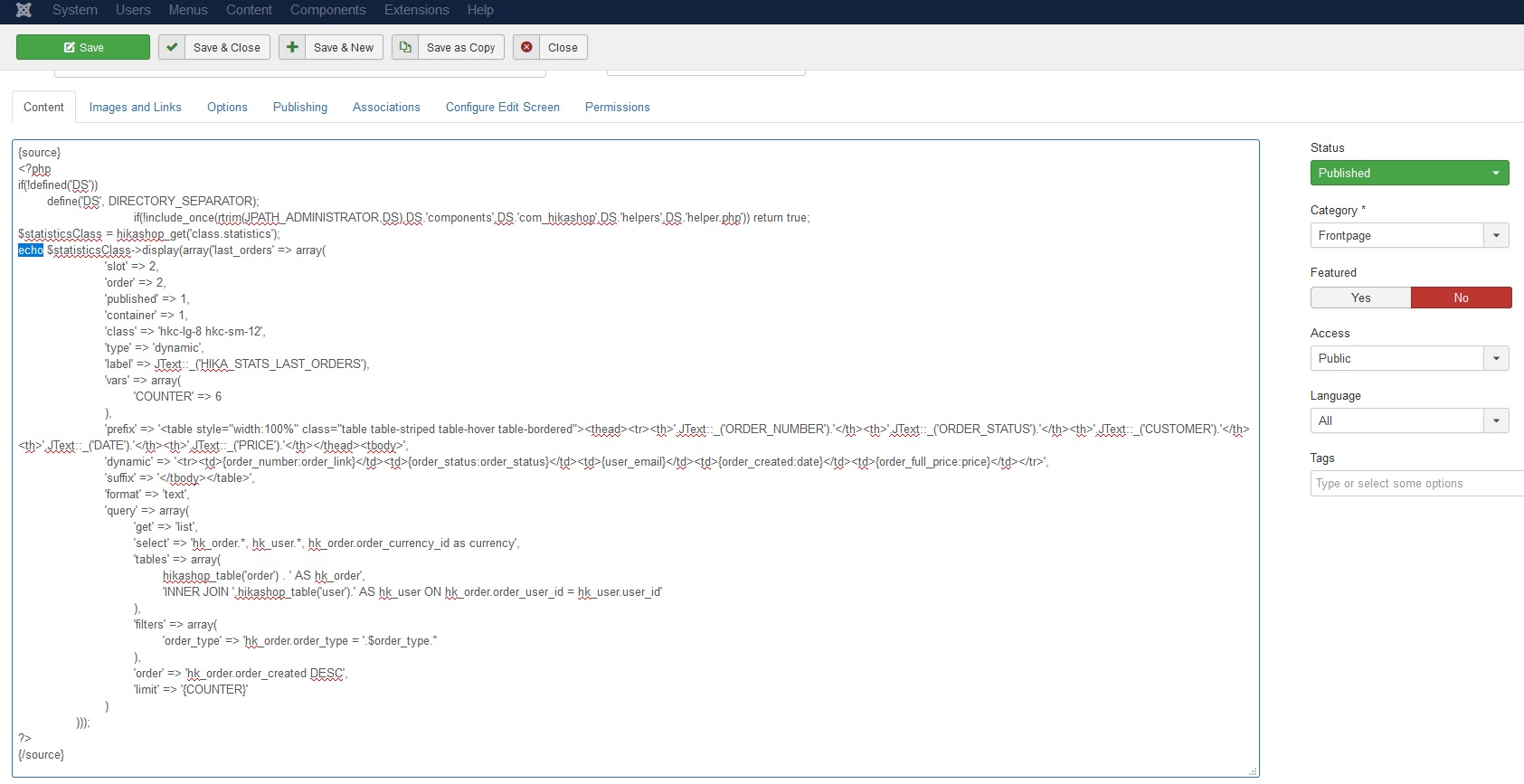
Please Log in or Create an account to join the conversation.
8 years 3 months ago #294321
by nicolas
Replied by nicolas on topic Iframing specific dashboard components
Hi,
Note that you need to initialize the variable $order_type.
So for example, you could add such line at the beginning:
$order_type='sale';
Also, maybe your tag plugin doesn't like that there are these {COUNTER}, {user_email}, etc tags inside the code.
Note that you need to initialize the variable $order_type.
So for example, you could add such line at the beginning:
$order_type='sale';
Also, maybe your tag plugin doesn't like that there are these {COUNTER}, {user_email}, etc tags inside the code.
Please Log in or Create an account to join the conversation.
8 years 3 months ago #294329
by derek_cts
Replied by derek_cts on topic Iframing specific dashboard components
What are the allowed $order_type=''; ?
Please Log in or Create an account to join the conversation.
8 years 3 months ago #294340
by nicolas
Replied by nicolas on topic Iframing specific dashboard components
Hi,
Check the order_type column in the hikashop_order table in your database and you'll see all the types.
In 95% of the cases, you'll only have the "sale" type. You can have another type for the sub-orders generated by HikaMarket for each vendor, and the affiliate system also has another type when you make pay outs to partners for their comissions.
But in your case, you want to use "sale".
Check the order_type column in the hikashop_order table in your database and you'll see all the types.
In 95% of the cases, you'll only have the "sale" type. You can have another type for the sub-orders generated by HikaMarket for each vendor, and the affiliate system also has another type when you make pay outs to partners for their comissions.
But in your case, you want to use "sale".
Please Log in or Create an account to join the conversation.
8 years 3 months ago #294358
by derek_cts
Replied by derek_cts on topic Iframing specific dashboard components
Ok, yeah that's what I had. Still not rendering anything when the code is put into the article.
I've checked other php code and it works.
I'm using the same codeset w/ the addition of the line:
still not working... suggestions?
I've checked other php code and it works.
I'm using the same codeset w/ the addition of the line:
Code:
<div id="lastOrders" style="height:500px;">
<?php
defined('_JEXEC') OR defined('_VALID_MOS') OR die( "Direct Access Is Not Allowed" );
if(!defined('DS'))
define('DS', DIRECTORY_SEPARATOR);
if(!include_once(rtrim(JPATH_ADMINISTRATOR,DS).DS.'components'.DS.'com_hikashop'.DS.'helpers'.DS.'helper.php')) return true;
$statisticsClass = hikashop_get('class.statistics');
$order_type='sale';
echo $statisticsClass->display(array('last_orders' => array(
'slot' => 2,
'order' => 2,
'published' => 1,
'container' => 1,
'class' => 'hkc-lg-8 hkc-sm-12',
'type' => 'dynamic',
'label' => JText::_('HIKA_STATS_LAST_ORDERS'),
'vars' => array(
'COUNTER' => 6
),
'prefix' => '<table style="width:100%" class="table table-striped table-hover table-bordered"><thead><tr><th>'.JText::_('ORDER_NUMBER').'</th><th>'.JText::_('ORDER_STATUS').'</th><th>'.JText::_('CUSTOMER').'</th><th>'.JText::_('DATE').'</th><th>'.JText::_('PRICE').'</th></thead><tbody>',
'dynamic' => '<tr><td>{order_number:order_link}</td><td>{order_status:order_status}</td><td>{user_email}</td><td>{order_created:date}</td><td>{order_full_price:price}</td></tr>',
'suffix' => '</tbody></table>',
'format' => 'text',
'query' => array(
'get' => 'list',
'select' => 'hk_order.*, hk_user.*, hk_order.order_currency_id as currency',
'tables' => array(
hikashop_table('order') . ' AS hk_order',
'INNER JOIN '.hikashop_table('user').' AS hk_user ON hk_order.order_user_id = hk_user.user_id'
),
'filters' => array(
'order_type' => 'hk_order.order_type = '.$order_type.''
),
'order' => 'hk_order.order_created DESC',
'limit' => '{COUNTER}'
)
)));
?>
</div>
still not working... suggestions?
Please Log in or Create an account to join the conversation.

8 years 3 months ago #294359
by Jerome
Jerome - Obsidev.com
HikaMarket & HikaSerial developer / HikaShop core dev team.
Also helping the HikaShop support team when having some time or couldn't sleep.
By the way, do not send me private message, use the "contact us" form instead.
Replied by Jerome on topic Iframing specific dashboard components
Hello,
Your $order_type is not quoted.
I don't understand why you do not have a query error.
Regards,
Your $order_type is not quoted.
I don't understand why you do not have a query error.
Regards,
Jerome - Obsidev.com
HikaMarket & HikaSerial developer / HikaShop core dev team.
Also helping the HikaShop support team when having some time or couldn't sleep.
By the way, do not send me private message, use the "contact us" form instead.
Please Log in or Create an account to join the conversation.
Time to create page: 0.270 seconds