

- Posts: 637
- Thank you received: 26
Infinite scroll needs improvement for responsive sites
8 years 11 months ago - 8 years 11 months ago #281556
by Lumiga
Kind regards,
Lumiga
Infinite scroll needs improvement for responsive sites was created by Lumiga
-- HikaShop version -- : 3.2.1
-- Joomla version -- : 3.8.1
-- PHP version -- : 7
Hi Hikashop team,
I have a feature request about the Infinite scroll.
I have implemented Infinite scroll 1x12 items on my site. My site is a responsive site and have different columns for different screen sizes.
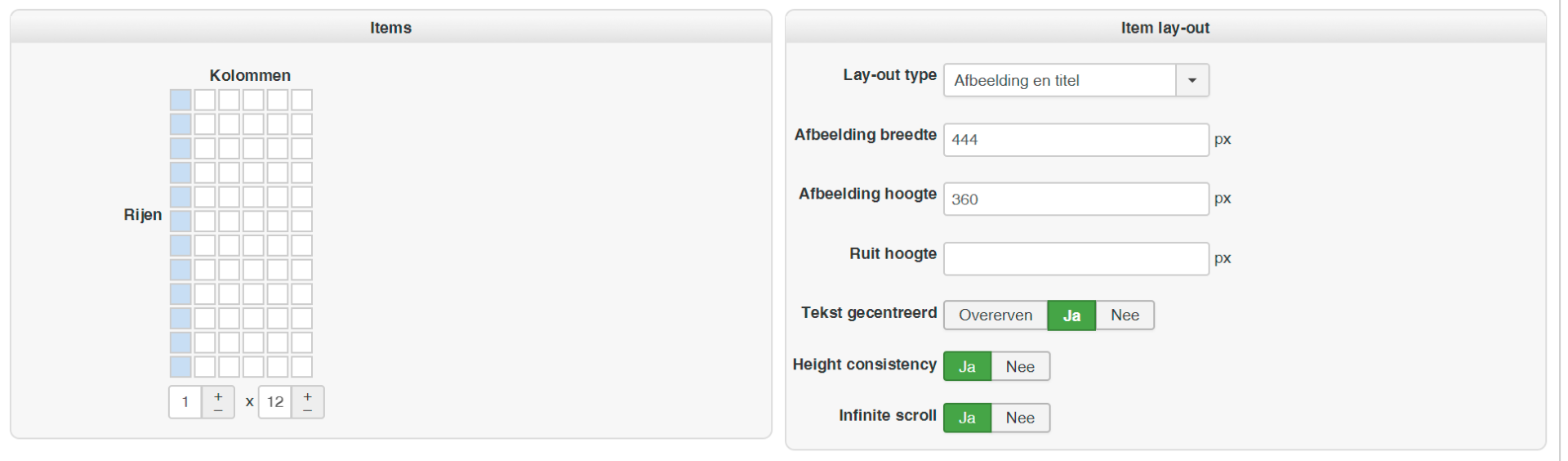
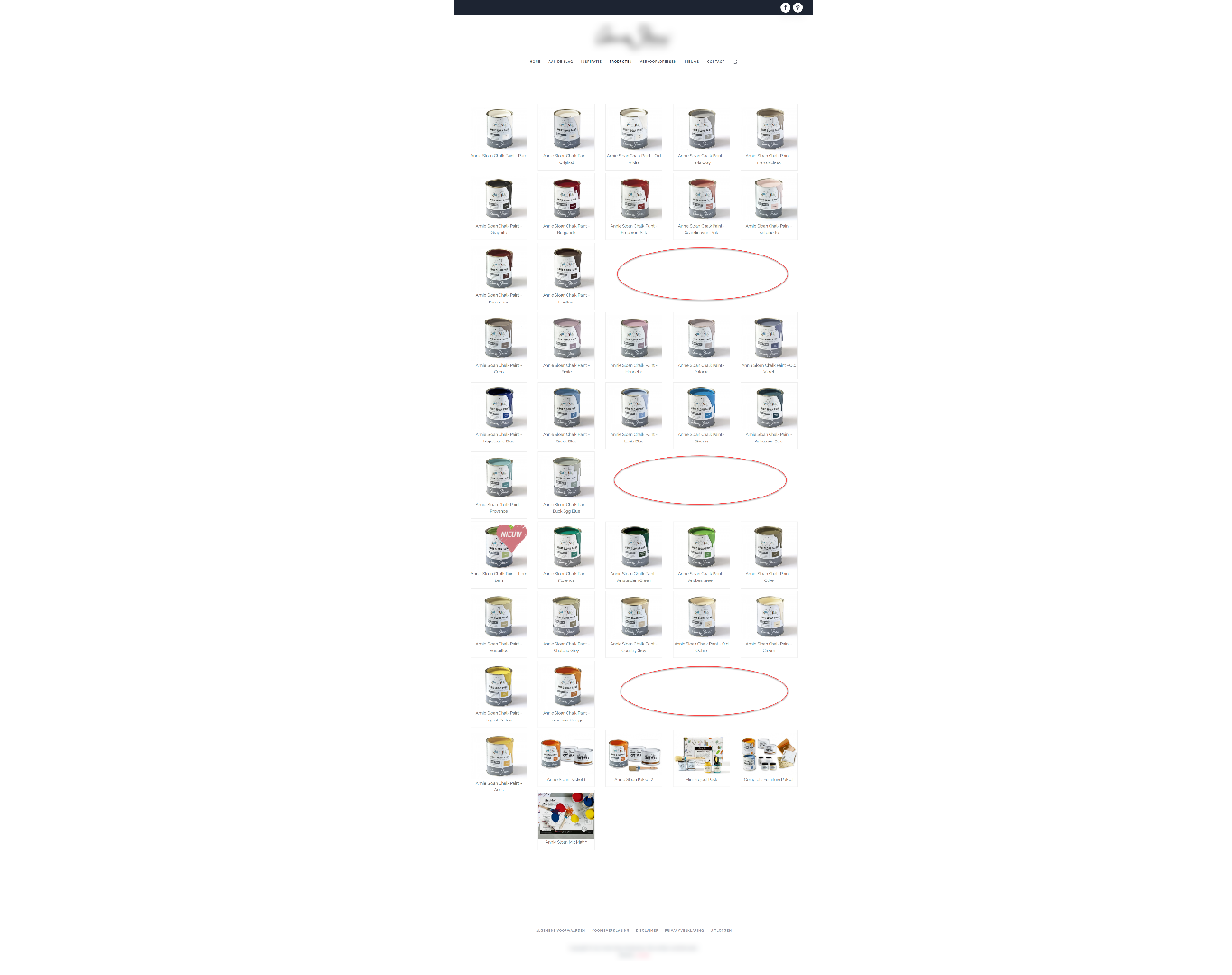
So the page is filled every time with 12 items. This works fine for 1, 2, 3 and 4 columns but when you have 5 columns it's not filling all the places.
It looks like this, see screenshot: Is it possible to fill in all the empty places so it looks a little bit better?
Hope to hear from you.
Kind regards,
Lumiga
-- Joomla version -- : 3.8.1
-- PHP version -- : 7
Hi Hikashop team,
I have a feature request about the Infinite scroll.
I have implemented Infinite scroll 1x12 items on my site. My site is a responsive site and have different columns for different screen sizes.
So the page is filled every time with 12 items. This works fine for 1, 2, 3 and 4 columns but when you have 5 columns it's not filling all the places.
It looks like this, see screenshot: Is it possible to fill in all the empty places so it looks a little bit better?
Hope to hear from you.
Kind regards,
Lumiga
Kind regards,
Lumiga
Last edit: 8 years 11 months ago by Lumiga.
Please Log in or Create an account to join the conversation.

8 years 11 months ago - 8 years 11 months ago #281570
by Philip
Replied by Philip on topic Infinite scroll needs improvement for responsive sites
Hello,
I think that your template (or plugin ?) display mess with your HikaShop configuration, because if I follow your Item Menu configuration screenshot, you must have in any case only 1 columns.
Maybe you have to see this specific point with your template (or plugin?) creator ?
Hope this will help you.
Regards
I think that your template (or plugin ?) display mess with your HikaShop configuration, because if I follow your Item Menu configuration screenshot, you must have in any case only 1 columns.
Maybe you have to see this specific point with your template (or plugin?) creator ?
Hope this will help you.
Regards
Last edit: 8 years 11 months ago by Philip.
Please Log in or Create an account to join the conversation.
8 years 11 months ago - 8 years 11 months ago #281609
by Lumiga
Kind regards,
Lumiga
Replied by Lumiga on topic Infinite scroll needs improvement for responsive sites
Hi Philip,
When I use this configuration (6x2 items), I got the same effect.
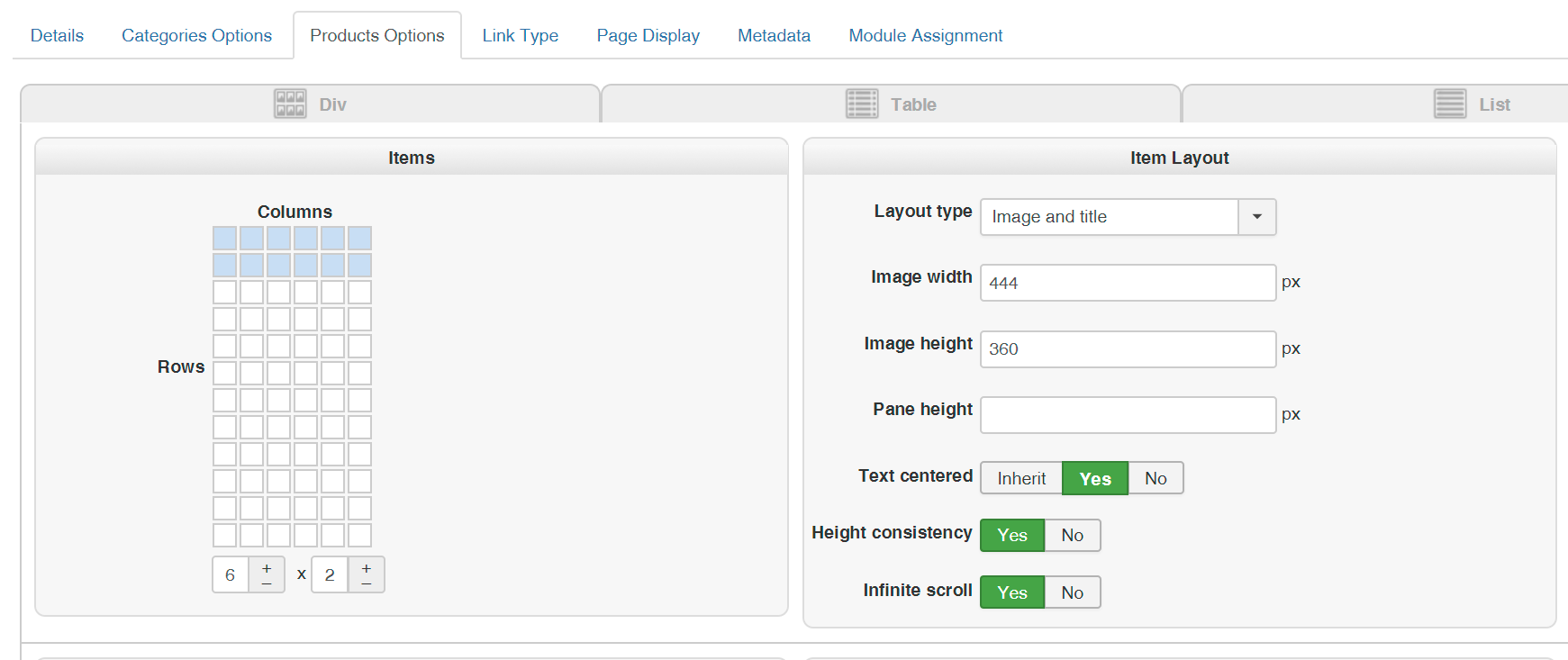
The only thing I did in the code was creating more columns than standard in your code.
I did it with this code (with the help from Nicolas): www.hikashop.com/forum/product-category-...mber-of-columns.html
I'm not a developer, but I found this website. Here you can see it is possible to add images without having holes in the grid.
infinite-scroll.com/options.html#outlayer
I hope that you will take a look at this issue, but forgive me if it has something to do with my configuration.
I think if you configure 2x1 columns/rows on the menu item in you demo website with a 3 columns presentation, you will get the same effect.
---
Or maybe we can do it with some of custom code between the screen size 1920px and 1281px.
And set the columns and rows to 5 x 2? Would that be an option or is that unpossible?
Kind regards,
Lumiga
When I use this configuration (6x2 items), I got the same effect.
The only thing I did in the code was creating more columns than standard in your code.
I did it with this code (with the help from Nicolas): www.hikashop.com/forum/product-category-...mber-of-columns.html
Code:
@media only screen and (max-width: 3840px) {
.hikashop_subcategories div.hikashop_category, .hikashop_products_listing div.hikashop_product
{width: 16.66% !important; float:left;}
}
@media only screen and (max-width: 1920px) {
.hikashop_subcategories div.hikashop_category, .hikashop_products_listing div.hikashop_product
{width: 20% !important; float:left;}
}
@media only screen and (max-width: 1280px) {
.hikashop_subcategories div.hikashop_category, .hikashop_products_listing div.hikashop_product
{width: 25% !important; float:left;}
}
@media only screen and (max-width: 1024px) {
.hikashop_subcategories div.hikashop_category, .hikashop_products_listing div.hikashop_product
{width: 33% !important; float:left; }
}
@media only screen and (max-width: 640px) {
.hikashop_subcategories div.hikashop_category, .hikashop_products_listing div.hikashop_product
{width: 50% !important; float:left; }
}
@media only screen and (max-width: 390px) {
.hikashop_subcategories div.hikashop_category, .hikashop_products_listing div.hikashop_product
{width: 100% !important; float:left;}
}
I'm not a developer, but I found this website. Here you can see it is possible to add images without having holes in the grid.
infinite-scroll.com/options.html#outlayer
I hope that you will take a look at this issue, but forgive me if it has something to do with my configuration.
I think if you configure 2x1 columns/rows on the menu item in you demo website with a 3 columns presentation, you will get the same effect.
---
Or maybe we can do it with some of custom code between the screen size 1920px and 1281px.
And set the columns and rows to 5 x 2? Would that be an option or is that unpossible?
Code:
@media screen and (max-width: 1920px) and (min-width: 1281px) {
?????? (5x2 columns/rows) ?????????
}
Kind regards,
Lumiga
Kind regards,
Lumiga
Last edit: 8 years 11 months ago by Lumiga.
Please Log in or Create an account to join the conversation.

8 years 11 months ago #281636
by Jerome
Jerome - Obsidev.com
HikaMarket & HikaSerial developer / HikaShop core dev team.
Replied by Jerome on topic Infinite scroll needs improvement for responsive sites
Hello,
For what I understand from your other posts ; you create these blanks by resizing the browser window.
So by doing it, you changed the rules of the display.
The "height consistency" which set-up the tiles height when the page loaded ; but if you change the rules, the processed height is maybe not the right one ; the product name can be in two lines and not only one, the image can be smaller, etc.
So the issue is not really a responsive issue but an adaptability issue ; it is very different.
Responsive is to provide the same content which will be display correctly on different devices (screens).
So you can display the page on a computer or on a smartphone ; it will have a different result but it will be display fine.
Resizing is not part of responsive ; and that was not the purpose of the "height consistency" script when I created it.
Its purpose is to set the same height to every blocks because the content in the listing is not always the same and users do not want to spent time to adjust their content or their CSS to have some homogeneous.
Regards,
For what I understand from your other posts ; you create these blanks by resizing the browser window.
So by doing it, you changed the rules of the display.
The "height consistency" which set-up the tiles height when the page loaded ; but if you change the rules, the processed height is maybe not the right one ; the product name can be in two lines and not only one, the image can be smaller, etc.
So the issue is not really a responsive issue but an adaptability issue ; it is very different.
Responsive is to provide the same content which will be display correctly on different devices (screens).
So you can display the page on a computer or on a smartphone ; it will have a different result but it will be display fine.
Resizing is not part of responsive ; and that was not the purpose of the "height consistency" script when I created it.
Its purpose is to set the same height to every blocks because the content in the listing is not always the same and users do not want to spent time to adjust their content or their CSS to have some homogeneous.
Regards,
Jerome - Obsidev.com
HikaMarket & HikaSerial developer / HikaShop core dev team.
The following user(s) said Thank You: Lumiga
Please Log in or Create an account to join the conversation.

8 years 7 months ago - 8 years 7 months ago #288716
by erickb
Replied by erickb on topic Infinite scroll needs improvement for responsive sites
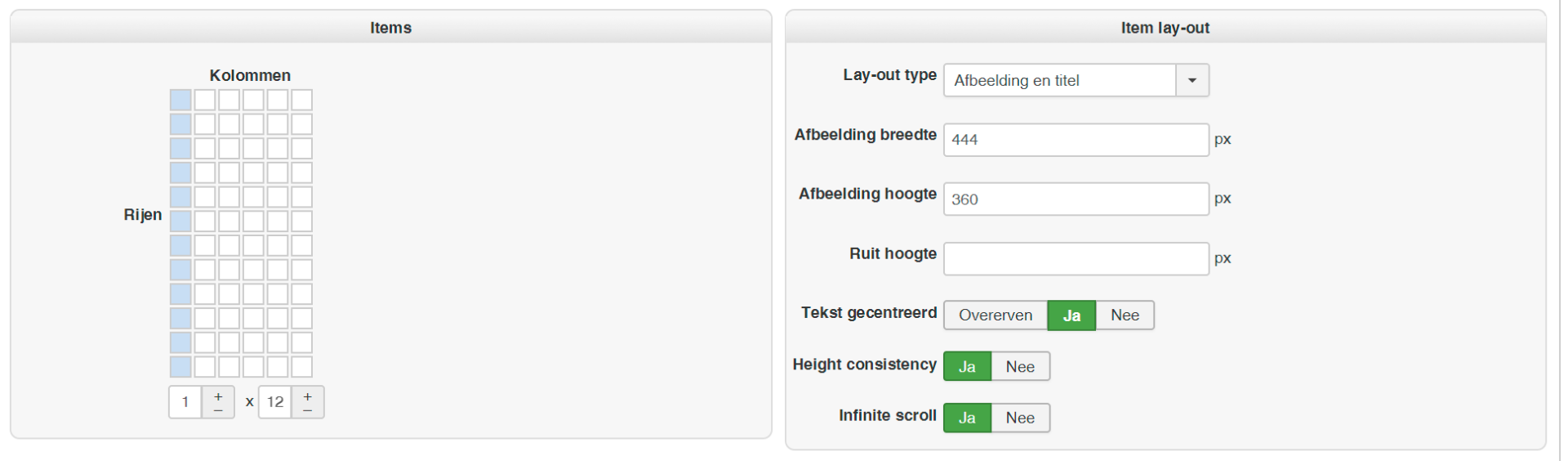
where do you find this view ? step by step please
thank you
thank you
Last edit: 8 years 7 months ago by erickb.
Please Log in or Create an account to join the conversation.
8 years 7 months ago #288737
by Lumiga
Kind regards,
Lumiga
Replied by Lumiga on topic Infinite scroll needs improvement for responsive sites
Hi Erick,
You can find this view at the menu-item for your webshop and then look at the different tabs and use the div's.
Kind regards,
Lumiga
You can find this view at the menu-item for your webshop and then look at the different tabs and use the div's.
Kind regards,
Lumiga
Kind regards,
Lumiga
The following user(s) said Thank You: Philip
Please Log in or Create an account to join the conversation.
8 years 7 months ago - 8 years 7 months ago #288738
by erickb
Replied by erickb on topic Infinite scroll needs improvement for responsive sites
thanks a lot Sailfin !
but now I have to check 100 links to set infinite scroll everywhere ?! when a simple default value in the config would be useful
where are the values stored in the database ? Ill change all my links with SQL
but now I have to check 100 links to set infinite scroll everywhere ?! when a simple default value in the config would be useful
where are the values stored in the database ? Ill change all my links with SQL
Last edit: 8 years 7 months ago by erickb.
Please Log in or Create an account to join the conversation.
8 years 7 months ago #288739
by Jerome
Jerome - Obsidev.com
HikaMarket & HikaSerial developer / HikaShop core dev team.
Replied by Jerome on topic Infinite scroll needs improvement for responsive sites
ErickB : Please do not duplicate your messages in our forum.
You have to note that only menus have an "infinite scroll" setting.
Since it still considered as a special feature, there is no "default value" for that, just like there is not default value for enabling "carousel" in modules (or the height consistency).
You have to note that only menus have an "infinite scroll" setting.
Since it still considered as a special feature, there is no "default value" for that, just like there is not default value for enabling "carousel" in modules (or the height consistency).
Jerome - Obsidev.com
HikaMarket & HikaSerial developer / HikaShop core dev team.
Please Log in or Create an account to join the conversation.
8 years 7 months ago - 8 years 7 months ago #288796
by erickb
Replied by erickb on topic Infinite scroll needs improvement for responsive sites
yes it could be a default value of course !
anyway I found it in #__menu params if = 0 I replace by 1 , if not set at all I write it
it works ! I changed all with SQL
anyway I found it in #__menu params if = 0 I replace by 1 , if not set at all I write it
it works ! I changed all with SQL
Last edit: 8 years 7 months ago by erickb.
Please Log in or Create an account to join the conversation.
Time to create page: 0.156 seconds