

- Posts: 637
- Thank you received: 26
Media manager update
7 years 5 months ago #306406
by Lumiga
Kind regards,
Lumiga
Media manager update was created by Lumiga
-- HikaShop version -- : 4.0.3
-- Joomla version -- : 3.9.5
-- PHP version -- : 7.3
Hello everyone, I hope you are doing well.
I have a request.
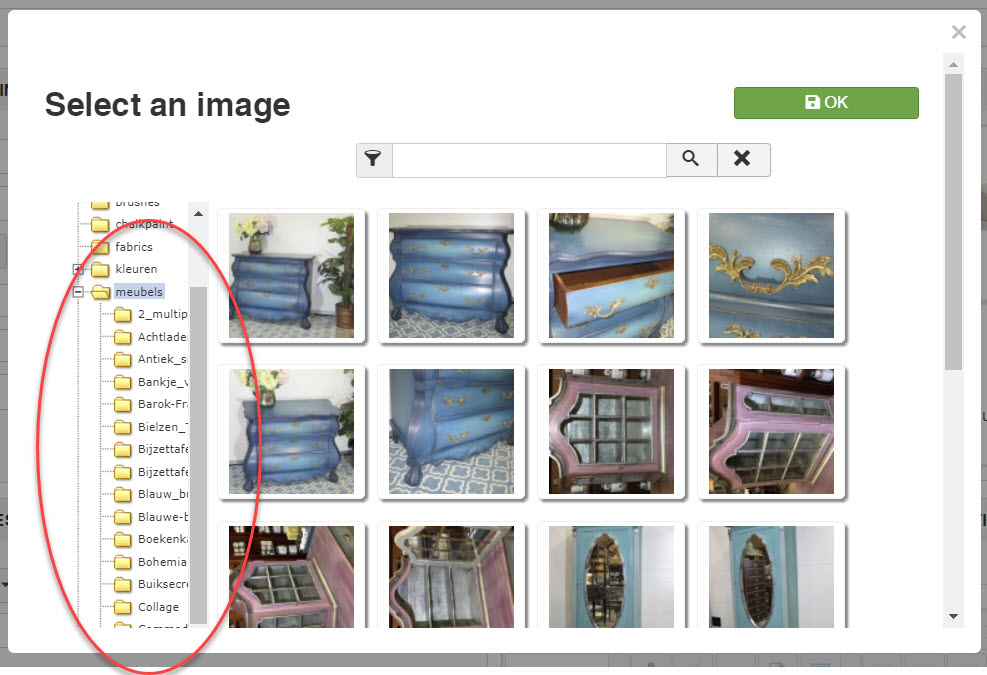
If you are ever going to tackle the media manager please take a look if it's possible to use the media manager from JCE or Joomla and otherwise give some more space for the folders. As you can see in the screenshot, this is difficult to read.
Thanks again
Lumiga
-- Joomla version -- : 3.9.5
-- PHP version -- : 7.3
Hello everyone, I hope you are doing well.
I have a request.
If you are ever going to tackle the media manager please take a look if it's possible to use the media manager from JCE or Joomla and otherwise give some more space for the folders. As you can see in the screenshot, this is difficult to read.
Thanks again
Lumiga
Kind regards,
Lumiga
Please Log in or Create an account to join the conversation.

7 years 5 months ago #306413
by nicolas
Replied by nicolas on topic Media manager update
Hi,
1. We'll look at adding more width to the left explorer for next version. Note that you can also add a view override of the galleryimage view file via the menu Display>Views and increase the width in the HTML there yourself.
2. Note also that you have the scrollbar at the bottom of the popup to scroll horizontally the left area.
3. Integrating with the Joomla media manager is a good idea and that's something we wanted to look at for a while. However, it has several issues (it requires using the exact same folder as joomla for the images upload for example. Our image selector allows for dynamic folder restrictions. So for vendors creating products on the frontend, there is the possibility to have them only access their own upload folder) and we were also waiting for the new media manager which has been postponed several times (it will apparently be in Joomla 4).
1. We'll look at adding more width to the left explorer for next version. Note that you can also add a view override of the galleryimage view file via the menu Display>Views and increase the width in the HTML there yourself.
2. Note also that you have the scrollbar at the bottom of the popup to scroll horizontally the left area.
3. Integrating with the Joomla media manager is a good idea and that's something we wanted to look at for a while. However, it has several issues (it requires using the exact same folder as joomla for the images upload for example. Our image selector allows for dynamic folder restrictions. So for vendors creating products on the frontend, there is the possibility to have them only access their own upload folder) and we were also waiting for the new media manager which has been postponed several times (it will apparently be in Joomla 4).
Please Log in or Create an account to join the conversation.
Time to create page: 0.156 seconds