

- Posts: 966
- Thank you received: 11
Make All Boxes, Espcially Related Products Box Expandable
6 years 3 months ago #320674
by MyWorld
Make All Boxes, Espcially Related Products Box Expandable was created by MyWorld
Hello Team,
Can you put on your list to make the "Related Products" box expandable, similar to how the "Keywords" field is where you can expand it in order to see all the content.
It actually would be nice to make all boxes expandable if possible
Thanks
Can you put on your list to make the "Related Products" box expandable, similar to how the "Keywords" field is where you can expand it in order to see all the content.
It actually would be nice to make all boxes expandable if possible
Thanks
Please Log in or Create an account to join the conversation.

6 years 3 months ago #320708
by nicolas
Replied by nicolas on topic Make All Boxes, Espcially Related Products Box Expandable
Hi,
The box where you have the products listed should expand in height automatically when new elements are added.
And the box which appear when you click in the first box has a magnet at the bottom to increase its height.
The box where you have the products listed should expand in height automatically when new elements are added.
And the box which appear when you click in the first box has a magnet at the bottom to increase its height.
Please Log in or Create an account to join the conversation.
6 years 3 months ago #320839
by MyWorld
Replied by MyWorld on topic Make All Boxes, Espcially Related Products Box Expandable
The related products box is the one I'm more concerned about. It does not have the tingy to expand it.
Please see attached.
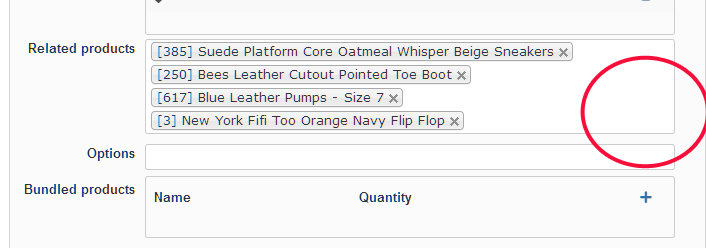
Please see attached.
Please Log in or Create an account to join the conversation.
6 years 3 months ago #320864
by nicolas
Replied by nicolas on topic Make All Boxes, Espcially Related Products Box Expandable
Hi,
As I said, the height of that box increases automatically when you add new related products.
So you should not need to resize it vertically.
I could understand the need to resize it horizontally if the name of your products would go over the width of the box but the box width already has quite some space for that.
As I said, the height of that box increases automatically when you add new related products.
So you should not need to resize it vertically.
I could understand the need to resize it horizontally if the name of your products would go over the width of the box but the box width already has quite some space for that.
Please Log in or Create an account to join the conversation.
6 years 2 months ago #321828
by MyWorld
Replied by MyWorld on topic Make All Boxes, Espcially Related Products Box Expandable
I know that it expands but the space is still small/limited. I just think it would be nice to be able to expand it manually, similar to the "Keywords" box.
Thanks anyway.
Thanks anyway.
Please Log in or Create an account to join the conversation.
6 years 2 months ago #321839
by nicolas
Replied by nicolas on topic Make All Boxes, Espcially Related Products Box Expandable
Thanks for your feedback.
Please Log in or Create an account to join the conversation.
5 years 5 months ago #331569
by MyWorld
Replied by MyWorld on topic Make All Boxes, Espcially Related Products Box Expandable
Any idea when/if the "related box" will have the ability to expand. I find it a bit hard squeezing through the little space given. It would be nice to be able to see a lot more products/categories in the box.
Thanks!
Thanks!
Please Log in or Create an account to join the conversation.
5 years 5 months ago #331574
by nicolas
Replied by nicolas on topic Make All Boxes, Espcially Related Products Box Expandable
Hi,
As I said before, the height of the box expands automatically when you add more elements. So I don't see how allowing you to expend the height manually would help see more products / categories since you already see all the selected ones in it.
So I don't see why we would do that.
Or maybe you're talking about the selection area that pops with the categories tree below the main box ? If you want to increase its height, you can do that easily with a bit of CSS added in your backend:
As I said before, the height of the box expands automatically when you add more elements. So I don't see how allowing you to expend the height manually would help see more products / categories since you already see all the selected ones in it.
So I don't see why we would do that.
Or maybe you're talking about the selection area that pops with the categories tree below the main box ? If you want to increase its height, you can do that easily with a bit of CSS added in your backend:
Code:
div.namebox-popup div.namebox-popup-container {
height: 300px !important;
}
Please Log in or Create an account to join the conversation.
5 years 5 months ago #331602
by MyWorld
Yes, I was referring to the area that pops up. I guess I should have said that initially. For my information it was added to System > Configuration > Display > CSS > Back-end CSS File.
Thanks for the code.
Replied by MyWorld on topic Make All Boxes, Espcially Related Products Box Expandable
Or maybe you're talking about the selection area that pops with the categories tree below the main box ? If you want to increase its height, you can do that easily with a bit of CSS added in your backend:
Yes, I was referring to the area that pops up. I guess I should have said that initially. For my information it was added to System > Configuration > Display > CSS > Back-end CSS File.
Thanks for the code.
Please Log in or Create an account to join the conversation.
Time to create page: 0.227 seconds