

- Posts: 52
- Thank you received: 2
1054 - Unknown column...
12 years 2 months ago #166589
by Lexnia
1054 - Unknown column... was created by Lexnia
I've been working on the filters for all product categories and they all work a treat. The only problem I'm having now is that I've created a filters for the brands pages too and they don't work.
The filter shows up fine, but when I select a search criteria and click 'Filter', it brings me to an error page with the following message:
1054 - Unknown column 'a.product_id' in 'on clause' SQL=SELECT DISTINCT b.* FROM zudjf_hikashop_product AS b INNER JOIN zudjf_hikashop_product_category AS Brand_Colour2 ON Brand_Colour2.product_id=a.product_id AND Brand_Colour2.category_id IN (73) WHERE b.product_published=1 AND b.product_type = 'main' AND b.product_manufacturer_id IN (22) AND b.product_quantity!=0 AND (b.product_access = 'all' OR b.product_access LIKE '%,9,%') ORDER BY b.product_created DESC LIMIT 0, 12
I've googled the error message, but can's find an answer.
Does anyone know what I can do to fix this?
I've unpublished the filter (except for the price filter, which seems to work) so the message does not come up in the meantime, but I've attached a screenshot.
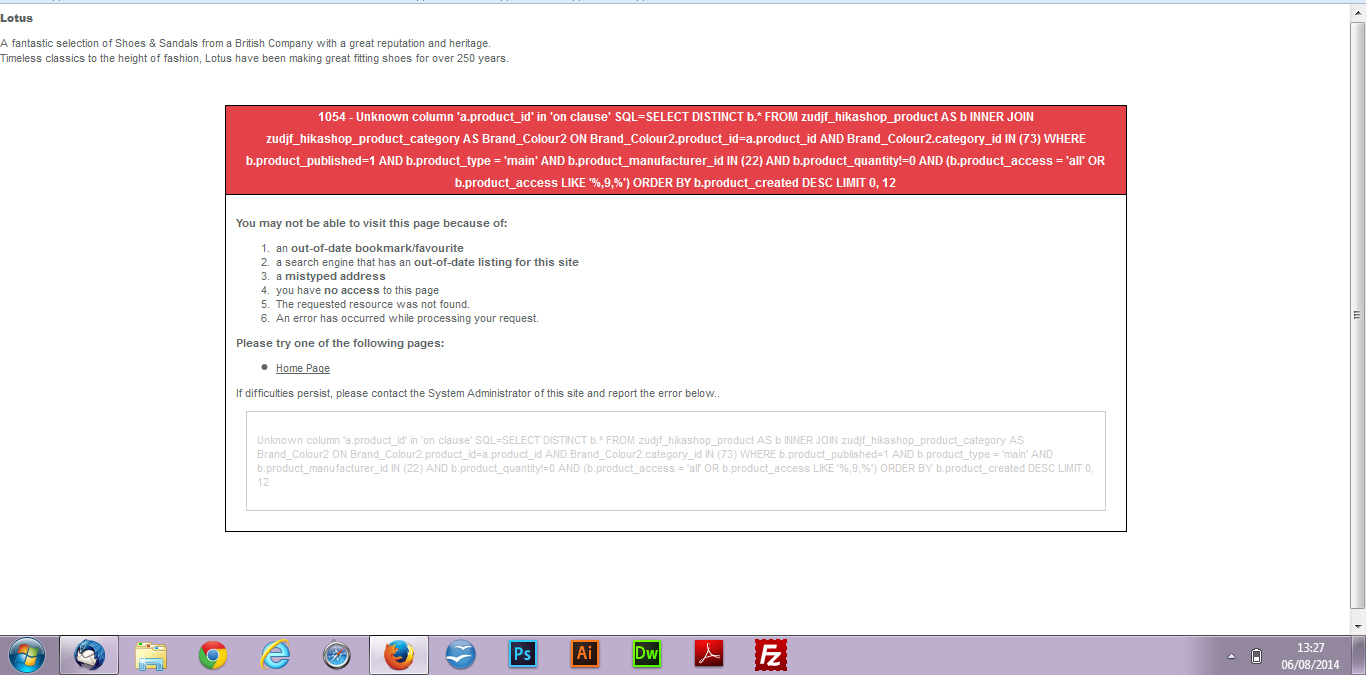
The filter shows up fine, but when I select a search criteria and click 'Filter', it brings me to an error page with the following message:
1054 - Unknown column 'a.product_id' in 'on clause' SQL=SELECT DISTINCT b.* FROM zudjf_hikashop_product AS b INNER JOIN zudjf_hikashop_product_category AS Brand_Colour2 ON Brand_Colour2.product_id=a.product_id AND Brand_Colour2.category_id IN (73) WHERE b.product_published=1 AND b.product_type = 'main' AND b.product_manufacturer_id IN (22) AND b.product_quantity!=0 AND (b.product_access = 'all' OR b.product_access LIKE '%,9,%') ORDER BY b.product_created DESC LIMIT 0, 12
I've googled the error message, but can's find an answer.
Does anyone know what I can do to fix this?
I've unpublished the filter (except for the price filter, which seems to work) so the message does not come up in the meantime, but I've attached a screenshot.
Please Log in or Create an account to join the conversation.

12 years 2 months ago #166596
by nicolas
Replied by nicolas on topic 1054 - Unknown column...
Please replace the content of the file administrator/components/com_hikashop/classes/filter.php with this:
pastebin.com/K2zMf5cW
pastebin.com/K2zMf5cW
Please Log in or Create an account to join the conversation.
12 years 2 months ago #166700
by Lexnia
Replied by Lexnia on topic 1054 - Unknown column...
Hi Nicolas,
Thanks for your response.
I replaced the specific page with pastebin.com/K2zMf5cW as suggested, but this brings up an error page across the entire website:
Fatal error: Call to a member function getFilters() on a non-object in /homepages/30/d293983197/htdocs/elevateshop/components/com_hikashop/views/product/view.html.php on line 125
What should i do?
Thanks for your response.
I replaced the specific page with pastebin.com/K2zMf5cW as suggested, but this brings up an error page across the entire website:
Fatal error: Call to a member function getFilters() on a non-object in /homepages/30/d293983197/htdocs/elevateshop/components/com_hikashop/views/product/view.html.php on line 125
What should i do?
Please Log in or Create an account to join the conversation.
12 years 2 months ago #166719
by nicolas
Replied by nicolas on topic 1054 - Unknown column...
Hi,
This indicates that HikaShop didn't find the code for the filter class (the code that I told you to put in the filter.php file.
So you must not have copy/pasted the code in the filter.php properly or something.
This indicates that HikaShop didn't find the code for the filter class (the code that I told you to put in the filter.php file.
So you must not have copy/pasted the code in the filter.php properly or something.
Please Log in or Create an account to join the conversation.
12 years 2 months ago #166801
by Lexnia
Replied by Lexnia on topic 1054 - Unknown column...
Hi Nicolas,
I replaced the entire page with pastebin.com/K2zMf5cW, I guess this was not correct. Where exactly should I place the code in the filter.php file?
I replaced the entire page with pastebin.com/K2zMf5cW, I guess this was not correct. Where exactly should I place the code in the filter.php file?
Please Log in or Create an account to join the conversation.
12 years 2 months ago #166806
by nicolas
Replied by nicolas on topic 1054 - Unknown column...
You should indeed replace the whole file. There is nothing particular to do.
Please Log in or Create an account to join the conversation.

Less
More
- Posts: 20
- Thank you received: 1
12 years 2 months ago #169028
by andreahill
Replied by andreahill on topic 1054 - Unknown column...
I am having the same problem. I have two filters on my site
diamondnecessities.com/index.php?option=...og&id=99&Itemid=1610
- Price, and Carat Size.
I uploaded the newest version of Hikashop yesterday.
Now the price filter is not working. However, I don't know for sure that the price filter was working before the update either. The carat filter is working just fine.
I tried deleting and recreating the filter. I tried the suggestions you made to the previous person with this problem. I created an entirely new filter (new name) and reset the related parameters. Nothing has worked. Here is the error I am getting:
diamondnecessities.com/index.php?option=...k=listing&Itemid=424
Thank you.
I uploaded the newest version of Hikashop yesterday.
Now the price filter is not working. However, I don't know for sure that the price filter was working before the update either. The carat filter is working just fine.
I tried deleting and recreating the filter. I tried the suggestions you made to the previous person with this problem. I created an entirely new filter (new name) and reset the related parameters. Nothing has worked. Here is the error I am getting:
diamondnecessities.com/index.php?option=...k=listing&Itemid=424
Thank you.
Please Log in or Create an account to join the conversation.
12 years 2 months ago #169035
by nicolas
Replied by nicolas on topic 1054 - Unknown column...
Hi,
The error that you have on your website is different than the error that the other user on this thread had.
Could you replace the content of the file administrator/components/com_hikashop/classes/filter.php with this pastebin.com/K2zMf5cW and try again ?
The error that you have on your website is different than the error that the other user on this thread had.
Could you replace the content of the file administrator/components/com_hikashop/classes/filter.php with this pastebin.com/K2zMf5cW and try again ?
The following user(s) said Thank You: kassil
Please Log in or Create an account to join the conversation.
Less
More
- Posts: 20
- Thank you received: 1
12 years 1 month ago #169644
by andreahill
Replied by andreahill on topic 1054 - Unknown column...
This doesn't fix it either  . Any other suggestions? This filter is really important.
. Any other suggestions? This filter is really important. Please Log in or Create an account to join the conversation.
12 years 1 month ago #169656
by nicolas
Replied by nicolas on topic 1054 - Unknown column...
Then I don't know and it would require debugging the problem on the website.
Please provide a FTP access and a link to this thread via our contact form and we can look deeper into the problem.
www.hikashop.com/support/contact-us.html
Please provide a FTP access and a link to this thread via our contact form and we can look deeper into the problem.
www.hikashop.com/support/contact-us.html
Please Log in or Create an account to join the conversation.

12 years 1 month ago - 12 years 1 month ago #169705
by nossibe63
Replied by nossibe63 on topic 1054 - Unknown column...
Hi, I have the same problem, I send you FTP access to my site.
Problem on this page : www.impress-3d.com/fichiers-3d/imprimante-3d.html
I replace the content of the file administrator/components/com_hikashop/classes/filter.php with this pastebin.com/K2zMf5cW but it doesn't fix the problem.
After replace I have this message :
Parse error: syntax error, unexpected 'hikashopFilterClass' (T_STRING) in /administrator/components/com_hikashop/classes/filter.php on line 1
Thank you
(sorry for my bad english)
Problem on this page : www.impress-3d.com/fichiers-3d/imprimante-3d.html
I replace the content of the file administrator/components/com_hikashop/classes/filter.php with this pastebin.com/K2zMf5cW but it doesn't fix the problem.
After replace I have this message :
Parse error: syntax error, unexpected 'hikashopFilterClass' (T_STRING) in /administrator/components/com_hikashop/classes/filter.php on line 1
Thank you
(sorry for my bad english)
Last edit: 12 years 1 month ago by nossibe63.
Please Log in or Create an account to join the conversation.
12 years 1 month ago #169795
by nicolas
Replied by nicolas on topic 1054 - Unknown column...
Hi,
@nossibe63: I've just copied the code from pastebin.com to your filter.php and it didn't create any error and just fix the problem. So I'm thinking that you didn't do your copy/paste from my pastebin.com link properly.
@nossibe63: I've just copied the code from pastebin.com to your filter.php and it didn't create any error and just fix the problem. So I'm thinking that you didn't do your copy/paste from my pastebin.com link properly.
Please Log in or Create an account to join the conversation.
12 years 1 month ago #169810
by nossibe63
Replied by nossibe63 on topic 1054 - Unknown column...
Hi,
I do not understand how I could copy the code wrong, yet I have done this several times with the top code and then with the bottom one ...
Thank you for your help!
Regards, Nossibe
I do not understand how I could copy the code wrong, yet I have done this several times with the top code and then with the bottom one ...
Thank you for your help!
Regards, Nossibe
Please Log in or Create an account to join the conversation.
12 years 1 month ago #170166
by permsk
Replied by permsk on topic 1054 - Unknown column...
thanks helped
Please Log in or Create an account to join the conversation.
Less
More
- Posts: 20
- Thank you received: 1
12 years 1 month ago #170288
by andreahill
Replied by andreahill on topic 1054 - Unknown column...
I just tried it again, in case I was making a mistake. Still not fixed. One thing I noticed. You told me to replace the pastebin file into
administrator/components/com_hikashop/classes/filter.php
I don't have a /classes/ folder. My filter.php is in components/com_hikashop/fields/filter.php. Could that be part of the problem?
administrator/components/com_hikashop/classes/filter.php
I don't have a /classes/ folder. My filter.php is in components/com_hikashop/fields/filter.php. Could that be part of the problem?
Please Log in or Create an account to join the conversation.
12 years 1 month ago #170298
by permsk
Replied by permsk on topic 1054 - Unknown column...
update hikashop
Please Log in or Create an account to join the conversation.
Less
More
- Posts: 20
- Thank you received: 1
12 years 1 month ago #170299
by andreahill
Replied by andreahill on topic 1054 - Unknown column...
I'm on the latest version.
Please Log in or Create an account to join the conversation.
12 years 1 month ago #170309
by permsk
Replied by permsk on topic 1054 - Unknown column...
delete and new
Please Log in or Create an account to join the conversation.

12 years 1 month ago #170315
by Jerome
Jerome - Obsidev.com
HikaMarket & HikaSerial developer / HikaShop core dev team.
Replied by Jerome on topic 1054 - Unknown column...
Hi,
@andreahill : You do not look in the right folder.
"administrator/components/com_hikashop/classes/filter.php"
@permsk : Thanks for the help ; don't worry, we will handle it.
Regards,
@andreahill : You do not look in the right folder.
"administrator/components/com_hikashop/classes/filter.php"
@permsk : Thanks for the help ; don't worry, we will handle it.
Regards,
Jerome - Obsidev.com
HikaMarket & HikaSerial developer / HikaShop core dev team.
Please Log in or Create an account to join the conversation.
Less
More
- Posts: 20
- Thank you received: 1
12 years 1 month ago #170448
by andreahill
Replied by andreahill on topic 1054 - Unknown column...
Oh good grief. You are so right. OK, it's fixed. Sorry!
Please Log in or Create an account to join the conversation.
Time to create page: 0.592 seconds