

- Posts: 30
- Thank you received: 0
Products dissapear after filtering
11 years 11 months ago - 11 years 11 months ago #178818
by Bugaenko
Products dissapear after filtering was created by Bugaenko
-- HikaShop version -- : 2.3.4
-- Joomla version -- : 3.3.3
-- Browser(s) name and version -- : Firefox, Chrome latest
I`m new to Hikashop, sorry for such questions...
After filtering there are no products on the screen.Shall I find settings for displaying filtered items (category listing?)?
Also filter is dispalyed in checkout process (because checkout do not change the menu when pushing the cart module). Is there any way to fix it ?
Thank you!
-- Joomla version -- : 3.3.3
-- Browser(s) name and version -- : Firefox, Chrome latest
I`m new to Hikashop, sorry for such questions...
After filtering there are no products on the screen.Shall I find settings for displaying filtered items (category listing?)?
Also filter is dispalyed in checkout process (because checkout do not change the menu when pushing the cart module). Is there any way to fix it ?
Thank you!
Last edit: 11 years 11 months ago by Bugaenko.
Please Log in or Create an account to join the conversation.

11 years 11 months ago #178832
by nicolas
Replied by nicolas on topic Products dissapear after filtering
Hi,
1. You want to turn on the "force redirect" option of your hikashop filter module and enter the id of the menu item of the type hikashop products listing configured to display all your products (the HikaShop "products listing" menu item which is installed by default with HikaShop is there for that) in the menu item id option of the module.
2. Yes. You can select a "hikashop checkout" type menu item in the "force a menu on checkout" option of the configuration in order to do that.
1. You want to turn on the "force redirect" option of your hikashop filter module and enter the id of the menu item of the type hikashop products listing configured to display all your products (the HikaShop "products listing" menu item which is installed by default with HikaShop is there for that) in the menu item id option of the module.
2. Yes. You can select a "hikashop checkout" type menu item in the "force a menu on checkout" option of the configuration in order to do that.
The following user(s) said Thank You: Bugaenko
Please Log in or Create an account to join the conversation.
11 years 11 months ago - 11 years 11 months ago #178862
by Bugaenko
Replied by Bugaenko on topic Products dissapear after filtering
Thank you!
Now after "Force redirect" disabled, brand filter (one of two filters) dissapeared (now it is displayed only at product page with all brands at all).
One more question. Filter continues to be displayed at the product page. In menus options it is associated only with the category.
How to disable the filter at the product page?
Now after "Force redirect" disabled, brand filter (one of two filters) dissapeared (now it is displayed only at product page with all brands at all).
One more question. Filter continues to be displayed at the product page. In menus options it is associated only with the category.
How to disable the filter at the product page?
Last edit: 11 years 11 months ago by Bugaenko.
Please Log in or Create an account to join the conversation.
11 years 11 months ago #178905
by nicolas
Replied by nicolas on topic Products dissapear after filtering
Hi,
1. I said to enable that option, not disable it, so I'm not sure what you're talking about.
2. You will have to use a more fine grained module managing extension like Advanced Modules Manager which allows you to restrict modules on specific pages of your website.
1. I said to enable that option, not disable it, so I'm not sure what you're talking about.
2. You will have to use a more fine grained module managing extension like Advanced Modules Manager which allows you to restrict modules on specific pages of your website.
Please Log in or Create an account to join the conversation.
11 years 11 months ago - 11 years 11 months ago #178924
by Bugaenko
Replied by Bugaenko on topic Products dissapear after filtering
1. Ok, so I enable "force redirect" and after pushing the "filter" button there are no results of filtering - no products. - Looks like empty page (with header and footer). Breadcrumbs shows: "main / product category", and address /index.php/component/hikashop/product/listing?Itemid=0
2. I think maybe I am not only one your customer who do not want to see the filter with all shop brands at product info page...
Shall I really install third-party paid products to disable that, or maybe there are some options in HikaShop? (now will try to writejavascript module)
2. I think maybe I am not only one your customer who do not want to see the filter with all shop brands at product info page...
Shall I really install third-party paid products to disable that, or maybe there are some options in HikaShop? (now will try to writejavascript module)
Last edit: 11 years 11 months ago by Bugaenko.
Please Log in or Create an account to join the conversation.

11 years 11 months ago #178957
by Xavier
Replied by Xavier on topic Products dissapear after filtering
Hi,
1) That's because in the filter module options you have to select a menu which is listing all the products, else it's filtering on a menu which has not the desired products in it, so no products displayed.
2) It's the easiest solution, else it will require custom code to handle that.
We don't have this kind of possibility by default in HikaShop.
1) That's because in the filter module options you have to select a menu which is listing all the products, else it's filtering on a menu which has not the desired products in it, so no products displayed.
2) It's the easiest solution, else it will require custom code to handle that.
We don't have this kind of possibility by default in HikaShop.
Please Log in or Create an account to join the conversation.
11 years 11 months ago - 11 years 11 months ago #179103
by Bugaenko
Replied by Bugaenko on topic Products dissapear after filtering
Hello!
Seeems to work (I had to apply "Category" to filter) !
1) I will have more then 50 subcategories, and now shall create not only 50+ menus for them, but 50+ filter modules?
Thanks!
Seeems to work (I had to apply "Category" to filter) !
1) I will have more then 50 subcategories, and now shall create not only 50+ menus for them, but 50+ filter modules?
Thanks!
Last edit: 11 years 11 months ago by Bugaenko.
Please Log in or Create an account to join the conversation.
11 years 11 months ago #179176
by nicolas
Replied by nicolas on topic Products dissapear after filtering
Hi,
That's not a problem if you want different field modules. You can go in the Joomla modules manager and click on the "new" button there and select the "hikashop filter module" and you'll get a new one which you can configure differently than the other hikashop filter modules you already have.
That's not a problem if you want different field modules. You can go in the Joomla modules manager and click on the "new" button there and select the "hikashop filter module" and you'll get a new one which you can configure differently than the other hikashop filter modules you already have.
Please Log in or Create an account to join the conversation.
11 years 11 months ago #180883
by Kadasta
Replied by Kadasta on topic Products dissapear after filtering
Hi,
I have similar problem. When I select some filter my product page is empty. I'm setting filters from display->filters.
The category set correctly. Also have dynamic display enabled and filter give to chose exactly from values on page. That means, that filter "know" what he have to sort. But hen I choose something, page is empty.
You can check here
Any idea?
I have similar problem. When I select some filter my product page is empty. I'm setting filters from display->filters.
The category set correctly. Also have dynamic display enabled and filter give to chose exactly from values on page. That means, that filter "know" what he have to sort. But hen I choose something, page is empty.
You can check here
Any idea?
Please Log in or Create an account to join the conversation.
11 years 11 months ago #181365
by Kadasta
Replied by Kadasta on topic Products dissapear after filtering
Some one? some thing?
Please Log in or Create an account to join the conversation.
11 years 11 months ago #181369
by Bugaenko
Replied by Bugaenko on topic Products dissapear after filtering
www.ostraining.com/support-forum/joomla-...shop-sort-by-brands/
In Joomla Filter module if you enable "force redirect" , then select the Id of menu
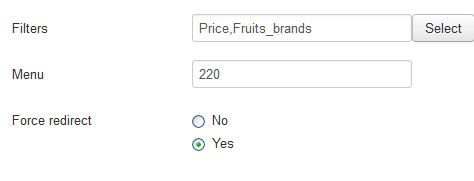
My filter works fine without "force redirect".
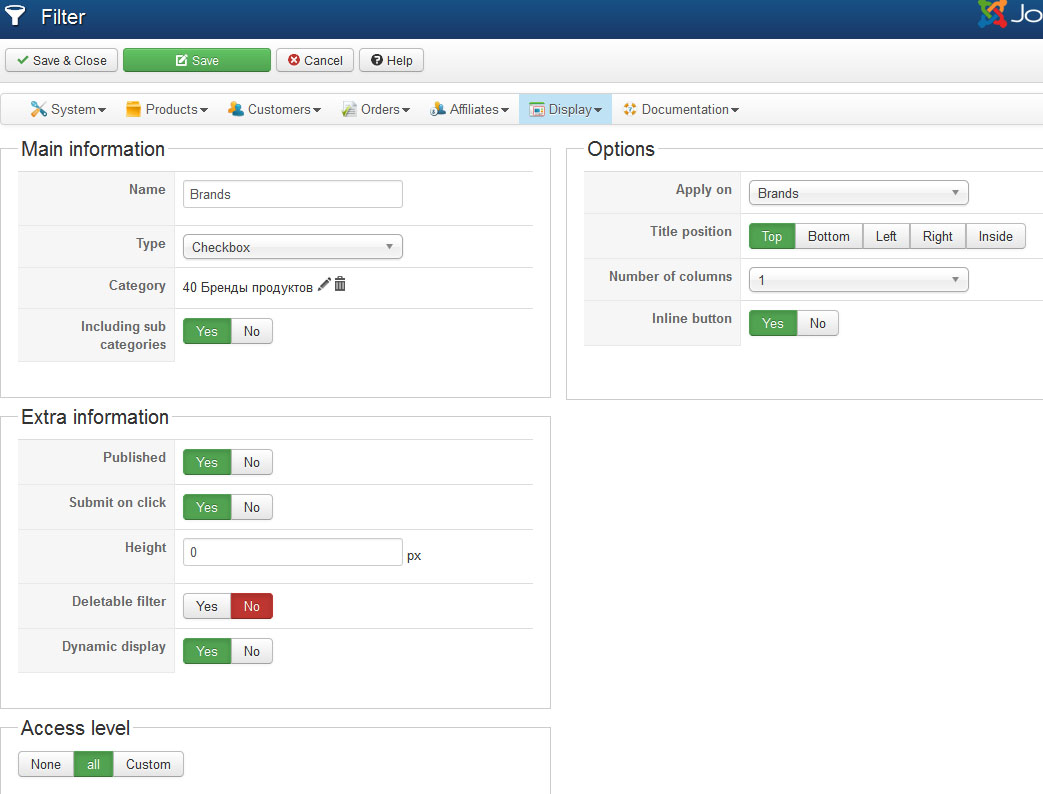
Working brands filter config:
In Joomla Filter module if you enable "force redirect" , then select the Id of menu
My filter works fine without "force redirect".
Working brands filter config:
Please Log in or Create an account to join the conversation.
Time to create page: 0.335 seconds