

- Posts: 206
- Thank you received: 7
Filter display always ...
6 years 7 months ago #316294
by c-line
Filter display always ... was created by c-line
-- HikaShop version -- : 4.2.3
-- Joomla version -- : 3..15
hello
i add filter module in my right position
i disable display in checkout, and product view, only for products listing ..
module doesn't show BUT position seems occuped not realy empty !
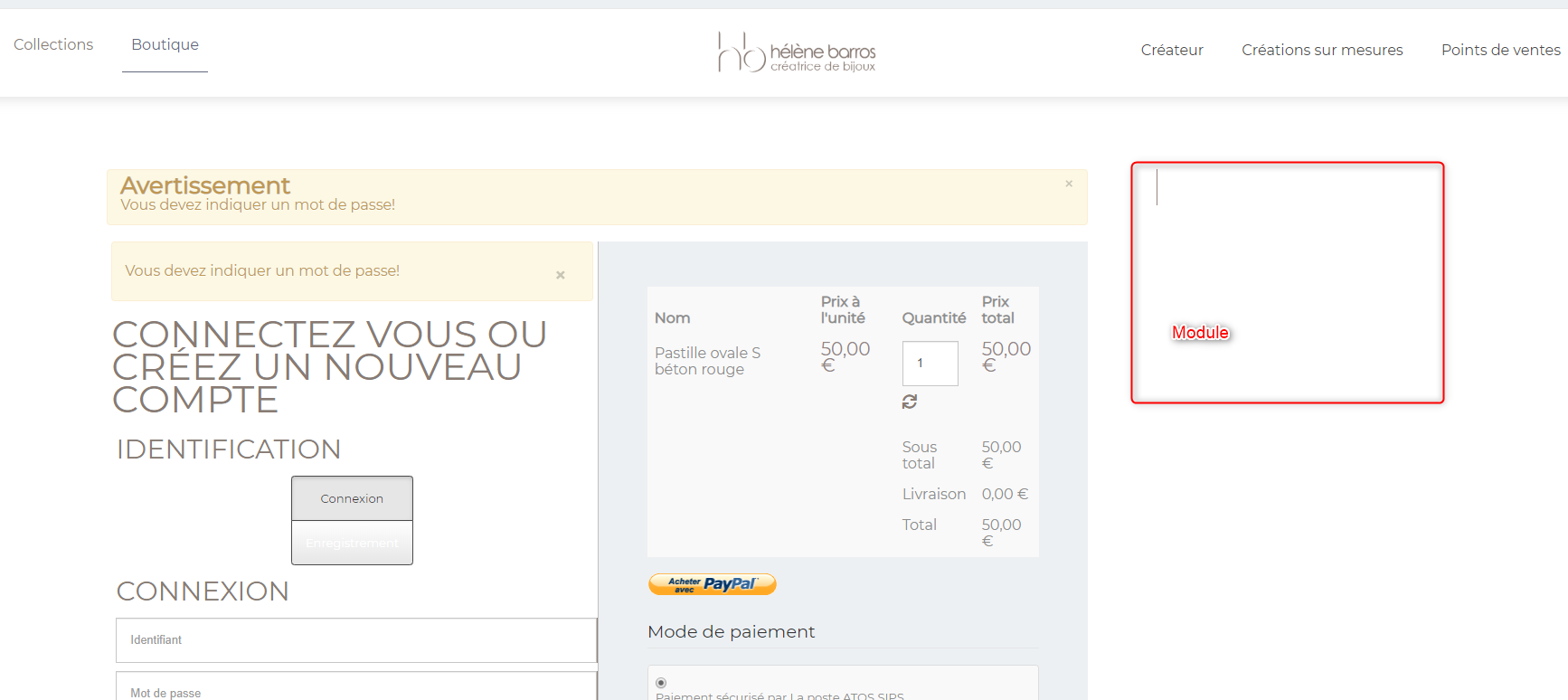
thanks for all
-- Joomla version -- : 3..15
hello
i add filter module in my right position
i disable display in checkout, and product view, only for products listing ..
module doesn't show BUT position seems occuped not realy empty !
thanks for all
Please Log in or Create an account to join the conversation.

6 years 7 months ago #316302
by nicolas
Replied by nicolas on topic Filter display always ...
Hi,
Not much we can do to help here. This indicates that your template is displaying that position because it sees the module, even if the module doesn't output anything.
Basically, the template has to rely not only on the count of the modules, but also check if their are empty or not:
joomla.stackexchange.com/a/18775
That's a common issue with templates.
Not much we can do to help here. This indicates that your template is displaying that position because it sees the module, even if the module doesn't output anything.
Basically, the template has to rely not only on the count of the modules, but also check if their are empty or not:
joomla.stackexchange.com/a/18775
That's a common issue with templates.
Please Log in or Create an account to join the conversation.
6 years 7 months ago #316314
by c-line
Replied by c-line on topic Filter display always ...
ok i will check .. i am surprise i only use ttemplate creator to create my theme ... by cédric keflein
Please Log in or Create an account to join the conversation.
6 years 7 months ago #316315
by c-line
Replied by c-line on topic Filter display always ...
hello i switch to protostart same display !!! colum is rendered without module !!
joomla core template isn't good too ?
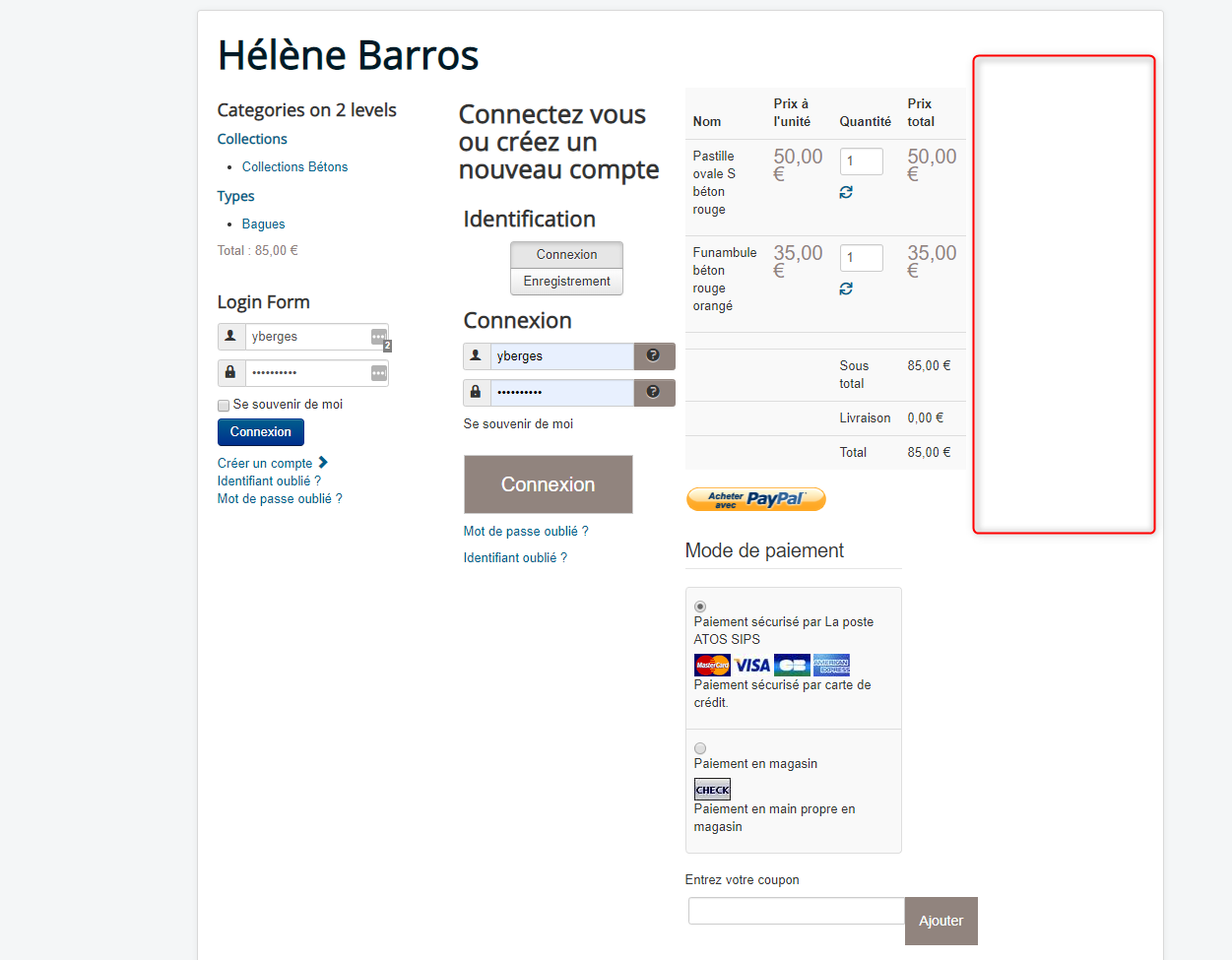
joomla core template isn't good too ?
Please Log in or Create an account to join the conversation.

6 years 7 months ago - 6 years 7 months ago #316356
by Philip
Replied by Philip on topic Filter display always ...
Hello,
Strange because as Nicolas told you your module isn't here (nothing in html code).

We need to see it by ourselves and so can you provide backend access in order to process some test and be able to better understand how this is possible.
Awaiting news from you.
Regards
Strange because as Nicolas told you your module isn't here (nothing in html code).
We need to see it by ourselves and so can you provide backend access in order to process some test and be able to better understand how this is possible.
Awaiting news from you.
Regards
Last edit: 6 years 7 months ago by Philip.
Please Log in or Create an account to join the conversation.
6 years 7 months ago #316386
by c-line
Replied by c-line on topic Filter display always ...
hello some news about this ?
Please Log in or Create an account to join the conversation.
6 years 7 months ago - 6 years 7 months ago #316390
by Philip
Replied by Philip on topic Filter display always ...
Hello,
Sorry, for the delay but usually we don't use the PM, but the Contact us form in order to allow every person from the HikaShop Team to help you.
Plus, your issue wasn't easy, we have to investigate in order to better understand the context, here the results step by step.
"hello i switch to protostart same display !!! colum is rendered without module !!
joomla core template isn't good too ?"
- To better understand the situation, and unfortunately, yes, ProtoStar have the same issue, see this link .
- The point is that your template count the number of module but doesn't check if it's empty, as result the display space is created, but as there are nothing to display... You have the empty space.
And so, from the Start Nicolas was right the template is the root issue, and we lost time because we didn't know that protostar had this problem too... Sorry for this.
Now, your next step is to contact your template support.
Regards
Sorry, for the delay but usually we don't use the PM, but the Contact us form in order to allow every person from the HikaShop Team to help you.
Plus, your issue wasn't easy, we have to investigate in order to better understand the context, here the results step by step.
"hello i switch to protostart same display !!! colum is rendered without module !!
joomla core template isn't good too ?"
- To better understand the situation, and unfortunately, yes, ProtoStar have the same issue, see this link .
- The point is that your template count the number of module but doesn't check if it's empty, as result the display space is created, but as there are nothing to display... You have the empty space.
And so, from the Start Nicolas was right the template is the root issue, and we lost time because we didn't know that protostar had this problem too... Sorry for this.
Now, your next step is to contact your template support.
Regards
Last edit: 6 years 7 months ago by Philip.
Please Log in or Create an account to join the conversation.
6 years 7 months ago #316396
by c-line
Replied by c-line on topic Filter display always ...
sorry for mp ... forgot
i will check more but if all templates have problem and core template too ... are you sure about your approch ?
i use flexicontent component and we have a option for display module in specific view that works for all template i do (template creator helix 3 etc ..)
i didn't say that your product is buggy i like it and support it but need to find a good solution for it
i will check more but if all templates have problem and core template too ... are you sure about your approch ?
i use flexicontent component and we have a option for display module in specific view that works for all template i do (template creator helix 3 etc ..)
i didn't say that your product is buggy i like it and support it but need to find a good solution for it
Please Log in or Create an account to join the conversation.
6 years 7 months ago #316399
by nicolas
Replied by nicolas on topic Filter display always ...
Hi,
I am sure. Templates often don't hide the position when the module is there but doesn't output any HTML.
The issue can be solved differently however. Your initial issue is that you don't want to display the filter module on the checkout.
The solution I usually recommend is to create a menu item of the type HikaShop checkout (it can be hidden if you don't want it to appear on your main menu), and then select that menu item in the "force a menu item on checkout" setting of the HikaShop configuration.
Then, just make sure that the modules you don't want to appear on your checkout are not assigned to that menu item.
I am sure. Templates often don't hide the position when the module is there but doesn't output any HTML.
The issue can be solved differently however. Your initial issue is that you don't want to display the filter module on the checkout.
The solution I usually recommend is to create a menu item of the type HikaShop checkout (it can be hidden if you don't want it to appear on your main menu), and then select that menu item in the "force a menu item on checkout" setting of the HikaShop configuration.
Then, just make sure that the modules you don't want to appear on your checkout are not assigned to that menu item.
Please Log in or Create an account to join the conversation.
6 years 7 months ago #316416
by c-line
Replied by c-line on topic Filter display always ...
ok for check out !
for product view ? did you have the same tips ?
for product view ? did you have the same tips ?
Please Log in or Create an account to join the conversation.
6 years 7 months ago #316427
by nicolas
Replied by nicolas on topic Filter display always ...
For the product page, it's more problematic.
You could also use menu items and use the canonical URL of the products to direct to the correct menu item, but it will be a pain in the ass to setup and you'll loose the breadcrumb from the category.
The modification int he template would be ideal, but your template provider might not want to help you with that.
In that case, I would recommend using extensions.joomla.org/extensions/extensi...nced-module-manager/ to hide the modules when empty. The extension has an option for that:
www.regularlabs.com/extensions/advancedm...atures-hide-if-empty
You could also use menu items and use the canonical URL of the products to direct to the correct menu item, but it will be a pain in the ass to setup and you'll loose the breadcrumb from the category.
The modification int he template would be ideal, but your template provider might not want to help you with that.
In that case, I would recommend using extensions.joomla.org/extensions/extensi...nced-module-manager/ to hide the modules when empty. The extension has an option for that:
www.regularlabs.com/extensions/advancedm...atures-hide-if-empty
Please Log in or Create an account to join the conversation.
6 years 7 months ago #316444
by c-line
Replied by c-line on topic Filter display always ...
no works .... grrrrr
Please Log in or Create an account to join the conversation.

6 years 7 months ago #316456
by ced1870
c'est pas très sympa ce que tu dis là, tu sais très bien que Céline utilise mon extension Template Creator CK
Peut-être ne te rends-tu pas compte que l'on cherche tous une solution à cela, mais dire du mal des autres c'est mauvais et je suis vraiment navré de voir ta réponse en ce sens.
Un peu plus de collaboration dans le bon sens serait le bienvenu
Cédric - développeur de Template Creator CK
Replied by ced1870 on topic Filter display always ...
Salut Nicolas,but your template provider might not want to help you with that.
c'est pas très sympa ce que tu dis là, tu sais très bien que Céline utilise mon extension Template Creator CK
Peut-être ne te rends-tu pas compte que l'on cherche tous une solution à cela, mais dire du mal des autres c'est mauvais et je suis vraiment navré de voir ta réponse en ce sens.
Un peu plus de collaboration dans le bon sens serait le bienvenu
Cédric - développeur de Template Creator CK
Please Log in or Create an account to join the conversation.
6 years 7 months ago - 6 years 7 months ago #316452
by nicolas
Replied by nicolas on topic Filter display always ...
If it doesn't work with AMM, then I'm afraid you're left with modifying the code of the template.
@ced1870:
Euh, non je n'avais aucune idée de la source de son template.
Je disais juste ça d'expérience car d'habitude les fournisseurs de template rechignent à faire des changements dans leurs templates.
C'est d'ailleurs pour cela que j'essayais de fournir des solutions dans ce thread sans avoir à changer quelque chose dans le template.
Mais je ne voulais pas du tout faire d'attaque contre toi.
Au contraire, avoir quelqu'un qui s'intéresse au problème du coté du fournisseur du template est une super nouvelle !
Désolé si mes messages ont paru invectifs, ce n'était pas le but.
@ced1870:
Euh, non je n'avais aucune idée de la source de son template.
Je disais juste ça d'expérience car d'habitude les fournisseurs de template rechignent à faire des changements dans leurs templates.
C'est d'ailleurs pour cela que j'essayais de fournir des solutions dans ce thread sans avoir à changer quelque chose dans le template.
Mais je ne voulais pas du tout faire d'attaque contre toi.
Au contraire, avoir quelqu'un qui s'intéresse au problème du coté du fournisseur du template est une super nouvelle !
Désolé si mes messages ont paru invectifs, ce n'était pas le but.
Last edit: 6 years 7 months ago by nicolas.
Please Log in or Create an account to join the conversation.
6 years 7 months ago #316466
by ced1870
Replied by ced1870 on topic Filter display always ...
@nico :
ok, merci pour ta réponse
cela m'a bien surpris, et comme je suis cela depuis le début j'essaie aussi de voir avec Céline et Yannick
dans son 2e message elle dit bien
Just for other users who don't speak french :
I'm the developper of Template Creator CK used for the template of Celine. I'm also checking with her what could be done and how to fix this issue
CEd
ok, merci pour ta réponse
cela m'a bien surpris, et comme je suis cela depuis le début j'essaie aussi de voir avec Céline et Yannick
dans son 2e message elle dit bien
Désolé d'avoir écrit en français mais comme c'était un apparté au sujet initial ...i am surprise i only use ttemplate creator to create my theme ... by cédric keflein
Just for other users who don't speak french :
I'm the developper of Template Creator CK used for the template of Celine. I'm also checking with her what could be done and how to fix this issue
CEd
Please Log in or Create an account to join the conversation.
6 years 7 months ago #316469
by c-line
Replied by c-line on topic Filter display always ...
lol force to joomla french user ! for sure
Please Log in or Create an account to join the conversation.
6 years 7 months ago #316470
by nicolas
Replied by nicolas on topic Filter display always ...
@ced1870:
J'avais zappé cela dans son message en effet.
Mais du coup, que penses-tu de la solution que j'ai fourni au début de ce sujet ?
C'est à dire d'implémenter une vérification du contenu des modules de la position avant de faire le jinclude de la position comme expliqué dans le lien ci-dessous ?
joomla.stackexchange.com/a/18775
J'avais zappé cela dans son message en effet.
Mais du coup, que penses-tu de la solution que j'ai fourni au début de ce sujet ?
C'est à dire d'implémenter une vérification du contenu des modules de la position avant de faire le jinclude de la position comme expliqué dans le lien ci-dessous ?
joomla.stackexchange.com/a/18775
Please Log in or Create an account to join the conversation.
6 years 7 months ago #316477
by ced1870
Replied by ced1870 on topic Filter display always ...
j'ai testé la solution mais ça n'a pas marché, bon je n'ai pas creusé des heures non plus
le $module->content ne renvoit rien, meme si c'est un module chargé dans la page
donc au final ça va pas. J'ai peut etre fait une erreur ...
par contre je crois que AdvModudules manager de RL fait le job, il faut revoir cela avec Celine et Yannick
le $module->content ne renvoit rien, meme si c'est un module chargé dans la page
donc au final ça va pas. J'ai peut etre fait une erreur ...
par contre je crois que AdvModudules manager de RL fait le job, il faut revoir cela avec Celine et Yannick
Please Log in or Create an account to join the conversation.
6 years 7 months ago #316480
by micker
Replied by micker on topic Filter display always ...
Le advenced module ne fonctionne pas
Please Log in or Create an account to join the conversation.
6 years 7 months ago #316484
by micker
Replied by micker on topic Filter display always ...
alors j'aimerai avoir ton avis
voici la partie du code d'un module de flexicontent
il a integrer une option du meme type que vous afficher le module en fonction de la vue (pas du contenu)
github.com/FLEXIcontent/flexicontent-cck...xicategories.php#L30
Cela fonctionne partout sans distinction de template ...
peus être une piste ou pas ... je n'ai pas votre niveau d'expertise !
voici la partie du code d'un module de flexicontent
il a integrer une option du meme type que vous afficher le module en fonction de la vue (pas du contenu)
github.com/FLEXIcontent/flexicontent-cck...xicategories.php#L30
Cela fonctionne partout sans distinction de template ...
peus être une piste ou pas ... je n'ai pas votre niveau d'expertise !
Please Log in or Create an account to join the conversation.
Time to create page: 0.629 seconds