

- Posts: 152
- Thank you received: 11
Create blank search page ??
5 years 1 month ago #335601
by gerryna09
Create blank search page ?? was created by gerryna09
-- url of the page with the problem -- : demo.hikashop.com
-- HikaShop version -- : 4.4.3
-- Joomla version -- : 3.10
-- PHP version -- : 7.4.14
-- Error-message(debug-mod must be tuned on) -- : Chrome
I create a new menu item HikaShop->Products listing with the name Search
In Products Options i select Main category=Root and Filters=Yes
I have a page with all the filters but also with all the products ;-(
How can I have a page without products and only with filters?
-- HikaShop version -- : 4.4.3
-- Joomla version -- : 3.10
-- PHP version -- : 7.4.14
-- Error-message(debug-mod must be tuned on) -- : Chrome
I create a new menu item HikaShop->Products listing with the name Search
In Products Options i select Main category=Root and Filters=Yes
I have a page with all the filters but also with all the products ;-(
How can I have a page without products and only with filters?
Please Log in or Create an account to join the conversation.

5 years 1 month ago #335612
by nicolas
Replied by nicolas on topic Create blank search page ??
Hi,
In that case, you need to create a menu item of the type Joomla article with an empty Joomla article and configure the "HikaShop filter module" to display at the top of the main area of your template (or even inside the Joomla article with a load position tag ( www.joomlashack.com/blog/joomla/loadposition-loadmodule/ )).
That way, you'll arrive on en empty page with just the filters displayed by the module, and when you use the filters in the module, it will display the results on a products listing page.
In that case, you need to create a menu item of the type Joomla article with an empty Joomla article and configure the "HikaShop filter module" to display at the top of the main area of your template (or even inside the Joomla article with a load position tag ( www.joomlashack.com/blog/joomla/loadposition-loadmodule/ )).
That way, you'll arrive on en empty page with just the filters displayed by the module, and when you use the filters in the module, it will display the results on a products listing page.
Please Log in or Create an account to join the conversation.
5 years 1 month ago #335628
by gerryna09
Replied by gerryna09 on topic Create blank search page ??
All clear. As always.
Thanks Nicolas
Thanks Nicolas
Please Log in or Create an account to join the conversation.
5 years 1 month ago #335643
by gerryna09
Replied by gerryna09 on topic Create blank search page ??
There is a bug with the cursor type filter
In the empty page, if Cursor maximum value = 0, I no longer display the maximum value.
In the empty page, if Cursor maximum value = 0, I no longer display the maximum value.
Please Log in or Create an account to join the conversation.

5 years 1 month ago - 5 years 1 month ago #335649
by Philip
Replied by Philip on topic Create blank search page ??
Hello,
We weren't able to reproduce your issue, in order to help you we will need more, can you provide these elements :
- Related setting page screenshot(s), filter and module setting page
- Url link to your issue
Awaiting your elements to be able to progress on your subject.
Regards
We weren't able to reproduce your issue, in order to help you we will need more, can you provide these elements :
- Related setting page screenshot(s), filter and module setting page
- Url link to your issue
Awaiting your elements to be able to progress on your subject.
Regards
Last edit: 5 years 1 month ago by Philip.
Please Log in or Create an account to join the conversation.
5 years 1 month ago #335673
by gerryna09
Replied by gerryna09 on topic Create blank search page ??
I'm building my first site with HihaShop. I'm still on the localhost
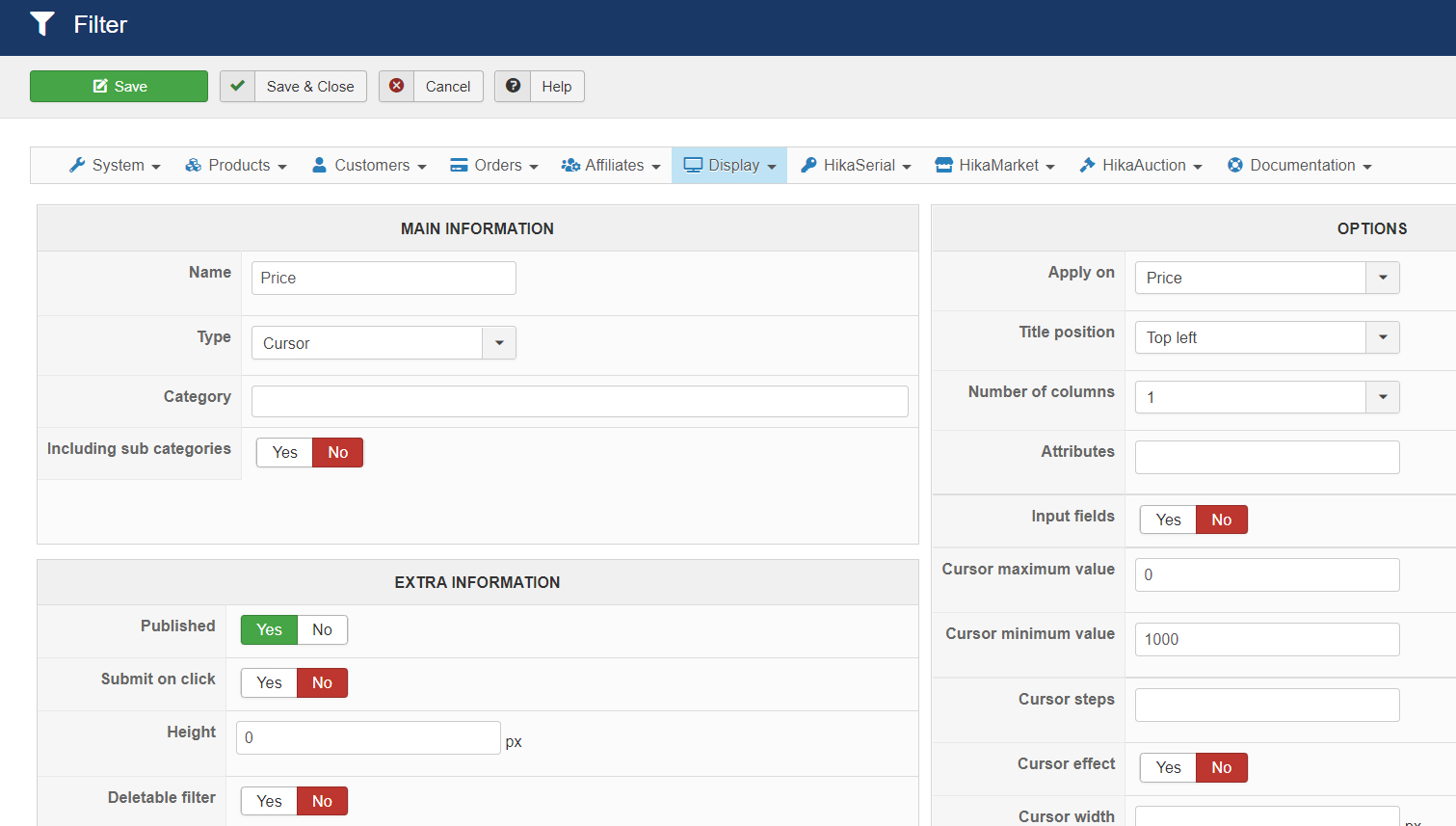
Please Log in or Create an account to join the conversation.
5 years 1 month ago #335678
by nicolas
Replied by nicolas on topic Create blank search page ??
Hi,
Maybe it's because you didn't enter a value for the "step" input field ? I would recommend entering 1 for now.
Also, how after configured the other options of your filter, like the "dynamic display" setting ? Maybe changing the dynamic display setting might help.
Maybe it's because you didn't enter a value for the "step" input field ? I would recommend entering 1 for now.
Also, how after configured the other options of your filter, like the "dynamic display" setting ? Maybe changing the dynamic display setting might help.
Please Log in or Create an account to join the conversation.
5 years 1 month ago #335685
by gerryna09
Replied by gerryna09 on topic Create blank search page ??
Cursor steps> 1 or blank
Deletable filter > Yes or No
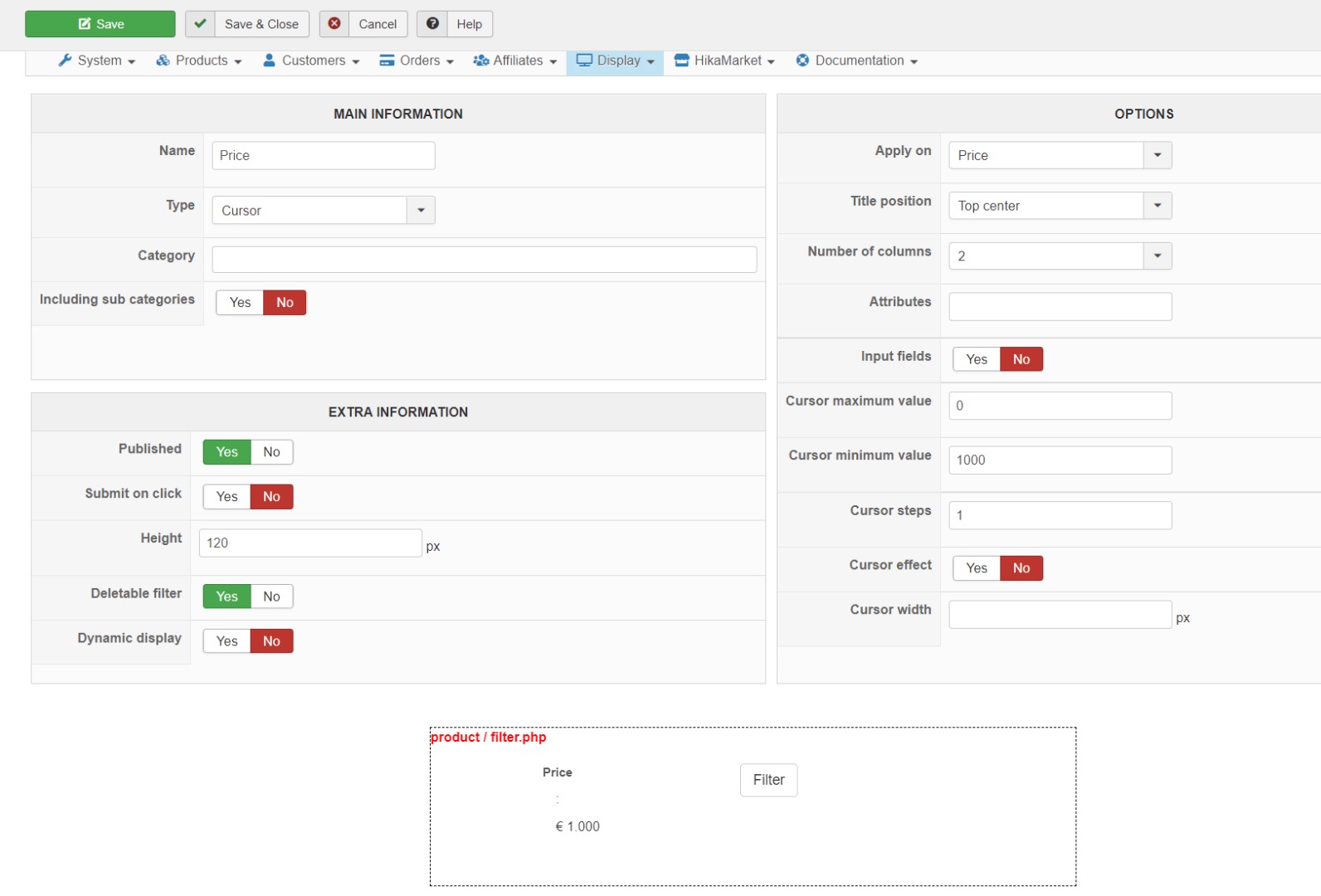
Deletable filter > Yes or No
Please Log in or Create an account to join the conversation.
5 years 1 month ago #335689
by nicolas
Replied by nicolas on topic Create blank search page ??
Hi,
From your screenshot of the problem on the frontend, it looks like a javascript error issue.
On the page, there must be a javascript error (which could potentially come from a conflict with another extension or a bug in another extension), which lead to the cursor not being initialized.
Fixing the javascript error, that you can look at in the console of your browser, should automatically fix the problem.
Could you provide the URL of the page so that we can check what javascript error you have ?
From your screenshot of the problem on the frontend, it looks like a javascript error issue.
On the page, there must be a javascript error (which could potentially come from a conflict with another extension or a bug in another extension), which lead to the cursor not being initialized.
Fixing the javascript error, that you can look at in the console of your browser, should automatically fix the problem.
Could you provide the URL of the page so that we can check what javascript error you have ?
Please Log in or Create an account to join the conversation.
5 years 1 month ago #335712
by gerryna09
Replied by gerryna09 on topic Create blank search page ??
Localhost + Joomla 3.10 + Protostar template + Only HikaShop.
No javascript error in the console of browser.
As soon as possible I will try on a web server and not on localhost
No javascript error in the console of browser.
As soon as possible I will try on a web server and not on localhost
Please Log in or Create an account to join the conversation.
5 years 1 month ago #335768
by gerryna09
Replied by gerryna09 on topic Create blank search page ??
Now it is clear!
In the HikaShop filter module the cursor maximum value = 0 option works only if Dynamic display = YES
If I associate HikaShop filter module with a NO HIKASHOP menu item, the Dynamic display option does not receive data and therefore does not display any maximum value.
In the HikaShop filter module the cursor maximum value = 0 option works only if Dynamic display = YES
If I associate HikaShop filter module with a NO HIKASHOP menu item, the Dynamic display option does not receive data and therefore does not display any maximum value.
Please Log in or Create an account to join the conversation.
5 years 1 month ago #335769
by nicolas
Replied by nicolas on topic Create blank search page ??
Hi,
Well, you should enter 1000 in the maximum value and 1 in the minimum value.
Having 1000 as minimum and nothing as maximum is indeed not possible. I had overlooked that on your screenshot.
Well, you should enter 1000 in the maximum value and 1 in the minimum value.
Having 1000 as minimum and nothing as maximum is indeed not possible. I had overlooked that on your screenshot.
Please Log in or Create an account to join the conversation.
5 years 1 month ago #335784
by gerryna09
Replied by gerryna09 on topic Create blank search page ??
Car shop ... I don't think there are cars that cost one euro 
Please Log in or Create an account to join the conversation.
5 years 1 month ago #335808
by nicolas
Replied by nicolas on topic Create blank search page ??
Hi,
Well, I don't know what you're selling. If the minimum is 1000, then ok, but you need to specify a maximum higher than the minimum.
Well, I don't know what you're selling. If the minimum is 1000, then ok, but you need to specify a maximum higher than the minimum.
Please Log in or Create an account to join the conversation.
Time to create page: 0.204 seconds