
- Posts: 609
- Thank you received: 13
Wrong icons in user panel?
- mohairbears
-
 Topic Author
- Offline
Less
More
12 years 9 months ago #141117
by mohairbears
Wrong icons in user panel? was created by mohairbears
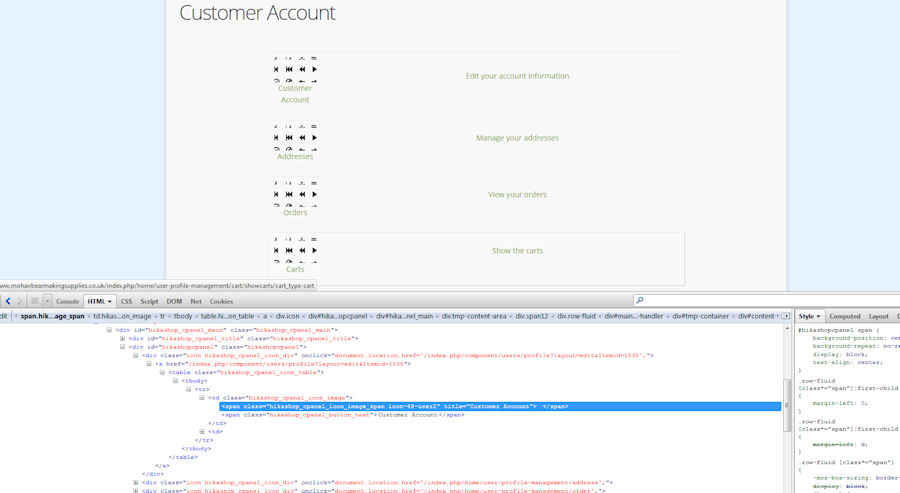
Hi, I have spent quite sum time trying to resolve this problem without success. As you can seen from the screen dump the wrong icons are showing and I would like the correct Hikashop icons to be displayed is possible?
Please Log in or Create an account to join the conversation.

12 years 9 months ago #141123
by Jerome
Jerome - Obsidev.com
HikaMarket & HikaSerial developer / HikaShop core dev team.
Replied by Jerome on topic Wrong icons in user panel?
Hi,
Your template force the background-image so the HikaShop one is not used.
You have to force the HikaShop background image in order to bypass your template which has bypass HikaShop.
Regards,
Your template force the background-image so the HikaShop one is not used.
You have to force the HikaShop background image in order to bypass your template which has bypass HikaShop.
Regards,
Jerome - Obsidev.com
HikaMarket & HikaSerial developer / HikaShop core dev team.
Please Log in or Create an account to join the conversation.
- mohairbears
-
Topic Author
- Offline
Less
More
- Posts: 609
- Thank you received: 13
12 years 9 months ago #141127
by mohairbears
Replied by mohairbears on topic Wrong icons in user panel?
Hi Jerome.. and how do I do that?
thanks
thanks
Please Log in or Create an account to join the conversation.

12 years 9 months ago #141150
by nicolas
Replied by nicolas on topic Wrong icons in user panel?
Edit the frontend CSS file of HikaShop via the hikashop configuration and add !important for the icon-42-xxx css lines like that:
.icon-48-user2 {background-image:url(../images/icons/icon-48-account.png) !important;}
.icon-48-user2 {background-image:url(../images/icons/icon-48-account.png) !important;}
The following user(s) said Thank You: mohairbears
Please Log in or Create an account to join the conversation.
Time to create page: 0.146 seconds