
- Posts: 21
- Thank you received: 1
Canada Post Shipping plugin not displaying all
- geeksonthebeach
-
 Topic Author
- Offline
Less
More
12 years 2 months ago #165172
by geeksonthebeach
Canada Post Shipping plugin not displaying all was created by geeksonthebeach
-- url of the page with the problem -- :
mywebsite.com/mypage
-- HikaShop version -- don't know! please see attached
-- Joomla version -- .3.1
.3.1
-- PHP version -- : x.x.x
-- Browser(s) name and version --chrome 35.0.1916.153
Canada Post Shipping plugin not displaying all options, only two. There may be a plugin version problem as I saw in another post, however I can't tell you what version I have. see attached. I'm concerned that I won't be able to upgrade.
I've gone through the checklist for shipping problems.
Also getting this error message "Error while sending XML to CANADA POST. Error code: -3000. Message: Origin Postal Code is illegal."
Changed the warehouse postal code so there was no spaces, but still getting the error.
Thanks!
-- HikaShop version -- don't know! please see attached
-- Joomla version --
.3.1-- PHP version -- : x.x.x
-- Browser(s) name and version --chrome 35.0.1916.153
Canada Post Shipping plugin not displaying all options, only two. There may be a plugin version problem as I saw in another post, however I can't tell you what version I have. see attached. I'm concerned that I won't be able to upgrade.
I've gone through the checklist for shipping problems.
Also getting this error message "Error while sending XML to CANADA POST. Error code: -3000. Message: Origin Postal Code is illegal."
Changed the warehouse postal code so there was no spaces, but still getting the error.
Thanks!
Please Log in or Create an account to join the conversation.

Less
More
- Posts: 12953
- Thank you received: 1778
12 years 2 months ago #165258
by Mohamed Thelji
Replied by Mohamed Thelji on topic Canada Post Shipping plugin not displaying all
Hello,
1. Can you download the last Hikashop version through our website, install it, and test it again ?
2. Can you show me some screenshots of how did you configured your canada post shipping method ?
Thanks.
1. Can you download the last Hikashop version through our website, install it, and test it again ?
2. Can you show me some screenshots of how did you configured your canada post shipping method ?
Thanks.
Please Log in or Create an account to join the conversation.
- geeksonthebeach
-
Topic Author
- Offline
Less
More
- Posts: 21
- Thank you received: 1
12 years 2 months ago #165325
by geeksonthebeach
Replied by geeksonthebeach on topic Canada Post Shipping plugin not displaying all
Hi, Thanks for your response.
Installed latest Hikashop- same results
Please see attached files for the Canada Post. Also, I talked to Canada Post, they say they are not receiving the postal code.
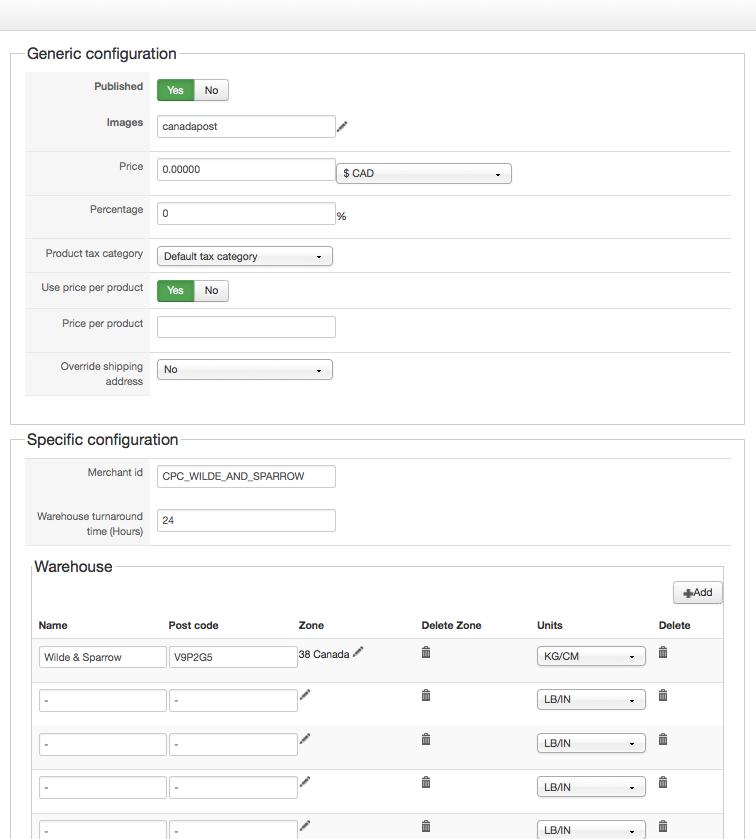
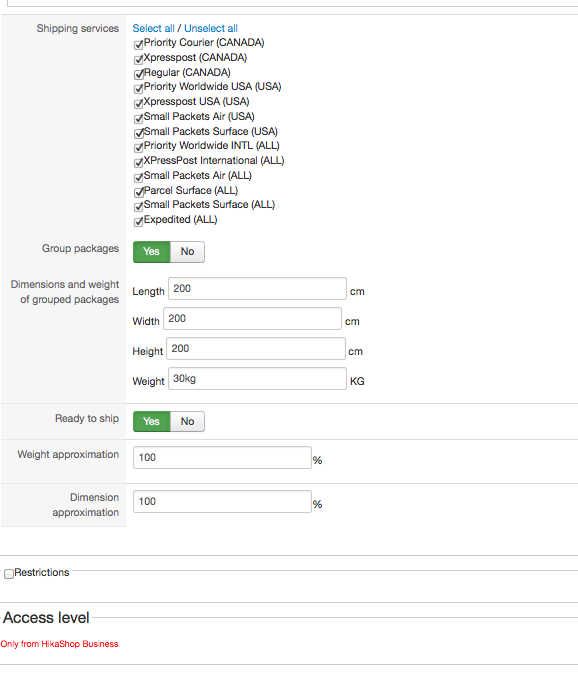
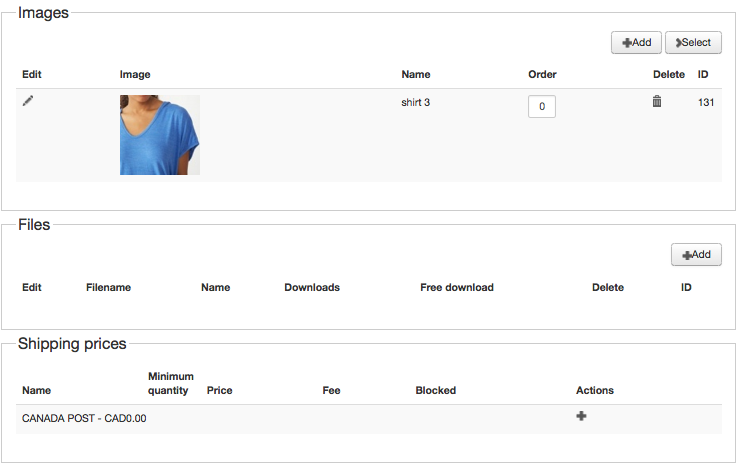
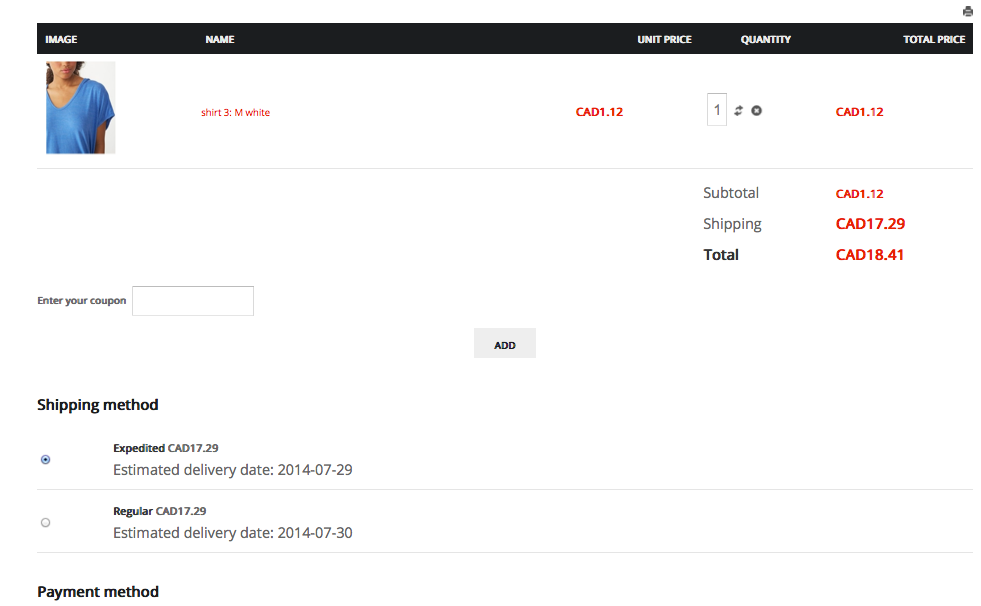
Installed latest Hikashop- same results
Please see attached files for the Canada Post. Also, I talked to Canada Post, they say they are not receiving the postal code.
Please Log in or Create an account to join the conversation.
Less
More
- Posts: 12953
- Thank you received: 1778
12 years 2 months ago - 12 years 2 months ago #165364
by Mohamed Thelji
Replied by Mohamed Thelji on topic Canada Post Shipping plugin not displaying all
Hello,
Can you remove the warehouses without any value, and also the values of the Weight ans dimenssion approximation and then try it again ?
If it's still not working, can you send me a temporary Access to your back-end through a private message ?
And also replace the Weight value of the "Dimensions and weight of grouped packages" option to 30
Thanks.
Can you remove the warehouses without any value, and also the values of the Weight ans dimenssion approximation and then try it again ?
If it's still not working, can you send me a temporary Access to your back-end through a private message ?
And also replace the Weight value of the "Dimensions and weight of grouped packages" option to 30
Thanks.
Last edit: 12 years 2 months ago by Mohamed Thelji.
Please Log in or Create an account to join the conversation.
- geeksonthebeach
-
Topic Author
- Offline
Less
More
- Posts: 21
- Thank you received: 1
12 years 2 months ago #165462
by geeksonthebeach
Replied by geeksonthebeach on topic Canada Post Shipping plugin not displaying all
Hi Mohamed
I made those changes. I removed the empty warehouse fields, however a new one keeps reappearing each time i save. This did have some effect: now I only get one error message "Error while sending XML to CANADA POST. Error code: -3000. Message: Origin Postal Code is illegal." instead of eight, so the warehouses seem to be the issue there. Is there a way to stop another empty warehouse field appearing on save?
Also, I still only get the two options for shipping.
I'll send the login credentials privately.
I made those changes. I removed the empty warehouse fields, however a new one keeps reappearing each time i save. This did have some effect: now I only get one error message "Error while sending XML to CANADA POST. Error code: -3000. Message: Origin Postal Code is illegal." instead of eight, so the warehouses seem to be the issue there. Is there a way to stop another empty warehouse field appearing on save?
Also, I still only get the two options for shipping.
I'll send the login credentials privately.
Please Log in or Create an account to join the conversation.
- geeksonthebeach
-
Topic Author
- Offline
Less
More
- Posts: 21
- Thank you received: 1
12 years 2 months ago #165464
by geeksonthebeach
Replied by geeksonthebeach on topic Canada Post Shipping plugin not displaying all
What is the email address for a private message?
Please Log in or Create an account to join the conversation.
Less
More
- Posts: 12953
- Thank you received: 1778
12 years 2 months ago #165634
by Mohamed Thelji
Replied by Mohamed Thelji on topic Canada Post Shipping plugin not displaying all
You can send it to me through a private message by using the "Private message" icon below my avatar.
Please Log in or Create an account to join the conversation.
Less
More
- Posts: 12953
- Thank you received: 1778
12 years 2 months ago #165781
by Mohamed Thelji
Replied by Mohamed Thelji on topic Canada Post Shipping plugin not displaying all
Hello,
I've done some tests modifications on the Canada Post shipping plugin, can you test it with that last version :
I've done some tests modifications on the Canada Post shipping plugin, can you test it with that last version :
This attachment is hidden for guests.
Please log in or register to see it.
Please log in or register to see it.
Please Log in or Create an account to join the conversation.
- geeksonthebeach
-
Topic Author
- Offline
Less
More
- Posts: 21
- Thank you received: 1
12 years 2 months ago #165801
by geeksonthebeach
Replied by geeksonthebeach on topic Canada Post Shipping plugin not displaying all
Thank you Mohamed. The error message has now gone.
The shipping options still don't show, only one of the three that I selected in configuration shows in the front.
The shipping options still don't show, only one of the three that I selected in configuration shows in the front.
Please Log in or Create an account to join the conversation.
Less
More
- Posts: 12953
- Thank you received: 1778
12 years 1 month ago #165874
by Mohamed Thelji
Replied by Mohamed Thelji on topic Canada Post Shipping plugin not displaying all
Hello,
I think that the issue is probably coming from your Canada Post account, so the solution will probably to directly contact Canada Post about that issue.
I think that the issue is probably coming from your Canada Post account, so the solution will probably to directly contact Canada Post about that issue.
The following user(s) said Thank You: geeksonthebeach
Please Log in or Create an account to join the conversation.

11 years 11 months ago #176388
by samuel
Replied by samuel on topic Canada Post Shipping plugin not displaying all
I am having a very similar issue!
Canada post error
Error while sending XML to canada post -3000
origin postal code is illegal
Please advise what could be wrong.
no one has been able to checkout on my site for about 2 weeks!
As soon as this error comes up, the cart becomes EMPTY also.
Canada post error
Error while sending XML to canada post -3000
origin postal code is illegal
Please advise what could be wrong.
no one has been able to checkout on my site for about 2 weeks!
As soon as this error comes up, the cart becomes EMPTY also.
Please Log in or Create an account to join the conversation.
Less
More
- Posts: 12953
- Thank you received: 1778
11 years 11 months ago #176450
by Mohamed Thelji
Replied by Mohamed Thelji on topic Canada Post Shipping plugin not displaying all
Can you download the last Hikashop version through our website, Install it, and test it again ?
Please Log in or Create an account to join the conversation.
11 years 11 months ago #176510
by samuel
Replied by samuel on topic Canada Post Shipping plugin not displaying all
yes. i just did the other day.
I always have the most current versions.
Thanks!
I always have the most current versions.
Thanks!
Please Log in or Create an account to join the conversation.
Less
More
- Posts: 12953
- Thank you received: 1778
11 years 11 months ago #176612
by Mohamed Thelji
Replied by Mohamed Thelji on topic Canada Post Shipping plugin not displaying all
Hello,
I just checked your website and your Hikashop version is from the one month ago (24/09/14), Can you download it through our website and test it again ?
Thanks.
I just checked your website and your Hikashop version is from the one month ago (24/09/14), Can you download it through our website and test it again ?
Thanks.
The following user(s) said Thank You: samuel
Please Log in or Create an account to join the conversation.
11 years 11 months ago - 11 years 11 months ago #176688
by samuel
Replied by samuel on topic Canada Post Shipping plugin not displaying all
Updated hikashop to download as of today.
1) Today the testing is different!
imgur.com/rGtfUs8
is there anything else here that needs to be configured or changed to make it look / work better?
2) What do i do about this ERROR? imgur.com/VuXgDBT
3) Also, I have 2 two payment methods, How can I tell hikashop to select PAYPAL as default?
1) Today the testing is different!
imgur.com/rGtfUs8
is there anything else here that needs to be configured or changed to make it look / work better?
2) What do i do about this ERROR? imgur.com/VuXgDBT
3) Also, I have 2 two payment methods, How can I tell hikashop to select PAYPAL as default?
Last edit: 11 years 11 months ago by samuel.
Please Log in or Create an account to join the conversation.
Less
More
- Posts: 55
- Thank you received: 4
11 years 11 months ago - 11 years 11 months ago #176725
by av.opticom
Replied by av.opticom on topic Canada Post Shipping plugin not displaying all
Previous errors that I had been getting with Canada Post plugin (which I thought were due to the empty warehouse problem) appear to be fixed with the 2014-10-24 version of Hikashop. I continue to get an empty warehouse created when the plugin is saved, though.
Dave
Dave
Last edit: 11 years 11 months ago by av.opticom. Reason: wrong date on HS version
Please Log in or Create an account to join the conversation.
Less
More
- Posts: 12953
- Thank you received: 1778
11 years 11 months ago #176768
by Mohamed Thelji
Replied by Mohamed Thelji on topic Canada Post Shipping plugin not displaying all
Hi,
@Samuel
2. You should probably enable the "FedEx Ground (Home Delivery) (USA, PUERTO RICO)" service of your FedEx shipping method.
3. You'll have to set the "Auto select default shipping and payment methods" option to YES through "Hikasohp->System->Configuration->Checkout" and make sure that the PayPal payment method is ordered first through your payment method listing ("Hikashop->System->Payment Methods").
@av.opticom
Can you give me more information about the issue that you are having ?
@Samuel
2. You should probably enable the "FedEx Ground (Home Delivery) (USA, PUERTO RICO)" service of your FedEx shipping method.
3. You'll have to set the "Auto select default shipping and payment methods" option to YES through "Hikasohp->System->Configuration->Checkout" and make sure that the PayPal payment method is ordered first through your payment method listing ("Hikashop->System->Payment Methods").
@av.opticom
Can you give me more information about the issue that you are having ?
Please Log in or Create an account to join the conversation.
Less
More
- Posts: 55
- Thank you received: 4
11 years 11 months ago - 11 years 11 months ago #176817
by av.opticom
Replied by av.opticom on topic Canada Post Shipping plugin not displaying all
When I edit the Canada Post shipping plugin a new warehouse is created whenever I select "Save" or "Save & Close". With "Save", the new warehouse - with empty fields - appears immediately; with "Save & Close" the new warehouse appears when the plugin is opened again for editing. If the new one is not trashed each time, more and more new warehouses will appear. Since it now looks like that this not the cause of CP returning errors at checkout, it is simply a frustrating inconvenience and so far apparently not causing any other issues.
Note: I found this thread while searching for the new warehouse problem, which was first posted by geeksonthebeach in #165462.
Note: I found this thread while searching for the new warehouse problem, which was first posted by geeksonthebeach in #165462.
Last edit: 11 years 11 months ago by av.opticom.
Please Log in or Create an account to join the conversation.
Less
More
- Posts: 12953
- Thank you received: 1778
11 years 11 months ago #177001
by Mohamed Thelji
Replied by Mohamed Thelji on topic Canada Post Shipping plugin not displaying all
Hello,
Thanks for your feedback, I just reproduced your issue and I'll fix it.
Thanks for your feedback, I just reproduced your issue and I'll fix it.
Please Log in or Create an account to join the conversation.
Time to create page: 0.479 seconds