

- Posts: 141
- Thank you received: 3
lack of Reset Button in Hikashop Filter after 4.2.0 update
7 years 2 months ago #308908
by Greg_C
lack of Reset Button in Hikashop Filter after 4.2.0 update was created by Greg_C
-- HikaShop version -- : 4.2.0
-- Joomla version -- : 3.9.8
-- PHP version -- : 7.2.14
Hello, I have noticed lack of Reset button in the Hikashop Filter after Hikashop 4.2.0 update.
I didn't override product / filter.php and I set option Show reset button in Hikashop Configuration as ON. In fact I didn't make any changes after Hikashop 4.2.0 update and Reset button simply does not appear.
Regards,
Greg
-- Joomla version -- : 3.9.8
-- PHP version -- : 7.2.14
Hello, I have noticed lack of Reset button in the Hikashop Filter after Hikashop 4.2.0 update.
I didn't override product / filter.php and I set option Show reset button in Hikashop Configuration as ON. In fact I didn't make any changes after Hikashop 4.2.0 update and Reset button simply does not appear.
Regards,
Greg
Please Log in or Create an account to join the conversation.
7 years 2 months ago #308913
by Greg_C
Replied by Greg_C on topic lack of Reset Button in Hikashop Filter after 4.2.0 update
Hello, Filter deletion buttons, which should be present next to the filters fields are also not appearing despite that Delatable Filter options in Filters Configuration are set as ON
Regards,
Greg
Regards,
Greg
Please Log in or Create an account to join the conversation.

7 years 2 months ago #308911
by nicolas
Replied by nicolas on topic lack of Reset Button in Hikashop Filter after 4.2.0 update
Hi,
Several releases ago, we made an improvement to only display the reset button once at least one filter is set.
So try to use a filter. Then you should see the reset button.
If you still don't, then please provide a link to the page with the issue so that we can have a look.
Several releases ago, we made an improvement to only display the reset button once at least one filter is set.
So try to use a filter. Then you should see the reset button.
If you still don't, then please provide a link to the page with the issue so that we can have a look.
Please Log in or Create an account to join the conversation.
7 years 2 months ago - 7 years 2 months ago #308940
by Greg_C
Replied by Greg_C on topic lack of Reset Button in Hikashop Filter after 4.2.0 update
Hi, Yes, I know that Reset Button should appear after Filter is set. Please find enclosed screenshots from test page how it looks in Hikashop 4.1 (image 1) and how it looks in Hikashop 4.2 (image 2) after Filter is set (selection confirmed by using button Filter).
You can see test page here: test page
Regards,
Greg
You can see test page here: test page
Regards,
Greg
Last edit: 7 years 2 months ago by Greg_C.
Please Log in or Create an account to join the conversation.
7 years 2 months ago #308943
by nicolas
Replied by nicolas on topic lack of Reset Button in Hikashop Filter after 4.2.0 update
Hi,
I think it comes from a customization of the template which generates a javascript error when the product listing area is refreshed preventing the filter area from being refreshed (as it's done after):
monosnap.com/file/QhlwWIqY77P1DnoRoF4j2GFMkiDG2R
Change the line:
if(!el.getAttribute("data-votetype"))
to;
if(!el || !el.getAttribute("data-votetype"))
in the file media/com_hikashop/js/vote.js and that should prevent the javascript error and it should then hopefully work properly.
I think it comes from a customization of the template which generates a javascript error when the product listing area is refreshed preventing the filter area from being refreshed (as it's done after):
monosnap.com/file/QhlwWIqY77P1DnoRoF4j2GFMkiDG2R
Change the line:
if(!el.getAttribute("data-votetype"))
to;
if(!el || !el.getAttribute("data-votetype"))
in the file media/com_hikashop/js/vote.js and that should prevent the javascript error and it should then hopefully work properly.
Please Log in or Create an account to join the conversation.
7 years 2 months ago #308957
by Greg_C
Replied by Greg_C on topic lack of Reset Button in Hikashop Filter after 4.2.0 update
Hi, Unfortunately this change didn't help - problem still exist
I have checked also on Prostar Template - even after template change the problem exist
Before update from Hikashop 4.1 to 4.2 this problem didn't exist
Regards,
Greg
I have checked also on Prostar Template - even after template change the problem exist
Before update from Hikashop 4.1 to 4.2 this problem didn't exist
Regards,
Greg
Please Log in or Create an account to join the conversation.
7 years 2 months ago #308960
by nicolas
Replied by nicolas on topic lack of Reset Button in Hikashop Filter after 4.2.0 update
Hi,
Well, then I don't know. I checked further on your website and I can see that your website properly returns the updated filter area:
monosnap.com/file/2GFCJyEXPCoziW7mWxcm6O3UcJgXHY
It's just that the area is not replaced, as if there was a problem with a view override missing something. But that shouldn't be the case with protostar.
So There is something else, but I don't know what and I can't reproduce the problem on my end, which is even stranger.
Could you provide a FTP access so that we could do some debugging to better understand the situation and find out what is the issue exactly ?
If so, please use our contact form and include a link to this thread in your message:
www.hikashop.com/support/contact-us.html
Well, then I don't know. I checked further on your website and I can see that your website properly returns the updated filter area:
monosnap.com/file/2GFCJyEXPCoziW7mWxcm6O3UcJgXHY
It's just that the area is not replaced, as if there was a problem with a view override missing something. But that shouldn't be the case with protostar.
So There is something else, but I don't know what and I can't reproduce the problem on my end, which is even stranger.
Could you provide a FTP access so that we could do some debugging to better understand the situation and find out what is the issue exactly ?
If so, please use our contact form and include a link to this thread in your message:
www.hikashop.com/support/contact-us.html
Please Log in or Create an account to join the conversation.
7 years 2 months ago #308979
by Greg_C
Replied by Greg_C on topic lack of Reset Button in Hikashop Filter after 4.2.0 update
Hi Nicolas, ok, I have sent FTP / Joomla Admin access through contact form
Regards,
Greg
Regards,
Greg
Please Log in or Create an account to join the conversation.
7 years 2 months ago #309029
by nicolas
Replied by nicolas on topic lack of Reset Button in Hikashop Filter after 4.2.0 update
Hi,
Thank you. I was able to debug the situation. I've had to add several patchs in different files. It seems to work fine now on your website.
I've also added those patches on my end.
Thank you. I was able to debug the situation. I've had to add several patchs in different files. It seems to work fine now on your website.
I've also added those patches on my end.
Please Log in or Create an account to join the conversation.
7 years 2 months ago #309052
by Greg_C
Replied by Greg_C on topic lack of Reset Button in Hikashop Filter after 4.2.0 update
Hi Nicolas, Thank you for your feedback.
I have tested filters after these changes and I have noticed problem with changes in fields formatting after Filter is Set. You can see that after Filter is Set (after pressing the filter button) dropdown filters are narrower than before Filter is Set and Price Cursor Filter even disappears at all. Such a change stay even when you press the Reset button unless you use filter deletion next to the deletable filter field then the correct formatting of the fields returns.
Regards,
Greg
I have tested filters after these changes and I have noticed problem with changes in fields formatting after Filter is Set. You can see that after Filter is Set (after pressing the filter button) dropdown filters are narrower than before Filter is Set and Price Cursor Filter even disappears at all. Such a change stay even when you press the Reset button unless you use filter deletion next to the deletable filter field then the correct formatting of the fields returns.
Regards,
Greg
Please Log in or Create an account to join the conversation.
7 years 2 months ago #309056
by nicolas
Replied by nicolas on topic lack of Reset Button in Hikashop Filter after 4.2.0 update
Hi,
Thanks for the feedback. I've added a patch for that on our end.
Download again the install package on our end and install it on yours and it will fix the problem.
Thanks for the feedback. I've added a patch for that on our end.
Download again the install package on our end and install it on yours and it will fix the problem.
The following user(s) said Thank You: Greg_C
Please Log in or Create an account to join the conversation.
7 years 2 months ago #309067
by Greg_C
Replied by Greg_C on topic lack of Reset Button in Hikashop Filter after 4.2.0 update
Hi Nicolas, thank you ! now fields format is ok !
I have one more doubt regarding filtering after Hikashop update – I am using custom made masonry layout for product listing (override of listing_div and listing_img views) – and after Hikashop update from 4.1 to 4.2 masonry layout didn't work properly after Filter was Set (after pressing the filter button) – all images were presented in one column instead of masonry layout display.
However after deletion of the line “$submit = 'window.hikashop.refreshFilters(this);';” in filter.php masonry layout is working properly. Is this line necessary for proper operation of the filters ?
Regards,
Greg
I have one more doubt regarding filtering after Hikashop update – I am using custom made masonry layout for product listing (override of listing_div and listing_img views) – and after Hikashop update from 4.1 to 4.2 masonry layout didn't work properly after Filter was Set (after pressing the filter button) – all images were presented in one column instead of masonry layout display.
However after deletion of the line “$submit = 'window.hikashop.refreshFilters(this);';” in filter.php masonry layout is working properly. Is this line necessary for proper operation of the filters ?
Regards,
Greg
Please Log in or Create an account to join the conversation.

7 years 2 months ago #309075
by kyratn
Replied by kyratn on topic lack of Reset Button in Hikashop Filter after 4.2.0 update
Hi,
@Greg_C
As far as i remember it was me who create masonry for u. The best would to move javascript which creates masonry layout inside that div which is getting refreshed so each time after refresh the script will work. Or you need to initialize masonry layout again after ajax refresh. Not sure which is the best option as i don't remember how it was made for you.
Hope that helps.
Thank you
@Greg_C
As far as i remember it was me who create masonry for u. The best would to move javascript which creates masonry layout inside that div which is getting refreshed so each time after refresh the script will work. Or you need to initialize masonry layout again after ajax refresh. Not sure which is the best option as i don't remember how it was made for you.
Hope that helps.
Thank you
Please Log in or Create an account to join the conversation.
7 years 2 months ago #309077
by Greg_C
Replied by Greg_C on topic lack of Reset Button in Hikashop Filter after 4.2.0 update
Hi Kyratn, you are right, it is your job 
ok, I will check how it will works and let you know
Regards,
Greg
ok, I will check how it will works and let you know
Regards,
Greg
The following user(s) said Thank You: kyratn
Please Log in or Create an account to join the conversation.
7 years 2 months ago #309110
by Greg_C
Replied by Greg_C on topic lack of Reset Button in Hikashop Filter after 4.2.0 update
Hi Kyratn, After deletion of the line “$submit = 'window.hikashop.refreshFilters(this);';” in filter.php (this line is placed in filter.php two times – deletion concern only this second time) filtering and masonry layout is working properly. Do you think any other changes are necessary ?
Javascript is placed in listing_div.php. During masonry layout implementation no changes in filter.php were adopted.
Regards,
Greg
Javascript is placed in listing_div.php. During masonry layout implementation no changes in filter.php were adopted.
Regards,
Greg
Please Log in or Create an account to join the conversation.
7 years 2 months ago #309114
by kyratn
Replied by kyratn on topic lack of Reset Button in Hikashop Filter after 4.2.0 update
Hi,
Are you talking about "submit" which is added after these lines:
If yes, then this is used for "filter" and "reset" buttons and shouldn't be removed... Not sure why it effects masonry layout.
Do you have any errors in console or maybe link where i could see it live?
Thanks
Are you talking about "submit" which is added after these lines:
Code:
if($this->params->get('module') == 'mod_hikashop_filter') {
$url = hikaInput::get()->getVar('return_url', hikashop_currentURL());
}
If yes, then this is used for "filter" and "reset" buttons and shouldn't be removed... Not sure why it effects masonry layout.
Do you have any errors in console or maybe link where i could see it live?
Thanks
Please Log in or Create an account to join the conversation.
7 years 2 months ago #309123
by Greg_C
Replied by Greg_C on topic lack of Reset Button in Hikashop Filter after 4.2.0 update
Hi, yes, this is this line
you can see test site here
before deletion of the line in filter.php I see following error in console:
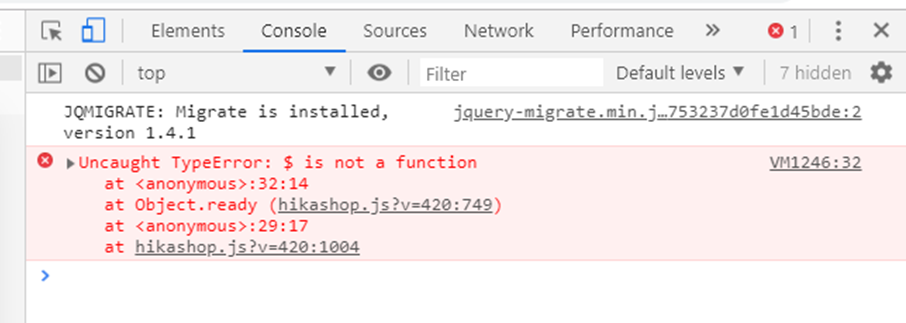
after deletion of the line in filter.php there is no errors in console
Regards,
Greg
you can see test site here
before deletion of the line in filter.php I see following error in console:
after deletion of the line in filter.php there is no errors in console
Regards,
Greg
Please Log in or Create an account to join the conversation.
7 years 2 months ago - 7 years 2 months ago #309133
by kyratn
Replied by kyratn on topic lack of Reset Button in Hikashop Filter after 4.2.0 update
Hi,
Try changing this:
to this:
And that should fix your issue.
Let me know how it goes.
Thanks
Try changing this:
Code:
window.hikashop.ready(function($) {
// init Isotope
var $grid = $('.masonry-grid').isotope({
to this:
Code:
window.hikashop.ready(function() {
// init Isotope
var $grid = jQuery('.masonry-grid').isotope({
And that should fix your issue.
Let me know how it goes.
Thanks
Last edit: 7 years 2 months ago by kyratn.
The following user(s) said Thank You: Greg_C
Please Log in or Create an account to join the conversation.
7 years 2 months ago #309135
by Greg_C
Replied by Greg_C on topic lack of Reset Button in Hikashop Filter after 4.2.0 update
Hi, thanks ! masonry layout now is working without any changes in filter.php - with no errors in console !
however I have noticed something strange with dynamic display, which is not working properly (it is not related with masonry layout) – after update to hikashop 4.2. dynamic display works properly only until Filter is Set and then all values for the rest of the filters are available and dynamic display doesn’t work - even after Reset button dynamic display doesn’t work unless you use reset button next to the field
same situation occurs with prostar template
I am using filters with “Submit on click” set as No
I have also checked that dynamic display is working properly when you only use filters with option “Submit on click” set as Yes
Reset Button “switch off” dynamic display for all fields and after pressing Reset Button dynamic display doesn’t work
Strange is that after deletion of the line “$submit = 'window.hikashop.refreshFilters(this);';” in filter.php dynamic display is working properly !
Regards,
Greg
however I have noticed something strange with dynamic display, which is not working properly (it is not related with masonry layout) – after update to hikashop 4.2. dynamic display works properly only until Filter is Set and then all values for the rest of the filters are available and dynamic display doesn’t work - even after Reset button dynamic display doesn’t work unless you use reset button next to the field
same situation occurs with prostar template
I am using filters with “Submit on click” set as No
I have also checked that dynamic display is working properly when you only use filters with option “Submit on click” set as Yes
Reset Button “switch off” dynamic display for all fields and after pressing Reset Button dynamic display doesn’t work
Strange is that after deletion of the line “$submit = 'window.hikashop.refreshFilters(this);';” in filter.php dynamic display is working properly !
Regards,
Greg
Please Log in or Create an account to join the conversation.
7 years 2 months ago #309146
by nicolas
Replied by nicolas on topic lack of Reset Button in Hikashop Filter after 4.2.0 update
Hi,
I'm not able to reproduce the problem. The dynamic display works fine on my end and we didn't change anything regarding this when adding the ajax system so I don't see why it wouldn't work.
Could you present a test case scenario on your test website so that we can better understand the situation ?
I'm not able to reproduce the problem. The dynamic display works fine on my end and we didn't change anything regarding this when adding the ajax system so I don't see why it wouldn't work.
Could you present a test case scenario on your test website so that we can better understand the situation ?
Please Log in or Create an account to join the conversation.
Time to create page: 0.303 seconds