
Error when trying to edit product after Joomla 4.2 update
4 years 2 months ago #343939
by jazzmang
-- HikaShop version -- : 4.6.1
-- Joomla version -- : 4.2.0
-- PHP version -- : 8.1.9
-- Browser(s) name and version -- : Any
-- Error-message(debug-mod must be tuned on) -- : Database not set in Joomla\CMS\Form\Field\TagField
Just opening up a product in the administration area of Hika causes this error:
Database not set in Joomla\CMS\Form\Field\TagField
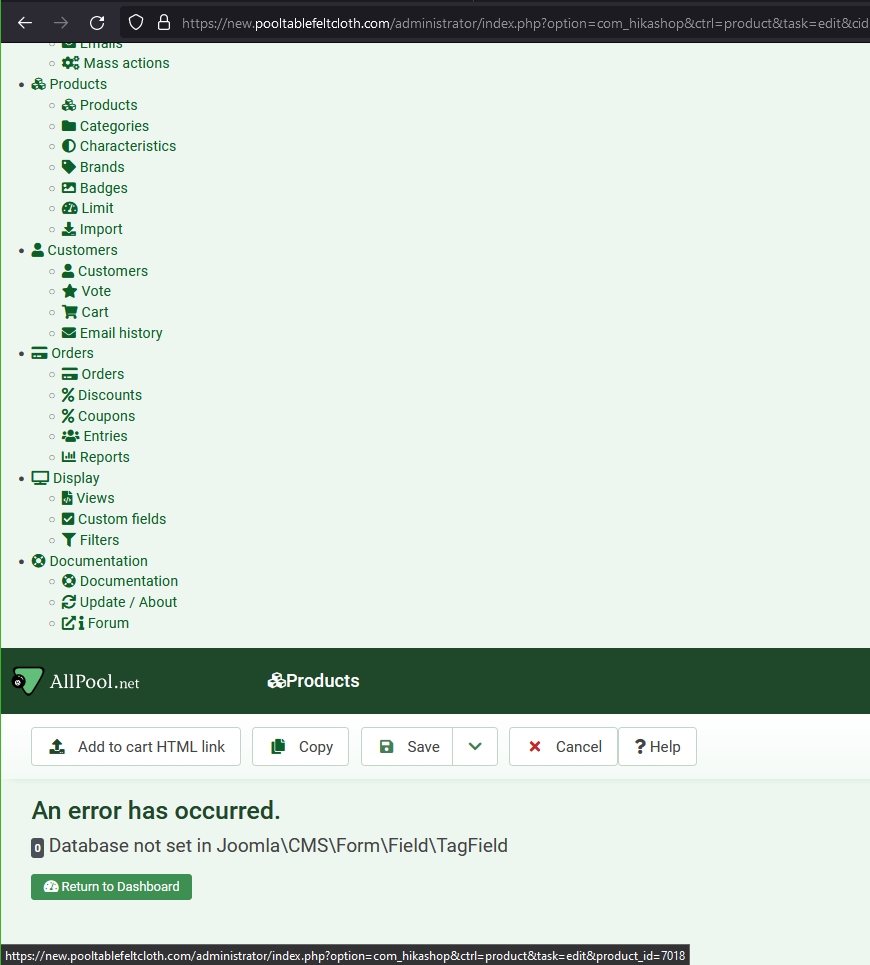
It doesn't happen when editing or updating anything else like a category.
It also seems to scramble the HikaShop administrator menu (but just when you get that error).
Fortunately, this is not on a production site.
-- Joomla version -- : 4.2.0
-- PHP version -- : 8.1.9
-- Browser(s) name and version -- : Any
-- Error-message(debug-mod must be tuned on) -- : Database not set in Joomla\CMS\Form\Field\TagField
Just opening up a product in the administration area of Hika causes this error:
Database not set in Joomla\CMS\Form\Field\TagField
It doesn't happen when editing or updating anything else like a category.
It also seems to scramble the HikaShop administrator menu (but just when you get that error).
Fortunately, this is not on a production site.
Please Log in or Create an account to join the conversation.

4 years 2 months ago #343940
by dyvel
Replied by dyvel on topic Error when trying to edit product after Joomla 4.2 update
I get the same error. It seems related to /administrator/components/com_hikashop/helpers/tags.php:82
If I disable that line I can edit the product again.
If I disable that line I can edit the product again.
Please Log in or Create an account to join the conversation.
4 years 2 months ago #343941
by jazzmang
Replied by jazzmang on topic Error when trying to edit product after Joomla 4.2 update
Did you disable a plugin or just rename tags.php file?
Please Log in or Create an account to join the conversation.
4 years 2 months ago #343942
by dyvel
Line 82 edited:
This is just a temporary fix to get access back to the edit page. I'm sure Hikashop will fix the underlying issue ASAP.
Replied by dyvel on topic Error when trying to edit product after Joomla 4.2 update
I edited the file and uncommented line 82.jazzmang wrote: Did you disable a plugin or just rename tags.php file?
Line 82 edited:
Code:
//return $fieldTag->input;
This is just a temporary fix to get access back to the edit page. I'm sure Hikashop will fix the underlying issue ASAP.
The following user(s) said Thank You: jazzmang
Please Log in or Create an account to join the conversation.
Less
More
- Posts: 609
- Thank you received: 13
4 years 2 months ago #343943
by mohairbears
Replied by mohairbears on topic Error when trying to edit product after Joomla 4.2 update
Getting exactly the same issue?
Please Log in or Create an account to join the conversation.
4 years 2 months ago #343944
by jazzmang
Replied by jazzmang on topic Error when trying to edit product after Joomla 4.2 update
Thanks, can confirm that does the job at least temporarily until HikaShop fixes it right.
FYI noticed the Tags field is now no longer usable so your mileage may vary.
We don't use tags, so hopefully won't be an issue for us.
FYI noticed the Tags field is now no longer usable so your mileage may vary.
We don't use tags, so hopefully won't be an issue for us.
Please Log in or Create an account to join the conversation.

4 years 2 months ago #343952
by nicolas
Replied by nicolas on topic Error when trying to edit product after Joomla 4.2 update
Hi,
Instead of deleting the line
of the file /administrator/components/com_hikashop/helpers/tags.php what you can do is add this code before it in that same file:
That way, it will fix the problem and the tags system will work again.
We've added the fix in the 4.6.1 on our end.
So for anyone having the issue and reading this :
- if you have HikaShop 4.6.1 you can download it again on our website and install it on yours to get the hot fix
- if you have a previous version of HikaShop, you can just update your HikaShop or apply the patch as explained above
Instead of deleting the line
Code:
return $fieldTag->input;
Code:
if(method_exists($fieldTag, 'setDatabase')) {
$db = JFactory::getDBO();
$fieldTag->setDatabase($db);
}
We've added the fix in the 4.6.1 on our end.
So for anyone having the issue and reading this :
- if you have HikaShop 4.6.1 you can download it again on our website and install it on yours to get the hot fix
- if you have a previous version of HikaShop, you can just update your HikaShop or apply the patch as explained above
The following user(s) said Thank You: mohairbears, jazzmang, yumasan, grafixpress, Philip, imcom, SEKME, khashiz, levelup, Akdag
Please Log in or Create an account to join the conversation.
4 years 2 months ago #344010
by khashiz
Replied by khashiz on topic Error when trying to edit product after Joomla 4.2 update
how can a person have solutions for all questions ??
you are a magician Nicolas
thank you
you are a magician Nicolas
thank you
Please Log in or Create an account to join the conversation.
Less
More
- Posts: 35
- Thank you received: 2
4 years 1 month ago #344562
by grafixpress
Replied by grafixpress on topic Error when trying to edit product after Joomla 4.2 update
Thank you for your quick response, Nicolas.
Reinstalling with the hot fixed file worked!
Reinstalling with the hot fixed file worked!
Please Log in or Create an account to join the conversation.
Time to create page: 0.364 seconds