

- Posts: 317
- Thank you received: 20
Edit e-mail bodies and customer invoices
3 years 5 months ago - 3 years 5 months ago #351101
by jgribble
Edit e-mail bodies and customer invoices was created by jgribble
-- url of the page with the problem -- :
jimg57.sg-host.com/en/my-cart
-- HikaShop version -- : 4.7.2
-- Joomla version -- : 4
I remember there are some pretty sophisticated capabalities. But, I couldn't find anything on that here: www.hikashop.com/support/documentation/5...fig.html#main_emails
So, I thought I would just ask where to find it.
Please walk me through how to set up and configure a customer invoice.
In System/emails, I don't see one that is labeled Invoice. Is it there or somewhere else?
-Jim Gribble
-- HikaShop version -- : 4.7.2
-- Joomla version -- : 4
I remember there are some pretty sophisticated capabalities. But, I couldn't find anything on that here: www.hikashop.com/support/documentation/5...fig.html#main_emails
So, I thought I would just ask where to find it.
Please walk me through how to set up and configure a customer invoice.
In System/emails, I don't see one that is labeled Invoice. Is it there or somewhere else?
-Jim Gribble
Last edit: 3 years 5 months ago by jgribble.
Please Log in or Create an account to join the conversation.
3 years 5 months ago #351109
by jgribble
Replied by jgribble on topic Edit e-mail bodies and customer invoices
So I see that the templates populate the layout wth style parameters. Very clever, but complicated. Perhaps more thann most customers need or are expecting. I suspect it's possible to use your form fields and some plain old HTML to make a super simple e-mail form. I would wrap it in the same table we use across the site in all our forms. So we have visual continuity between email forms and the look and feel of the website, Please comment. (I am xtill not sure which of the e-mails is our invoice. Nor am I sure how to regulate which ones get sent and which don't. Some will wil be viewed as just bothersome.)
Thank you,
-Jim Gribble
Thank you,
-Jim Gribble
Please Log in or Create an account to join the conversation.
3 years 5 months ago #351110
by jgribble
Replied by jgribble on topic Edit e-mail bodies and customer invoices
Also I want to confirm that if I want to customize an e-mail, I create a new custom_mytemplate, copy the default code to it and customize that. This file will not be overwritten by component updates?
Thank you,
-Jim Gribble
Thank you,
-Jim Gribble
Please Log in or Create an account to join the conversation.

3 years 5 months ago - 3 years 5 months ago #351106
by nicolas
Replied by nicolas on topic Edit e-mail bodies and customer invoices
Hi,
An email is not an invoice. An email can contain the order summary, but for an invoice, it has to be a file, like a PDF.
So if you want invoices to be sent to customers, they normally need to be sent as PDF attachments to the emails sent to the customers.
We actually have the PDF invoice plugin which does precisely this:
www.hikashop.com/marketplace/product/18-plugin-pdf.html
An email is not an invoice. An email can contain the order summary, but for an invoice, it has to be a file, like a PDF.
So if you want invoices to be sent to customers, they normally need to be sent as PDF attachments to the emails sent to the customers.
We actually have the PDF invoice plugin which does precisely this:
www.hikashop.com/marketplace/product/18-plugin-pdf.html
Note that the allowed HTML and CSS is not the same in emails and browsers. You're more restricted in emails. So you can't just copy / paste the HTML / CSS of the website to the email to make it look the same as the website.I would wrap it in the same table we use across the site in all our forms. So we have visual continuity between email forms and the look and feel of the website, Please comment.
That's correct.Also I want to confirm that if I want to customize an e-mail, I create a new custom_mytemplate, copy the default code to it and customize that. This file will not be overwritten by component updates?
Last edit: 3 years 5 months ago by nicolas.
Please Log in or Create an account to join the conversation.
3 years 5 months ago #351127
by jgribble
Replied by jgribble on topic Edit e-mail bodies and customer invoices
Thank you. But please identify the e-mail which is sent to customer. It is not clearly labeled in the system. That e-mail will contain all the order details. I therefore think of it as an invoice. Technically, yes, the actual invoice is the PDF and I will use that. Have worked with e-mail marketing for a long time and know all the limitations, including the prohibition of CSS. Am expert user of ACY Mailing. I just want to really simplify these tabular HTML forms.
What is the name of the system e-mail I should be working on? Which is the one which goes out to customer? Guessing on my part won't do.
And, is it possible to test-send e-mails so we can debug them before the system is turned on?
Please consider adding a tutorial on e-mail management to your documentation. Then you will get fewer questions and they will be more informed.
A simple thing I want to do is add the company logo at the bottom with hyperlink to homepage. How?
Thank you again,
-Jim Gribble
What is the name of the system e-mail I should be working on? Which is the one which goes out to customer? Guessing on my part won't do.
And, is it possible to test-send e-mails so we can debug them before the system is turned on?
Please consider adding a tutorial on e-mail management to your documentation. Then you will get fewer questions and they will be more informed.
A simple thing I want to do is add the company logo at the bottom with hyperlink to homepage. How?
Thank you again,
-Jim Gribble
Please Log in or Create an account to join the conversation.
3 years 5 months ago - 3 years 5 months ago #351138
by jgribble
Replied by jgribble on topic Edit e-mail bodies and customer invoices
I have surmised that Payment Notification is the email that goes to the customer after conifrmed purchase.
Please identify the emal to admin after confirmed purchase. Just taking a guess that it's "Order administrator notification."
I doubt we will be allowing user registration/account creation so as to not attract identity thieves. There's a PHP backlink to user account on website. Does that need to be hidden in the email? How?
I do want to add company logo with backlink to homepage. How?
So I have my custom email template created and ready to go.
Thank you,
-Jim Gribble
Please identify the emal to admin after confirmed purchase. Just taking a guess that it's "Order administrator notification."
I doubt we will be allowing user registration/account creation so as to not attract identity thieves. There's a PHP backlink to user account on website. Does that need to be hidden in the email? How?
I do want to add company logo with backlink to homepage. How?
So I have my custom email template created and ready to go.
Thank you,
-Jim Gribble
Last edit: 3 years 5 months ago by jgribble.
Please Log in or Create an account to join the conversation.
3 years 5 months ago - 3 years 5 months ago #351140
by jgribble
Replied by jgribble on topic Edit e-mail bodies and customer invoices
Suddenly, can no longer preview email templates or work with orders. System asked me to create an order and I did. Did not edit anything. Went back to work on emails. Boom. None of the default templates work. All produce this error. Why?
It actually opens up a dashboard. For what?
Thank you.
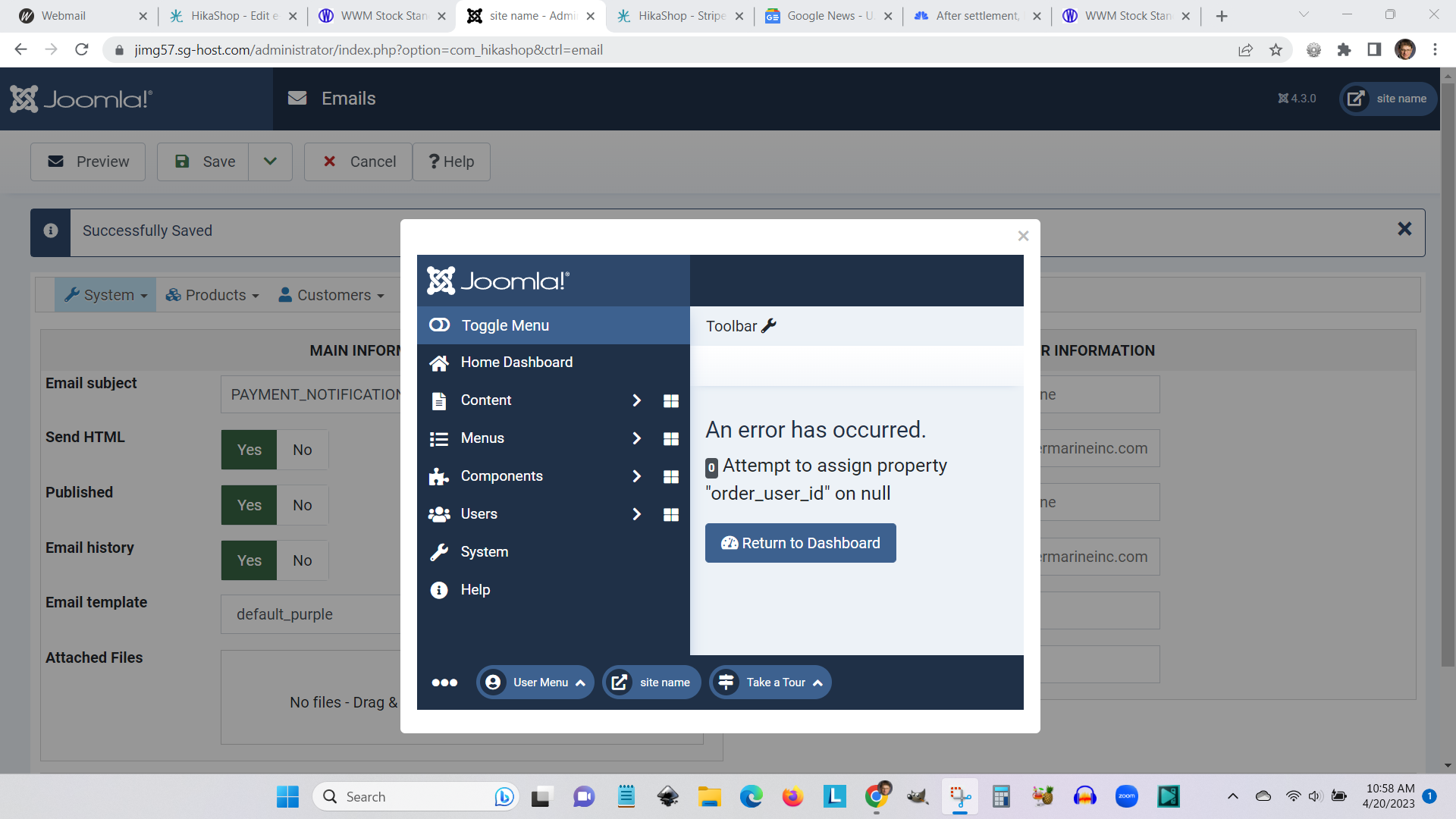
It actually opens up a dashboard. For what?
Thank you.
Last edit: 3 years 5 months ago by jgribble.
Please Log in or Create an account to join the conversation.
3 years 5 months ago - 3 years 5 months ago #351143
by jgribble

The email form has a little Hikashop item which is published here at PHP line 36.
<img src="{VAR:LIVE_SITE}media/com_hikashop/images/icons/icon-48-order.png" border="0" alt="" style="float:left;margin-right:4px;"/>
I realize I could delete it but it would be overwritten by updates. I could also redirect it to a White Water Marine icon, But that too would not be permanent.
Can it be addressed via the custom email template?
Thank you,
-Jim Gribble
Replied by jgribble on topic Edit e-mail bodies and customer invoices
The email form has a little Hikashop item which is published here at PHP line 36.
<img src="{VAR:LIVE_SITE}media/com_hikashop/images/icons/icon-48-order.png" border="0" alt="" style="float:left;margin-right:4px;"/>
I realize I could delete it but it would be overwritten by updates. I could also redirect it to a White Water Marine icon, But that too would not be permanent.
Can it be addressed via the custom email template?
Thank you,
-Jim Gribble
Last edit: 3 years 5 months ago by jgribble.
Please Log in or Create an account to join the conversation.
3 years 5 months ago - 3 years 5 months ago #351132
by nicolas
Replied by nicolas on topic Edit e-mail bodies and customer invoices
Hi,
The email sent to the user when the order is created is the "order creation notification".
The email sent to the user when the order status changes from "created" to "confirmed" after a payment plugin receives a payment notification from its payment gateway is the "order status notification".
6.
7. Regarding the error in the preview, please activate the "debug" setting of the Joomla configuration and try again. It will display a full error message with more information on what's going on.
8.
No. "Payment Notification" is the email sent to the shop owner when a payment is received.1. The critical email is called Payment Notification?
2. Different versions get sent to both admin and customer?
3. That is all governed in the PHP?
The email sent to the user when the order is created is the "order creation notification".
The email sent to the user when the order status changes from "created" to "confirmed" after a payment plugin receives a payment notification from its payment gateway is the "order status notification".
Yes. The style, frame, header and footer of the emails are defined in the template. That way, if you want to change the color of the emails, or add a logo to them, you don't have to edit each email and do the changes one by one. You do the change in the template they all use and you're ready to go. If you want to add a logo in the template, just write the HTML of the logo (an img tag basically) where you want it in the template.4. I can change the appearance via customize email template?
That's indeed what is the best. However, it is possible to change the wording in the "preload" section at the bottom, with the PHP code. This second option can be useful when you want the text to be dynamic. For example, if you want to display a different text based on the shipping method selected, you'll need to write PHP code to add the condition on the shipping method of the order.5. I can ONLY change the wording via a language override?
6.
What do you mean by that ? Under the Checkout tab of the HikaShop configuration, there is a setting called "Allow registration after guest checkout" which you can activate so that the customer checking out as a guest can then create a user account on your website with a link added to the order status notification email. If you don't want that, deactivate the setting.There's a PHP backlink to user account on website. Does that need to be hidden in the email? How?
7. Regarding the error in the preview, please activate the "debug" setting of the Joomla configuration and try again. It will display a full error message with more information on what's going on.
8.
Sure. You can add CSS in the template to hide it. Like this:Can it be addressed via the custom email template?
Code:
#title img{ display: none; }
Last edit: 3 years 5 months ago by nicolas.
Please Log in or Create an account to join the conversation.
3 years 5 months ago - 3 years 5 months ago #351153
by jgribble
Replied by jgribble on topic Edit e-mail bodies and customer invoices
This helps quite a bit, thanks.
Regarding the error, I did as you suggest and I see a long list but it tells me nothing. Since I did not edit anything in Hikashop, other than create my first order, I don't know why it occurred.
Before creating that order, I was able to preview.
Then after first order was created, everything went south.
Also, when I manually create an order and then add a product, the same error message appears and I can't add any products. I don't know as yet how far-reading this issue is. But it is obviously something serious.
Are you willing to take a quick look?
At least I find I can create new products.
Thank you,
-Jim Gribble
error has occurred.
0 Attempt to assign property "order_user_id" on null
Call stack
# Function Location
1 () JROOT/administrator/components/com_hikashop/classes/order.php:2041
2 hikashopOrderClass->loadOrderNotification() JROOT/administrator/components/com_hikashop/classes/order.php:2034
3 hikashopOrderClass->loadNotification() JROOT/media/com_hikashop/mail/order_creation_notification.preview.php:20
4 order_creation_notificationPreviewMaker->prepareMail() JROOT/administrator/components/com_hikashop/views/email/view.html.php:304
5 EmailViewEmail->preview() JROOT/administrator/components/com_hikashop/views/email/view.html.php:24
6 EmailViewEmail->display() JROOT/libraries/src/MVC/Controller/BaseController.php:645
7 Joomla\CMS\MVC\Controller\BaseController->display() JROOT/administrator/components/com_hikashop/helpers/helper.php:2459
8 hikashopController->display() JROOT/administrator/components/com_hikashop/controllers/email.php:103
9 emailController->preview() JROOT/libraries/src/MVC/Controller/BaseController.php:678
10 Joomla\CMS\MVC\Controller\BaseController->execute() JROOT/administrator/components/com_hikashop/helpers/helper.php:2437
11 hikashopController->execute() JROOT/administrator/components/com_hikashop/hikashop.php:73
12 require_once() JROOT/libraries/src/Dispatcher/LegacyComponentDispatcher.php:71
13 Joomla\CMS\Dispatcher\LegacyComponentDispatcher::Joomla\CMS\Dispatcher\{closure}() JROOT/libraries/src/Dispatcher/LegacyComponentDispatcher.php:73
14 Joomla\CMS\Dispatcher\LegacyComponentDispatcher->dispatch() JROOT/libraries/src/Component/ComponentHelper.php:361
15 Joomla\CMS\Component\ComponentHelper::renderComponent() JROOT/libraries/src/Application/AdministratorApplication.php:143
16 Joomla\CMS\Application\AdministratorApplication->dispatch() JROOT/libraries/src/Application/AdministratorApplication.php:186
17 Joomla\CMS\Application\AdministratorApplication->doExecute() JROOT/libraries/src/Application/CMSApplication.php:293
18 Joomla\CMS\Application\CMSApplication->execute() JROOT/administrator/includes/app.php:61
19 require_once() JROOT/administrator/index.php:32
Regarding the error, I did as you suggest and I see a long list but it tells me nothing. Since I did not edit anything in Hikashop, other than create my first order, I don't know why it occurred.
Before creating that order, I was able to preview.
Then after first order was created, everything went south.
Also, when I manually create an order and then add a product, the same error message appears and I can't add any products. I don't know as yet how far-reading this issue is. But it is obviously something serious.
Are you willing to take a quick look?
At least I find I can create new products.
Thank you,
-Jim Gribble
error has occurred.
0 Attempt to assign property "order_user_id" on null
Call stack
# Function Location
1 () JROOT/administrator/components/com_hikashop/classes/order.php:2041
2 hikashopOrderClass->loadOrderNotification() JROOT/administrator/components/com_hikashop/classes/order.php:2034
3 hikashopOrderClass->loadNotification() JROOT/media/com_hikashop/mail/order_creation_notification.preview.php:20
4 order_creation_notificationPreviewMaker->prepareMail() JROOT/administrator/components/com_hikashop/views/email/view.html.php:304
5 EmailViewEmail->preview() JROOT/administrator/components/com_hikashop/views/email/view.html.php:24
6 EmailViewEmail->display() JROOT/libraries/src/MVC/Controller/BaseController.php:645
7 Joomla\CMS\MVC\Controller\BaseController->display() JROOT/administrator/components/com_hikashop/helpers/helper.php:2459
8 hikashopController->display() JROOT/administrator/components/com_hikashop/controllers/email.php:103
9 emailController->preview() JROOT/libraries/src/MVC/Controller/BaseController.php:678
10 Joomla\CMS\MVC\Controller\BaseController->execute() JROOT/administrator/components/com_hikashop/helpers/helper.php:2437
11 hikashopController->execute() JROOT/administrator/components/com_hikashop/hikashop.php:73
12 require_once() JROOT/libraries/src/Dispatcher/LegacyComponentDispatcher.php:71
13 Joomla\CMS\Dispatcher\LegacyComponentDispatcher::Joomla\CMS\Dispatcher\{closure}() JROOT/libraries/src/Dispatcher/LegacyComponentDispatcher.php:73
14 Joomla\CMS\Dispatcher\LegacyComponentDispatcher->dispatch() JROOT/libraries/src/Component/ComponentHelper.php:361
15 Joomla\CMS\Component\ComponentHelper::renderComponent() JROOT/libraries/src/Application/AdministratorApplication.php:143
16 Joomla\CMS\Application\AdministratorApplication->dispatch() JROOT/libraries/src/Application/AdministratorApplication.php:186
17 Joomla\CMS\Application\AdministratorApplication->doExecute() JROOT/libraries/src/Application/CMSApplication.php:293
18 Joomla\CMS\Application\CMSApplication->execute() JROOT/administrator/includes/app.php:61
19 require_once() JROOT/administrator/index.php:32
Last edit: 3 years 5 months ago by jgribble.
Please Log in or Create an account to join the conversation.
3 years 5 months ago #351157
by jgribble
Replied by jgribble on topic Edit e-mail bodies and customer invoices
If I want to delete Hika icons and images from the emails, can 't I just delete them in my custom template? And substitute iconography which represents the client, White Water Marine?
Please Log in or Create an account to join the conversation.
3 years 5 months ago - 3 years 5 months ago #351158
by jgribble
-Jim Gribble
Replied by jgribble on topic Edit e-mail bodies and customer invoices
This attachment is hidden for guests.
Please log in or register to see it.
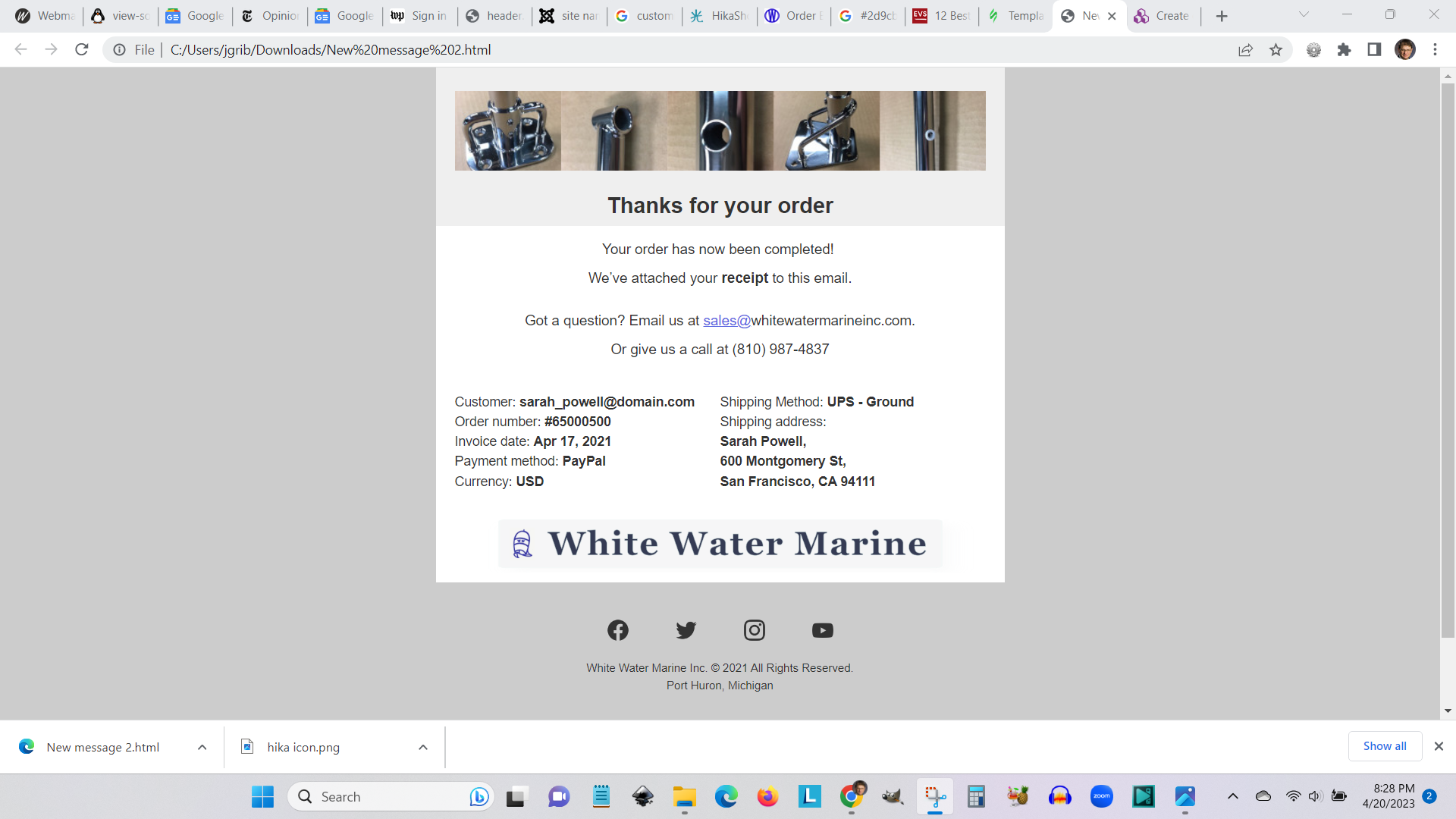
Your system, while amazing in so many aspects, makes it hard and laborious for us to achieve our design goals. So I wondered, could I not quicly create a template using one of the many wysyg email template builders. They work just like ACY Mailing. Below I'm showing what I mean. Could I not just use that, so long as I grab the necessary data tags and insert them into layout? This result took me 10 minutes to achieve. I figure it would take me many hours trying to edit one of your built-in templates.Please log in or register to see it.
-Jim Gribble
Last edit: 3 years 5 months ago by jgribble.
Please Log in or Create an account to join the conversation.
3 years 5 months ago - 3 years 5 months ago #351154
by nicolas
Replied by nicolas on topic Edit e-mail bodies and customer invoices
Hi,
1. It might tell you nothing, but it tells us a lot about what is the problem.
This error means that the order which you selected before in the preview popup is not found. You must have deleted the order in the middle of your tests.
Logout from your backend and login again. It will reset the Joomla user session, including the selection you made previously in the preview popup and you won't get the error.
On our end, we'll add a fix so that even if the selected order is not found, it doesn't generate an error.
2. You sure can use an another email template builder and just replace the text by the tags.
Previously, AcyMailing had an integration which allowed you to customize the HikaShop templates in AcyMailing. So you could have a better customization experience. But I believe they've discontinued it in the last few years.
1. It might tell you nothing, but it tells us a lot about what is the problem.
This error means that the order which you selected before in the preview popup is not found. You must have deleted the order in the middle of your tests.
Logout from your backend and login again. It will reset the Joomla user session, including the selection you made previously in the preview popup and you won't get the error.
On our end, we'll add a fix so that even if the selected order is not found, it doesn't generate an error.
2. You sure can use an another email template builder and just replace the text by the tags.
Previously, AcyMailing had an integration which allowed you to customize the HikaShop templates in AcyMailing. So you could have a better customization experience. But I believe they've discontinued it in the last few years.
Last edit: 3 years 5 months ago by nicolas.
Please Log in or Create an account to join the conversation.
3 years 5 months ago #351180
by jgribble
Replied by jgribble on topic Edit e-mail bodies and customer invoices
That's exact;y right, I did delete the original order and started over. The reason was, that first order did not have a product added to it. So I created a new order with a product, and that's where the trouble started.
Regarding the e-mails, your system is designed for the lowest common denominator and is ingenious in that regard. Seeing how it is engineered, I was amazed. If we were to have a big store with big volume and a fulltime manager, I would use it. But this is going to be more of a boutique store with a sporadic volume and needing only two e-mails: one to admin and a confirmation to customer when a sale happens.
It's just not feasible for you to be all thiings to everyone.But what I appreciate about Hikashop is the room it leaves for people like us to do it our way. Other systems don't offer that.
-Jim Gribble
Regarding the e-mails, your system is designed for the lowest common denominator and is ingenious in that regard. Seeing how it is engineered, I was amazed. If we were to have a big store with big volume and a fulltime manager, I would use it. But this is going to be more of a boutique store with a sporadic volume and needing only two e-mails: one to admin and a confirmation to customer when a sale happens.
It's just not feasible for you to be all thiings to everyone.But what I appreciate about Hikashop is the room it leaves for people like us to do it our way. Other systems don't offer that.
-Jim Gribble
The following user(s) said Thank You: nicolas
Please Log in or Create an account to join the conversation.
3 years 5 months ago - 3 years 5 months ago #351182
by jgribble
Replied by jgribble on topic Edit e-mail bodies and customer invoices
If I can use tags inside my custom email layout, what about LINVAR. There, I find the critical tag: {LINEVAR:item.order_product_name} And also ones like {LINEVAR:item.order_product_quantity}.
To the left, in the VAR column, I see plenty of useful things like {VAR:customer.name} and {VAR:customer.email} and {VAR:shipping_address.address_street} So that should work fine without any modifications..
I am thinking that for the LINEVAR tags to work they have to be converted intop VAR format. As in {VAR:item.order_product_name}. Is that what I need to do? And then I can drop my tags into my custom layout anywhere that works best?
Thank you,
-Jim Gribble
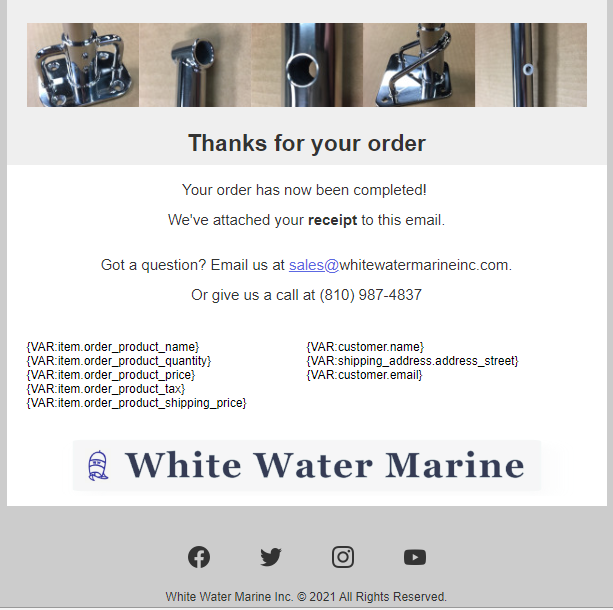
To the left, in the VAR column, I see plenty of useful things like {VAR:customer.name} and {VAR:customer.email} and {VAR:shipping_address.address_street} So that should work fine without any modifications..
I am thinking that for the LINEVAR tags to work they have to be converted intop VAR format. As in {VAR:item.order_product_name}. Is that what I need to do? And then I can drop my tags into my custom layout anywhere that works best?
Thank you,
-Jim Gribble
Last edit: 3 years 5 months ago by jgribble.
Please Log in or Create an account to join the conversation.
3 years 5 months ago #351183
by nicolas
Replied by nicolas on topic Edit e-mail bodies and customer invoices
Hi,
For LINEVAR tags, you need to make sure they are between
and
so that the email template system can replace the tags several times, once for each product in the order.
I invite you to check the default HTML of an order email. You'll see that the start and end tags are around the |code]<tr></tr>[/code] which encompass each row of the products listing table.
For LINEVAR tags, you need to make sure they are between
Code:
<!--{START:PRODUCT_LINE}-->
Code:
<!--{END:PRODUCT_LINE}-->
I invite you to check the default HTML of an order email. You'll see that the start and end tags are around the |code]<tr></tr>[/code] which encompass each row of the products listing table.
Please Log in or Create an account to join the conversation.
3 years 5 months ago #351226
by jgribble
Replied by jgribble on topic Edit e-mail bodies and customer invoices
Thanks. Then, the way I proposed will not work. My undertstandng is faulty. Correct?
In the example I am showing, how do I fix that so that it will work?
Other form systems I work with typically offer something like this. {all_fields} Which publishes data from all tags. Very simple. Is that possible in Hikashop?
-Jim Gribble
In the example I am showing, how do I fix that so that it will work?
Other form systems I work with typically offer something like this. {all_fields} Which publishes data from all tags. Very simple. Is that possible in Hikashop?
-Jim Gribble
Please Log in or Create an account to join the conversation.
3 years 5 months ago #351228
by nicolas
Replied by nicolas on topic Edit e-mail bodies and customer invoices
Hi,
Yes and No.
Having the result like your screenshot on www.hikashop.com/forum/install-update/90...invoices.html#351158 is possible.
But I don't understand why you're trying to add the product tags in www.hikashop.com/forum/install-update/90...invoices.html#351182 ? The product tags are there to display the details of each product in the order.
If you want the same result as www.hikashop.com/forum/install-update/90...invoices.html#351158 then you need to use order tags. The list of tags is available with a button you can click on at the top of the "HTML" area when you're editing an email.
For example, for the order number you can use the tag {VAR:order.order_number}
For the total amount : {VAR:order.order_full_price}
For the customer email: {VAR:customer.user_email}
Now, some things like the order currency, are not available directly as a tag. Then, you can use PHP code. For example, for the invoice date, you can use:
Yes and No.
Having the result like your screenshot on www.hikashop.com/forum/install-update/90...invoices.html#351158 is possible.
But I don't understand why you're trying to add the product tags in www.hikashop.com/forum/install-update/90...invoices.html#351182 ? The product tags are there to display the details of each product in the order.
If you want the same result as www.hikashop.com/forum/install-update/90...invoices.html#351158 then you need to use order tags. The list of tags is available with a button you can click on at the top of the "HTML" area when you're editing an email.
For example, for the order number you can use the tag {VAR:order.order_number}
For the total amount : {VAR:order.order_full_price}
For the customer email: {VAR:customer.user_email}
Now, some things like the order currency, are not available directly as a tag. Then, you can use PHP code. For example, for the invoice date, you can use:
Code:
<?php echo hikashop_getDate($data->order_invoice_created); ?>
Please Log in or Create an account to join the conversation.
3 years 5 months ago - 3 years 5 months ago #351242
by jgribble
Replied by jgribble on topic Edit e-mail bodies and customer invoices
If I understand correctly, the form template I created will work?
If I understand correctly, you question why I would use the product details tag?
On that point, I may be misunderstanding the purpose of that tag.
I want to be sure that customer sees ALL the options he selected in buying the stanchion.
That's what I thought "details" was for.
But no, maybe it shows the product description etc? Please clarify.
Bottom line is that you are saying it will work as configured, but you recommend deleting "details?"
And it will work to use the line_var tags and simple var tags? For trhe purpose of really simplifying things? Please confirm.
Thank you,
-Jim Gribble
If I understand correctly, you question why I would use the product details tag?
On that point, I may be misunderstanding the purpose of that tag.
I want to be sure that customer sees ALL the options he selected in buying the stanchion.
That's what I thought "details" was for.
But no, maybe it shows the product description etc? Please clarify.
Bottom line is that you are saying it will work as configured, but you recommend deleting "details?"
And it will work to use the line_var tags and simple var tags? For trhe purpose of really simplifying things? Please confirm.
Thank you,
-Jim Gribble
Last edit: 3 years 5 months ago by jgribble.
Please Log in or Create an account to join the conversation.
3 years 5 months ago - 3 years 5 months ago #351244
by nicolas
Replied by nicolas on topic Edit e-mail bodies and customer invoices
Hi,
If you want to add the products / options the customer ordered, just do like in the default HTML. Here is a copy / paste from the default HTML where I just removed the style attributes so that it reads easier. As you can see, it's just an HTML table with the tags :
The text/HTML between the START and END tags will automatically repeat itself, once per product in the order and the LINEVAR tags will be replaced by the data of the current product being processed.
If you want to add the products / options the customer ordered, just do like in the default HTML. Here is a copy / paste from the default HTML where I just removed the style attributes so that it reads easier. As you can see, it's just an HTML table with the tags :
Code:
<table>
<tr>
<td class="hika_template_color">{TXT:PRODUCT_NAME}</td>
{TXT:CUSTOMFIELD_NAME}
<td class="hika_template_color">{TXT:PRODUCT_PRICE}</td>
<td class="hika_template_color">{TXT:PRODUCT_QUANTITY}</td>
<td class="hika_template_color">{TXT:PRODUCT_TOTAL}</td>
</tr>
<!--{START:PRODUCT_LINE}-->
<tr>
<td>
{LINEVAR:PRODUCT_IMG}
{LINEVAR:PRODUCT_NAME}<!--{IF:ORDER_PRODUCT_CODE}--> {LINEVAR:PRODUCT_CODE}<!--{ENDIF:ORDER_PRODUCT_CODE}-->
{LINEVAR:PRODUCT_DOWNLOAD}
{LINEVAR:PRODUCT_DETAILS}
</td>
{LINEVAR:CUSTOMFIELD_VALUE}
<td>{LINEVAR:PRODUCT_PRICE}</td>
<td>{LINEVAR:PRODUCT_QUANTITY}</td>
<td>{LINEVAR:PRODUCT_TOTAL}</td>
</tr>
<!--{END:PRODUCT_LINE}-->
</table>
Last edit: 3 years 5 months ago by nicolas.
Please Log in or Create an account to join the conversation.
Time to create page: 0.367 seconds