

- Posts: 966
- Thank you received: 11
Disable Redirect, Disable Editing in Cart, Change Cart URL
3 years 4 months ago #352893
by MyWorld
Hi there,
1) The "Hikashop Cart notification Plugin" allows a popup message to appear after I add an item to the cart, how do I disable that? I need the plugin published though so that I can turn off "Redirect to checkout", but there's no option to turn off the popup.
2) I can't figure out what I did but in the cart it's showing the pen that says "edit the options of the product". How do I disable that?
3) Why does the checkout page have the "layout-show" at the end of the URL and how can I edit it and have the 2 checkouts, eg: checkout/checkout.html
www.mywebsite.com/checkout/checkout/layout-show.html
Thanks!
1) The "Hikashop Cart notification Plugin" allows a popup message to appear after I add an item to the cart, how do I disable that? I need the plugin published though so that I can turn off "Redirect to checkout", but there's no option to turn off the popup.
2) I can't figure out what I did but in the cart it's showing the pen that says "edit the options of the product". How do I disable that?
3) Why does the checkout page have the "layout-show" at the end of the URL and how can I edit it and have the 2 checkouts, eg: checkout/checkout.html
www.mywebsite.com/checkout/checkout/layout-show.html
Thanks!
Please Log in or Create an account to join the conversation.

3 years 4 months ago #352907
by nicolas
Replied by nicolas on topic Disable Redirect, Disable Editing in Cart, Change Cart URL
Hi,
1. I would have said to disable it.
Note that in the "Display location" setting of the plugin, you can select either "web page", "popup" or "add to cart button". If you select "popup" there, you'll have a real popup in the center of the page.
If you select "web page", you'll have instead a notification box on the corner of the page, like on our demo website.
If you select "add to cart button", the notification box will be linked to the add to cart button.
So these are potential alternatives.
2. There is no option to disable that. However, you can add a bit of CSS if you want to hide it:
3. Create a menu item of the type "HikaShop checkout" via the Joomla menu manager, and select it in the "force a menu on checkout" setting under the Checkout tab of the HikaShop configuration and you'll be able to use the alias of the menu item to customize the URL of the checkout.
1. I would have said to disable it.
Note that in the "Display location" setting of the plugin, you can select either "web page", "popup" or "add to cart button". If you select "popup" there, you'll have a real popup in the center of the page.
If you select "web page", you'll have instead a notification box on the corner of the page, like on our demo website.
If you select "add to cart button", the notification box will be linked to the add to cart button.
So these are potential alternatives.
2. There is no option to disable that. However, you can add a bit of CSS if you want to hide it:
Code:
.edit_cart_product{ display:none; }
3. Create a menu item of the type "HikaShop checkout" via the Joomla menu manager, and select it in the "force a menu on checkout" setting under the Checkout tab of the HikaShop configuration and you'll be able to use the alias of the menu item to customize the URL of the checkout.
Please Log in or Create an account to join the conversation.
3 years 3 months ago #352996
by MyWorld
Replied by MyWorld on topic Disable Redirect, Disable Editing in Cart, Change Cart URL
Hi Nicolas,
Regarding #3, I already had it set-up as you suggested. The alias is "checkout", so not sure where the layout-show part is coming from.
Thanks!
Regarding #3, I already had it set-up as you suggested. The alias is "checkout", so not sure where the layout-show part is coming from.
Thanks!
Please Log in or Create an account to join the conversation.
3 years 3 months ago #352998
by nicolas
Replied by nicolas on topic Disable Redirect, Disable Editing in Cart, Change Cart URL
Hi,
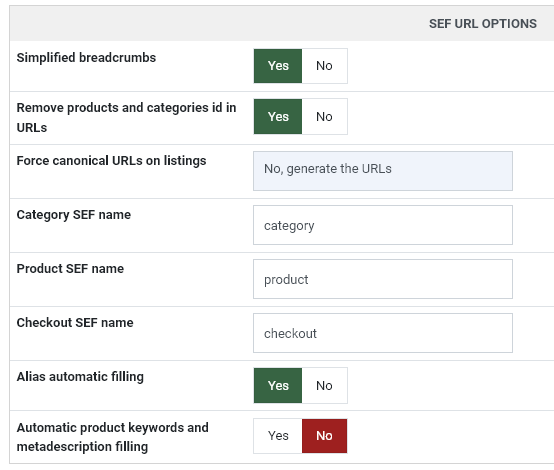
What do you have in the "checkout SEF name" setting of the HikaShop configuration ?
What do you have in the "checkout SEF name" setting of the HikaShop configuration ?
Please Log in or Create an account to join the conversation.
3 years 3 months ago #353057
by MyWorld
Replied by MyWorld on topic Disable Redirect, Disable Editing in Cart, Change Cart URL
Hi Nicolas,
It's "checkout". See below.
Thanks!
It's "checkout". See below.
Thanks!
Please Log in or Create an account to join the conversation.
3 years 3 months ago #353117
by nicolas
Replied by nicolas on topic Disable Redirect, Disable Editing in Cart, Change Cart URL
Hi,
So what if you empty that setting ? Does it help ?
So what if you empty that setting ? Does it help ?
Please Log in or Create an account to join the conversation.
3 years 3 months ago #353123
by MyWorld
Replied by MyWorld on topic Disable Redirect, Disable Editing in Cart, Change Cart URL
Hi Nicolas,
Removing "checkout" seems to work. Now the URL is just www.mysite.com/checkout.html .
Another question please... How can I style the notifyer that pops up when I add an item to cart? It disappears so it's hard to see it in order to style it. Is there a way around that?
Thanks!
Removing "checkout" seems to work. Now the URL is just www.mysite.com/checkout.html .
Another question please... How can I style the notifyer that pops up when I add an item to cart? It disappears so it's hard to see it in order to style it. Is there a way around that?
Thanks!
Please Log in or Create an account to join the conversation.
3 years 3 months ago #353128
by nicolas
Replied by nicolas on topic Disable Redirect, Disable Editing in Cart, Change Cart URL
Hi,
You can configure the time it stays on in the options of the HikaShop cart notification plugin. So just set a long time in there so that you can inspect the HTML / CSS with your browser.
You can configure the time it stays on in the options of the HikaShop cart notification plugin. So just set a long time in there so that you can inspect the HTML / CSS with your browser.
Please Log in or Create an account to join the conversation.
Time to create page: 0.107 seconds