
- Posts: 220
- Thank you received: 0
When choosing another shipping way, stop asking customers to fill out address
- clairewang
-
 Topic Author
- Offline
Less
More
3 years 2 months ago #353689
by clairewang
When choosing another shipping way, stop asking customers to fill out address was created by clairewang
Hi
Is there way when customer chooses "FamilyMart" shipping, the address columns all don't show so the customers don't need to fill out addresses information? Thanks a lot.
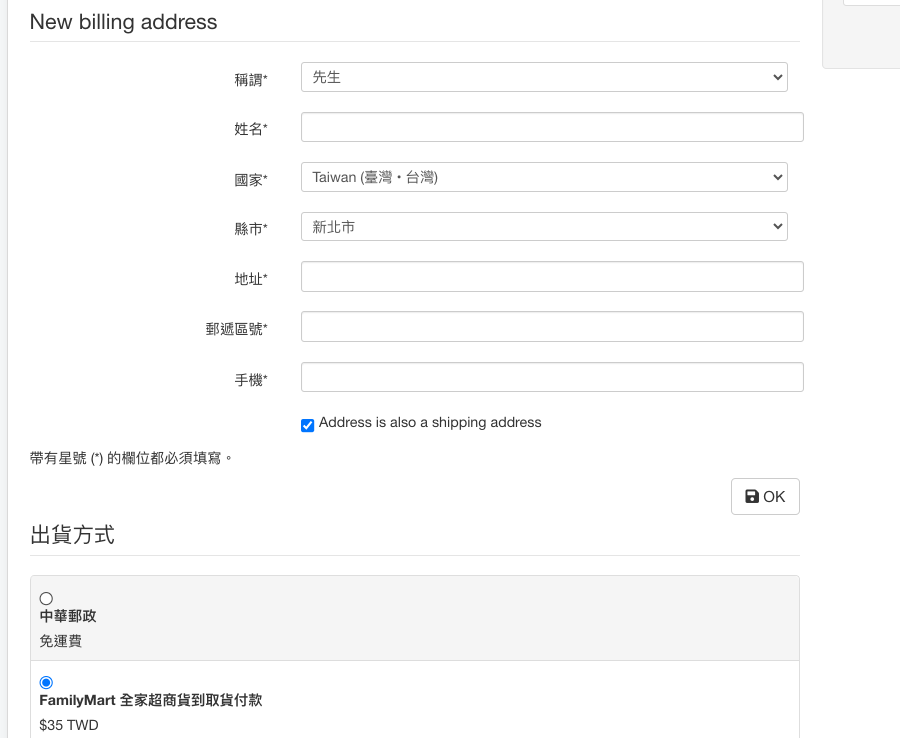
Is there way when customer chooses "FamilyMart" shipping, the address columns all don't show so the customers don't need to fill out addresses information? Thanks a lot.
Please Log in or Create an account to join the conversation.

3 years 2 months ago #353696
by nicolas
Replied by nicolas on topic When choosing another shipping way, stop asking customers to fill out address
Hi,
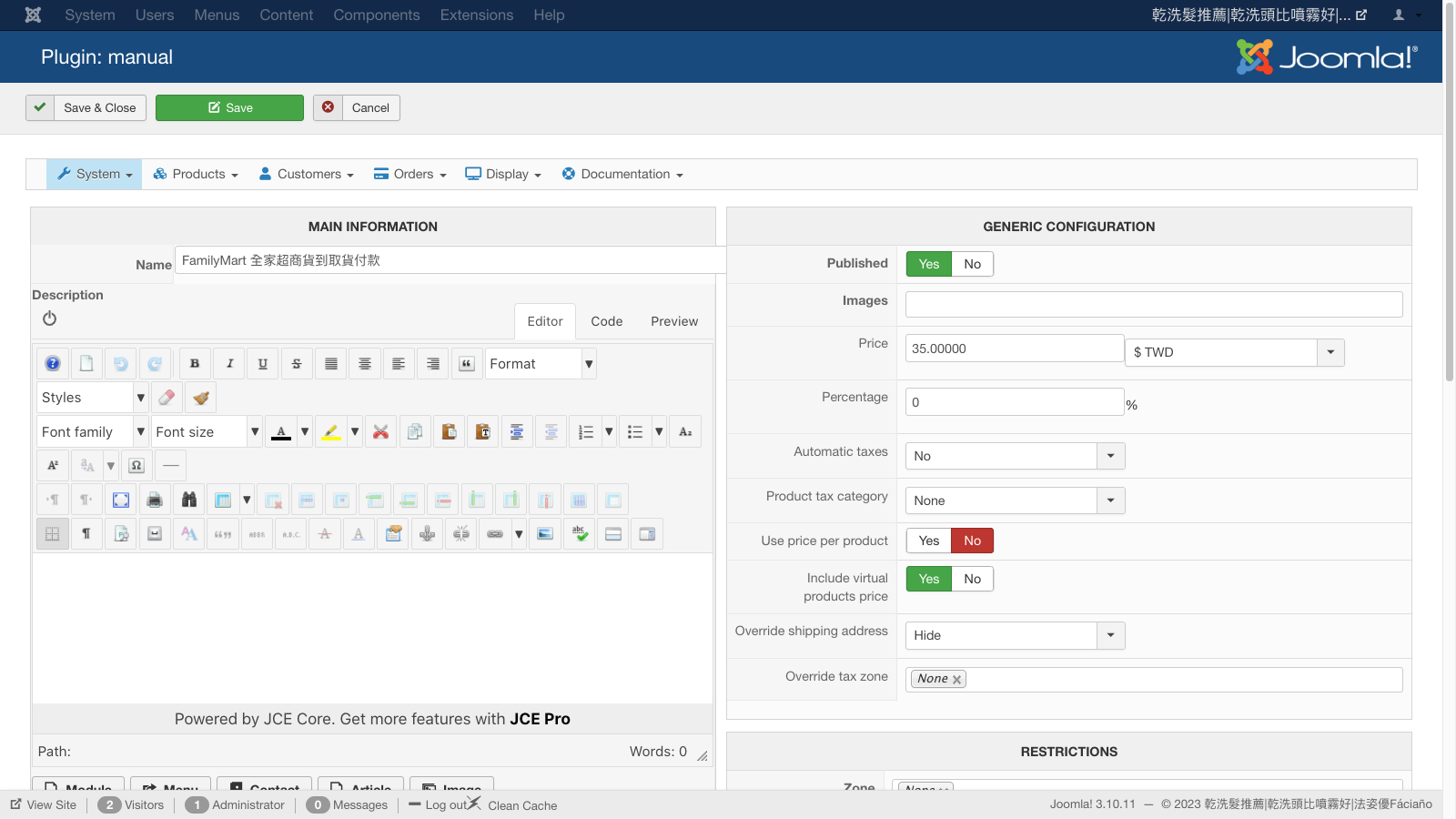
In your FamilyMart shipping method settings, turn on the "override shipping address" setting. This will remove the shipping address fields.
Note that the billing address fields will still be asked to the customer if you configure your Checkout workflow in the HikaShop configuration to ask for both the billing and the shipping address.
In your FamilyMart shipping method settings, turn on the "override shipping address" setting. This will remove the shipping address fields.
Note that the billing address fields will still be asked to the customer if you configure your Checkout workflow in the HikaShop configuration to ask for both the billing and the shipping address.
Please Log in or Create an account to join the conversation.
- clairewang
-
Topic Author
- Offline
Less
More
- Posts: 220
- Thank you received: 0
3 years 2 months ago #353706
by clairewang
Replied by clairewang on topic When choosing another shipping way, stop asking customers to fill out address
Thank Nicolas, but when customers don't logon yet, they are still asked to fill out address information. How to turn off the address form here? Appreciate that.
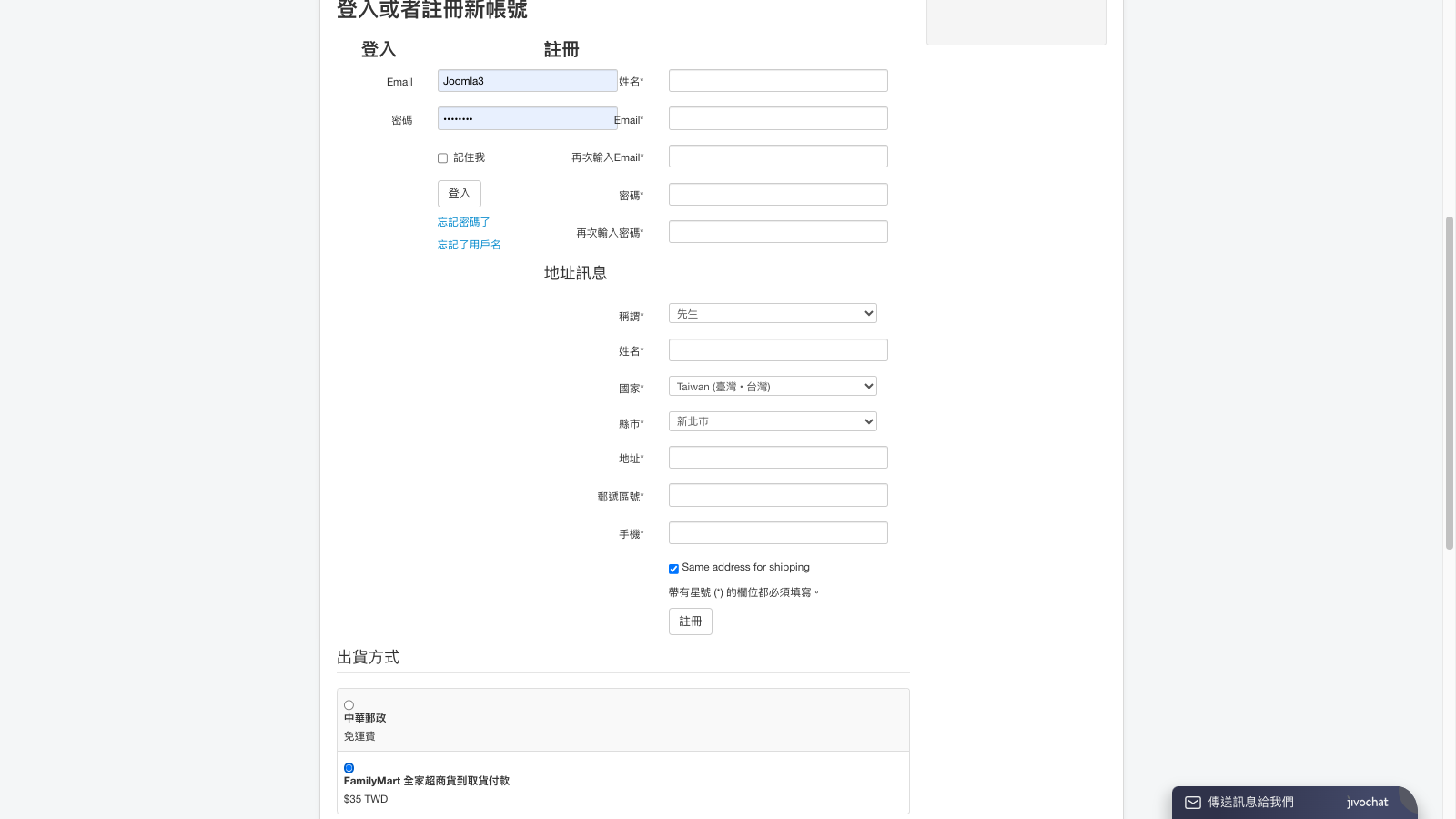
Please Log in or Create an account to join the conversation.
3 years 2 months ago #353709
by nicolas
Replied by nicolas on topic When choosing another shipping way, stop asking customers to fill out address
Hi,
Go in the Checkout tab of the HikaShop configuration.
There, in the "login" view of the Checkout workflow, you have the setting "Ask address on registration" you can turn off for that.
Go in the Checkout tab of the HikaShop configuration.
There, in the "login" view of the Checkout workflow, you have the setting "Ask address on registration" you can turn off for that.
Please Log in or Create an account to join the conversation.
- clairewang
-
Topic Author
- Offline
Less
More
- Posts: 220
- Thank you received: 0
3 years 2 months ago #353722
by clairewang
Replied by clairewang on topic When choosing another shipping way, stop asking customers to fill out address
Thank you, Nicolas. The address is turned off at the registration, but the FamilyMart is turned on to ask address again even I chose No to Override address.
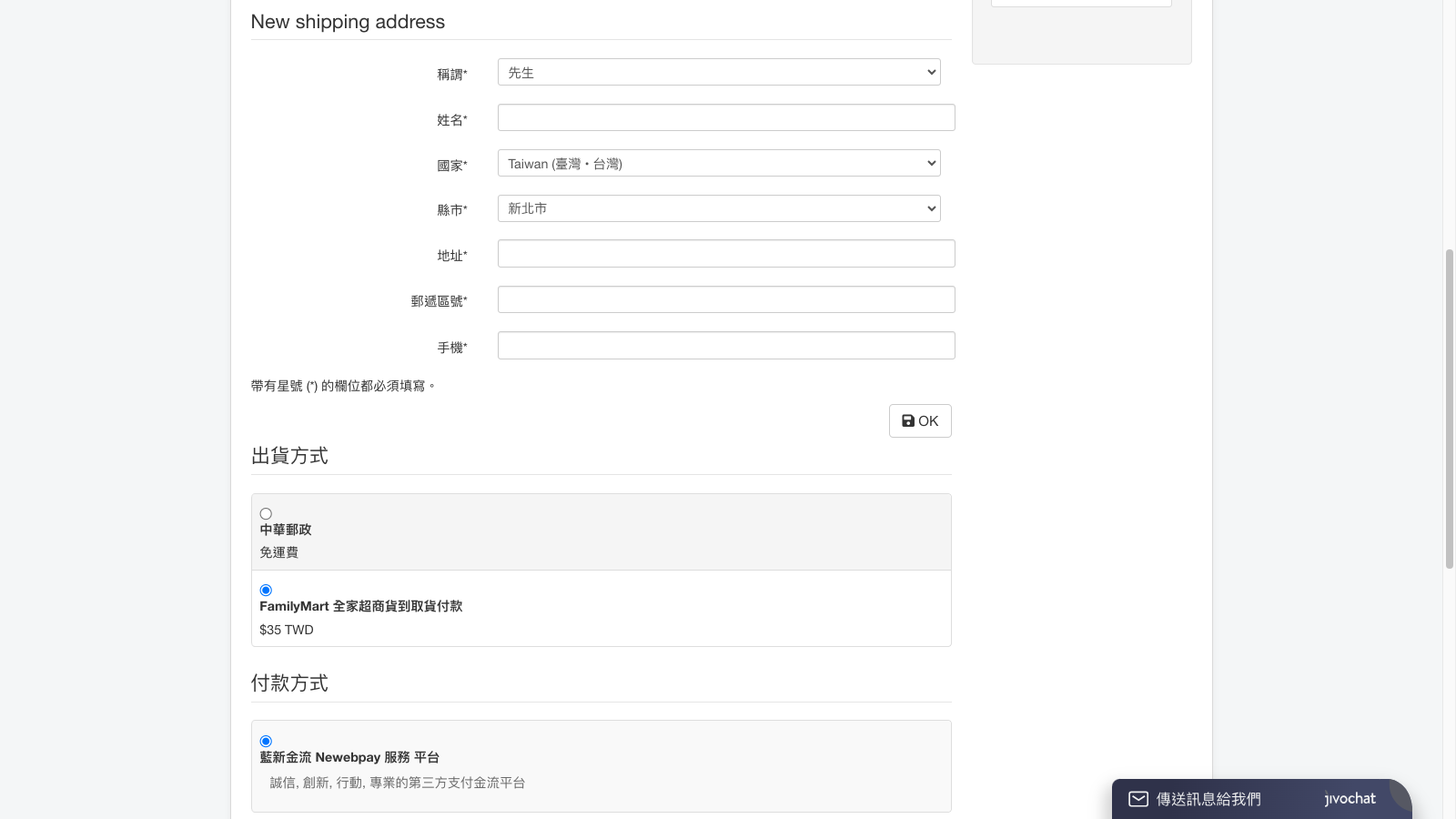
Please Log in or Create an account to join the conversation.
3 years 2 months ago #353723
by nicolas
Replied by nicolas on topic When choosing another shipping way, stop asking customers to fill out address
Hi,
If you want the shipping address to not be asked, you need to turn ON the "override shipping address" setting. If you turn it off, it will ask the shipping address.
If you want the shipping address to not be asked, you need to turn ON the "override shipping address" setting. If you turn it off, it will ask the shipping address.
Please Log in or Create an account to join the conversation.
- clairewang
-
Topic Author
- Offline
Less
More
- Posts: 220
- Thank you received: 0
3 years 2 months ago #353748
by clairewang
Replied by clairewang on topic When choosing another shipping way, stop asking customers to fill out address
Which one is to choose to turn ON in the image? Thank you.
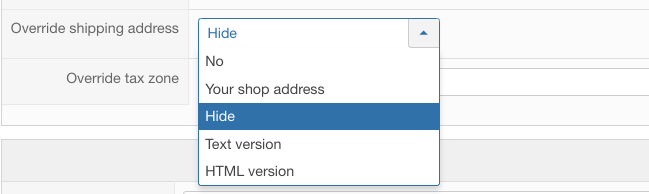
Please Log in or Create an account to join the conversation.
3 years 2 months ago #353751
by nicolas
Replied by nicolas on topic When choosing another shipping way, stop asking customers to fill out address
Hi,
Well, it depends what you want to do. All the choices besides "no" will turn it on.
"Your shop address" will display your shop address instead of the shipping address area.
"Hide" will hide the shipping address area.
"Text version" and "HTML version" will allow you to enter some text to be displayed instead of the shipping address area.
Well, it depends what you want to do. All the choices besides "no" will turn it on.
"Your shop address" will display your shop address instead of the shipping address area.
"Hide" will hide the shipping address area.
"Text version" and "HTML version" will allow you to enter some text to be displayed instead of the shipping address area.
Please Log in or Create an account to join the conversation.
- clairewang
-
Topic Author
- Offline
Less
More
- Posts: 220
- Thank you received: 0
3 years 2 months ago #353762
by clairewang
Replied by clairewang on topic When choosing another shipping way, stop asking customers to fill out address
Okay, I chose Hide, but the address columns are still showed up....
Please Log in or Create an account to join the conversation.

3 years 2 months ago - 3 years 2 months ago #353764
by Philip
Replied by Philip on topic When choosing another shipping way, stop asking customers to fill out address
Hello,
Please, provide us an url link to your checkout in order to see directly the situation, and add your checkout workflow screenshot (make sure that we can see everything).
Regards
Please, provide us an url link to your checkout in order to see directly the situation, and add your checkout workflow screenshot (make sure that we can see everything).
Regards
Last edit: 3 years 2 months ago by Philip.
Please Log in or Create an account to join the conversation.
- clairewang
-
Topic Author
- Offline
Less
More
- Posts: 220
- Thank you received: 0
3 years 2 months ago #353782
by clairewang
Replied by clairewang on topic When choosing another shipping way, stop asking customers to fill out address
Hi Philip and Nicolas,
Thank you a lot.
facianohair.com.tw/%E7%B7%9A%E4%B8%8A%E8%A8%82%E8%B3%BC.html
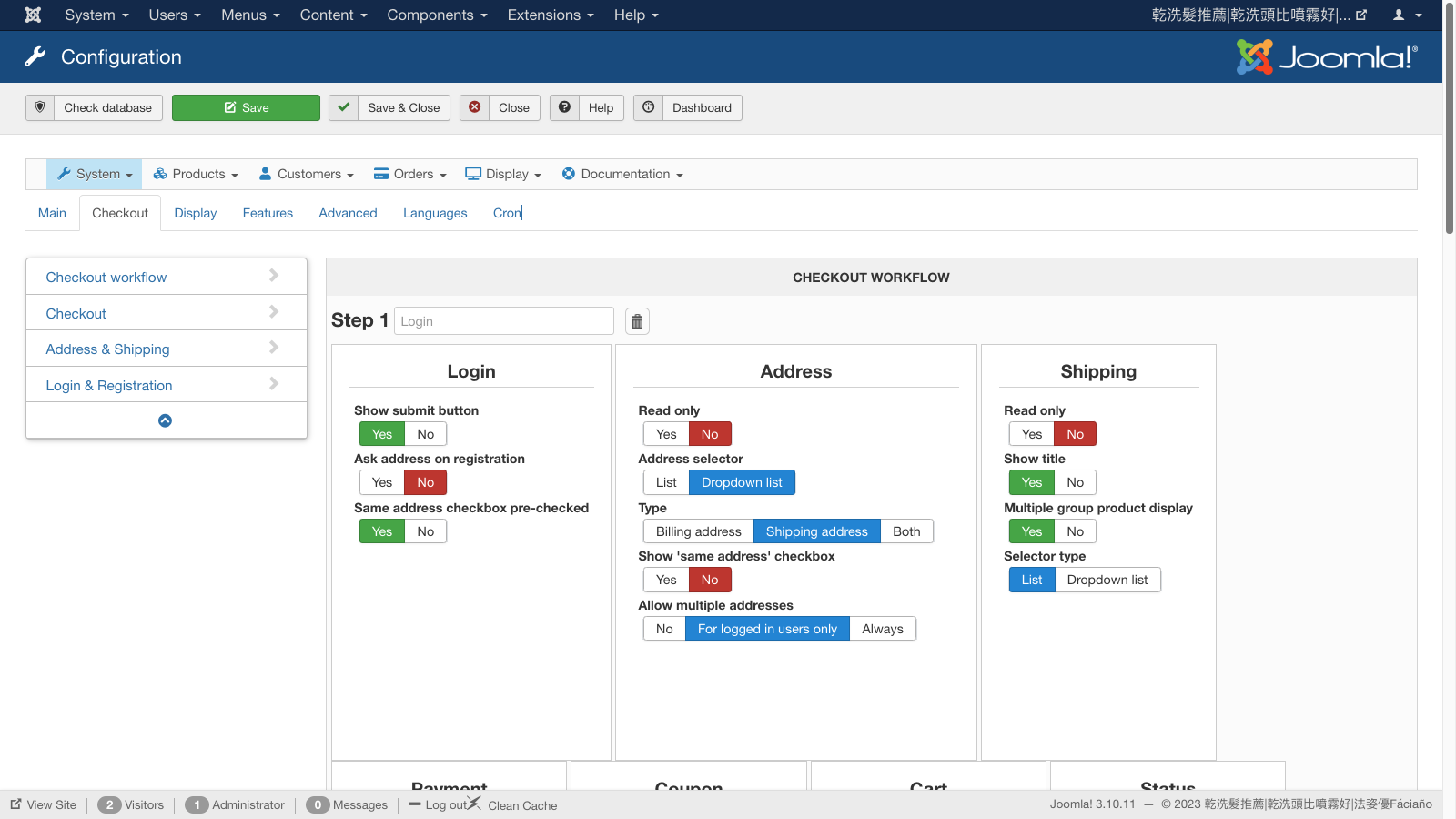
Thank you a lot.
facianohair.com.tw/%E7%B7%9A%E4%B8%8A%E8%A8%82%E8%B3%BC.html
Please Log in or Create an account to join the conversation.
3 years 2 months ago #353795
by nicolas
Replied by nicolas on topic When choosing another shipping way, stop asking customers to fill out address
Hi,
Ok, I see what's the problem. You're missing a patch we made 1 year ago so that the new shipping address form doesn't appear when a shipping method is overriding the shipping address area and the user doesn't have yet any shipping method.
Updating your HikaShop will fix the problem.
Ok, I see what's the problem. You're missing a patch we made 1 year ago so that the new shipping address form doesn't appear when a shipping method is overriding the shipping address area and the user doesn't have yet any shipping method.
Updating your HikaShop will fix the problem.
Please Log in or Create an account to join the conversation.
- clairewang
-
Topic Author
- Offline
Less
More
- Posts: 220
- Thank you received: 0
3 years 2 months ago #353797
by clairewang
Replied by clairewang on topic When choosing another shipping way, stop asking customers to fill out address
"the new shipping address form doesn't appear when a shipping method is overriding the shipping address area and the user doesn't have yet any shipping method."
But now the the new shipping address form DOES STILL appear when a shipping method is overriding the shipping address area and [strike]the user doesn't have yet any shipping method.
[/strike] the user has already chose FamilyMart method.
I don't want the address area to show up.
But now the the new shipping address form DOES STILL appear when a shipping method is overriding the shipping address area and [strike]the user doesn't have yet any shipping method.
[/strike] the user has already chose FamilyMart method.
I don't want the address area to show up.
Please Log in or Create an account to join the conversation.
3 years 2 months ago #353799
by nicolas
Replied by nicolas on topic When choosing another shipping way, stop asking customers to fill out address
Hi,
Yes, that's a bug in your version of HikaShop 4.3.0. As I said, if you update your HikaShop, you'll get the patch for this and it will work like you want.
Yes, that's a bug in your version of HikaShop 4.3.0. As I said, if you update your HikaShop, you'll get the patch for this and it will work like you want.
Please Log in or Create an account to join the conversation.
- clairewang
-
Topic Author
- Offline
Less
More
- Posts: 220
- Thank you received: 0
3 years 2 months ago #353890
by clairewang
Replied by clairewang on topic When choosing another shipping way, stop asking customers to fill out address
Thank you, so I upgrade Hikahop basic to 4.7 and still can upload Hikashop essential 4.3?
Please Log in or Create an account to join the conversation.
3 years 2 months ago #353896
by nicolas
Replied by nicolas on topic When choosing another shipping way, stop asking customers to fill out address
If you just update to HikaShop Starter 4.7.5, you will loose the features of the Essential edition.
And if you then install the HikaShop Essential 4.3.0 version, you'll end up with HikaShop Essential 4.3.0.
If you want to update to HikaShop Essential 4.7.5, you need to install the HikShop Essential 4.7.5 install package.
And if you then install the HikaShop Essential 4.3.0 version, you'll end up with HikaShop Essential 4.3.0.
If you want to update to HikaShop Essential 4.7.5, you need to install the HikShop Essential 4.7.5 install package.
Please Log in or Create an account to join the conversation.
- clairewang
-
Topic Author
- Offline
Less
More
- Posts: 220
- Thank you received: 0
3 years 2 months ago #353912
by clairewang
Replied by clairewang on topic When choosing another shipping way, stop asking customers to fill out address
My Joomla is 3.10, PHP is 8. Can I upgrade Hikashop? Thank you.
Please Log in or Create an account to join the conversation.
3 years 2 months ago #353913
by nicolas
Replied by nicolas on topic When choosing another shipping way, stop asking customers to fill out address
Hi,
Yes. the latest version of HikaShop is compatible with your versions of PHP and Joomla.
Yes. the latest version of HikaShop is compatible with your versions of PHP and Joomla.
Please Log in or Create an account to join the conversation.
- clairewang
-
Topic Author
- Offline
Less
More
- Posts: 220
- Thank you received: 0
3 years 2 months ago #353918
by clairewang
Replied by clairewang on topic When choosing another shipping way, stop asking customers to fill out address
Sorry my PHP is 7.4.33, Joomla 3.10. Are they compatible to upgraded Hikashop?
Please Log in or Create an account to join the conversation.
3 years 2 months ago #353925
by Philip
Replied by Philip on topic When choosing another shipping way, stop asking customers to fill out address
Hello,
There shouldn't be any more problems though.
Regards
There shouldn't be any more problems though.
Regards
Please Log in or Create an account to join the conversation.
Time to create page: 0.318 seconds