

- Posts: 220
- Thank you received: 10
Lots of duplicates
3 years 2 months ago #354453
by ilyaminsk
Hello, There are a lot of different duplicates and the canonical is not correctly prescribed for them ....
How to get rid of them?
Lots of duplicates was created by ilyaminsk
This message contains confidential information
Hello, There are a lot of different duplicates and the canonical is not correctly prescribed for them ....
How to get rid of them?
Please Log in or Create an account to join the conversation.
3 years 2 months ago #354459
by ilyaminsk
Replied by ilyaminsk on topic Lots of duplicates
The site was crawled by the crawler, these are the urls that are visible:
This message contains confidential information
Please Log in or Create an account to join the conversation.

3 years 2 months ago #354454
by nicolas
Replied by nicolas on topic Lots of duplicates
Hi,
I do see the canonical URL provided on that page. What are the other URLs of that page ?
Maybe you just need to ask Google to index again the duplicate URLs so that it can see the canonical tag for them ?
developers.google.com/search/docs/crawli...sk-google-to-recrawl
I do see the canonical URL provided on that page. What are the other URLs of that page ?
Maybe you just need to ask Google to index again the duplicate URLs so that it can see the canonical tag for them ?
developers.google.com/search/docs/crawli...sk-google-to-recrawl
Please Log in or Create an account to join the conversation.
3 years 2 months ago #354484
by ilyaminsk
Replied by ilyaminsk on topic Lots of duplicates
You probably misunderstood me. I meant that incorrect cannonicals are generated. I don't know where this url comes from. I didn't prescribe it

Please Log in or Create an account to join the conversation.
3 years 2 months ago #354490
by nicolas
Replied by nicolas on topic Lots of duplicates
Hi,
Well, from what I can see, this is the URL you provided in the "canonical URL" setting of the product.
Could you please check on that ?
Are you using some kind of SEO extension on your website ?
Well, from what I can see, this is the URL you provided in the "canonical URL" setting of the product.
Could you please check on that ?
Are you using some kind of SEO extension on your website ?
Please Log in or Create an account to join the conversation.
3 years 2 months ago #354518
by ilyaminsk
Replied by ilyaminsk on topic Lots of duplicates
Hello. no. I don't use seo components. I can give you superuser access so that you can see.
Please Log in or Create an account to join the conversation.
3 years 2 months ago #354524
by nicolas
Replied by nicolas on topic Lots of duplicates
Hi,
So, did you enter something in the "canonical URL" field of the product ? Can you please check ? If yes, what do you have exactly for the product of your example ?
If no, can you please check the status of the system SEF plugin in the Joomla plugins manager ? Is it enabled ?
So, did you enter something in the "canonical URL" field of the product ? Can you please check ? If yes, what do you have exactly for the product of your example ?
If no, can you please check the status of the system SEF plugin in the Joomla plugins manager ? Is it enabled ?
Please Log in or Create an account to join the conversation.
3 years 2 months ago #354536
by ilyaminsk
Replied by ilyaminsk on topic Lots of duplicates
Hello. I checked this product, the canonical address that you see is written there, but I did not indicate it there. I have automatic addition of the canonical address enabled in the hickshop settings. But for some reason it is indicated automatically, it is incorrect.
Please Log in or Create an account to join the conversation.
3 years 2 months ago - 3 years 2 months ago #354549
by nicolas
Replied by nicolas on topic Lots of duplicates
Hi,
When you have the "force canonical URLs on listings" set to "Use canonical URL and generate it if missing", HikaShop will use the canonical URL provided when a listing of products requires the URL to a product. And if that URL is not provided, it will generate it with the current menu item as basis.
If you get a URL with the "component/hikashop" part in it automatically generated in the canonical URL of a product, it means that the first time the URL to that product's details page was generated was somewhere where HikaShop didn't have a menu item to use.
This can happen if you didn't select a HikaShop product/category listing menu item in the "menu" setting of a HikaShop content module for example.
Also, third party display modules might also have a similar setting which needs to be set to provide the menu item to be used.
So there are several things you can do:
- empty the canonical URL of this product, so that HikaShop can regenerate it in the future. You could automate this with a mass action if you have many products like that.
- try to identify which module is not configured properly and fix its configuration so that next time HikaShop has to generate a URL for it, it can rely on the menu item selected to generate the URL
When you have the "force canonical URLs on listings" set to "Use canonical URL and generate it if missing", HikaShop will use the canonical URL provided when a listing of products requires the URL to a product. And if that URL is not provided, it will generate it with the current menu item as basis.
If you get a URL with the "component/hikashop" part in it automatically generated in the canonical URL of a product, it means that the first time the URL to that product's details page was generated was somewhere where HikaShop didn't have a menu item to use.
This can happen if you didn't select a HikaShop product/category listing menu item in the "menu" setting of a HikaShop content module for example.
Also, third party display modules might also have a similar setting which needs to be set to provide the menu item to be used.
So there are several things you can do:
- empty the canonical URL of this product, so that HikaShop can regenerate it in the future. You could automate this with a mass action if you have many products like that.
- try to identify which module is not configured properly and fix its configuration so that next time HikaShop has to generate a URL for it, it can rely on the menu item selected to generate the URL
Last edit: 3 years 2 months ago by nicolas.
Please Log in or Create an account to join the conversation.
3 years 2 months ago #354559
by ilyaminsk
Replied by ilyaminsk on topic Lots of duplicates
Hello. The template with modules was bought from rcatheme. Their modules apparently do not work correctly .....
Please Log in or Create an account to join the conversation.
3 years 2 months ago #354561
by nicolas
Replied by nicolas on topic Lots of duplicates
Hi,
Check the settings of the modules. Maybe they have a setting for the menu item.
Otherwise, check with their support.
Check the settings of the modules. Maybe they have a setting for the menu item.
Otherwise, check with their support.
Please Log in or Create an account to join the conversation.
3 years 2 months ago #354613
by ilyaminsk
Replied by ilyaminsk on topic Lots of duplicates
Hello. For the modules to work correctly, it was necessary to create one more menu item with all the products. There were duplicate products with a different url, but if you go modulo after clearing the canonical url. Then the canonical url becomes on the transition path from the module.
Please Log in or Create an account to join the conversation.
3 years 2 months ago - 3 years 2 months ago #354614
by ilyaminsk
Replied by ilyaminsk on topic Lots of duplicates
Due to this, the number of duplicate goods increases.
Last edit: 3 years 2 months ago by ilyaminsk.
Please Log in or Create an account to join the conversation.
3 years 2 months ago - 3 years 2 months ago #354618
by ilyaminsk
Replied by ilyaminsk on topic Lots of duplicates
I will study the question at the expense of modules
Last edit: 3 years 2 months ago by ilyaminsk.
Please Log in or Create an account to join the conversation.
3 years 2 months ago #354616
by nicolas
Replied by nicolas on topic Lots of duplicates
Hi,
As long as a canonical URL is filled in your products, having duplicate URLs for the products won't impact your SEO as crawlers will register all the URLs of a product under its canonical URL and only the canonical URL will be indexed.
Ideally, the module should directly use the canonical URL, similarly to what HikaShop does on its listings when the "force canonical URLs on listings" setting is activated in the HikaShop configuration page.
As long as a canonical URL is filled in your products, having duplicate URLs for the products won't impact your SEO as crawlers will register all the URLs of a product under its canonical URL and only the canonical URL will be indexed.
Ideally, the module should directly use the canonical URL, similarly to what HikaShop does on its listings when the "force canonical URLs on listings" setting is activated in the HikaShop configuration page.
Please Log in or Create an account to join the conversation.
3 years 2 months ago #354665
by ilyaminsk
Replied by ilyaminsk on topic Lots of duplicates
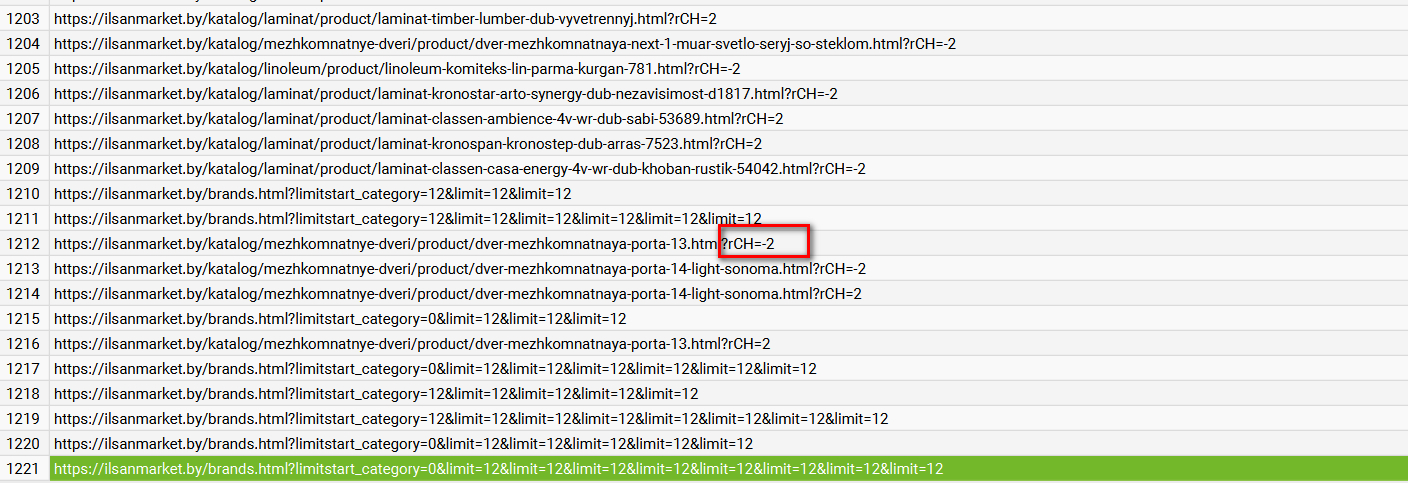
Did research. Regarding the url:
They are not related to rcatheme developer modules. Could you look into this question, why does the crawler crawl such addresses?
The same scanner sees the following addresses:
This message contains confidential information
They are not related to rcatheme developer modules. Could you look into this question, why does the crawler crawl such addresses?
The same scanner sees the following addresses:
Please Log in or Create an account to join the conversation.
3 years 2 months ago - 3 years 2 months ago #354666
by ilyaminsk
It is curious that on pages that link to such urls, I do not find the ending ?rCH=-2
Replied by ilyaminsk on topic Lots of duplicates
This message contains confidential information
It is curious that on pages that link to such urls, I do not find the ending ?rCH=-2
Last edit: 3 years 2 months ago by ilyaminsk.
Please Log in or Create an account to join the conversation.
3 years 2 months ago #354667
by ilyaminsk
Replied by ilyaminsk on topic Lots of duplicates
This message contains confidential information
Please Log in or Create an account to join the conversation.
3 years 2 months ago #354669
by nicolas
Replied by nicolas on topic Lots of duplicates
Hi,
Searching on Google for "rch=-2", I found this page:
forum.joomla.de/thread/10537-fehlermeldu...ch-url-anhang-rch-2/
Translating what the people there say with Google Translate, it seems that this rch parameter is added in the Cookiehint plugin.
Regarding the URL brands.html?limitstart_category=0&limit=12&limit=12&limit=12&limit=12&limit=12&limit=12&limit=12&limit=12
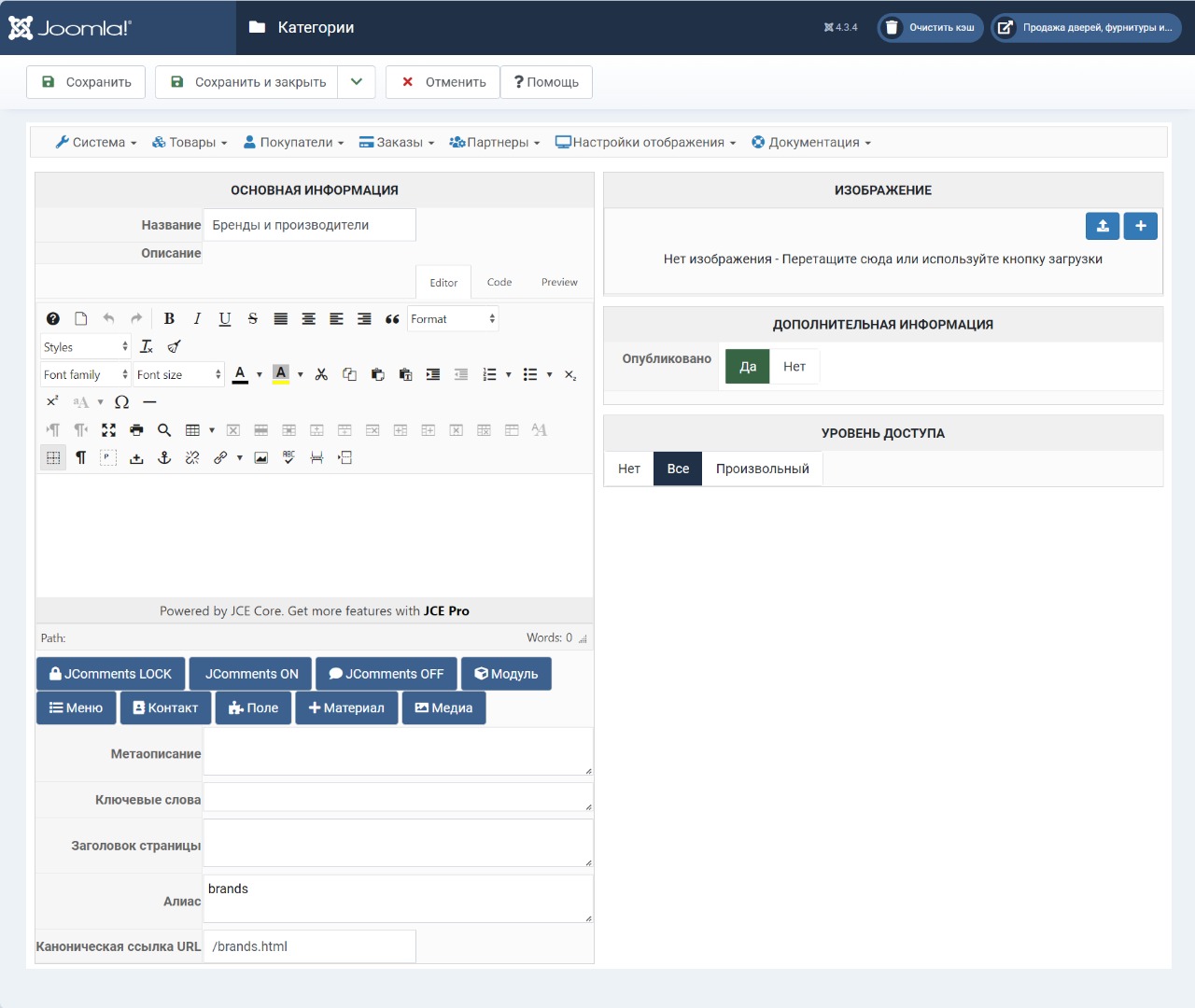
It seems that you didn't enter any canonical URL in the main brand category you're using as the "main category" of your menu item.
I would recommend going in the menu Products>Categories, and on the left explorer panel, click on the "root" link.
Then, you should see the "brand" main category. Edit it, and set "brands.html" as its canonical URL and that way other URLs linking to it won't be indexed.
Searching on Google for "rch=-2", I found this page:
forum.joomla.de/thread/10537-fehlermeldu...ch-url-anhang-rch-2/
Translating what the people there say with Google Translate, it seems that this rch parameter is added in the Cookiehint plugin.
Regarding the URL brands.html?limitstart_category=0&limit=12&limit=12&limit=12&limit=12&limit=12&limit=12&limit=12&limit=12
It seems that you didn't enter any canonical URL in the main brand category you're using as the "main category" of your menu item.
I would recommend going in the menu Products>Categories, and on the left explorer panel, click on the "root" link.
Then, you should see the "brand" main category. Edit it, and set "brands.html" as its canonical URL and that way other URLs linking to it won't be indexed.
Please Log in or Create an account to join the conversation.
3 years 2 months ago #354682
by ilyaminsk
Replied by ilyaminsk on topic Lots of duplicates
Hello, thanks for the reply. As for cookies, I figured it out, removed this plugin. And as for brands, I went to where you wrote, and I already had a canonical address:
Please Log in or Create an account to join the conversation.
Time to create page: 0.188 seconds