

- Posts: 30
- Thank you received: 1
Brand image in product display
12 years 4 months ago #160235
by jdponce
Brand image in product display was created by jdponce
-- url of the page with the problem -- :
www.dadatecnologia.com/categorias/Productos/3-aastra-415.html
-- HikaShop version -- : HikaShop Starter 2.3.0
-- Joomla version -- : 3.3.0
-- PHP version -- : 5.3.28
-- Browser(s) name and version -- : Google Chrome Versión 35.0.1916.114 m
-- Error-message(debug-mod must be tuned on) -- : No error
Hi, I have done this:
hikashop.com/forum/product-category-disp...he-product-view.html
I have paste that script in /components/com_hikashop/controllers/product.php and if I do that, I get a blank page in product display.
I would appreciate you tell me where should I paste it.
Thanks in advance
David
-- HikaShop version -- : HikaShop Starter 2.3.0
-- Joomla version -- : 3.3.0
-- PHP version -- : 5.3.28
-- Browser(s) name and version -- : Google Chrome Versión 35.0.1916.114 m
-- Error-message(debug-mod must be tuned on) -- : No error
Hi, I have done this:
hikashop.com/forum/product-category-disp...he-product-view.html
I have paste that script in /components/com_hikashop/controllers/product.php and if I do that, I get a blank page in product display.
I would appreciate you tell me where should I paste it.
Thanks in advance
David
Please Log in or Create an account to join the conversation.

12 years 4 months ago #160236
by lousyfool
Need help with customisations of layouts, style or other site development? PM me!
(Don't forget to turn on "E-mail notification of new messages" )
Replied by lousyfool on topic Brand image in product display
Well, sorry to say this, but obviously you haven't done as suggested in the linked thread. To start with, you've picked an entirely wrong file which hasn't been mentioned once in the thread, and which isn't a "view" as should be. When you basically asked the same question a couple of days ago, Nicolas gave you the correct file to work on. So, this time you want to follow instructions and pick that file, please, otherwise it'll never work, and no one will be able to help you.
Hint: How do I know where to insert the code? As mentioned just a bit earlier in that same page of documentation, Firebug is your friend, telling you where stuff is in your HTML/PHP code - hence, telling you where to alter existing or plant new code.
Good luck. Let us know when you're done!
- If you haven't, yet, reverse everything you've done (seems you did, because I can see your product page).
- Always a good start: reading the documentation, here and now particularly hikashop.com/support/support/documentati...-display.html#layout
- In accordance with this documentation, in the correct file which you know now once and forever, and telling from where your brand name is now in your product page (assuming that's where you want the image), you will want to insert the code inside the div with the id "hikashop_product_right_part", following the span with id "hikashop_product_price_main", and just before the two br's.
Hint: How do I know where to insert the code? As mentioned just a bit earlier in that same page of documentation, Firebug is your friend, telling you where stuff is in your HTML/PHP code - hence, telling you where to alter existing or plant new code.
Good luck. Let us know when you're done!
Need help with customisations of layouts, style or other site development? PM me!
(Don't forget to turn on "E-mail notification of new messages" )
Please Log in or Create an account to join the conversation.
12 years 4 months ago #160507
by jdponce
Replied by jdponce on topic Brand image in product display
Hi Lousyfool, you are right, I was wrong, I apologize.
As Nicolas told me in the first thread, I have pasted the script in the show_defalt view, but instead an image, I got the following:
string(44) "media/com_hikashop/upload/tripp_lite_ups.jpg"
You can see it here:
www.dadatecnologia.com/categorias/Productos/1-su1500xl.html
What am I doing wrong?
Thanks in advance
As Nicolas told me in the first thread, I have pasted the script in the show_defalt view, but instead an image, I got the following:
string(44) "media/com_hikashop/upload/tripp_lite_ups.jpg"
You can see it here:
www.dadatecnologia.com/categorias/Productos/1-su1500xl.html
What am I doing wrong?
Thanks in advance
Please Log in or Create an account to join the conversation.
12 years 4 months ago #160508
by lousyfool
Need help with customisations of layouts, style or other site development? PM me!
(Don't forget to turn on "E-mail notification of new messages" )
Replied by lousyfool on topic Brand image in product display
Ha, guess you pasted only the code as per Xavier's post in that other thread? Well, as promised there, that'll give you the brand's image path, which you have now displayed there. Not the image... :silly:
Reverse it, delete it. The following code works for me, so it should work for you, too:
Notes:
Looking forward to your "Success!" post.
Reverse it, delete it. The following code works for me, so it should work for you, too:
Code:
<div class="custom_brand_image">
<?php
if($this->config->get('manufacturer_display', 0) && !empty($this->element->product_manufacturer_id)){
$class = hikashop_get('class.category');
$manufacturer = $class->get($this->element->product_manufacturer_id, true);
global $Itemid;
$categoryClass = hikashop_get('class.category');
$categoryClass->addAlias($manufacturer);
echo $this->image->display($manufacturer->file_path,false,$manufacturer->file_name, '', '', $this->image->main_thumbnail_x, $this->image->main_thumbnail_y);
}
?>
</div>
Notes:
- With where you've positioned it now in the code, should you ever decide to also display voting and pricing, those two will show up sort of in between the brand image and the line "Fabricantes: TRIPP LITE". I can't think of any reason why you'd want that, so re-think where to put it. Gave you a hint in my previous post here, but of course, it's your call.
- I've wrapped it into a div with class name "custom_brand_image", so you have some control over it per CSS. You might want to consider doing similar with the brand name/link for the same good reason.
- The size of the image should be what you set for thumbnails in the backend system config. You could change it there unless you'd then be unhappy with the thumbnail size elsewhere... in which case you can still apply CSS. (Did I mention Firebug before...?
 )
)
Looking forward to your "Success!" post.
Need help with customisations of layouts, style or other site development? PM me!
(Don't forget to turn on "E-mail notification of new messages" )
The following user(s) said Thank You: jdponce
Please Log in or Create an account to join the conversation.
12 years 4 months ago #160610
by jdponce
Replied by jdponce on topic Brand image in product display
It works!
Yes, I have wrapped it as you said and the size is good... What can I say? this is an out of the box support.
Thanks a lot!
Yes, I have wrapped it as you said and the size is good... What can I say? this is an out of the box support.
Thanks a lot!
Please Log in or Create an account to join the conversation.
12 years 4 months ago #160611
by lousyfool
Need help with customisations of layouts, style or other site development? PM me!
(Don't forget to turn on "E-mail notification of new messages" )
Replied by lousyfool on topic Brand image in product display
Glad to hear! Where do I send the bill? :woohoo:  :woohoo:
:woohoo: Need help with customisations of layouts, style or other site development? PM me!
(Don't forget to turn on "E-mail notification of new messages" )
The following user(s) said Thank You: jdponce
Please Log in or Create an account to join the conversation.
12 years 4 months ago #160614
by jdponce
Replied by jdponce on topic Brand image in product display
Hahahaha 
Please Log in or Create an account to join the conversation.
7 years 8 months ago #303845
by n00bster
Replied by n00bster on topic Brand image in product display
I have to jump in here and hope someone can help me a bit her.
the brand image is setup so far on my product detail page - i placed the code in the "show_block_dimensions.php" file.
put i want to link it also to the brand page what i have setup, for that i have to call also the brand URL and surround the brand image with a html link code.
my code what i use right now is based on the code above this thread:
the brand image is setup so far on my product detail page - i placed the code in the "show_block_dimensions.php" file.
put i want to link it also to the brand page what i have setup, for that i have to call also the brand URL and surround the brand image with a html link code.
my code what i use right now is based on the code above this thread:
Code:
// modification - Show Manufacturer Image - START
if($this->config->get('manufacturer_display', 0) && !empty($this->element->product_manufacturer_id)){
$class = hikashop_get('class.category');
$categoryClass = hikashop_get('class.category');
$manufacturer = $class->get($this->element->product_manufacturer_id, true);
global $Itemid;
$categoryClass = hikashop_get('class.category');
$categoryClass->addAlias($manufacturer);
echo $this->image->display($manufacturer->file_path,false,$manufacturer->file_name, '', '', 100, 100);
}
Please Log in or Create an account to join the conversation.

7 years 8 months ago #303847
by nicolas
Replied by nicolas on topic Brand image in product display
Hi,
You can change the line:
to:
You can change the line:
Code:
echo $this->image->display($manufacturer->file_path,false,$manufacturer->file_name, '', '', 100, 100);
Code:
$menuClass = hikashop_get('class.menus');
$Itemid = $menuClass->loadAMenuItemId('manufacturer','listing');
if(empty($Itemid)){
$Itemid = $menuClass->loadAMenuItemId('','');
}
echo '<a href="'.hikashop_contentLink('category&task=listing&cid='.$manufacturer->category_id.'&name='.$manufacturer->alias.'&Itemid='.$Itemid,$manufacturer).'">'.$this->image->display($manufacturer->file_path,false,$manufacturer->file_name, '', '', 100, 100).'</a>';
The following user(s) said Thank You: n00bster
Please Log in or Create an account to join the conversation.
7 years 8 months ago #303854
by n00bster
Replied by n00bster on topic Brand image in product display
is working perfect, thank you!
Please Log in or Create an account to join the conversation.
Less
More
- Posts: 424
- Thank you received: 11
6 years 11 months ago #312714
by BluepointWebdesign
Replied by BluepointWebdesign on topic Brand image in product display
Hello,
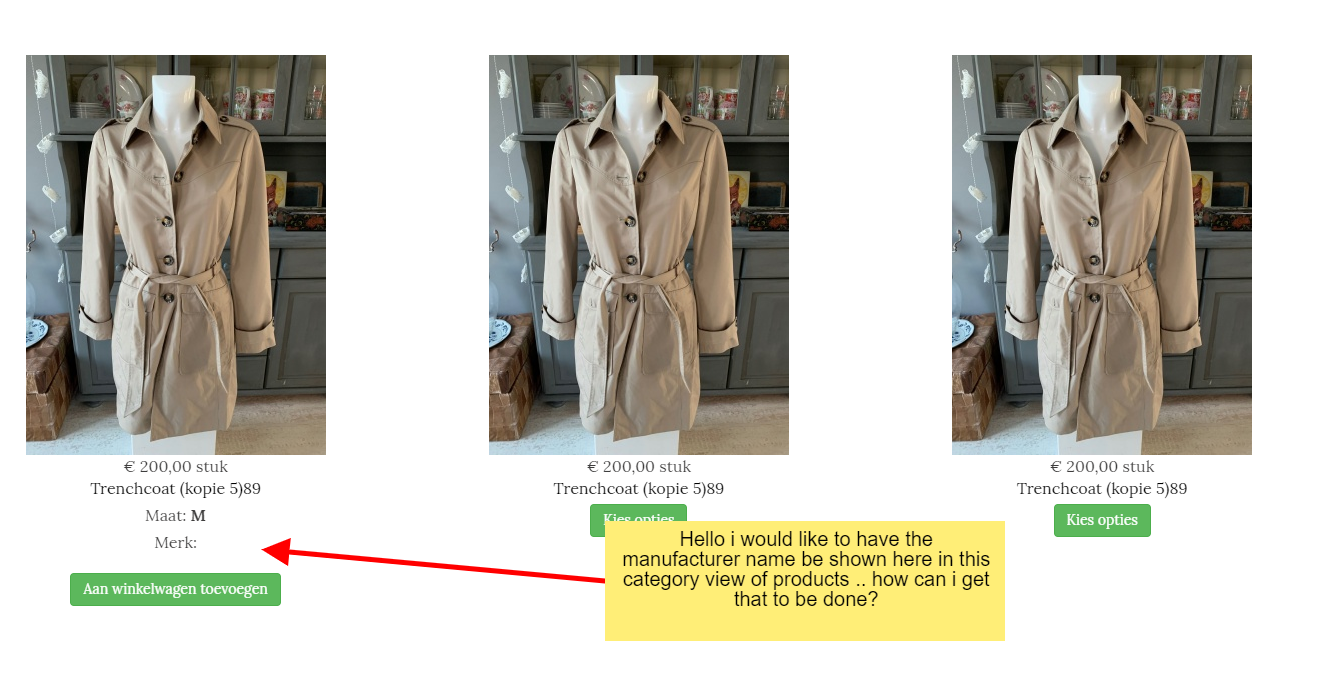
I don;t want the brand image to be displayed but want the brandname to be displayed in the product category view..
I places this code: <?php echo JText::_('MANUFACTURER').': '.'<a href="'.hikashop_completeLink('category&task=listing&cid='.$manufacturer->category_id.'&name='.$manufacturer->alias.'&Itemid='.$Itemid).'">'.$manufacturer->category_name.'</a>'; ?>
into the product/listing_img_title and only get this:
Merk:
After this the manufacturer category attached to this product is missing..
how can i get this here??
Please also see attachement.
Thanks
I don;t want the brand image to be displayed but want the brandname to be displayed in the product category view..
I places this code: <?php echo JText::_('MANUFACTURER').': '.'<a href="'.hikashop_completeLink('category&task=listing&cid='.$manufacturer->category_id.'&name='.$manufacturer->alias.'&Itemid='.$Itemid).'">'.$manufacturer->category_name.'</a>'; ?>
into the product/listing_img_title and only get this:
Merk:
After this the manufacturer category attached to this product is missing..
how can i get this here??
Please also see attachement.
Thanks
Please Log in or Create an account to join the conversation.
6 years 11 months ago #312715
by nicolas
Replied by nicolas on topic Brand image in product display
Hi,
You first need to load the manufacturer/brand data from the database.
So you first need the code:
You first need to load the manufacturer/brand data from the database.
So you first need the code:
Code:
$class = hikashop_get('class.category');
$manufacturer = $class->get($this->row->product_manufacturer_id, true);
Please Log in or Create an account to join the conversation.
Time to create page: 0.496 seconds