

- Posts: 29
- Thank you received: 0
Multicurrency / Different prices
11 years 7 months ago #190335
by Pajerchin
Multicurrency / Different prices was created by Pajerchin
-- HikaShop version -- : 2.3.5
-- Joomla version -- : 3.3.6
-- PHP version -- : 5.3.17
-- Browser(s) name and version -- : Firefox 35.0.1
Hello,
1)
I Have two currencies>
- EURO (default currency)
- CZK (second currency)
2)
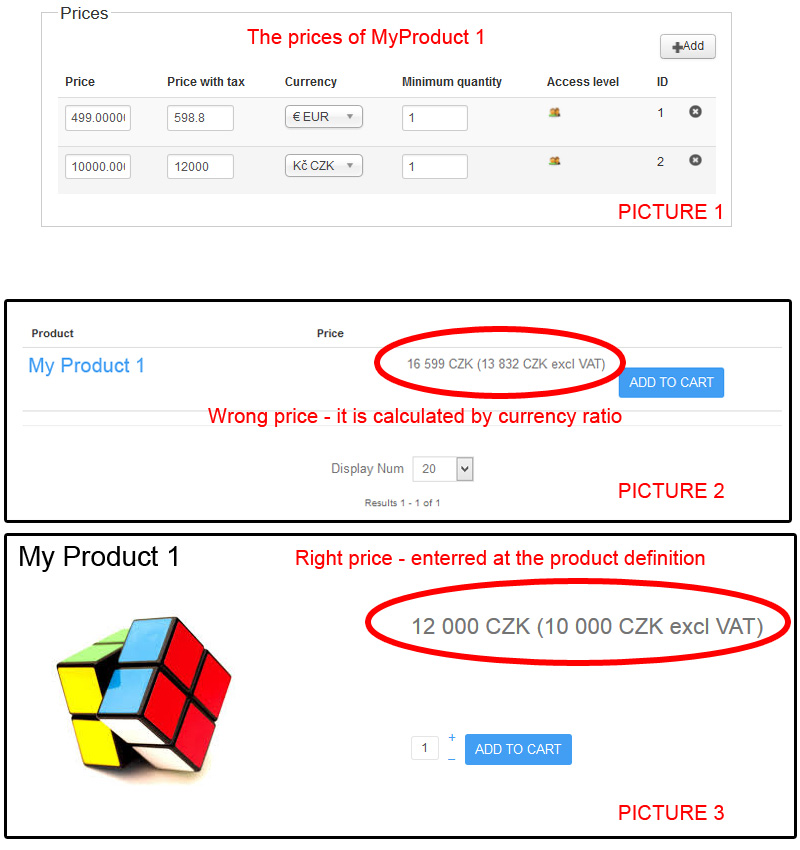
For product I define separate prices for EURO & CZK (See PICTURE 1)
3)
On Front end I set CZK currency
PROBLEM:
In the category listing of the products - the displayed prices are the prices in CZK calculated by currency ratio (See PICTURE 2)
It is wrong, because at the product definition are enterred the prices for every currency separatelly
In the product detail listing - is everything OK - the displayed price is CZK price defined in my Product (See PICTURE 3)
Would you be so kind to provide any advice how on the category listing of the products (PICTURE 2) display right prices for "second currency - CZK", please ?
-- Joomla version -- : 3.3.6
-- PHP version -- : 5.3.17
-- Browser(s) name and version -- : Firefox 35.0.1
Hello,
1)
I Have two currencies>
- EURO (default currency)
- CZK (second currency)
2)
For product I define separate prices for EURO & CZK (See PICTURE 1)
3)
On Front end I set CZK currency
PROBLEM:
In the category listing of the products - the displayed prices are the prices in CZK calculated by currency ratio (See PICTURE 2)
It is wrong, because at the product definition are enterred the prices for every currency separatelly
In the product detail listing - is everything OK - the displayed price is CZK price defined in my Product (See PICTURE 3)
Would you be so kind to provide any advice how on the category listing of the products (PICTURE 2) display right prices for "second currency - CZK", please ?
Please Log in or Create an account to join the conversation.

11 years 7 months ago #190394
by nicolas
Replied by nicolas on topic Multicurrency / Different prices
Hi,
Change the code:
by the code:
in the file administrator/components/com_hikashop/classes/currency.php and that should fix the problem.
Change the code:
Code:
$currentRowPrices = array();
$matches=array();
foreach($prices as $price){
if($price->price_product_id!=$element->product_id){
continue;
}
if ( !empty( $price->price_site_id) && $price->price_site_id == '[unselected]') {
$price->price_site_id = '';
}
if ( !isset( $matches[$price->price_min_quantity])) {
$matches[$price->price_min_quantity]=$price;
}elseif ( empty( $matches[$price->price_min_quantity]->price_site_id)) {
$matches[$price->price_min_quantity]=$price;
}elseif ( $matches[$price->price_min_quantity]->price_site_id == $price->price_site_id) {
$matches[$price->price_min_quantity]=$price;
}
$currentRowPrices[]=$price;
}
if(empty($matches)&&!empty($currentRowPrices)){
foreach($currentRowPrices as $price){
if($price->price_currency_id==$main_currency){
$matches[$price->price_min_quantity]=$price;
}
}
if(empty($matches)){
$match = array_pop($currentRowPrices);
if(!empty($currentRowPrices)){
foreach($currentRowPrices as $price){
if($price->price_currency_id==$match->price_currency_id){
$matches[$price->price_min_quantity]=$price;
}
}
}
$matches[]=$match;
}
}
Code:
$defaultCurrentRowPrices = array();
$currentRowPrices = array();
$matches=array();
//get a list of the prices with the good currency and a list of prices in other currencies for the current product
foreach($prices as $price){
// Skip if the price is not for the current product
if($price->price_product_id!=$element->product_id){
continue;
}
$defaultCurrentRowPrices[]=$price;
// Skip if the price is not for the current currency
if($price->price_currency_id!=$currency_id) {
continue;
}
if ( !empty( $price->price_site_id) && $price->price_site_id == '[unselected]') {
$price->price_site_id = '';
}
if ( !isset( $matches[$price->price_min_quantity])) {
// If a price is not already saved for this minimum quantity, save it
$matches[$price->price_min_quantity]=$price;
}elseif ( empty( $matches[$price->price_min_quantity]->price_site_id)) {
// Otherwise, when a default price is present, it can be replaced by another default (lower) price or specific site ID price
$matches[$price->price_min_quantity]=$price;
}elseif ( $matches[$price->price_min_quantity]->price_site_id == $price->price_site_id) {
// Finally, when the SAME "Site" price is present, then replace it with the lower price (as the prices are sorted in DESC order)
$matches[$price->price_min_quantity]=$price;
}
$currentRowPrices[]=$price;
}
// When no price is selected for the currency
if ( empty( $currentRowPrices) && !empty( $defaultCurrentRowPrices)) {
// Then use the default one to allow currency conversion.
$currentRowPrices = $defaultCurrentRowPrices;
}
//if we didn't found any prices in the good currency we choose another currency (the main one preferably) and use the prices in this currency
if(empty($matches)&&!empty($currentRowPrices)){
foreach($currentRowPrices as $price){
if($price->price_currency_id==$main_currency){
$matches[$price->price_min_quantity]=$price;
}
}
if(empty($matches)){
$match = array_pop($currentRowPrices);
if(!empty($currentRowPrices)){
foreach($currentRowPrices as $price){
if($price->price_currency_id==$match->price_currency_id){
$matches[$price->price_min_quantity]=$price;
}
}
}
$matches[]=$match;
}
}
Please Log in or Create an account to join the conversation.
11 years 7 months ago #190414
by Pajerchin
Replied by Pajerchin on topic Multicurrency / Different prices
Yes - it works
The problem is solved.
Thank you very much for quick and perfect help.
The problem is solved.
Thank you very much for quick and perfect help.
Please Log in or Create an account to join the conversation.
Less
More
- Posts: 4
- Thank you received: 1
11 years 6 months ago #197014
by tristanbailey
Replied by tristanbailey on topic Multicurrency / Different prices
Hi @nicolas
Thanks for that code for currency using all available priced options not just the main currency.
Could this be an option switch in Hikashop rather than a code change in a next version?
Works for me now though, so thank you
tristan
Thanks for that code for currency using all available priced options not just the main currency.
Could this be an option switch in Hikashop rather than a code change in a next version?
Works for me now though, so thank you
tristan
Please Log in or Create an account to join the conversation.
11 years 6 months ago #197096
by nicolas
Replied by nicolas on topic Multicurrency / Different prices
Hi,
This fix was included in HikaShop 2.4.0
This fix was included in HikaShop 2.4.0
Please Log in or Create an account to join the conversation.
Time to create page: 0.186 seconds