

- Posts: 175
- Thank you received: 0
How to get path for image/file from custom field?
11 years 3 months ago - 11 years 3 months ago #204332
by veeco
How to get path for image/file from custom field? was created by veeco
-- url of the page with the problem -- : -
-- HikaShop version -- : 2.3.3
-- Joomla version -- : 3.36
Hi
i tried to add a custom field containing image/file for my category & products

however when i want to know the path of image stored, it seems it's generated

i also tried it through template override

but it only containing the filename of the image


link in the front end
how to generate the link image / where the image is stored ?
-- HikaShop version -- : 2.3.3
-- Joomla version -- : 3.36
Hi
i tried to add a custom field containing image/file for my category & products
however when i want to know the path of image stored, it seems it's generated
i also tried it through template override
but it only containing the filename of the image
link in the front end
how to generate the link image / where the image is stored ?
Last edit: 11 years 3 months ago by veeco.
Please Log in or Create an account to join the conversation.

11 years 3 months ago #204401
by Jerome
Jerome - Obsidev.com
HikaMarket & HikaSerial developer / HikaShop core dev team.
Replied by Jerome on topic How to get path for image/file from custom field?
Hi,
Images from custom fields are generally not accessible directly ; they are stored in the "safe" folder and we use a PHP script to let them available (if you have the right access to).
So even if you can generate the right url ; the file won't be accessible (because the "safe" folder is not restricted). You need to display the field using the custom field system (with the field class and the "show" function).
Regards,
Images from custom fields are generally not accessible directly ; they are stored in the "safe" folder and we use a PHP script to let them available (if you have the right access to).
So even if you can generate the right url ; the file won't be accessible (because the "safe" folder is not restricted). You need to display the field using the custom field system (with the field class and the "show" function).
Regards,
Jerome - Obsidev.com
HikaMarket & HikaSerial developer / HikaShop core dev team.
Please Log in or Create an account to join the conversation.
11 years 3 months ago - 11 years 3 months ago #204435
by veeco
Replied by veeco on topic How to get path for image/file from custom field?
Hi
i need to use them in front end using the template override [as shown], is there anyway i can get the file then?
i need a field to upload file in back end and then use the picture in front end
any suggestion how to do it?
i need to use them in front end using the template override [as shown], is there anyway i can get the file then?
i need a field to upload file in back end and then use the picture in front end
any suggestion how to do it?
Last edit: 11 years 3 months ago by veeco.
Please Log in or Create an account to join the conversation.

11 years 3 months ago - 11 years 3 months ago #204480
by nicolas
Replied by nicolas on topic How to get path for image/file from custom field?
Hi,
As jerome said, you need to display the field using the custom field system (with the field class and the "show" function):
But normally, custom category fields are already displayed on the listings as long as you turn on the "frontend" setting of the field, so it should not even be necessary.
As jerome said, you need to display the field using the custom field system (with the field class and the "show" function):
Code:
<?php $fieldsClass = hikashop_get('class.field');
$fields = $fieldsClass->getFields('frontcomp', $this->row, 'category', 'checkout&task=state');
foreach($fields as $key => $val){
echo $fieldsClass->show($val,$this->row->$key);
} ?>
But normally, custom category fields are already displayed on the listings as long as you turn on the "frontend" setting of the field, so it should not even be necessary.
Last edit: 11 years 3 months ago by nicolas.
Please Log in or Create an account to join the conversation.
8 years 3 months ago #293580
by razlie
Replied by razlie on topic How to get path for image/file from custom field?
Hi,
So if I create an external form (like say using RSFORM) then how get i retrieve the path of the this uploaded file? Appreciate your help
So if I create an external form (like say using RSFORM) then how get i retrieve the path of the this uploaded file? Appreciate your help
Please Log in or Create an account to join the conversation.
8 years 3 months ago #293600
by nicolas
Replied by nicolas on topic How to get path for image/file from custom field?
Hi,
You would have to ask RSFORM's support for that. We don't know how that extension forms work.
You would have to ask RSFORM's support for that. We don't know how that extension forms work.
Please Log in or Create an account to join the conversation.
8 years 3 months ago #293722
by razlie
Replied by razlie on topic How to get path for image/file from custom field?
Hi,
I mean if I want to create a plain file and make a direct connection using php code to select the data of a particular order items . How can I call for the product images since is there any php code that i can used to display the images?
I mean if I want to create a plain file and make a direct connection using php code to select the data of a particular order items . How can I call for the product images since is there any php code that i can used to display the images?
Please Log in or Create an account to join the conversation.
8 years 3 months ago #293726
by nicolas
Replied by nicolas on topic How to get path for image/file from custom field?
Hi,
The exact code will depend on how you configured the custom field. We would need a screenshot of its settings to be able to say.
The exact code will depend on how you configured the custom field. We would need a screenshot of its settings to be able to say.
Please Log in or Create an account to join the conversation.
Less
More
- Posts: 12
- Thank you received: 0
5 years 7 months ago #329944
by lirimimeri
Replied by lirimimeri on topic How to get path for image/file from custom field?
Hi,
here is my screenshot, my question is: How can I access these fields caTest, certTest, keyTest in function onAfterOrderConfirm.
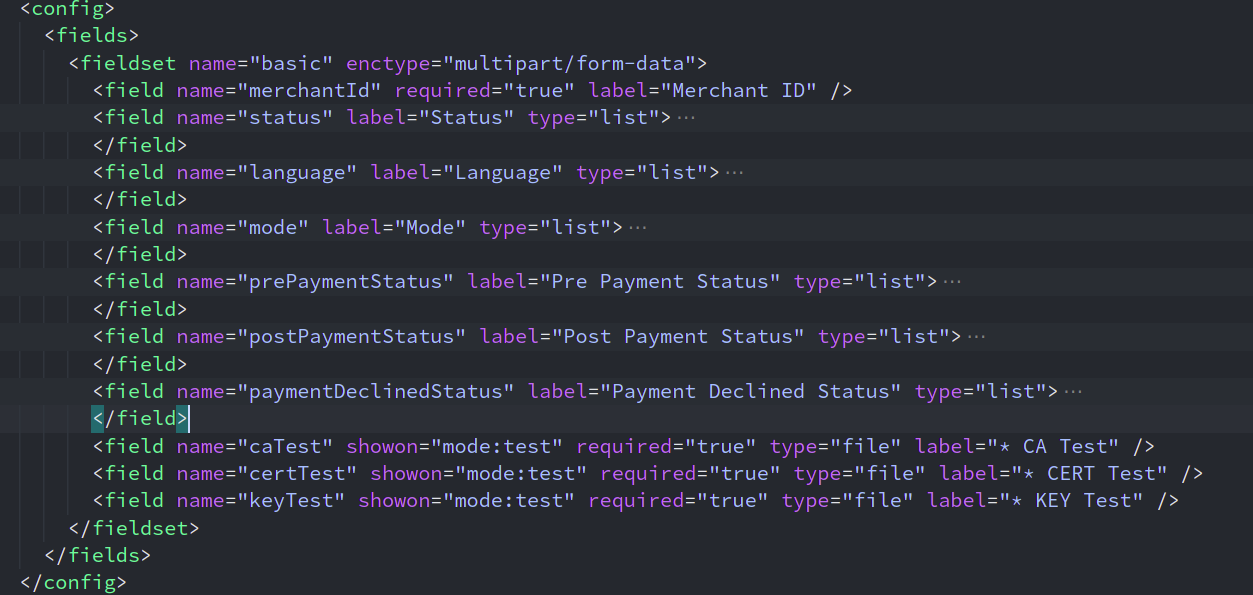
here is my screenshot, my question is: How can I access these fields caTest, certTest, keyTest in function onAfterOrderConfirm.
Please Log in or Create an account to join the conversation.
5 years 7 months ago #329949
by nicolas
Replied by nicolas on topic How to get path for image/file from custom field?
Hi,
This thread is about custom fields, not plugin settings.
And I already replied to you about this here:
www.hikashop.com/forum/integrations/9019...t-plugin.html#329893
As I already told you:
This thread is about custom fields, not plugin settings.
And I already replied to you about this here:
www.hikashop.com/forum/integrations/9019...t-plugin.html#329893
As I already told you:
Is there something you don't understand in this text ?you can use such code:
$plugin = JPluginHelper::getPlugin('hikashoppayment', 'xxx');
$this->params = new JRegistry(@$plugin->params);
echo $this->params->get('yyy');
where xxx is the folder name of your plugin and yyy the name of the setting (field).
Please Log in or Create an account to join the conversation.
Time to create page: 0.216 seconds