

- Posts: 107
- Thank you received: 8
Product display not correct in initial display
10 years 10 months ago #222149
by bmm01
Product display not correct in initial display was created by bmm01
-- url of the page with the problem -- :
midwestmeats.com.au/online-butcher/category/52-christmas-hamper
-- HikaShop version -- : 2.6.0
-- Joomla version -- : 3.4.5
-- PHP version -- : 5.5.30
-- Browser(s) name and version -- : Firefox 42.0
This is a really weird issue. I updated the site midwestmeats.com.au to Joomla 3.4.5 and Hikashop 2.6.0 after testing in the dev environment where everything was OK.
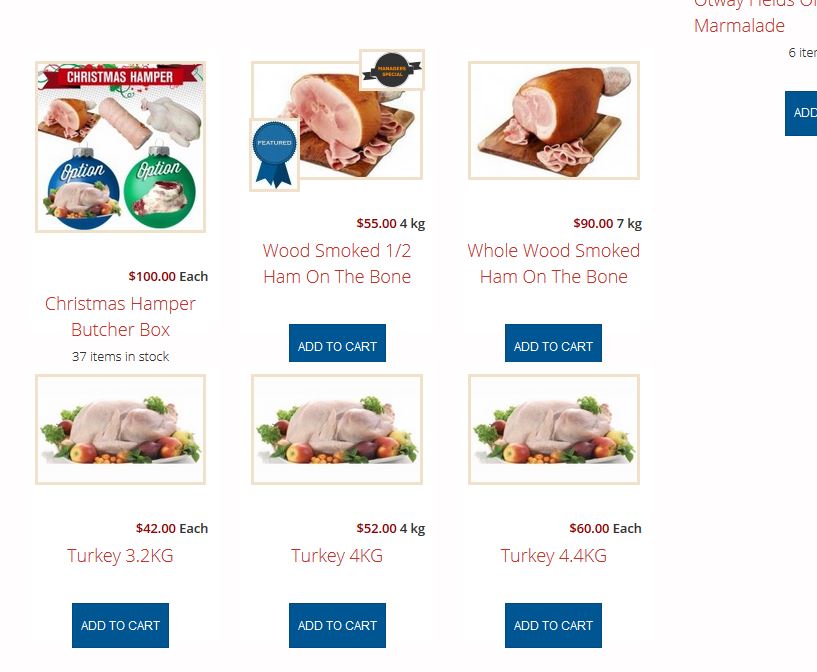
When you display a Hikashop product listing the display is not correct (Add to Cart buttons obscured as shown). When you refresh that page it's ok. Could it be something to do with the image sizes not being uniform?
I have cleared my browser caches and flushed the Joomla and Site Ground caches but no effect.
Any hints greatly appreciated
-- HikaShop version -- : 2.6.0
-- Joomla version -- : 3.4.5
-- PHP version -- : 5.5.30
-- Browser(s) name and version -- : Firefox 42.0
This is a really weird issue. I updated the site midwestmeats.com.au to Joomla 3.4.5 and Hikashop 2.6.0 after testing in the dev environment where everything was OK.
When you display a Hikashop product listing the display is not correct (Add to Cart buttons obscured as shown). When you refresh that page it's ok. Could it be something to do with the image sizes not being uniform?
I have cleared my browser caches and flushed the Joomla and Site Ground caches but no effect.
Any hints greatly appreciated
Please Log in or Create an account to join the conversation.

10 years 10 months ago #222155
by Xavier
Replied by Xavier on topic Product display not correct in initial display
Hi,
Please try to edit the view "product / listing_div" and remove that code:
This code allow to set the same height for all the elements on the page, but if there is view editions, so it can potentially broke the display.
www.hikashop.com/support/documentation/1...ize-the-display.html
Please try to edit the view "product / listing_div" and remove that code:
Code:
data-consistencyheight=".hikashop_subcontainer"
This code allow to set the same height for all the elements on the page, but if there is view editions, so it can potentially broke the display.
www.hikashop.com/support/documentation/1...ize-the-display.html
The following user(s) said Thank You: bmm01
Please Log in or Create an account to join the conversation.
10 years 10 months ago #222265
by bmm01
Replied by bmm01 on topic Product display not correct in initial display
Thanks Xavier
That worked and fixed the problem!
That worked and fixed the problem!
Please Log in or Create an account to join the conversation.
Time to create page: 0.148 seconds