

- Posts: 129
- Thank you received: 0
Count the items in mini cart
10 years 4 months ago #242280
by nic7071
Count the items in mini cart was created by nic7071
-- HikaShop version -- : 2.6.3
-- Joomla version -- : 3.5.1
hi,
i'm using this code to return the number of items in my mini cart,
first i want you to tell me if my code is wrong or correct ?
then i want to exclude the options from count. i want to only count the main products my current code returns 3 when i have a product with to options in my cart. i want it to return 1 instead of 3 .
-- Joomla version -- : 3.5.1
hi,
i'm using this code to return the number of items in my mini cart,
Code:
if(!defined('DS'))
define('DS', DIRECTORY_SEPARATOR);
if(!include_once(rtrim(JPATH_ADMINISTRATOR,DS).DS.'components'.DS.'com_hikashop'.DS.'helpers'.DS.'helper.php'))
return true;
$cartClass = hikashop_get('class.cart');
$fullCart = $cartClass->loadFullCart();
$nbProducts = 0;
foreach($fullCart->products as $product){
$nbProducts += $product->cart_product_quantity;
}
echo $nbProducts;
first i want you to tell me if my code is wrong or correct ?
then i want to exclude the options from count. i want to only count the main products my current code returns 3 when i have a product with to options in my cart. i want it to return 1 instead of 3 .
Please Log in or Create an account to join the conversation.
10 years 4 months ago #242282
by nic7071
Replied by nic7071 on topic Count the items in mini cart
also i want an if condition like this:
if user has an item in cart {do this }
else { do that }
if user has an item in cart {do this }
else { do that }
Please Log in or Create an account to join the conversation.

10 years 4 months ago - 10 years 4 months ago #242285
by nicolas
Replied by nicolas on topic Count the items in mini cart
Hi,
Yes, the code is correct.
To skip the options, you want to add the line:
if($group && $row->cart_product_option_parent_id) continue;
before the line:
$nbProducts += $product->cart_product_quantity;
And for your second question:
if($nbProducts){do this }
else { do that }
Yes, the code is correct.
To skip the options, you want to add the line:
if($group && $row->cart_product_option_parent_id) continue;
before the line:
$nbProducts += $product->cart_product_quantity;
And for your second question:
if($nbProducts){do this }
else { do that }
Last edit: 10 years 4 months ago by nicolas.
Please Log in or Create an account to join the conversation.
10 years 3 months ago #244833
by nic7071
Replied by nic7071 on topic Count the items in mini cart
okay then
so i should use this code:
but it returns "0" while i have 3 product with selected options in my cart.
when i remove this line :
it returns"11" which is my product count + their options.
i want the code to return "3" as the count of only my main products in cart!
so i should use this code:
Code:
<?php
if(!defined('DS'))
define('DS', DIRECTORY_SEPARATOR);
if(!include_once(rtrim(JPATH_ADMINISTRATOR,DS).DS.'components'.DS.'com_hikashop'.DS.'helpers'.DS.'helper.php'))
return true;
$cartClass = hikashop_get('class.cart');
$fullCart = $cartClass->loadFullCart();
$nbProducts = 0;
foreach($fullCart->products as $product){
if($group && $row->cart_product_option_parent_id) continue;
$nbProducts += $product->cart_product_quantity;
}
echo $nbProducts;
?>
when i remove this line :
Code:
if($group && $row->cart_product_option_parent_id) continue;
i want the code to return "3" as the count of only my main products in cart!
Please Log in or Create an account to join the conversation.
10 years 3 months ago #244835
by nic7071
Replied by nic7071 on topic Count the items in mini cart
i also want the mini cart to show up the shop-card ul list with a message of "nothing in cart" inside it.
but when shopping cart is empty nothing happens when i click on mini card icon.
can you give me a help on this too ?
thanks
but when shopping cart is empty nothing happens when i click on mini card icon.
can you give me a help on this too ?
thanks
Please Log in or Create an account to join the conversation.
10 years 3 months ago - 10 years 3 months ago #244834
by nicolas
Replied by nicolas on topic Count the items in mini cart
The variable $group is not defined in your code.
You first need to add the code:
$config = hikashop_config();
$group = $config->get('group_options');
I don't know how you built your mini cart module so hard to say.
By default with the mini cart module of HikaShop, when you click on the link of the mini cart, it directs you to the checkout. And if there is no products in the cart, the mini cart displays by default a message saying that the cart is empty, and there is no link.
You first need to add the code:
$config = hikashop_config();
$group = $config->get('group_options');
I don't know how you built your mini cart module so hard to say.
By default with the mini cart module of HikaShop, when you click on the link of the mini cart, it directs you to the checkout. And if there is no products in the cart, the mini cart displays by default a message saying that the cart is empty, and there is no link.
Last edit: 10 years 3 months ago by nicolas.
Please Log in or Create an account to join the conversation.
9 years 9 months ago #260068
by nic7071
Replied by nic7071 on topic Count the items in mini cart
how can i make hikashoping cart module to show up when its empty and show me a message like "cart is empty" instead of not doing anything at all when it's empty !
it's like a corrupted cart when nothing is in cart nothing will happen when user clicks on the logo !
it's like a corrupted cart when nothing is in cart nothing will happen when user clicks on the logo !
Please Log in or Create an account to join the conversation.
9 years 9 months ago #260074
by nicolas
Replied by nicolas on topic Count the items in mini cart
Hi,
The default HikaShop cart module of HikaShop, that is installed by default with HikaShop already display a message "the cart is empty" when the cart is empty.
Also, if you click on the "proceed to checkout" button of the cart module, or on its link when in mini cart mode, it will redirect you to the checkout. And if the checkout finds that the current cart is empty, it will redirect you to the URL that you set in "URL where you will be redirected when the cart is empty" setting of the HikaShop configuration and will also display a message saying that the cart is empty.
So I don't see what you're talking about.
The default HikaShop cart module of HikaShop, that is installed by default with HikaShop already display a message "the cart is empty" when the cart is empty.
Also, if you click on the "proceed to checkout" button of the cart module, or on its link when in mini cart mode, it will redirect you to the checkout. And if the checkout finds that the current cart is empty, it will redirect you to the URL that you set in "URL where you will be redirected when the cart is empty" setting of the HikaShop configuration and will also display a message saying that the cart is empty.
So I don't see what you're talking about.
Please Log in or Create an account to join the conversation.
9 years 9 months ago #260211
by nic7071
Replied by nic7071 on topic Count the items in mini cart
my hikashop version is 2.6.3
in this version hikashop cart is not loading anything when cart is empty !
i think this ability that u are saying is on 2.6.4 right ?
if so can you please tell me how to only update the hika cart module ?
thanks
in this version hikashop cart is not loading anything when cart is empty !
i think this ability that u are saying is on 2.6.4 right ?
if so can you please tell me how to only update the hika cart module ?
thanks
Please Log in or Create an account to join the conversation.
9 years 9 months ago #260216
by nicolas
Replied by nicolas on topic Count the items in mini cart
Hi,
No. This ability has been in the HikaShop cart module since HikaShop 1.0.0 and was also there in the 2.6.3.
So if you don't see any message in your cart when empty it's etiher:
- That you have a translation override of that text to remove it
- That you've changed the option for the cart empty message in the HikaShop cart module
- That you or your template provider have customized the layout of the cart to not display that message in the cart
- That's you're using a third party cart module which doesn't display that message
Updating HikaShop won't help.
No. This ability has been in the HikaShop cart module since HikaShop 1.0.0 and was also there in the 2.6.3.
So if you don't see any message in your cart when empty it's etiher:
- That you have a translation override of that text to remove it
- That you've changed the option for the cart empty message in the HikaShop cart module
- That you or your template provider have customized the layout of the cart to not display that message in the cart
- That's you're using a third party cart module which doesn't display that message
Updating HikaShop won't help.
Please Log in or Create an account to join the conversation.
9 years 4 months ago - 9 years 4 months ago #271324
by nic7071
Replied by nic7071 on topic Count the items in mini cart
Hello Nicolas,
on a new project, i'm trying to show the numbers of Main Product inside the cart at bottom of cart drop down.
i'm using this line of codes but it counts the product Options too.
for example with i have two product with Option and Characteristic it count it as 3 instead of 1 !
how can i remove Characteristic and Options from Product count in this code?
on a new project, i'm trying to show the numbers of Main Product inside the cart at bottom of cart drop down.
i'm using this line of codes but it counts the product Options too.
for example with i have two product with Option and Characteristic it count it as 3 instead of 1 !
how can i remove Characteristic and Options from Product count in this code?
Code:
<?php
$config = hikashop_config();
$group = $config->get('group_options');
if(!defined('DS'))
define('DS', DIRECTORY_SEPARATOR);
if(!include_once(rtrim(JPATH_ADMINISTRATOR,DS).DS.'components'.DS.'com_hikashop'.DS.'helpers'.DS.'helper.php'))
return true;
$cartClass = hikashop_get('class.cart');
$fullCart = $cartClass->loadFullCart();
$nbProducts = 0;
foreach($fullCart->products as $product){
if($group && $row->cart_product_option_parent_id) continue;
$nbProducts += $product->cart_product_quantity;
}
echo $nbProducts;
?>
Last edit: 9 years 4 months ago by Jerome.
Please Log in or Create an account to join the conversation.

9 years 4 months ago #271361
by Jerome
Jerome - Obsidev.com
HikaMarket & HikaSerial developer / HikaShop core dev team.
Replied by Jerome on topic Count the items in mini cart
Hello,
"product_parent_id" indicates if the element is a main (0) or a variant (not 0).
"cart_product_quantity" indicates if the element is used or just used to have content data (when a variant do not have a data, the data is taken from the parent ; so the parent is in the cart but with no quantity to not interact with the display)
Regards,
"product_parent_id" indicates if the element is a main (0) or a variant (not 0).
"cart_product_quantity" indicates if the element is used or just used to have content data (when a variant do not have a data, the data is taken from the parent ; so the parent is in the cart but with no quantity to not interact with the display)
Regards,
Jerome - Obsidev.com
HikaMarket & HikaSerial developer / HikaShop core dev team.
Please Log in or Create an account to join the conversation.
9 years 4 months ago #271533
by nic7071
Replied by nic7071 on topic Count the items in mini cart
Hello Jerome,
thanks for your explanation you are right cause I have variants (Product Type) assigned to the main product,
with this explanations.
is there any way to count only the main products?
i don't want the variants (Type Product or not) to be counted as a product (Main) in the cart !
is there any trick or hint you can tell me?
thanks for your explanation you are right cause I have variants (Product Type) assigned to the main product,
with this explanations.
is there any way to count only the main products?
i don't want the variants (Type Product or not) to be counted as a product (Main) in the cart !
is there any trick or hint you can tell me?
Please Log in or Create an account to join the conversation.
9 years 4 months ago #271541
by nicolas
Replied by nicolas on topic Count the items in mini cart
Hi,
As Jerome said, "product_parent_id" indicates if the element is a main (0) or a variant (not 0).
So you can use:
if(!$product->product_parent_id) continue;
To skip variants in your counting.
As Jerome said, "product_parent_id" indicates if the element is a main (0) or a variant (not 0).
So you can use:
if(!$product->product_parent_id) continue;
To skip variants in your counting.
Please Log in or Create an account to join the conversation.
9 years 4 months ago - 9 years 4 months ago #271566
by nic7071
Replied by nic7071 on topic Count the items in mini cart
Hello Nicolas,
Thank you for your answer,
i've tried to skip the variants from counting as you said but i think there is something wrong or something i'm mistaking about.
i tried this line of codes and it's still counting the variant with the main product.
<?php
$cartClass = hikashop_get('class.cart');
$fullCart = $cartClass->loadFullCart();
$nbProducts = 0;
foreach($fullCart->products as $product){
if(!$product->product_parent_id) continue;
$nbProducts += $product->cart_product_quantity;
}
echo $nbProducts;
?>
i'm sorry if i'm asking to much but i rally appreciate it if you can tell me what i'm doing wrong with these line of codes ?
Thanks
Thank you for your answer,
i've tried to skip the variants from counting as you said but i think there is something wrong or something i'm mistaking about.
i tried this line of codes and it's still counting the variant with the main product.
<?php
$cartClass = hikashop_get('class.cart');
$fullCart = $cartClass->loadFullCart();
$nbProducts = 0;
foreach($fullCart->products as $product){
if(!$product->product_parent_id) continue;
$nbProducts += $product->cart_product_quantity;
}
echo $nbProducts;
?>
i'm sorry if i'm asking to much but i rally appreciate it if you can tell me what i'm doing wrong with these line of codes ?
Thanks
Last edit: 9 years 4 months ago by nic7071.
Please Log in or Create an account to join the conversation.
9 years 4 months ago #271567
by Jerome
Jerome - Obsidev.com
HikaMarket & HikaSerial developer / HikaShop core dev team.
Replied by Jerome on topic Count the items in mini cart
Hello,
Why not simply using the data from the cart object ?
If you update to HikaShop 3 ; you will be able to access to the $cart->quantity->total and $cart->quantity->items.
Regards,
Why not simply using the data from the cart object ?
If you update to HikaShop 3 ; you will be able to access to the $cart->quantity->total and $cart->quantity->items.
Regards,
Jerome - Obsidev.com
HikaMarket & HikaSerial developer / HikaShop core dev team.
Please Log in or Create an account to join the conversation.
9 years 4 months ago #271597
by nic7071
Replied by nic7071 on topic Count the items in mini cart
Hello Jerome,
I tried that but it's not giving me the count of ONLY main products yet!
can you please do me a favor at giving me the exact line of codes that can echo the count of the main product inside cart?
or tell me how to use $cart->quantity->total and $cart->quantity->items and filter the variants and options from count ?
P.S: i'm using the latest version of Hikashop.
I tried that but it's not giving me the count of ONLY main products yet!
can you please do me a favor at giving me the exact line of codes that can echo the count of the main product inside cart?
or tell me how to use $cart->quantity->total and $cart->quantity->items and filter the variants and options from count ?
P.S: i'm using the latest version of Hikashop.
Please Log in or Create an account to join the conversation.
9 years 4 months ago #271598
by Jerome
Jerome - Obsidev.com
HikaMarket & HikaSerial developer / HikaShop core dev team.
Replied by Jerome on topic Count the items in mini cart
Hello,
I gave you the required code for latest version of HikaShop (3.x) in my previous message.
Afterwards, I'm afraid that I'm not following you.
Regards,
I gave you the required code for latest version of HikaShop (3.x) in my previous message.
Afterwards, I'm afraid that I'm not following you.
Regards,
Jerome - Obsidev.com
HikaMarket & HikaSerial developer / HikaShop core dev team.
Please Log in or Create an account to join the conversation.
9 years 4 months ago - 9 years 4 months ago #271720
by nic7071
Replied by nic7071 on topic Count the items in mini cart
Hi,
I have HikaShop 3.1.1 installed.
I want to add a code to show the number of main products inside the cart!
My problem is that the line of codes I'm using and you are saying are counting the product variant and options too.
For example, when I add a product to cart with 12-month warranty (Options) and software package (Variants) the counter shows 3 instead of one!
I want the counter to only count the main product.
You have done me a favor and told me to use this code $cart->quantity->total or $cart->quantity->items but these codes are also counting the variants and options too.
this is my final code and it returens 3 instead of 1 :
I have HikaShop 3.1.1 installed.
I want to add a code to show the number of main products inside the cart!
My problem is that the line of codes I'm using and you are saying are counting the product variant and options too.
For example, when I add a product to cart with 12-month warranty (Options) and software package (Variants) the counter shows 3 instead of one!
I want the counter to only count the main product.
You have done me a favor and told me to use this code $cart->quantity->total or $cart->quantity->items but these codes are also counting the variants and options too.
this is my final code and it returens 3 instead of 1 :
Code:
<?php
$config = hikashop_config();
$group = $config->get('group_options');
if(!defined('DS'))
define('DS', DIRECTORY_SEPARATOR);
if(!include_once(rtrim(JPATH_ADMINISTRATOR,DS).DS.'components'.DS.'com_hikashop'.DS.'helpers'.DS.'helper.php'))
return true;
$cartClass = hikashop_get('class.cart');
$fullCart = $cartClass->loadFullCart();
$nbProducts = 0;
foreach($fullCart->products as $product){
if($group && $row->cart_product_option_parent_id) continue;
$nbProducts += $product->cart_product_quantity;
}
echo $nbProducts;
echo $cart->quantity->total;
echo $cart->quantity->items;
?>
<?php $cart->quantity->items ?>
Last edit: 9 years 4 months ago by nicolas.
Please Log in or Create an account to join the conversation.

9 years 4 months ago - 9 years 4 months ago #271755
by Philip
Replied by Philip on topic Count the items in mini cart
Hello,
I will go back your aim :
Is to have a mini cart with the number item (without variants & options), right ?
So, without override view or custom... Let's try to go to Main HikaShop Configuration (in Components => HikaShop => Configuration) and in Product part switch ON "Group options with product"
As result, I get this :
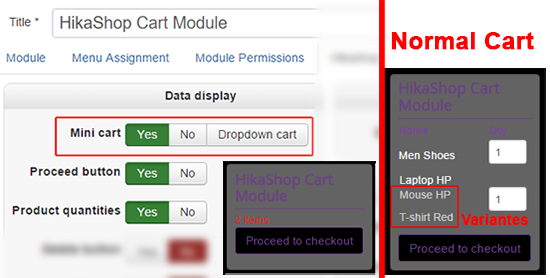
Hope this will fit your needs.
Regards
I will go back your aim :
Is to have a mini cart with the number item (without variants & options), right ?
So, without override view or custom... Let's try to go to Main HikaShop Configuration (in Components => HikaShop => Configuration) and in Product part switch ON "Group options with product"
As result, I get this :
Hope this will fit your needs.
Regards
Last edit: 9 years 4 months ago by Philip.
Please Log in or Create an account to join the conversation.
Time to create page: 0.127 seconds