

- Posts: 281
- Thank you received: 3
show "Product available" when quantity is unlimited
9 years 11 months ago #255767
by francota
show "Product available" when quantity is unlimited was created by francota
-- HikaShop version -- : 2.6.4
-- Joomla version -- : 3.6.4
Hello
In the product quantity I setted unlimited, but in this case in the product page it doesn't show "Product available"
I know there is the possibility to set a quantity of the produt and than ovverride the language setting what I want it shows when the produc quantity is more than 1.
But There is the possibility to show " "Product available"" also when the product quntity is unlimited??
Thanks
FRank
-- Joomla version -- : 3.6.4
Hello
In the product quantity I setted unlimited, but in this case in the product page it doesn't show "Product available"
I know there is the possibility to set a quantity of the produt and than ovverride the language setting what I want it shows when the produc quantity is more than 1.
But There is the possibility to show " "Product available"" also when the product quntity is unlimited??
Thanks
FRank
Please Log in or Create an account to join the conversation.

9 years 11 months ago #255770
by nicolas
Replied by nicolas on topic show "Product available" when quantity is unlimited
Hi,
There is no option for that.
You can edit the file "quantity" via the menu Display>Views and add such code:
echo "product available";
after the line:
if($this->row->product_quantity == -1) {
There is no option for that.
You can edit the file "quantity" via the menu Display>Views and add such code:
echo "product available";
after the line:
if($this->row->product_quantity == -1) {
Please Log in or Create an account to join the conversation.
9 years 11 months ago #255897
by francota
Replied by francota on topic show "Product available" when quantity is unlimited
Yes it works
Thanks
Frank
Thanks
Frank
Please Log in or Create an account to join the conversation.
9 years 8 months ago #262650
by verzevoul
Replied by verzevoul on topic show "Product available" when quantity is unlimited
Hello,
i would like to do the same here but i can't make it work, could you please write me a little more detailed code for quantity view?
Thank you
i would like to do the same here but i can't make it work, could you please write me a little more detailed code for quantity view?
Thank you
Please Log in or Create an account to join the conversation.

9 years 8 months ago - 9 years 8 months ago #262657
by Philip
Replied by Philip on topic show "Product available" when quantity is unlimited
Hello,
You have to create an override on quantity view :
For this :
- Go to Components => HikaShop => Configuration
- Then on Display tab select Views
- Use the three drop-down filter with Product/Your Template/frontend
"Custom" your view by clicking on Quantity, maybe you can copy the code, to past it on a code editor like notepad.
Then look for this line code :
You will see that :
Add ' echo "product available"; ' to have this :
Hope this will help you.
Regards
You have to create an override on quantity view :
For this :
- Go to Components => HikaShop => Configuration
- Then on Display tab select Views
- Use the three drop-down filter with Product/Your Template/frontend
"Custom" your view by clicking on Quantity, maybe you can copy the code, to past it on a code editor like notepad.
Then look for this line code :
Code:
if($this->row->product_quantity == -1) {
You will see that :
Code:
if($this->row->product_quantity == -1) {
?>
<div class="hikashop_product_stock"><?php
if(!empty($this->row->has_options)) {
etc etc...
Add ' echo "product available"; ' to have this :
Code:
if($this->row->product_quantity == -1) {
echo "product available";
?>
<div class="hikashop_product_stock"><?php
if(!empty($this->row->has_options)) {
etc etc...
Hope this will help you.
Regards
Last edit: 9 years 8 months ago by Philip.
The following user(s) said Thank You: verzevoul
Please Log in or Create an account to join the conversation.
9 years 8 months ago #262757
by verzevoul
Replied by verzevoul on topic show "Product available" when quantity is unlimited
Hi Philip,
i tried to edit quantity view but the code i see it's alittle different from the example of yours!
That's why i m a bit confused.
Here is the code i see
Thank you
i tried to edit quantity view but the code i see it's alittle different from the example of yours!
That's why i m a bit confused.
Here is the code i see
Code:
<?php
/**
* @package HikaShop for Joomla!
* @version 3.0.0
* @author hikashop.com
* @copyright (C) 2010-2017 HIKARI SOFTWARE. All rights reserved.
* @license GNU/GPLv3 http://www.gnu.org/licenses/gpl-3.0.html
*/
defined('_JEXEC') or die('Restricted access');
?><?php
if($this->config->get('add_to_cart_legacy', true)) {
$this->setLayout('quantity_legacy');
echo $this->loadTemplate();
return;
}
$catalogue_mode = $this->config->get('catalogue', false);
$enable_wishlist = (hikashop_level(1) && $this->config->get('enable_wishlist', 1) && $this->params->get('add_to_wishlist', 0) && (!$this->config->get('hide_wishlist_guest', 1) || hikashop_loadUser() != null));
if($catalogue_mode && !$enable_wishlist)
return;
$in_stock = ((int)$this->row->product_quantity == -1 || (int)$this->row->product_quantity > 0);
$is_free = empty($this->row->prices);
$display_free_cart = (int)$this->config->get('display_add_to_cart_for_free_products', 0);
$display_free_wishlist = (int)$this->config->get('display_add_to_wishlist_for_free_products', 1);
$display_quantity_field = ((int)$this->config->get('show_quantity_field', -1) != 0);
$global_on_listing = $this->config->get('show_quantity_field') == 2;
$waitlist = (int)$this->config->get('product_waitlist', 0);
$waitlist_btn = !$in_stock && (hikashop_level(1) && ($waitlist == 2 || ($waitlist == 1 && (!empty($this->row->main->product_waitlist) || !empty($this->row->product_waitlist)))));
$now = time();
$start_date = (@$this->row->product_sale_start || empty($this->element->main)) ? @$this->row->product_sale_start : $this->element->main->product_sale_start;
$end_date = (@$this->row->product_sale_end || empty($this->element->main)) ? @$this->row->product_sale_end : $this->element->main->product_sale_end;
$product_available = ($end_date <= 0 || $end_date >= $now) && ($start_date <= 0 || $start_date < $now);
$add_to_cart = !$catalogue_mode && $in_stock && (!$is_free || $display_free_cart) && $product_available;
$add_to_wishlist = $enable_wishlist && (!$is_free || $display_free_wishlist);
$css_button = $this->config->get('css_button', 'hikabtn');
$css_button_cart = $this->config->get('css_button_cart', 'hikacart');
$css_button_wishlist = $this->config->get('css_button_wishlist', 'hikawishlist');
if($global_on_listing && !empty($this->row->formName)) {
if($add_to_cart) {
?>
<a class="<?php echo $css_button . ' ' . $css_button_cart; ?>" href="#" onclick="if(window.hikashop.addToCart) { return window.hikashop.addToCart(this); }" data-addTo-div="<?php echo $this->row->formName; ?>" data-addTo-class="add_in_progress"><span><?php
echo JText::_('ADD_TO_CART');
?></span></a>
<?php
}
if($add_to_wishlist) {
?>
<a class="<?php echo $css_button . ' ' . $css_button_wishlist; ?>" href="#" onclick="if(window.hikashop.addToWishlist) { document.getElementById('hikashop_cart_type_0').value = 'wishlist'; return window.hikashop.addToWishlist(this); }" data-addTo-div="<?php echo $this->row->formName; ?>" data-addTo-class="add_in_progress"><span><?php
echo JText::_('ADD_TO_WISHLIST');
?></span></a>
<?php
}
return;
}
$classical_url = 'product&task=updatecart&add=1&product_id='.$this->row->product_id;
if(!empty($this->return_url))
$classical_url .= '&return_url=' . urlencode(base64_encode(urldecode($this->redirect_url)));
if($end_date > 0 && $end_date < $now) {
?>
<span class="hikashop_product_sale_end"><?php
echo JText::_('ITEM_NOT_SOLD_ANYMORE');
?></span>
<?php
return;
}
if($start_date > 0 && $start_date > $now) {
?>
<span class="hikashop_product_sale_start"><?php
echo JText::sprintf('ITEM_SOLD_ON_DATE', hikashop_getDate($start_date, $this->params->get('date_format', '%d %B %Y')));
?></span>
<?php
return;
}
?>
<span class="hikashop_product_stock_count">
<?php
if($this->row->product_quantity > 0)
echo (($this->row->product_quantity == 1 && JText::_('X_ITEM_IN_STOCK') != 'X_ITEM_IN_STOCK') ? JText::sprintf('X_ITEM_IN_STOCK', $this->row->product_quantity) : JText::sprintf('X_ITEMS_IN_STOCK', $this->row->product_quantity));
elseif(!$in_stock)
echo JText::_('NO_STOCK');
?>
</span>
<?php
if($waitlist_btn) {
?>
<a class="<?php echo $css_button; ?>" href="<?php echo hikashop_completeLink('product&task=waitlist&cid='.$this->row->product_id); ?>"><span><?php
echo JText::_('ADD_ME_WAITLIST');
?></span></a>
<?php
}
if(($add_to_cart || $add_to_wishlist) && $display_quantity_field) {
$this->setLayout('show_quantity');
echo $this->loadTemplate();
}
if($add_to_cart) {
?>
<a class="<?php echo $css_button . ' ' . $css_button_cart; ?>" href="<?php echo hikashop_completeLink($classical_url); ?>" onclick="if(window.hikashop.addToCart) { return window.hikashop.addToCart(this); }" data-addToCart="<?php echo $this->row->product_id; ?>" data-addTo-div="hikashop_product_form" data-addTo-class="add_in_progress"><span><?php
echo JText::_('ADD_TO_CART');
?></span></a>
<?php
}
if($add_to_wishlist) {
?>
<a class="<?php echo $css_button . ' ' . $css_button_wishlist; ?>" href="<?php echo hikashop_completeLink($classical_url); ?>" onclick="if(window.hikashop.addToWishlist) { return window.hikashop.addToWishlist(this); }" data-addToWishlist="<?php echo $this->row->product_id; ?>" data-addTo-div="hikashop_product_form" data-addTo-class="add_in_progress"><span><?php
echo JText::_('ADD_TO_WISHLIST');
?></span></a>
<?php
}
Thank you
Please Log in or Create an account to join the conversation.
9 years 8 months ago #262777
by nicolas
Replied by nicolas on topic show "Product available" when quantity is unlimited
Hi,
You can add the code:
elseif(($this->row->product_quantity == -1) echo "my text";
before the code:
elseif(!$in_stock)
in your view file.
You can add the code:
elseif(($this->row->product_quantity == -1) echo "my text";
before the code:
elseif(!$in_stock)
in your view file.
Please Log in or Create an account to join the conversation.
9 years 8 months ago #262884
by verzevoul
Replied by verzevoul on topic show "Product available" when quantity is unlimited
Hi,
i added the code but nothing changed!
Thank you
i added the code but nothing changed!
Thank you
Please Log in or Create an account to join the conversation.
9 years 8 months ago - 9 years 8 months ago #262912
by Philip
Replied by Philip on topic show "Product available" when quantity is unlimited
Hello,
I process some test from your code view, and do like Nicolas told you, but in Nicolas' code there was a little mistake.
There were 2 "(" to start the elseif condition.
That error leads to an error page, then you told nothing happen, so there is only one solution : you don't edit the right view.
Check please your three dropdown filters, like this :

Edit the Quantity view like I told you in my previous message
But use this code around line 88 (on your code view) or look for this
:
add
; to have this :
And that will work, I test it myself :
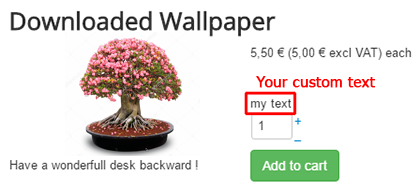
Regards
I process some test from your code view, and do like Nicolas told you, but in Nicolas' code there was a little mistake.
There were 2 "(" to start the elseif condition.
That error leads to an error page, then you told nothing happen, so there is only one solution : you don't edit the right view.
Check please your three dropdown filters, like this :
Edit the Quantity view like I told you in my previous message
But use this code around line 88 (on your code view) or look for this
Code:
elseif(!$in_stock) echo JText::_('NO_STOCK');
Code:
...
product_quantity) : JText::sprintf('X_ITEMS_IN_STOCK', $this->row->product_quantity));
elseif(!$in_stock)
echo JText::_('NO_STOCK');
?>
</span>
...
add
Code:
elseif($this->row->product_quantity == -1) echo "my text"
Code:
...
product_quantity) : JText::sprintf('X_ITEMS_IN_STOCK', $this->row->product_quantity));
elseif($this->row->product_quantity == -1)
echo "my text";
elseif(!$in_stock)
echo JText::_('NO_STOCK');
?>
</span>
...
Regards
Last edit: 9 years 8 months ago by Philip.
The following user(s) said Thank You: verzevoul
Please Log in or Create an account to join the conversation.
9 years 8 months ago #263019
by verzevoul
Replied by verzevoul on topic show "Product available" when quantity is unlimited
Hi Philip,
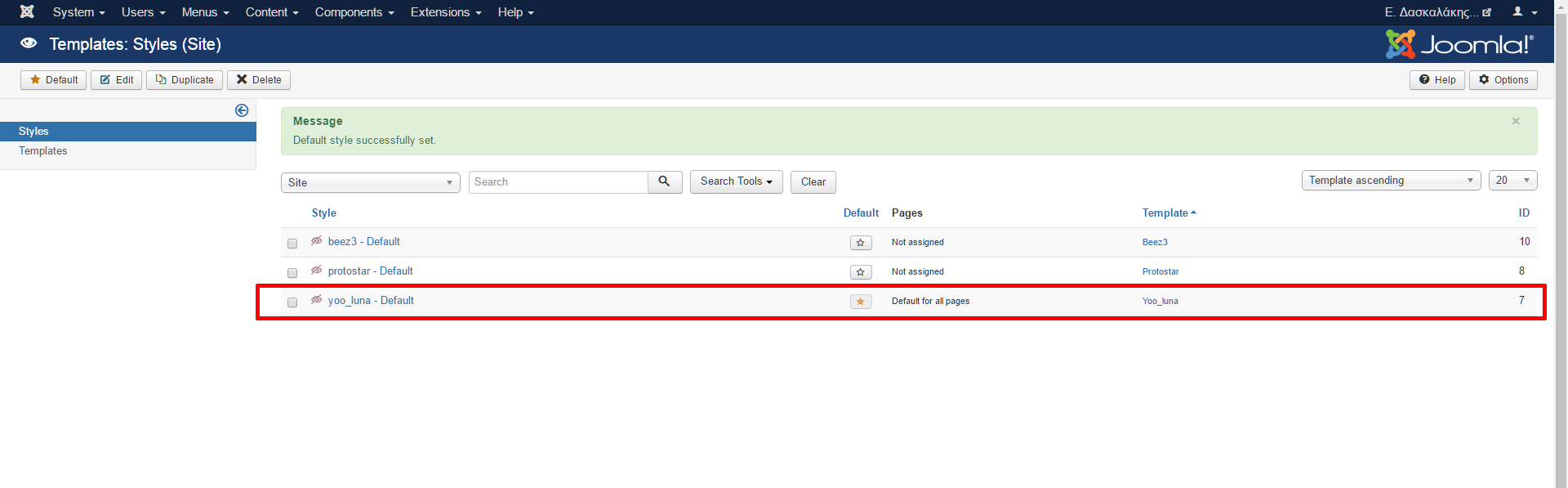
However, i tried your latest solution in both protostar AND yootheme template but still no result. Could you please send me the whole view code in case i have made any mistakes? I will send you joomla account details if you want to check.
Thank you
As youcan see in my answer, i tried to edit quantity view but the code i see it's a little different from the example of yours!Edit the Quantity view like I told you in my previous message
I don't understand, my default template is yoothemehat error leads to an error page, then you told nothing happen, so there is only one solution : you don't edit the right view.
However, i tried your latest solution in both protostar AND yootheme template but still no result. Could you please send me the whole view code in case i have made any mistakes? I will send you joomla account details if you want to check.
Thank you
Please Log in or Create an account to join the conversation.
9 years 8 months ago - 9 years 8 months ago #263030
by Philip
Replied by Philip on topic show "Product available" when quantity is unlimited
Hello,
I just have a look on your website, and that's didn't work because your quantity view isn't display because you don't display price.
And so you can process your custom code in your product general view, in your case show_tabular.
I make a custom test and comment it (in order to hide it on the frontend) around line 83.
of course, you can place it where you want, hope this will fit your needs, see this tutorial .
Regards
I just have a look on your website, and that's didn't work because your quantity view isn't display because you don't display price.
And so you can process your custom code in your product general view, in your case show_tabular.
I make a custom test and comment it (in order to hide it on the frontend) around line 83.
of course, you can place it where you want, hope this will fit your needs, see this tutorial .
Regards
Last edit: 9 years 8 months ago by Philip.
The following user(s) said Thank You: verzevoul
Please Log in or Create an account to join the conversation.
9 years 8 months ago #263141
by verzevoul
Replied by verzevoul on topic show "Product available" when quantity is unlimited
Hi,
i display prices but only for logged users. However i saw your code in show_tabular view and uncomment it and it works now!
Thank you Philip!
i display prices but only for logged users. However i saw your code in show_tabular view and uncomment it and it works now!
Thank you Philip!
Please Log in or Create an account to join the conversation.
9 years 7 months ago #263749
by verzevoul
Replied by verzevoul on topic show "Product available" when quantity is unlimited
Hi again!
I have another issue here, as we discused before i added this code in show_default view file
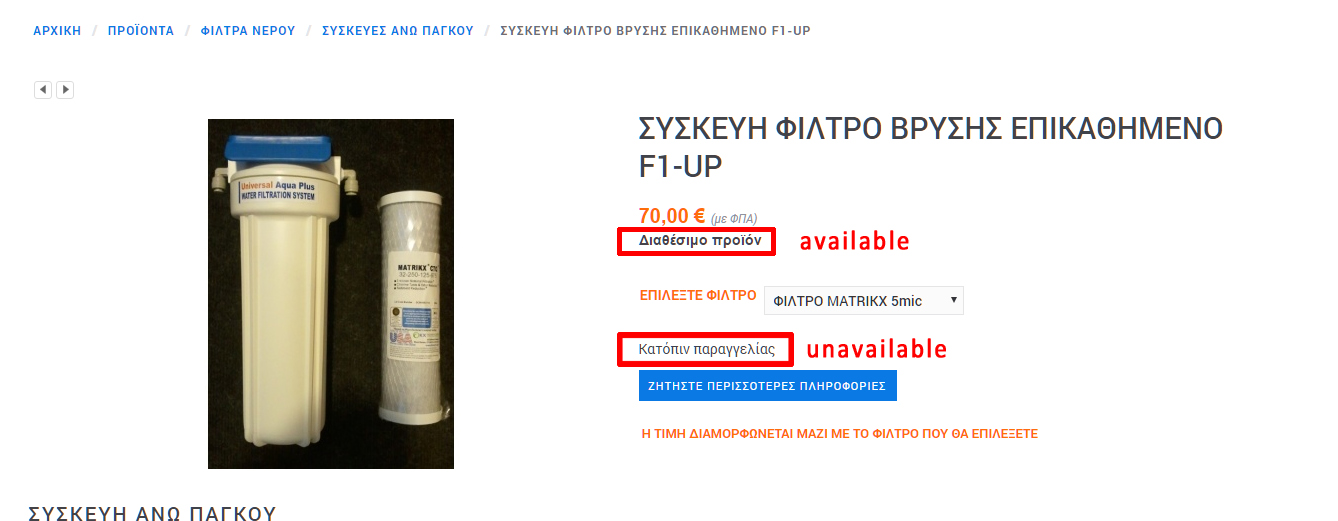
it shows product available but i also have a badge for -1 quantity to write product unavailable, so if the product quantity is -1 the product shows available BUT if quantity is -2 it shows both the available and unavailable text. I don't understand!!
Thank you
I have another issue here, as we discused before i added this code in show_default view file
Code:
<?php
if($this->row->product_quantity == -1)
echo "<span class='product_message'>Διαθέσιμο προϊόν</span>";
}
?>
it shows product available but i also have a badge for -1 quantity to write product unavailable, so if the product quantity is -1 the product shows available BUT if quantity is -2 it shows both the available and unavailable text. I don't understand!!
Thank you
Please Log in or Create an account to join the conversation.
9 years 7 months ago - 9 years 7 months ago #263758
by Philip
Replied by Philip on topic show "Product available" when quantity is unlimited
Hello,
The point I don't understand is why you have a -2 value ?...
You have to know that to customize HikaShop, you must understand how HikaShop code is build.
Here, quantity value in classical process have 3 value "group".
- 0 => No quantity
- 1 to 9999 (and more...) => Product available in this specific quantity number
- -1 => Is a quantity to notice HikaShop that this product isn't stock limited, and so is infinite, like for download software, wallpaper etc...
And so now, why do you have a -2 ?... I don't understand if it's your will (via custom) or else...
Plus, please note, that this forum's aim is to help people to configure and solve issue.
We can adviced people for their customization needs but that's all.
Awaiting more details from you.
Regards
The point I don't understand is why you have a -2 value ?...
You have to know that to customize HikaShop, you must understand how HikaShop code is build.
Here, quantity value in classical process have 3 value "group".
- 0 => No quantity
- 1 to 9999 (and more...) => Product available in this specific quantity number
- -1 => Is a quantity to notice HikaShop that this product isn't stock limited, and so is infinite, like for download software, wallpaper etc...
And so now, why do you have a -2 ?... I don't understand if it's your will (via custom) or else...
Plus, please note, that this forum's aim is to help people to configure and solve issue.
We can adviced people for their customization needs but that's all.
Awaiting more details from you.
Regards
Last edit: 9 years 7 months ago by Philip.
The following user(s) said Thank You: verzevoul
Please Log in or Create an account to join the conversation.
9 years 7 months ago #263876
by verzevoul
Replied by verzevoul on topic show "Product available" when quantity is unlimited
Hi Philip,
i used -2 value as a test. I tried now 0 for not available and it works you are right.
Sorry to bother you so much!
Thank you
i used -2 value as a test. I tried now 0 for not available and it works you are right.
Sorry to bother you so much!
Thank you
Please Log in or Create an account to join the conversation.
7 years 1 week ago #312149
by marek393
Replied by marek393 on topic show "Product available" when quantity is unlimited
Hi,
I just want to ask if somthing like this
elseif(($this->row->product_quantity == -1) echo "my text";
is possible to do on product listing page?
I just want to ask if somthing like this
elseif(($this->row->product_quantity == -1) echo "my text";
is possible to do on product listing page?
Please Log in or Create an account to join the conversation.
7 years 1 week ago - 7 years 1 week ago #312165
by Philip
Replied by Philip on topic show "Product available" when quantity is unlimited
Hello,
Yes, it's possible !
First, I advice you to have a look on this tutorial .
second, I'm drawing your attention to this "Display view files" option from Main HikaShop option in Advanced tab & Advanced settings.
This option will help you to get the good required view to customize.

Then, html & php knowledge to create an override to customize your product listing page.
In Display dropdown => Views, use the 3 filter dropdown with Product/ Your Template/ Frontend, and find your required view to edit it.
Hope this will help you.
Regards
Yes, it's possible !
First, I advice you to have a look on this tutorial .
second, I'm drawing your attention to this "Display view files" option from Main HikaShop option in Advanced tab & Advanced settings.
This option will help you to get the good required view to customize.
Then, html & php knowledge to create an override to customize your product listing page.
In Display dropdown => Views, use the 3 filter dropdown with Product/ Your Template/ Frontend, and find your required view to edit it.
Hope this will help you.
Regards
Last edit: 7 years 1 week ago by Philip.
Please Log in or Create an account to join the conversation.
Time to create page: 0.182 seconds