
- Posts: 62
- Thank you received: 0
Product display in three columns
- joostbloom
-
 Topic Author
- Offline
Less
More
9 years 9 months ago #260379
by joostbloom
Product display in three columns was created by joostbloom
-- HikaShop version -- : 3.0.0
-- Joomla version -- : 3.6.5
-- PHP version -- : 5.6.18
-- Browser(s) name and version -- : chrome
Hi,
I have upgrade to version 3.0.0 and now I have the problem my products are show in one columns instead of three columns. I have setup up my menu-item like this:
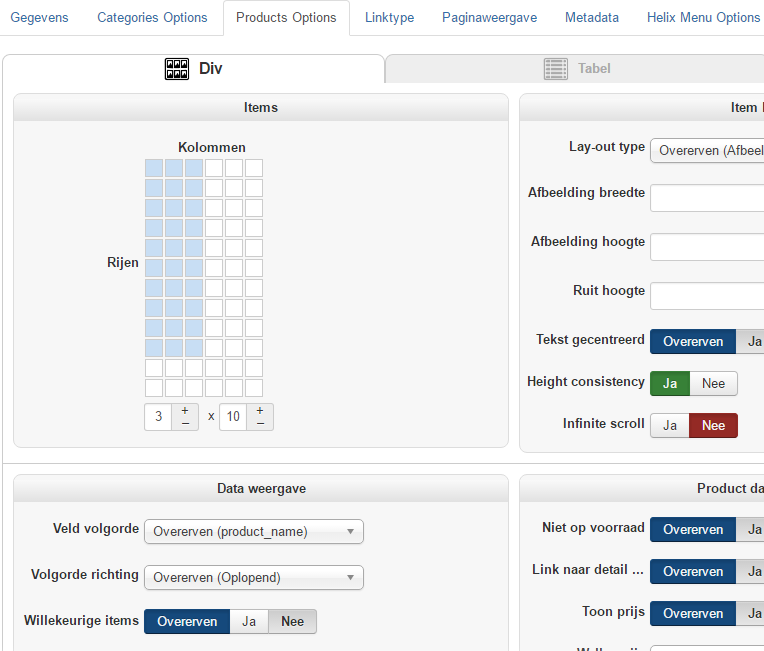
What am I doing wrong or how can I get my products in three columns?
regards and thanks in advance,
Joost
-- Joomla version -- : 3.6.5
-- PHP version -- : 5.6.18
-- Browser(s) name and version -- : chrome
Hi,
I have upgrade to version 3.0.0 and now I have the problem my products are show in one columns instead of three columns. I have setup up my menu-item like this:
What am I doing wrong or how can I get my products in three columns?
regards and thanks in advance,
Joost
Please Log in or Create an account to join the conversation.

9 years 9 months ago #260381
by nicolas
Replied by nicolas on topic Product display in three columns
Hi,
It comes from your custom CSS.
You need to remove the code:
in the custom CSS file of your HikaShop frontend CSS file in the HikaShop configuration in order to fix that.
It comes from your custom CSS.
You need to remove the code:
Code:
.hikashop_subcategories div.hikashop_category, .hikashop_products_listing div.hikashop_product {
float: left;
width: 100%;
}
Please Log in or Create an account to join the conversation.
Time to create page: 0.110 seconds