

- Posts: 344
- Thank you received: 3
Hide "add to cart button" when brand-url is filled out
9 years 8 months ago #261042
by river
Hide "add to cart button" when brand-url is filled out was created by river
-- HikaShop version -- : 3
-- Joomla version -- : 3.6.5
-- PHP version -- : 7
So iv'e used the code (below) and created a "buy now" button that links to external products (when I fill out brand url)
I placed it in the file product | quantity and it works perfect.
Anyway I have a question:
Is it possible to write aa php code to create a function that hide's the native "add to cart" button on the product page when the "brand URL" of the product is filled out ?
Would it be something like this
if($this->row->hikashop_product_url_main == 1)
{
$this->row->addtocartoption = 0;
}
?
-- Joomla version -- : 3.6.5
-- PHP version -- : 7
So iv'e used the code (below) and created a "buy now" button that links to external products (when I fill out brand url)
Code:
<input type="button" onclick="window.location='<?php echo $this->row->product_url; ?>'; return false;" value="buy now"/>
I placed it in the file product | quantity and it works perfect.
Anyway I have a question:
Is it possible to write aa php code to create a function that hide's the native "add to cart" button on the product page when the "brand URL" of the product is filled out ?
Would it be something like this
if($this->row->hikashop_product_url_main == 1)
{
$this->row->addtocartoption = 0;
}
?
Please Log in or Create an account to join the conversation.

9 years 8 months ago - 9 years 8 months ago #261066
by Philip
Replied by Philip on topic Hide "add to cart button" when brand-url is filled out
Hello,
In theory of course you can, but we need more context in order to better understand your needs, and maybe their is an HikaShop option that can fit your needs better than a custom code?
Awaiting news from you.
Regards
In theory of course you can, but we need more context in order to better understand your needs, and maybe their is an HikaShop option that can fit your needs better than a custom code?
Awaiting news from you.
Regards
Last edit: 9 years 8 months ago by Philip.
Please Log in or Create an account to join the conversation.
9 years 7 months ago - 9 years 7 months ago #261257
by river
Replied by river on topic Hide "add to cart button" when brand-url is filled out
OK this is what my product page on my test-site looks like now.
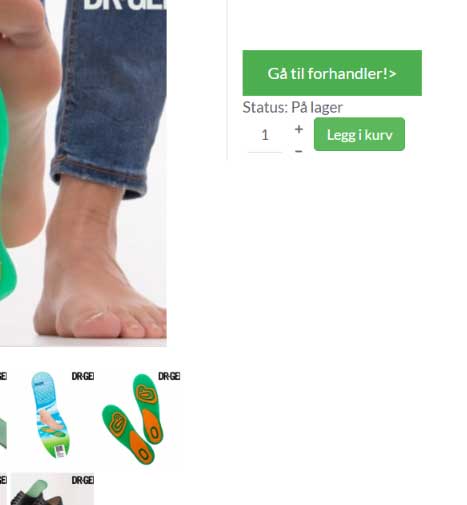
When I paste a URL in the in the product "brand url" field the button "Gå til forhandler/Go to dealer" links to this url.
But now both button displays. I need the standard "add to cart" button to be HIDDEN when the product "brand url" is filled out
So that only the new button "go to dealer" displays.
NOTE: I know that I can use code to remove the standard "add to cart" button, but I have some products that I sell myself so I need it to display on these products.
Any advice on how two write code like that ?
tnx
How my explenation makes more sense.
When I paste a URL in the in the product "brand url" field the button "Gå til forhandler/Go to dealer" links to this url.
But now both button displays. I need the standard "add to cart" button to be HIDDEN when the product "brand url" is filled out
So that only the new button "go to dealer" displays.
NOTE: I know that I can use code to remove the standard "add to cart" button, but I have some products that I sell myself so I need it to display on these products.
Any advice on how two write code like that ?
tnx
How my explenation makes more sense.
Last edit: 9 years 7 months ago by river.
Please Log in or Create an account to join the conversation.

9 years 7 months ago #261260
by nicolas
Replied by nicolas on topic Hide "add to cart button" when brand-url is filled out
Hi,
I suppose you could add such code at the top of the "quantity" view file:
I suppose you could add such code at the top of the "quantity" view file:
Code:
<?php if(!empty($this->element->product_url)) return; ?>
Please Log in or Create an account to join the conversation.
9 years 7 months ago - 9 years 7 months ago #261317
by river
Replied by river on topic Hide "add to cart button" when brand-url is filled out
OK tnx for reply
This works ! Excellent.
Now the begining of my product | quantity file look like this
Is it possible to add another small function to this code.
Now both buttons are displaying when the "Brand url" is NOT filled out.
Is if possible to add code so that ONLY the "add to cart" but is displaying when the "Brand url" if NOT filled out ?
This works ! Excellent.
Now the begining of my product | quantity file look like this
Code:
<input type="button" onclick="window.location='<?php echo $this->row->product_url; ?>'; return false;" value="Gå til forhandler!>"/><br/>
<?php if(!empty($this->element->product_url)) return; ?>
<?php
/**
* @package HikaShop for Joomla!
* @version 3.0.0
* @author hikashop.com
* @copyright (C) 2010-2017 HIKARI SOFTWARE. All rights reserved.
* @license GNU/GPLv3 http://www.gnu.org/licenses/gpl-3.0.html
*/
Is it possible to add another small function to this code.
Now both buttons are displaying when the "Brand url" is NOT filled out.
Is if possible to add code so that ONLY the "add to cart" but is displaying when the "Brand url" if NOT filled out ?
Last edit: 9 years 7 months ago by river.
Please Log in or Create an account to join the conversation.

9 years 7 months ago #261322
by Jerome
Jerome - Obsidev.com
HikaMarket & HikaSerial developer / HikaShop core dev team.
Replied by Jerome on topic Hide "add to cart button" when brand-url is filled out
Hi,
You should only display your custom code when the product_url is not fill.
It is simply an improvement of the content of the "if" that Nicolas gave you.
Even if it's basic PHP code ; I'm afraid that it is starting to become some custom code and we are starting to go outside of the limit of the HikaShop support.
I recommend you to read some articles in order to learn the base of PHP, so you will be able to move forward in your HikaShop customization.
Regards,
You should only display your custom code when the product_url is not fill.
It is simply an improvement of the content of the "if" that Nicolas gave you.
Even if it's basic PHP code ; I'm afraid that it is starting to become some custom code and we are starting to go outside of the limit of the HikaShop support.
I recommend you to read some articles in order to learn the base of PHP, so you will be able to move forward in your HikaShop customization.
Regards,
Jerome - Obsidev.com
HikaMarket & HikaSerial developer / HikaShop core dev team.
Please Log in or Create an account to join the conversation.
9 years 7 months ago - 9 years 7 months ago #261358
by river
Replied by river on topic Hide "add to cart button" when brand-url is filled out
Tnx for reply
Yes I know that its a simple improvement of the content of the "if"
So does anyone else have some advice on what piece of code to add to the last code-sentence so it hides my custom button "Gå til forhandler/Go to dealer" when the "Brand URL" of the product is not filled.
?
Any advice would be GREATLY appreciated
Yes I know that its a simple improvement of the content of the "if"
Code:
<input type="button" onclick="window.location='<?php echo $this->row->product_url; ?>'; return false;" value="Gå til forhandler!>"/><br/>
<?php if(!empty($this->element->product_url)) return; ?>
<?php
So does anyone else have some advice on what piece of code to add to the last code-sentence so it hides my custom button "Gå til forhandler/Go to dealer" when the "Brand URL" of the product is not filled.
?
Any advice would be GREATLY appreciated
Last edit: 9 years 7 months ago by river.
Please Log in or Create an account to join the conversation.
9 years 7 months ago #261397
by Jerome
Jerome - Obsidev.com
HikaMarket & HikaSerial developer / HikaShop core dev team.
Replied by Jerome on topic Hide "add to cart button" when brand-url is filled out
Hi,
Like I told you in my previous post, your request is more a request for "custom code" than support on HikaShop.
You want to modify the HikaShop view, change the behavior, the page of the content and the way that your website is "acting".
So it is going outside of the limit of our support.
Thank you for your understanding
Like I told you in my previous post, your request is more a request for "custom code" than support on HikaShop.
You want to modify the HikaShop view, change the behavior, the page of the content and the way that your website is "acting".
So it is going outside of the limit of our support.
Thank you for your understanding
Jerome - Obsidev.com
HikaMarket & HikaSerial developer / HikaShop core dev team.
Please Log in or Create an account to join the conversation.
9 years 7 months ago #261447
by river
Replied by river on topic Hide "add to cart button" when brand-url is filled out
OK I understad.
I will make a post under commerical jobs.
I will make a post under commerical jobs.
Please Log in or Create an account to join the conversation.
Time to create page: 0.204 seconds