
- Posts: 137
- Thank you received: 4
Default value for variants
- simonkloostra
-
 Topic Author
- Offline
Less
More
9 years 1 month ago - 9 years 1 month ago #278856
by simonkloostra
Default value for variants was created by simonkloostra
-- HikaShop version -- : 3.2.0
-- Joomla version -- : 3.8.0
-- PHP version -- : 7.1
-- Browser(s) name and version -- : all
I now have my "product variants" set up using custom fields as in he attachment, but since I will probably outsource my fulfillment I need a more structural way of setting this up, using 'real' variants. See the attachment for my current display.
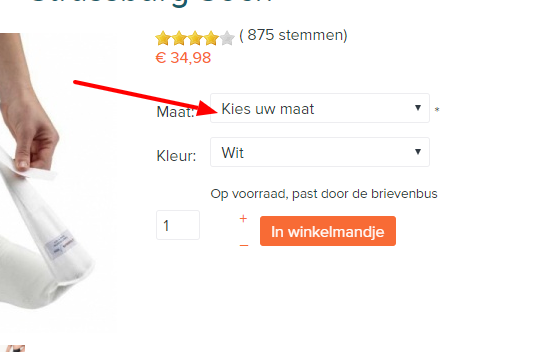
Doing so seems to work fine, except for one thing. I want to force people to make a decision about a size or color. Now with custom fields I manage doing so with a parameter with an empty value.
How can I achieve this with characteristics and variants?
I have tried to set a default variant with an empty stock, but this makes the order button disappear with an out of stock display (initially).
-- Joomla version -- : 3.8.0
-- PHP version -- : 7.1
-- Browser(s) name and version -- : all
I now have my "product variants" set up using custom fields as in he attachment, but since I will probably outsource my fulfillment I need a more structural way of setting this up, using 'real' variants. See the attachment for my current display.
Doing so seems to work fine, except for one thing. I want to force people to make a decision about a size or color. Now with custom fields I manage doing so with a parameter with an empty value.
How can I achieve this with characteristics and variants?
I have tried to set a default variant with an empty stock, but this makes the order button disappear with an out of stock display (initially).
Last edit: 9 years 1 month ago by simonkloostra.
Please Log in or Create an account to join the conversation.

9 years 1 month ago - 9 years 1 month ago #278862
by trevsmiff
Replied by trevsmiff on topic Default value for variants
Perhaps you could add variants with the name 'Select color' and and 'Select size' make them the default.
If you set the price of these variants to zero and change the setting Display 'add to cart' button for free products to 'NO' the user will have to change the selection before they can add it to the cart.
regards
Trevor
If you set the price of these variants to zero and change the setting Display 'add to cart' button for free products to 'NO' the user will have to change the selection before they can add it to the cart.
regards
Trevor
Last edit: 9 years 1 month ago by trevsmiff. Reason: Added set price to zero para.
The following user(s) said Thank You: Mohamed Thelji
Please Log in or Create an account to join the conversation.
- simonkloostra
-
Topic Author
- Offline
Less
More
- Posts: 137
- Thank you received: 4
9 years 1 month ago #278889
by simonkloostra
Replied by simonkloostra on topic Default value for variants
The variants I want to create are all free. It just concerns basic colors or shoe-sizes. The price is set on the actual product.
Also in your solution the add-to-cart button is not showing, so it is basically the same solution as the dummy value with a stock of zero.
There should be a simple way of achieving this, I guess?
Also in your solution the add-to-cart button is not showing, so it is basically the same solution as the dummy value with a stock of zero.
There should be a simple way of achieving this, I guess?
Please Log in or Create an account to join the conversation.
9 years 1 month ago #278890
by trevsmiff
Replied by trevsmiff on topic Default value for variants
Yes for this method to work you would need to set the product price in all the variants except the default one, a bit of a pain if there are a lot of variants!
Trevor
Trevor
Please Log in or Create an account to join the conversation.
- simonkloostra
-
Topic Author
- Offline
Less
More
- Posts: 137
- Thank you received: 4
9 years 1 month ago #278892
by simonkloostra
Replied by simonkloostra on topic Default value for variants
Indeed this will be a very cumbersome task, but most importantly it still results in the add to cart button being hidden untill the user makes a selection, which is a definite conversionkiller.
Next to that a quick test gave me some more display issues that I will have to find soltions for, so this workaround is not workable for me, I'm sorrry.
Next to that a quick test gave me some more display issues that I will have to find soltions for, so this workaround is not workable for me, I'm sorrry.
Please Log in or Create an account to join the conversation.

9 years 1 month ago #278926
by nicolas
Replied by nicolas on topic Default value for variants
Hi,
That's how it's supposed to be though. If you want, you can add a custom text in one of the view files to notify the customer that he must first select a characteristic value. You could even have it display as an add to cart button and hide it when another variant is selected with a bit of javascript.
Otherwise, an alternative is to change the "characteristic selection method" setting of the HikaShop configuration to "list" in order to display the variants differently on the product page and avoid the issue altogether.
That's how it's supposed to be though. If you want, you can add a custom text in one of the view files to notify the customer that he must first select a characteristic value. You could even have it display as an add to cart button and hide it when another variant is selected with a bit of javascript.
Otherwise, an alternative is to change the "characteristic selection method" setting of the HikaShop configuration to "list" in order to display the variants differently on the product page and avoid the issue altogether.
Please Log in or Create an account to join the conversation.
- simonkloostra
-
Topic Author
- Offline
Less
More
- Posts: 137
- Thank you received: 4
9 years 1 month ago #278931
by simonkloostra
Replied by simonkloostra on topic Default value for variants
That's a real pity and really an issue for me.
Going back, maybe I'm choosing the wrong approach. Take the example of my shoe-sizes. That's a pretty standard thing to set up as variants, right? Without hacks, I would be forced to set up a default shoe-size, right? But there is not a shoe-shop in the world that forces a default size: having to select a size is standard behaviour (for a color-choice that would be no problem).
Isn't there another way to achieve this in Hikashop? I am not a coder, so custom Javascript ot PHP is not for me...
Going back, maybe I'm choosing the wrong approach. Take the example of my shoe-sizes. That's a pretty standard thing to set up as variants, right? Without hacks, I would be forced to set up a default shoe-size, right? But there is not a shoe-shop in the world that forces a default size: having to select a size is standard behaviour (for a color-choice that would be no problem).
Isn't there another way to achieve this in Hikashop? I am not a coder, so custom Javascript ot PHP is not for me...
Please Log in or Create an account to join the conversation.
9 years 1 month ago #278971
by MyWorld
Replied by MyWorld on topic Default value for variants
I'm having the same issue too and I agree that the solution is too cumbersome - there must be an easier way to accomplish this. When adding items to the site it takes a lot of time so it would be great to make this easier.
I don't want to have to worry each time an order comes if the customer choose the correct item or not
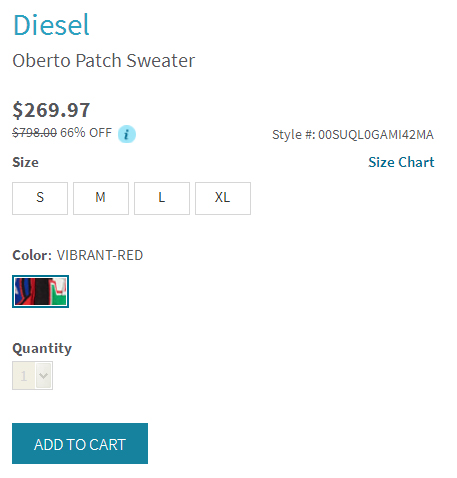
There is a site that I visited where the quantity box is greyed out until you select a size then the quantity becomes available and you can add to cart. If you click on "Add to Cart" before clicking on a size it prompts you to choose a size. This would be very helpful because it forces the customer to click on a size before proceeding.
See screenshot.
I don't want to have to worry each time an order comes if the customer choose the correct item or not
There is a site that I visited where the quantity box is greyed out until you select a size then the quantity becomes available and you can add to cart. If you click on "Add to Cart" before clicking on a size it prompts you to choose a size. This would be very helpful because it forces the customer to click on a size before proceeding.
See screenshot.
Please Log in or Create an account to join the conversation.
- simonkloostra
-
Topic Author
- Offline
Less
More
- Posts: 137
- Thank you received: 4
9 years 1 month ago - 9 years 1 month ago #279003
by simonkloostra
Replied by simonkloostra on topic Default value for variants
I just had a quick look at the Hikashop showcase at
www.hikashop.com/showcase.html
. I see a number of shops that seem to have accomplished what I wish:
workscene.com.au/fxd-wp-4-cuffed-stretch-pant.html
www.lacestamagica.com/boutique-del-bebe/...a-bebe/dou-dou-osito
Apparently they seem to be able to accomplish it. Can you guide me in a direction so that I can achieve this too?
workscene.com.au/fxd-wp-4-cuffed-stretch-pant.html
www.lacestamagica.com/boutique-del-bebe/...a-bebe/dou-dou-osito
Apparently they seem to be able to accomplish it. Can you guide me in a direction so that I can achieve this too?
Last edit: 9 years 1 month ago by simonkloostra.
Please Log in or Create an account to join the conversation.

9 years 1 month ago #279010
by kyratn
Replied by kyratn on topic Default value for variants
Hi,
I totally agree with @MyWorld and @simonkloostra, and would like add our word here too. So maybe devs would be kind and could take a look into this faster....
Another issue with variants selection as hikashop have it now is waitlist notification:
www.hikashop.com/forum/product-category-...ts-and-waitlist.html
So changes are really welcome and should be done as soon as possible.
Kind Regards
I totally agree with @MyWorld and @simonkloostra, and would like add our word here too. So maybe devs would be kind and could take a look into this faster....
Another issue with variants selection as hikashop have it now is waitlist notification:
www.hikashop.com/forum/product-category-...ts-and-waitlist.html
So changes are really welcome and should be done as soon as possible.
Kind Regards
Please Log in or Create an account to join the conversation.
9 years 1 month ago #279060
by nicolas
Replied by nicolas on topic Default value for variants
Hi,
Thank you for you feedback.
As I said:
The "list" display that I also proposed in my previous message was already a first solution to be able to circumvent the problem that we added last year.
Now for a solution where the add to cart button would stay and display an error when clicking on it, that's something we could add in the futuren, yes.
Thank you for your feedback.
Thank you for you feedback.
As I said:
That's all that is possible with the current version of HikaShop.If you want, you can add a custom text in one of the view files to notify the customer that he must first select a characteristic value. You could even have it display as an add to cart button and hide it when another variant is selected with a bit of javascript.
The "list" display that I also proposed in my previous message was already a first solution to be able to circumvent the problem that we added last year.
Now for a solution where the add to cart button would stay and display an error when clicking on it, that's something we could add in the futuren, yes.
Thank you for your feedback.
The following user(s) said Thank You: kyratn
Please Log in or Create an account to join the conversation.
- simonkloostra
-
Topic Author
- Offline
Less
More
- Posts: 137
- Thank you received: 4
9 years 1 month ago #279074
by simonkloostra
Replied by simonkloostra on topic Default value for variants
Hi Nicolas. Yes, having this as a new feature would be greatly appreciated, please put it on the list.
Any idea how fast you would be able to incorporate this? I can imagine it's hard to tell, but I must make a decision soon whether to wait for this or work on an alternative solution.
Any idea how fast you would be able to incorporate this? I can imagine it's hard to tell, but I must make a decision soon whether to wait for this or work on an alternative solution.
Please Log in or Create an account to join the conversation.
9 years 1 month ago #279110
by MyWorld
Replied by MyWorld on topic Default value for variants
I don't mean to be difficult but unfortunately I do not like the list option, plus it takes up too much space. This is not a cosmetic request this is essential to prevent customer errors. So making me have to choose a list instead of the nicely created buttons that I spent hours to create is not cool.
This option should be available, no matter what characteristics selection method we choose - no? I think this is a reasonable request and a valuable addition to HikaShop.
Thanks
This option should be available, no matter what characteristics selection method we choose - no? I think this is a reasonable request and a valuable addition to HikaShop.
Thanks
Please Log in or Create an account to join the conversation.
9 years 1 month ago #279083
by nicolas
Replied by nicolas on topic Default value for variants
Hi,
That's difficult to say. I'm not sure how it should be implemented as there are many different cases for the display or not of add to cart buttons (because there is no stock, because the product is not sold anymore, because the variant doesn't exist, because the variant is unpublished, etc). So there are cases where you don't want the button and cases where you might want it, plus it needs to be backward compatible and not change the behavior for other cases when people update.
While it's not difficult to do as a customization in a special case for a developer, make it work properly in all the cases is a bit harder and needs to be done carefully, with a lot of testing.
So I can't say when it would happen because it probably won't be in the next version and can't say anything yet for versions after that.
That's difficult to say. I'm not sure how it should be implemented as there are many different cases for the display or not of add to cart buttons (because there is no stock, because the product is not sold anymore, because the variant doesn't exist, because the variant is unpublished, etc). So there are cases where you don't want the button and cases where you might want it, plus it needs to be backward compatible and not change the behavior for other cases when people update.
While it's not difficult to do as a customization in a special case for a developer, make it work properly in all the cases is a bit harder and needs to be done carefully, with a lot of testing.
So I can't say when it would happen because it probably won't be in the next version and can't say anything yet for versions after that.
Please Log in or Create an account to join the conversation.
- simonkloostra
-
Topic Author
- Offline
Less
More
- Posts: 137
- Thank you received: 4
9 years 1 month ago #279124
by simonkloostra
Replied by simonkloostra on topic Default value for variants
Ok, I understand this may take time, so I will have to fin my own way around this. In case it is decided this will be incorporated, my suggestion would be to build an additional switch fort the default value that allows you to set it as invalid choice (default is valid). This would leave all existing situations intact and allow anyone to create the desired behaviour.
But maybe that's too simple, so I leave it up to you guys.
But maybe that's too simple, so I leave it up to you guys.
The following user(s) said Thank You: Mohamed Thelji
Please Log in or Create an account to join the conversation.

Less
More
- Posts: 12953
- Thank you received: 1778
9 years 1 month ago #279154
by Mohamed Thelji
Replied by Mohamed Thelji on topic Default value for variants
Hello,
Thank you for your feedback !
Best regards,
Mohamed Thelji.
Thank you for your feedback !
Best regards,
Mohamed Thelji.
Please Log in or Create an account to join the conversation.
9 years 4 weeks ago #280033
by kyratn
Replied by kyratn on topic Default value for variants
Hi,
Would it be possible to add stock count attribute to variant input method? So it would like this:
Stock attribute should show selected variant stock amount. This would allow to add simple js on load to select next variant which has stock.
Kind Regards
Would it be possible to add stock count attribute to variant input method? So it would like this:
Code:
<input name="hikashop_product_characteristic[29]" id="hikashop_product_characteristic_2933" value="33" [b]stock="0"[/b] class="inputbox" size="1" onclick="return hikashopUpdateVariant(this);" type="radio">
Stock attribute should show selected variant stock amount. This would allow to add simple js on load to select next variant which has stock.
Kind Regards
Please Log in or Create an account to join the conversation.

9 years 3 weeks ago #280034
by Jerome
Jerome - Obsidev.com
HikaMarket & HikaSerial developer / HikaShop core dev team.
Replied by Jerome on topic Default value for variants
Hello,
I'm sorry but I don't understand what you want to do.
You can't add parameters like that in HTML content. There are rules and specifications (RFC) for HTML.
Regards,
I'm sorry but I don't understand what you want to do.
You can't add parameters like that in HTML content. There are rules and specifications (RFC) for HTML.
Regards,
Jerome - Obsidev.com
HikaMarket & HikaSerial developer / HikaShop core dev team.
Please Log in or Create an account to join the conversation.
9 years 3 weeks ago - 9 years 3 weeks ago #280082
by kyratn
Replied by kyratn on topic Default value for variants
Hi,
Sorry, maybe i wasn't clear enough. I also tried to highlight attribute in code tag those it added this "b" tags....
I suggest to add stock attribute by default to hikashop for variant inputs. This would allow to add js if condition based on stock.
I think this little improvement for variant selection would allow some more modifications....
I have attached screenshot. I hope you see my point.
Kind Regards
Sorry, maybe i wasn't clear enough. I also tried to highlight attribute in code tag those it added this "b" tags....
I suggest to add stock attribute by default to hikashop for variant inputs. This would allow to add js if condition based on stock.
I think this little improvement for variant selection would allow some more modifications....
I have attached screenshot. I hope you see my point.
Kind Regards
Last edit: 9 years 3 weeks ago by kyratn.
Please Log in or Create an account to join the conversation.
9 years 3 weeks ago #280084
by Jerome
Jerome - Obsidev.com
HikaMarket & HikaSerial developer / HikaShop core dev team.
Replied by Jerome on topic Default value for variants
Hello,
Yes ; it does not change what I was telling you in my message.
You can't add a "stock" attribute ; it's not compatible with the RFC !
At least, you can see to have a "data" attribute like we're doing for the add to cart buttons ; so something like " data-stock ".
Regards,
Yes ; it does not change what I was telling you in my message.
You can't add a "stock" attribute ; it's not compatible with the RFC !
At least, you can see to have a "data" attribute like we're doing for the add to cart buttons ; so something like " data-stock ".
Regards,
Jerome - Obsidev.com
HikaMarket & HikaSerial developer / HikaShop core dev team.
Please Log in or Create an account to join the conversation.
Time to create page: 0.210 seconds