
- Posts: 4
- Thank you received: 0
how to change the quantity field
- Mydailylashes2019
-
 Topic Author
- Offline
Less
More
7 years 6 months ago #305099
by Mydailylashes2019
how to change the quantity field was created by Mydailylashes2019
i have a fresh installed hikashop.
i need to change the quantity field so its looks like the picture.
i want it to be the right size and nice buttons besides.. and not just a + and -..
if possible .. first a - button.. then the amount field (smal) and then a + button
i need to change the quantity field so its looks like the picture.
i want it to be the right size and nice buttons besides.. and not just a + and -..
if possible .. first a - button.. then the amount field (smal) and then a + button
Please Log in or Create an account to join the conversation.

7 years 6 months ago - 7 years 6 months ago #305118
by Philip
Replied by Philip on topic how to change the quantity field
Hello,
We have this, to reach it go to Main HikaShop Configuration, then Display tab, look in the Product options part, and find the "Quantity input method" option :

Hope this will fit your needs.
regards
We have this, to reach it go to Main HikaShop Configuration, then Display tab, look in the Product options part, and find the "Quantity input method" option :
Hope this will fit your needs.
regards
Last edit: 7 years 6 months ago by Philip.
Please Log in or Create an account to join the conversation.
- Mydailylashes2019
-
Topic Author
- Offline
Less
More
- Posts: 4
- Thank you received: 0
7 years 6 months ago - 7 years 6 months ago #305141
by Mydailylashes2019
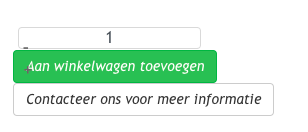 Hello..
did does not give me what i want.. when i change it to this setting i get the + & - sign to the left of the field and not with buttons.
Replied by Mydailylashes2019 on topic how to change the quantity field
did does not give me what i want.. when i change it to this setting i get the + & - sign to the left of the field and not with buttons.
Last edit: 7 years 6 months ago by Mydailylashes2019.
Please Log in or Create an account to join the conversation.

7 years 6 months ago #305147
by nicolas
Replied by nicolas on topic how to change the quantity field
Hi,
Yes, it's almost the same. Then, you can just add a bit of CSS to change the location of the - to be after instead of before.
For example, by adding that CSS, it does what you want on my end:
.hikashop_product_quantity_change_div_leftright input{ float: left !important; }
monosnap.com/file/AB5KBnJqMfOCfJkqhmMRC5pl3fBWHs
Yes, it's almost the same. Then, you can just add a bit of CSS to change the location of the - to be after instead of before.
For example, by adding that CSS, it does what you want on my end:
.hikashop_product_quantity_change_div_leftright input{ float: left !important; }
monosnap.com/file/AB5KBnJqMfOCfJkqhmMRC5pl3fBWHs
Please Log in or Create an account to join the conversation.
- Mydailylashes2019
-
Topic Author
- Offline
Less
More
- Posts: 4
- Thank you received: 0
7 years 6 months ago #305201
by Mydailylashes2019
Replied by Mydailylashes2019 on topic how to change the quantity field
when i select left and right i am getting this.
adding your line to custom css only results in allign the amount number to the left.
adding your line to custom css only results in allign the amount number to the left.
Please Log in or Create an account to join the conversation.
- Mydailylashes2019
-
Topic Author
- Offline
Less
More
- Posts: 4
- Thank you received: 0
7 years 6 months ago #305202
by Mydailylashes2019
Replied by Mydailylashes2019 on topic how to change the quantity field
the only working option is Show selected..
then i get this.. (for now its good)
then i get this.. (for now its good)
Please Log in or Create an account to join the conversation.
7 years 6 months ago #305207
by nicolas
Replied by nicolas on topic how to change the quantity field
Hi,
You need to use the left/right quantity input method AND the CSS I gave. If you only add the CSS I gave without selecting the left/right display as philip proposed before, it indeed won't work properly.
I did the test on my end and it works just fine. Now, if you still have some display glitch after that, then it means that the CSS of your template is interacting with the quantity input and the buttons. But we can't say exactly what you could do to counteract the CSS of the template without directly analyzing the CSS on the page.
You need to use the left/right quantity input method AND the CSS I gave. If you only add the CSS I gave without selecting the left/right display as philip proposed before, it indeed won't work properly.
I did the test on my end and it works just fine. Now, if you still have some display glitch after that, then it means that the CSS of your template is interacting with the quantity input and the buttons. But we can't say exactly what you could do to counteract the CSS of the template without directly analyzing the CSS on the page.
Please Log in or Create an account to join the conversation.
Time to create page: 0.140 seconds