

- Posts: 7
- Thank you received: 1
Custom input text on product page
3 years 9 months ago #347125
by tombowden
Custom input text on product page was created by tombowden
-- HikaShop version -- : 4.6.2
-- Joomla version -- : 4.2.5
-- PHP version -- : 8.0.8
Hi
Is there a tutorial for adding a custom input field (either text or text area) to specific product pages?
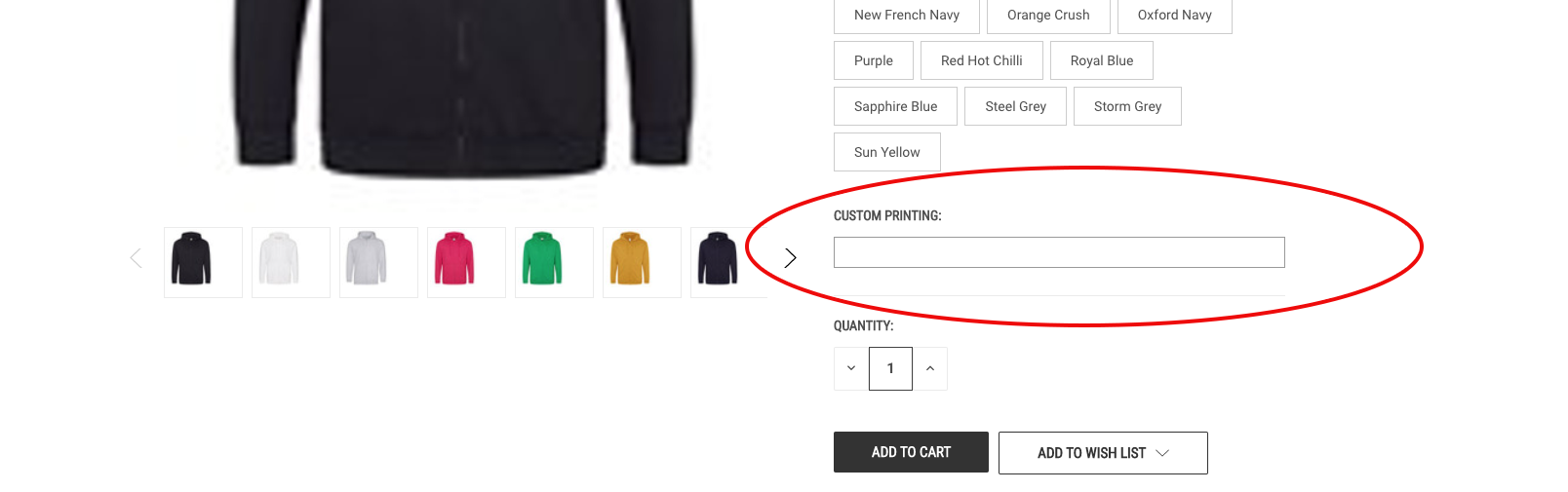
Basically, on some product pages I want to add a field like the one circled on the attached screenshot, that a customer can add their text to be printed on their product.
Thanks.
-- Joomla version -- : 4.2.5
-- PHP version -- : 8.0.8
Hi
Is there a tutorial for adding a custom input field (either text or text area) to specific product pages?
Basically, on some product pages I want to add a field like the one circled on the attached screenshot, that a customer can add their text to be printed on their product.
Thanks.
Please Log in or Create an account to join the conversation.

3 years 9 months ago #347128
by nicolas
Replied by nicolas on topic Custom input text on product page
Hi,
You want to go in the menu Display>Custom fields and create a new custom field of the type "text" and of the table "item".
You can read more about custom fields here:
www.hikashop.com/support/documentation/4...shop-field-form.html
You want to go in the menu Display>Custom fields and create a new custom field of the type "text" and of the table "item".
You can read more about custom fields here:
www.hikashop.com/support/documentation/4...shop-field-form.html
Please Log in or Create an account to join the conversation.
3 years 8 months ago #348505
by triotech
Replied by triotech on topic Custom input text on product page
does this mean that this is not possible on the Essentials subscription?
Please Log in or Create an account to join the conversation.
3 years 8 months ago #348511
by nicolas
Replied by nicolas on topic Custom input text on product page
Hi,
That's indeed the case. If you have the Essential edition and you want to upgrade to the Business edition, you can go in the menu My account>My subscriptions on our website and click on the upgrade link for the Essential edition subscription. You'll only pay the difference between the Business and Essential editions to upgrade it.
That's indeed the case. If you have the Essential edition and you want to upgrade to the Business edition, you can go in the menu My account>My subscriptions on our website and click on the upgrade link for the Essential edition subscription. You'll only pay the difference between the Business and Essential editions to upgrade it.
Please Log in or Create an account to join the conversation.
3 years 7 months ago #349059
by triotech
Replied by triotech on topic Custom input text on product page
Thanks, will advise the customer
Please Log in or Create an account to join the conversation.
Time to create page: 0.191 seconds